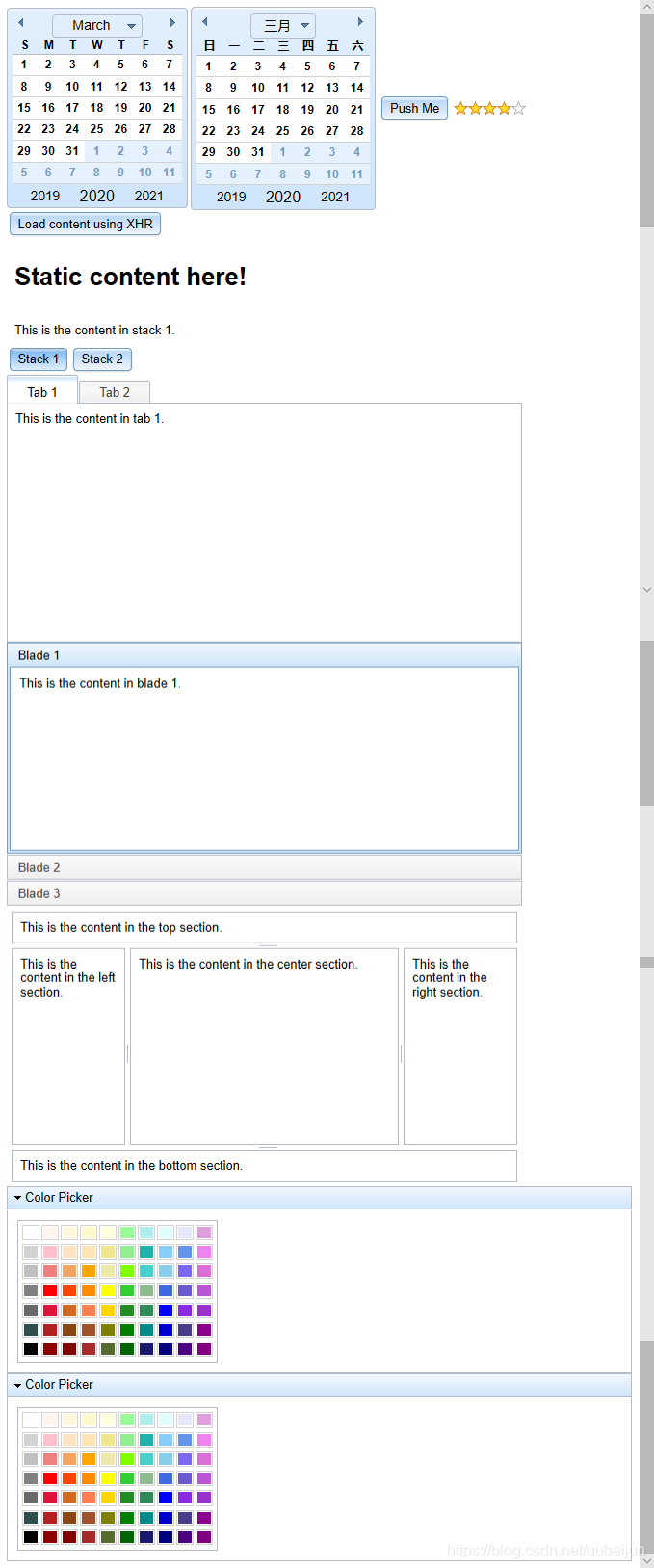
1
2
3
4
5
6
7
8
9
10
11
12
13
14
15
16
17
18
19
20
21
22
23
24
25
26
27
28
29
30
31
32
33
34
35
36
37
38
39
40
41
42
43
44
45
46
47
48
49
50
51
52
53
54
55
56
57
58
59
60
61
62
63
64
65
66
67
68
69
70
71
72
73
74
75
76
77
78
79
80
81
82
83
84
85
86
87
88
89
90
91
92
93
94
95
96
97
98
99
100
101
102
103
104
105
106
107
108
109
110
111
112
113
114
115
116
117
118
119
120
121
122
123
124
125
126
127
128
129
130
131
132
133
134
135
136
137
138
139
140
141
142
143
144
145
146
147
148
149
150
151
152
153
154
155
156
157
158
159
160
161
162
163
164
165
166
167
168
169
170
171
172
173
174
| <!DOCTYPE html>
<html lang="en" dir="ltr"></html>
<head>
<title>Dijit Template</title>
<link rel="stylesheet" href="dojo-release-1.16.2/dijit/themes/claro/claro.css" />
<link rel="stylesheet" href="dojo-release-1.16.2/dojox/form/resources/Rating.css" />
<style type="text/css">
body,
html {
font-family: helvetica, arial, sans-serif;
font-size: 90%;
}
</style>
</head>
<body class="claro">
<!-- HTML content here -->
<!-- 1、声明的方式使用dijit -->
<div dojoType="dijit._Calendar"></div>
<!-- 2、javascript使用dijit -->
<div id="myCalendar"></div>
<!-- 按钮 -->
<button id="myButton" dojoType="dijit.form.Button">Push Me</button>
<!-- 五星好评 -->
<div dojoType="dojox.form.Rating" numstars="5" value="3"></div>
<!-- 内容窗格 -->
<br />
<button dojoType="dijit.form.Button" id="myButton1">
Load content using XHR
</button>
<div dojoType="dijit.layout.ContentPane" id="myContentPane1">
<h1>Static content here!</h1>
</div>
<!-- 堆叠容器 -->
<div dojoType="dijit.layout.StackContainer" id="stackContainer">
<div dojoType="dijit.layout.ContentPane" title="Stack 1">
This is the content in stack 1.
</div>
<div dojoType="dijit.layout.ContentPane" title="Stack 2">
This is the content in stack 2.
</div>
</div>
<div dojoType="dijit.layout.StackController" containerId="stackContainer"></div>
<!-- 选项卡容器 -->
<div style="width: 535px; height: 290px">
<div dojoType="dijit.layout.TabContainer" style="width: 100%; height: 100%;">
<div dojoType="dijit.layout.ContentPane" title="Tab 1">
This is the content in tab 1.
</div>
<div dojoType="dijit.layout.ContentPane" title="Tab 2">
This is the content in tab 2.
</div>
</div>
</div>
<!-- 折叠容器 -->
<div style="width: 535px; height: 290px">
<div dojoType="dijit.layout.AccordionContainer" style="width: 100%; height: 100%;">
<div dojoType="dijit.layout.ContentPane" title="Blade 1">
This is the content in blade 1.
</div>
<div dojoType="dijit.layout.ContentPane" title="Blade 2">
This is the content in blade 2.
</div>
<div dojoType="dijit.layout.ContentPane" title="Blade 3">
This is the content in blade 3.
</div>
</div>
</div>
<!-- 边框容器布局 -->
<div style="width: 535px; height: 290px">
<div dojoType="dijit.layout.BorderContainer" style="width: 100%; height: 100%;">
<div dojoType="dijit.layout.ContentPane" region="top" splitter="true">
This is the content in the top section.
</div>
<div dojoType="dijit.layout.ContentPane" region="left" style="width: 100px;" splitter="true">
This is the content in the left section.
</div>
<div dojoType="dijit.layout.ContentPane" region="center" splitter="true">
This is the content in the center section.
</div>
<div dojoType="dijit.layout.ContentPane" region="right" style="width: 100px;" splitter="true">
This is the content in the right section.
</div>
<div dojoType="dijit.layout.ContentPane" region="bottom" splitter="true">
This is the content in the bottom section.
</div>
</div>
</div>
<!-- 1、嵌套组件 -->
<div dojoType="dijit.TitlePane" title="Color Picker">
<!-- 添加事件 -->
<div dojoType="dijit.ColorPalette" onChange="alert(this.value)">
<script type="dojo/method" event="onChange" args="evt">
alert(this.value);
</script>
</div>
</div>
<!-- 2、嵌套组件 -->
<div id="myTitlePane">
<div id="myColorPalette"></div>
</div>
<script src="dojo-release-1.16.2/dojo/dojo.js" djConfig="parseOnLoad: true"></script>
<script>
dojo.require('dijit.dijit')
//Add Dijit components you are using here using dojo.require
dojo.require('dijit._Calendar')
dojo.require('dojox.form.Rating')
dojo.require('dijit.form.Button')
dojo.require('dijit.Dialog')
dojo.require('dijit.form.Button')
dojo.require('dijit.layout.ContentPane')
dojo.require('dijit.layout.StackContainer')
dojo.require('dijit.layout.StackController')
dojo.require('dijit.layout.ContentPane')
dojo.require('dijit.layout.TabContainer')
dojo.require('dijit.layout.ContentPane')
dojo.require('dijit.layout.AccordionContainer')
dojo.require('dijit.layout.ContentPane')
dojo.require('dijit.layout.BorderContainer')
dojo.require('dijit.layout.ContentPane')
dojo.require('dijit.TitlePane')
dojo.require('dijit.ColorPalette')
dojo.addOnLoad(function() {
//时间组件
var calendar = new dijit.Calendar({}, 'myCalendar')
//嵌套组件
var colorPalette = new dijit.ColorPalette(
{
//1、点击事件方法1
// onChange: function(evt) {
// alert(this.value)
// }
},
'myColorPalette'
)
//2、点击事件方法2
dojo.connect(colorPalette, 'onChange', null, function(evt) {
alert(this.value)
})
var titlePane = new dijit.TitlePane({ title: 'Color Picker' }, 'myTitlePane')
//JavaScript content here
//按钮组件
var button = dijit.byId('myButton')
dojo.connect(button, 'onClick', null, function(evt) {
var dialog = new dijit.Dialog({
content: 'You clicked the button!',
title: 'Message'
}).show()
})
//内容窗格
var button = dijit.byId('myButton1')
var contentPane = dijit.byId('myContentPane1')
dojo.connect(button, 'onClick', null, function(evt) {
contentPane.attr('href', 'content.html')
})
})
</script>
</body>
</html>
|