惯性聚合 高效追踪和阅读你感兴趣的博客、新闻、科技资讯
阅读原文 在惯性聚合中打开

推荐订阅源

酷 壳 – CoolShell
酷 壳 – CoolShell
aimingoo的专栏
aimingoo的专栏
Microsoft Security Blog
NISL@THU
NISL@THU
T
Threatpost
T
The Exploit Database - CXSecurity.com
T
Threat Research - Cisco Blogs
S
Securelist
Cyber Security Advisories - MS-ISAC
人人都是产品经理
人人都是产品经理
B
Blog RSS Feed
S
Secure Thoughts
MyScale Blog
MyScale Blog
O
OpenAI News
P
Palo Alto Networks Blog
美团技术团队
C
Cyber Attacks, Cyber Crime and Cyber Security
TaoSecurity Blog
TaoSecurity Blog
量子位
L
Lohrmann on Cybersecurity
G
GRAHAM CLULEY
让小产品的独立变现更简单 - ezindie.com
T
Tailwind CSS Blog
Know Your Adversary
Know Your Adversary
Recent Commits to openclaw:main
Simon Willison's Weblog
宝玉的分享
宝玉的分享
PCI Perspectives
PCI Perspectives
Threat Intelligence Blog | Flashpoint
C
Cybersecurity and Infrastructure Security Agency CISA
T
Tenable Blog
I
InfoQ
D
Darknet – Hacking Tools, Hacker News & Cyber Security
Microsoft Azure Blog
Recent Announcements
S
Security @ Cisco Blogs
S
Schneier on Security
B
Blog
cs.CL updates on arXiv.org
The Cloudflare Blog
AWS News Blog
AWS News Blog
IT之家
IT之家
V
Vulnerabilities – Threatpost
The Hacker News
The Hacker News
H
Heimdal Security Blog
I
Intezer
A
Arctic Wolf
K
KPMG report finds enterprise disconnect between AI and its ROI | CIO
H
Help Net Security
W
WeLiveSecurity

mafeifan 的编程技术分享

mafengwo-mp3-downloader | mafeifan 的编程技术分享 示例页面 | mafeifan 的编程技术分享 mafeifan 的编程技术分享 mafeifan 的编程技术分享 mafeifan 的编程技术分享 mafeifan 的编程技术分享 mafeifan 的编程技术分享 mafeifan 的编程技术分享 mafeifan 的编程技术分享 mafeifan 的编程技术分享 mafeifan 的编程技术分享 查看 default namespace 下的 default service account名称 mafeifan 的编程技术分享 检查日志 | mafeifan 的编程技术分享 bridge fdb show dev flannel.1 mafeifan 的编程技术分享 mafeifan 的编程技术分享 mafeifan 的编程技术分享 mafeifan 的编程技术分享 mafeifan 的编程技术分享 mafeifan 的编程技术分享 mafeifan 的编程技术分享 mafeifan 的编程技术分享 mafeifan 的编程技术分享 mafeifan 的编程技术分享 mafeifan 的编程技术分享 mafeifan 的编程技术分享 mafeifan 的编程技术分享 mafeifan 的编程技术分享 mafeifan 的编程技术分享 数据收集原理分析 | mafeifan 的编程技术分享 mafeifan 的编程技术分享 mafeifan 的编程技术分享 mafeifan 的编程技术分享 mafeifan 的编程技术分享 mafeifan 的编程技术分享 mafeifan 的编程技术分享 mafeifan 的编程技术分享 mafeifan 的编程技术分享 mafeifan 的编程技术分享 mafeifan 的编程技术分享 mafeifan 的编程技术分享 mafeifan 的编程技术分享 mafeifan 的编程技术分享 mafeifan 的编程技术分享 几种方法 | mafeifan 的编程技术分享 mafeifan 的编程技术分享 mafeifan 的编程技术分享 mafeifan 的编程技术分享 mafeifan 的编程技术分享 mafeifan 的编程技术分享 mafeifan 的编程技术分享 mafeifan 的编程技术分享 mafeifan 的编程技术分享 mafeifan 的编程技术分享 mafeifan 的编程技术分享 mafeifan 的编程技术分享 mafeifan 的编程技术分享 mafeifan 的编程技术分享 mafeifan 的编程技术分享 mafeifan 的编程技术分享 mafeifan 的编程技术分享 mafeifan 的编程技术分享 mafeifan 的编程技术分享 mafeifan 的编程技术分享 mafeifan 的编程技术分享 mafeifan 的编程技术分享 mafeifan 的编程技术分享 mafeifan 的编程技术分享 mafeifan 的编程技术分享 mafeifan 的编程技术分享 mafeifan 的编程技术分享 mafeifan 的编程技术分享 mafeifan 的编程技术分享 mafeifan 的编程技术分享 mafeifan 的编程技术分享 mafeifan 的编程技术分享 mafeifan 的编程技术分享 mafeifan 的编程技术分享 mafeifan 的编程技术分享 mafeifan 的编程技术分享 mafeifan 的编程技术分享 mafeifan 的编程技术分享 mafeifan 的编程技术分享 mafeifan 的编程技术分享 mafeifan 的编程技术分享 mafeifan 的编程技术分享 mafeifan 的编程技术分享 mafeifan 的编程技术分享 mafeifan 的编程技术分享 mafeifan 的编程技术分享 mafeifan 的编程技术分享 mafeifan 的编程技术分享 check the export on the very top of this document so we can use $do mafeifan 的编程技术分享 mafeifan 的编程技术分享 mafeifan 的编程技术分享 mafeifan 的编程技术分享 延伸 -- 关于前端路由 xdebug 3 和 2 的区别
mafeifan 的编程技术分享
2026-01-16 · via mafeifan 的编程技术分享

Docker 学习系列17 镜像和容器的导入导出 我讲过docker镜像是由一层层组成的 比如如下dockerfile文件

bash

FROM node:10.8.0-alpine
MAINTAINER www.mafeifan.com
# 设置工作目录,下面的RUN命令会在工作目录执行
WORKDIR /app
# 先拷贝本地的 package.json 和 package-lock 到容器内
# 这样是利用docker的镜像分层机制
COPY package*.json ./
# 安装项目依赖包
# 生产环境可以运行 RUN npm install --only=production 只按照 package.json 中dependencies定义的模块
RUN npm install
# 将根目录下的文件都copy到container(运行此镜像的容器)文件系统的app文件夹下
ADD . /app/
# 暴露容器内的3000端口
EXPOSE 3000
# 容器启动时执行的命令,类似npm run start
CMD ["npm", "start"]

当我们执行docker build 生成镜像的时候,实际上每行命令产生的文件会存到一个目录中,即一层,Dockerfile 最佳实践 也建议我们

镜像层数尽可能少

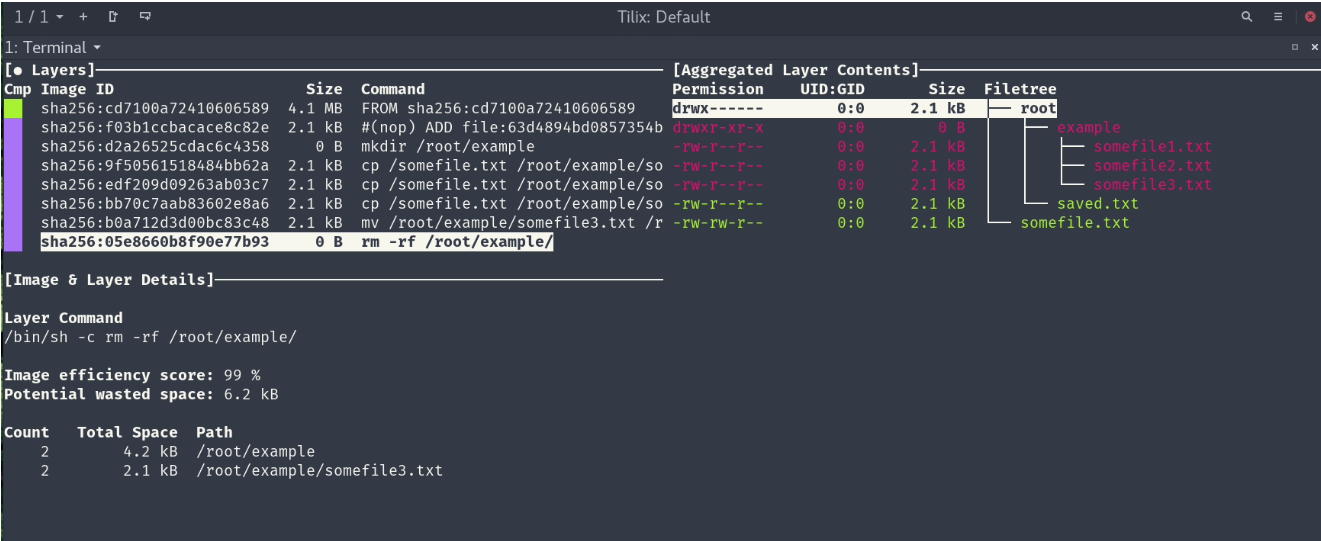
这里推荐一款工具 dive 可以方便的查看镜像层详情,评估镜像的质量,如浪费了多少空间

image.png

image.png

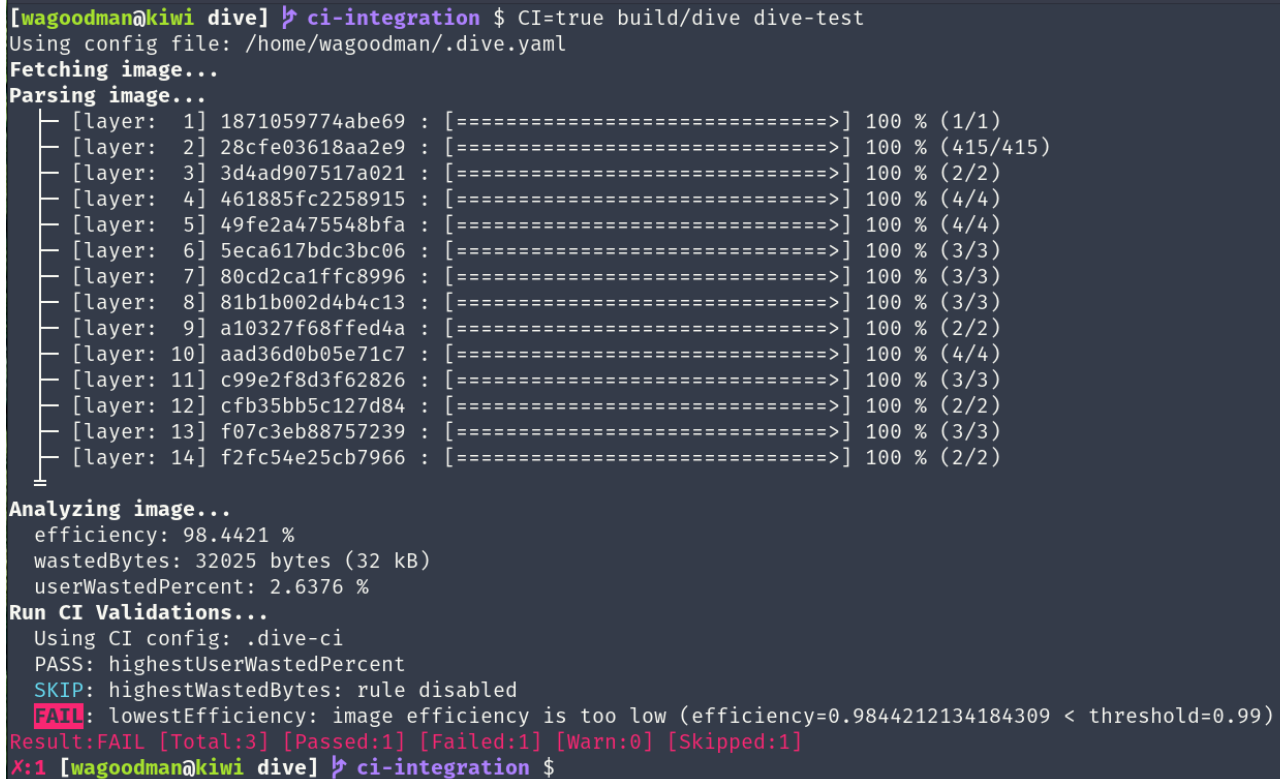
如果作为镜像审查之后,可以进行如下命令操作:

$: CI=true dive <image-id>
Fetching image... (this can take a while with large images)
Parsing image...
Analyzing image...
  efficiency: 95.0863 %
  wastedBytes: 671109 bytes (671 kB)
  userWastedPercent: 8.2274 %
Run CI Validations...
  Using default CI config
  PASS: highestUserWastedPercent
  SKIP: highestWastedBytes: rule disabled
  PASS: lowestEfficiency

从输出信息可以得到很多有用的信息,集成到CI过程也就非常容易了。 dive本身支持添加.dive-ci 配置文件作为项目的CI配置,具体配置规则见文档。

yaml

rules:
  # If the efficiency is measured below X%, mark as failed.
  # Expressed as a percentage between 0-1.
  lowestEfficiency: 0.95

  # If the amount of wasted space is at least X or larger than X, mark as failed.
  # Expressed in B, KB, MB, and GB.
  highestWastedBytes: 20MB

  # If the amount of wasted space makes up for X% or more of the image, mark as failed.
  # Note: the base image layer is NOT included in the total image size.
  # Expressed as a percentage between 0-1; fails if the threshold is met or crossed.
  highestUserWastedPercent: 0.20

集成到CI中,增加以下命令即可: $: CI=true dive <image-id>

镜像审查和代码审查类似,是一件开始抵制,开始后就欲罢不能的事。这件事宜早不宜迟,对于企业与个人而言均百利而无一害。

随着容器化的普及,个人觉得这个工具很有前途

另外推荐一个容器的静态分析工具 clair

参考 ​

如何对Docker Image进行审查