


惯性聚合 高效追踪和阅读你感兴趣的博客、新闻、科技资讯
阅读原文 在惯性聚合中打开

推荐订阅源

OSCHINA 社区最新新闻
OSCHINA 社区最新新闻
S
Secure Thoughts
C
Cyber Attacks, Cyber Crime and Cyber Security
SecWiki News
SecWiki News
AWS News Blog
AWS News Blog
P
Proofpoint News Feed
H
Help Net Security
I
InfoQ
T
Tor Project blog
cs.AI updates on arXiv.org
Schneier on Security
The GitHub Blog
The GitHub Blog
S
Schneier on Security
The Hacker News
The Hacker News
博客园 - Franky
雷峰网
雷峰网
S
Security @ Cisco Blogs
Google Online Security Blog
Engineering at Meta
Engineering at Meta
G
GRAHAM CLULEY
Security Latest
Security Latest
The Cloudflare Blog
M
MIT News - Artificial intelligence
云风的 BLOG
云风的 BLOG
K
Kaspersky official blog
C
Cisco Blogs
Microsoft Security Blog
宝玉的分享
宝玉的分享
Scott Helme
Scott Helme
腾讯CDC
阮一峰的网络日志
阮一峰的网络日志
A
Arctic Wolf
Latest news
Latest news
Last Week in AI
Last Week in AI
The Register - Security
Google DeepMind News
博客园 - 聂微东
T
Threatpost
G
Google Developers Blog
有赞技术团队
有赞技术团队
钛媒体:引领未来商业与生活新知
钛媒体:引领未来商业与生活新知
L
LINUX DO - 热门话题
aimingoo的专栏
aimingoo的专栏
S
Securelist
WordPress大学
WordPress大学
N
Netflix TechBlog - Medium
Y
Y Combinator Blog
T
The Exploit Database - CXSecurity.com
月光博客
月光博客
Recent Announcements

mafeifan 的编程技术分享

mafengwo-mp3-downloader | mafeifan 的编程技术分享 示例页面 | mafeifan 的编程技术分享 mafeifan 的编程技术分享 mafeifan 的编程技术分享 mafeifan 的编程技术分享 mafeifan 的编程技术分享 mafeifan 的编程技术分享 mafeifan 的编程技术分享 mafeifan 的编程技术分享 mafeifan 的编程技术分享 mafeifan 的编程技术分享 查看 default namespace 下的 default service account名称 mafeifan 的编程技术分享 检查日志 | mafeifan 的编程技术分享 bridge fdb show dev flannel.1 mafeifan 的编程技术分享 mafeifan 的编程技术分享 mafeifan 的编程技术分享 mafeifan 的编程技术分享 mafeifan 的编程技术分享 mafeifan 的编程技术分享 mafeifan 的编程技术分享 mafeifan 的编程技术分享 mafeifan 的编程技术分享 mafeifan 的编程技术分享 mafeifan 的编程技术分享 mafeifan 的编程技术分享 mafeifan 的编程技术分享 mafeifan 的编程技术分享 mafeifan 的编程技术分享 数据收集原理分析 | mafeifan 的编程技术分享 mafeifan 的编程技术分享 mafeifan 的编程技术分享 mafeifan 的编程技术分享 mafeifan 的编程技术分享 mafeifan 的编程技术分享 mafeifan 的编程技术分享 mafeifan 的编程技术分享 mafeifan 的编程技术分享 mafeifan 的编程技术分享 mafeifan 的编程技术分享 mafeifan 的编程技术分享 mafeifan 的编程技术分享 mafeifan 的编程技术分享 mafeifan 的编程技术分享 几种方法 | mafeifan 的编程技术分享 mafeifan 的编程技术分享 mafeifan 的编程技术分享 mafeifan 的编程技术分享 mafeifan 的编程技术分享 mafeifan 的编程技术分享 mafeifan 的编程技术分享 mafeifan 的编程技术分享 mafeifan 的编程技术分享 mafeifan 的编程技术分享 mafeifan 的编程技术分享 mafeifan 的编程技术分享 mafeifan 的编程技术分享 mafeifan 的编程技术分享 mafeifan 的编程技术分享 mafeifan 的编程技术分享 mafeifan 的编程技术分享 mafeifan 的编程技术分享 mafeifan 的编程技术分享 mafeifan 的编程技术分享 mafeifan 的编程技术分享 mafeifan 的编程技术分享 mafeifan 的编程技术分享 mafeifan 的编程技术分享 mafeifan 的编程技术分享 mafeifan 的编程技术分享 mafeifan 的编程技术分享 mafeifan 的编程技术分享 mafeifan 的编程技术分享 mafeifan 的编程技术分享 mafeifan 的编程技术分享 mafeifan 的编程技术分享 mafeifan 的编程技术分享 mafeifan 的编程技术分享 mafeifan 的编程技术分享 mafeifan 的编程技术分享 mafeifan 的编程技术分享 mafeifan 的编程技术分享 mafeifan 的编程技术分享 mafeifan 的编程技术分享 mafeifan 的编程技术分享 mafeifan 的编程技术分享 mafeifan 的编程技术分享 mafeifan 的编程技术分享 mafeifan 的编程技术分享 mafeifan 的编程技术分享 mafeifan 的编程技术分享 check the export on the very top of this document so we can use $do mafeifan 的编程技术分享 mafeifan 的编程技术分享 mafeifan 的编程技术分享 mafeifan 的编程技术分享 运维自动化之ANSIBLE | mafeifan 的编程技术分享 延伸 -- 关于前端路由 xdebug 3 和 2 的区别
mafeifan 的编程技术分享
2026-01-16 · via mafeifan 的编程技术分享

接上篇优化,我们使用Laravel的方式改造

首先编辑.env,修改广播驱动为pusher

# BROADCAST_DRIVER=log
BROADCAST_DRIVER=pusher

PUSHER_APP_ID=1122467
PUSHER_APP_KEY=7b7a4b68e07138fc3b11
PUSHER_APP_SECRET=af7******aadbc26a4
PUSHER_APP_CLUSTER=ap3

MIX_PUSHER_APP_KEY="${PUSHER_APP_KEY}"
MIX_PUSHER_APP_CLUSTER="${PUSHER_APP_CLUSTER}"

前端创建一个vue组件, Add按钮:往push服务端发送信息 同时,打开页面时监听广播并显示push服务端传回来的信息

resources/js/components/ExampleComponent.vue

vue

<template>
    <div class="container">
        <div class="row justify-content-center">
            <div class="col-md-8">
                <div class="card">
                    <div class="card-header">Example Component</div>
                    <div class="card-body">
                        <button @click="add">Add</button>

                        <ul>
                            <li v-for="(item, index) in items" :key="index">{{ item.name }} -- {{ item.data }}</li>
                        </ul>
                    </div>
                </div>
            </div>
        </div>
    </div>
</template>

<script>
export default {
    data() {
        return {
            items: []
        }
    },
    methods: {
        add() {
            axios.post('/task/demo')
        }
    },
    mounted() {
        let that = this;
        Echo.channel('task-event')
            .listen('TaskEvent', (e) => {
                console.log(e);
                that.items.push(e)
            });
    }
}
</script>

resources/js/app.js Vue.component('example-component', require('./components/ExampleComponent.vue').default);

后端

php artisan make:event TaskEvent

打开 app/Events/TaskEvent.php 并编辑

php

<?php

namespace App\Events;

use Illuminate\Broadcasting\Channel;
use Illuminate\Broadcasting\InteractsWithSockets;
use Illuminate\Contracts\Broadcasting\ShouldBroadcast;
use Illuminate\Foundation\Events\Dispatchable;
use Illuminate\Queue\SerializesModels;

class TaskEvent implements ShouldBroadcast
{
    use Dispatchable, InteractsWithSockets, SerializesModels;

    public $task;


    /**
     * TaskEvent constructor.
     * @param $task
     */
    public function __construct($task)
    {
        //
        $this->task = $task;
        // 这行很重要,有时候我们一条广播信息,我们只希望通知给其他监听者,自己不用接收
        // 比如我们添加一条记录,本身就可以push到当前列表,同时又要显示广播来的记录,就会重复显示
        // $this->dontBroadcastToCurrentUser();
    }

    /**
     * Get the channels the event should broadcast on.
     *
     * @return \Illuminate\Broadcasting\Channel|array
     */
    public function broadcastOn()
    {
        return new Channel('task-event');
    }

    public function broadcastWith()
    {
        return $this->task;
    }
}

添加测试路由

routes/web.php

php

Route::get('/task', 'TaskController@index')->name('task');

Route::post('/task/demo', function () {
    event(
        (new App\Events\TaskEvent(['name' => 'foo', 'data' => rand(1000, 9999)]))
    );
});

这里省略了 TaskController 和 view 的代码

浏览器打开 http://laravel6.test/task
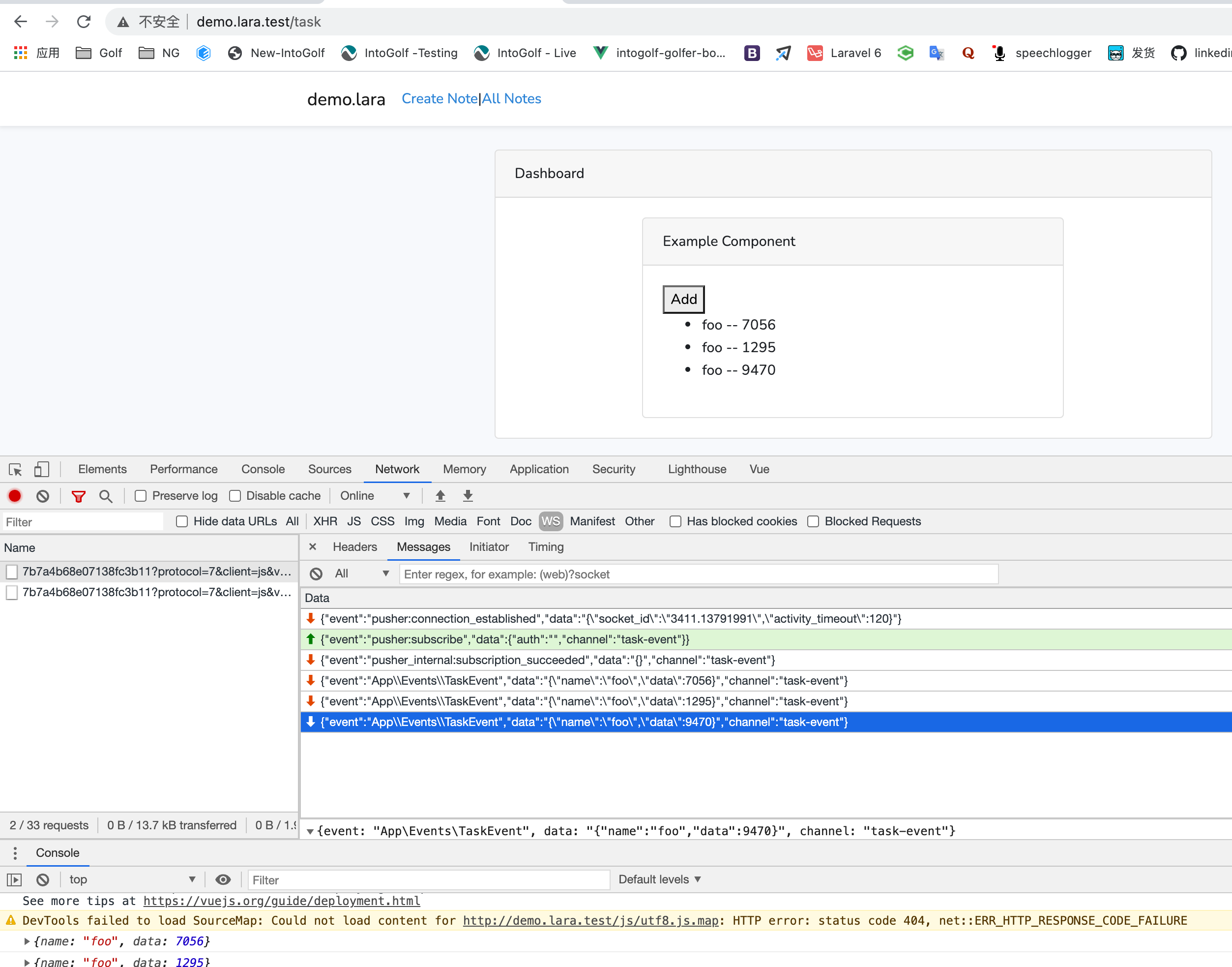
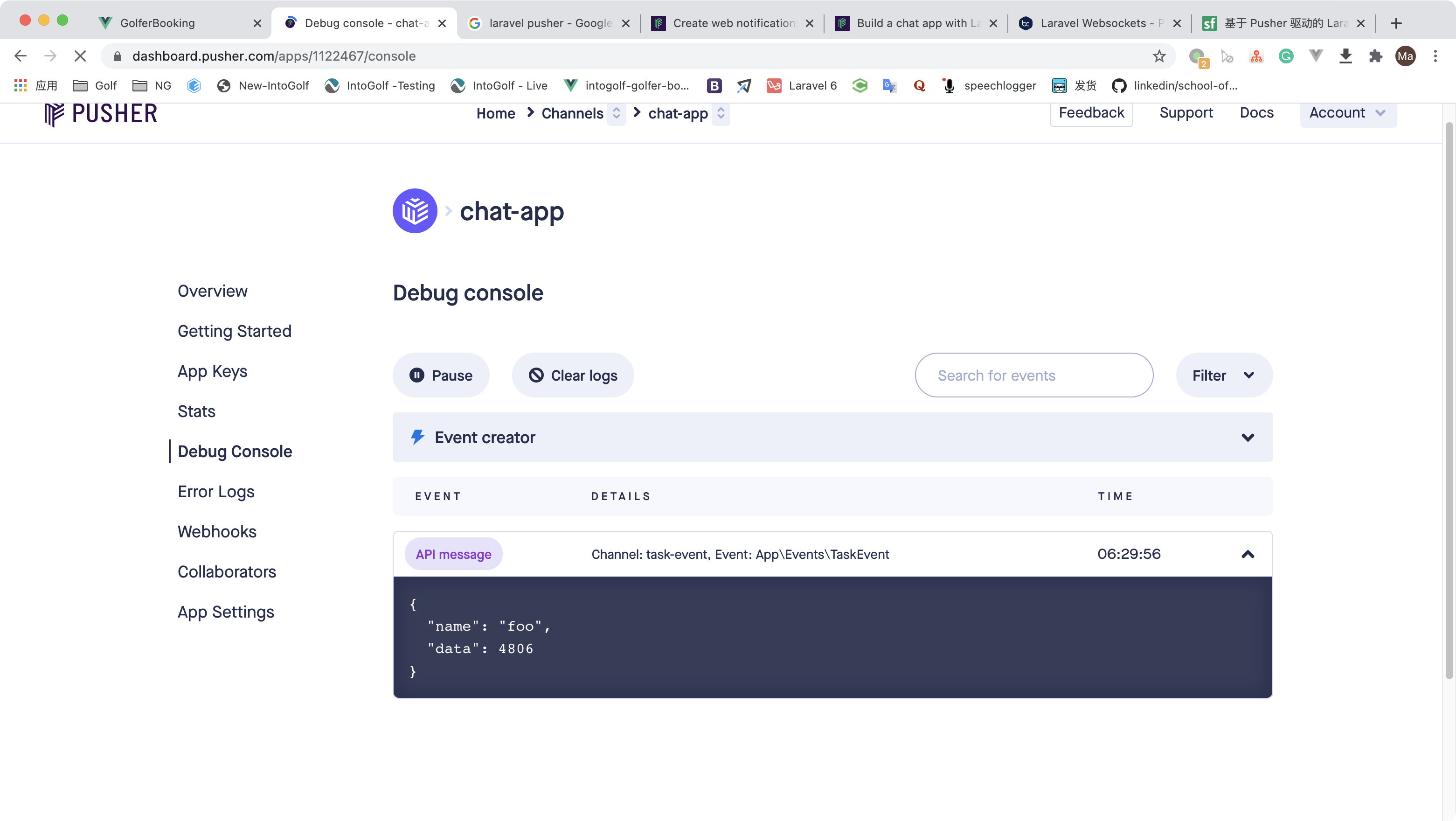
点add,打开pusher后台,会看到调试日志,非常方便
完整代码

https://github.com/mafeifan/chat-api-main/tree/echo-server