




Meta
目录
我已抛弃 Jekyll 换用 NextJS.
这里是本站开源: https://github.com/szhshp/NextJS-BlogTemplate-ProjectTitan
以下内容可能已经过时, 仅供参考
点击这个网址下载:http://jekyll-windows.juthilo.com/1-ruby-and-devkit/
ruby dk.rb init
ruby dk.rb install
经常 install 会失败,那是因为没有更新对应的 ruby list
到 DevKit 文件夹找到config.yml文件
加入以下代码,指向的是自己的 Ruby 的路径
---
- D:/Ruby22
注意横杠也要写进去
低版本可能需要写两行
安装成功的话输入以下代码可以看到版本
D:\Tools_For_Work\Projs>ruby --version
ruby 2.2.2p95 (2015-04-13 revision 50295) [i386-mingw32]安装 Jekyll
D:\Tools_For_Work\Projs>gem install jekyll这里会有各种错误
ERROR:  Could not find a valid gem 'jekyll' (>= 0), here is why:
 Unable to download data from http://ruby.taobao.org/ - bad respons
t Found 404 (http://ruby.taobao.org/specs.4.8.gz)
这样是因为对应的 Ruby Source 无法找到报 404 了
只需要修改 RubySource 即可
很多时候,在安装 gem 的过程中会出现找不到资源的 error,我们需要从另外一个 gem 服务器下载安装。 通过 gem sources 命令配置源,或通过修改 Gemfile 中的 source 语句可以实现。
常用的源
适合安装大多数常见的 gem[^ft]
显示当前使用的 sources
gem sources添加一个 source
gem sources -a url 地址删除一个 source
gem sources -r url 地址更新 source cache
gem sources -u
添加几个 Source 后重新下载
这次 Deploy 的时候这个问题困扰了我好久
大多数问题都是升级引发的问题
一旦我把对应的 Proj 进行 jekyll build 的时候就报错
D:\Tools_For_Work\Projs\Github Blog>jekyll b
Configuration file: D:/Projs/Github Blog/_config.yml
D:/Projs/Github Blog/_plugins/debug.rb:13:in `<module:Jekyll>': c
annot load such file -- jekyll/post (LoadError)
from D:/Projs/Github Blog/_plugins/debug.rb:8:in `<top (r
equired)>'
from D:/Ruby22/lib/ruby/2.2.0/rubygems/core_ext/kernel_re
quire.rb:54:in `require'
from D:/Ruby22/lib/ruby/2.2.0/rubygems/core_ext/kernel_re
quire.rb:54:in `require'
from D:/Ruby22/lib/ruby/gems/2.2.0/gems/jekyll-3.0.0/lib/
jekyll/plugin_manager.rb:75:in `block (2 levels) in require_plugin_files'
from D:/Ruby22/lib/ruby/gems/2.2.0/gems/jekyll-3.0.0/lib/
jekyll/plugin_manager.rb:74:in `each'
from D:/Ruby22/lib/ruby/gems/2.2.0/gems/jekyll-3.0.0/lib/
jekyll/plugin_manager.rb:74:in `block in require_plugin_files'
from D:/Ruby22/lib/ruby/gems/2.2.0/gems/jekyll-3.0.0/lib/
jekyll/plugin_manager.rb:73:in `each'
from D:/Ruby22/lib/ruby/gems/2.2.0/gems/jekyll-3.0.0/lib/
jekyll/plugin_manager.rb:73:in `require_plugin_files'
from D:/Ruby22/lib/ruby/gems/2.2.0/gems/jekyll-3.0.0/lib/
jekyll/plugin_manager.rb:18:in `conscientious_require'
from D:/Ruby22/lib/ruby/gems/2.2.0/gems/jekyll-3.0.0/lib/
jekyll/site.rb:97:in `setup'
from D:/Ruby22/lib/ruby/gems/2.2.0/gems/jekyll-3.0.0/lib/
jekyll/site.rb:49:in `initialize'
from D:/Ruby22/lib/ruby/gems/2.2.0/gems/jekyll-3.0.0/lib/
jekyll/commands/build.rb:30:in `new'
from D:/Ruby22/lib/ruby/gems/2.2.0/gems/jekyll-3.0.0/lib/
jekyll/commands/build.rb:30:in `process'
from D:/Ruby22/lib/ruby/gems/2.2.0/gems/jekyll-3.0.0/lib/
jekyll/commands/build.rb:18:in `block (2 levels) in init_with_program'
from D:/Ruby22/lib/ruby/gems/2.2.0/gems/mercenary-0.3.5/l
ib/mercenary/command.rb:220:in `call'
from D:/Ruby22/lib/ruby/gems/2.2.0/gems/mercenary-0.3.5/l
ib/mercenary/command.rb:220:in `block in execute'
from D:/Ruby22/lib/ruby/gems/2.2.0/gems/mercenary-0.3.5/l
ib/mercenary/command.rb:220:in `each'
from D:/Ruby22/lib/ruby/gems/2.2.0/gems/mercenary-0.3.5/l
ib/mercenary/command.rb:220:in `execute'
from D:/Ruby22/lib/ruby/gems/2.2.0/gems/mercenary-0.3.5/l
ib/mercenary/program.rb:42:in `go'
from D:/Ruby22/lib/ruby/gems/2.2.0/gems/mercenary-0.3.5/l
ib/mercenary.rb:19:in `program'
from D:/Ruby22/lib/ruby/gems/2.2.0/gems/jekyll-3.0.0/bin/
jekyll:17:in `<top (required)>'
from D:/Ruby22/bin/jekyll:23:in `load'
from D:/Ruby22/bin/jekyll:23:in `<main>'
后来搜了一下官方 Github 中的 Issue,发现了问题所在
相关连接:
原因是我拿 V2.X 的 Proj 并且用 V3.0 的 Jekyll 来 Build 了,并且对应的这个 post 文件夹也变了,因此处理方式就是干脆把所有所有转移到 3.0 的新 Proj 算了
所以只需要使用 Jekyll 建立一个新的 Proj
jekyll new MyBlog就会在当前目录建立一个 MyBlog 的文件夹,并且里面已经有主要文件了
这个可恶的问题在 StackOverFlow 找了好久,最终还是官方的 Help Doc 比较全面
这个也是上一个问题的连带问题
V2.X 里面的某些 Post 里面引用了以前的文件,因此现在 Not Found 是很正常的
D:\Tools_For_Work\Projs\blog>jekyll s
Configuration file: D:/Projs/blog/_config.yml
Source: D:/Projs/blog
   Destination: D:/Projs/blog/_site
 Incremental build: disabled. Enable with --incremental
  Generating……
  Liquid Exception: Included file '_includes/JB/setup' not found in D:/Tools_For
_Work/Projs/blog/_posts/2015-11-11-dicksday.md/#excerpt
jekyll 3.0.0 | Error:  Included file '_includes/JB/setup' not found
解决方法,把以前的 Post 的格式改成新的格式
错误的文件路径已经显示在 Error Msg 里面了
Gem install jekyll-paginate 就可以了
   Dependency Error: Yikes! It looks like you don't have redcarpet or one of its
dependencies installed. In order to use Jekyll as currently configured, you'll n
eed to install this gem. The full error message from Ruby is: 'cannot load such
file -- redcarpet' If you run into trouble, you can find helpful resources at ht
tp://jekyllrb.com/help/!
 ERROR: YOUR SITE COULD NOT BE BUILT:
------------------------------------
redcarpet
一样 Gem install 对应的组件就行了
一般官方的解答最为有效
https://github.com/jekyll/jekyll/search?utf8=%E2%9C%93&q=&type=Issues
Proj 根目录使用jekyll b就可以 build
解决了以上问题终于可以 build 了
D:\Projs\blog>jekyll b
Configuration file: D:/Projs/blog/_config.yml
Source: D:/Projs/blog
   Destination: D:/Projs/blog/_site
 Incremental build: disabled. Enable with --incremental
  Generating……
done in 0.557 seconds.
Auto-regeneration: disabled. Use --watch to enable.然后jekyll s开启 server,然后使用 http://localhost:4000/访问
添加分页效果的时候遇到问题
提示说没有安装对应 module
Deprecation: You appear to have pagination turned on, but you haven't inc
luded the `jekyll-paginate` gem. Ensure you have `gems: [jekyll-paginate]` in yo
ur configuration file.
使用 gem install 之后依然报错
原因是没有在 Config 里面配置本地的 Gem,config 中加入一行 gems 声明
gems: [jekyll-paginate]记得要配置分页细节
paginate: 12
paginate_path: "page:num"写新 post 的时候遇到问题
Regenerating: 1 file(s) changed at 2015-12-11 21:19:34 Error reading file
D:/Tools_For_Work/Projs/Github Blog/_posts/2015-12-11-wrapstringincf.md: (<unkno
wn>): mapping values are not allowed in this context at line 3 column 18
……error:
    Error: undefined method `each' for nil:NilClass
Error: Run jekyll build --trace for more information.跑到那篇文章里找到line 3 column 18发现对应 post 的 title 中不能含有分号(:)
删除后解决问题
更简单更便捷的 Jekyll 调试环境搭建: Portable Jekyll-最便捷的 JEKYLL 安装
Coding 的 Jekyll 远程调试环境搭建:Ruby x Jekyll 远程调试环境搭建
Error: SSL_connect returned=1 errno=0 state=SSLv3 read server certificate B: certificate verify failed (https://api.rubygems.org/latest_specs.4.8.gz)
Win10 中初次使用时出现问题, 原因是证书文件缺失
Solution[^1]:
Download the cacert.pem file from http://curl.haxx.se/ca/cacert.pem. Save this file to C:\RailsInstaller\cacert.pem.
Now make ruby aware of your certificate authority bundle by setting SSL_CERT_FILE. To set this in your current command prompt session, type:
set SSL_CERT_FILE=C:\RailsInstaller\cacert.pem To make this a permanent setting, add this in your control panel.
注意要设置到系统变量而不是用户变量
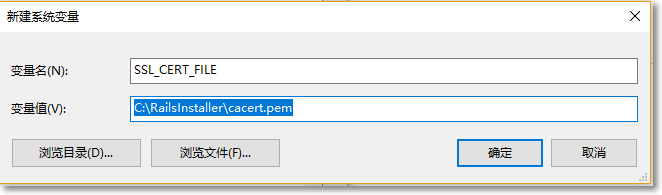
gem install时遇到错误
ERROR:  Error installing jekyll:
    invalid gem: package is corrupt, exception while verifying: undefined method `size' for nil:NilClass (NoMethodError)
运行
gem env然后到GEM PATHS里面删除 cache 文件夹[^3]
大版本更新查看这篇文章
小版本更新直接:
gem update jekyll一个小变化就是LiveReload, 每次修改后浏览器会自动刷新, 也算是更省事了
jekyll serve --livereload现在 Windows 安装已经非常简单了
3 步就能将环境完全安装: https://jekyllrb.com/docs/windows/
jekyll s 遇到错误
>C:/Projects/_bg/ruby/lib/ruby/2.3.0/rubygems/core_ext/kernel_require.rb:55:in `require': cannot load such file -- bundler (LoadError)
>        from C:/Projects/_bg/ruby/lib/ruby/2.3.0/rubygems/core_ext/kernel_require.rb:55:in `require'
>        from C:/Projects/_bg/ruby/lib/ruby/gems/2.3.0/gems/jekyll-3.8.4/lib/jekyll/plugin_manager.rb:48:in `require_from_bundler'
>        from C:/Projects/_bg/ruby/lib/ruby/gems/2.3.0/gems/jekyll-3.8.4/exe/jekyll:11:in `<top (required)>'
>        from C:/Projects/_bg/ruby/bin/jekyll:22:in `load'
>        from C:/Projects/_bg/ruby/bin/jekyll:22:in `<main>'
解决方法很简单:
gem install bundler安装即可
最近在使用一个 local gem 的时候报错:
  Dependency Error: Yikes! It looks like you don't have G:/Dev/GitRepos/Coding/tmp/_plugins/xxx.rb or one of its dependencies installed. In order to use Jekyll as currently configured, you'll need to install this gem. The full error message from Ruby is: 'cannot load such file -- bcrypt' If you run into trouble, you can find helpful resources at https://jekyllrb.com/help/!
jekyll 3.8.2 | Error:  G:/Dev/GitRepos/Coding/tmp/_plugins/xxx.rb
这个 local gem 保存在 _plugins/xxx.rb 然后里面引用了一些其他的 gem, 错误信息中指明了错误的 gem 是 bcrypt, 重复执行 gem install bcrypt 无果.
最后发现是需要在根目录的 Gemfile 里面添加一句:
gem 'bcrypt'这样就可以解决问题.
Jekyll 4.0 升级遇到问题, 升级 4.0 之后官方建议使用 bundle 启动 local server
gem install jekyll bundler
bundle exec jekyll serveCould not locate Gemfile or .bundle/ directory你肯定是旧版本 jekyll 创建的 site
新建一个文件文件名为 Gemfile
source "https://gems.ruby-china.com"

gem "jekyll", "~> 4.0.0"

group :jekyll_plugins do
  gem "jekyll-feed", "~> 0.12"
end


## Windows and JRuby does not include zoneinfo files, so bundle the tzinfo-data gem

## and associated library.
install_if -> { RUBY_PLATFORM =~ %r!mingw|mswin|java! } do
  gem "tzinfo", "~> 1.2"
  gem "tzinfo-data"
end


## Performance-booster for watching directories on Windows
gem "wdm", "~> 0.1.1", :install_if => Gem.win_platform?
然后执行
Bundle install换源, 换源! [^3]
执行下方这段即可
bundle config mirror.https://rubygems.org https://gems.ruby-china.com其实就是 ignore 参数, 例子:
exclude:
  - Gemfile
  - Gemfile.lock
  - node_modules
- blog pull and debug.bat此内容由惯性聚合(RSS阅读器)自动聚合整理,仅供阅读参考。 原文来自 — 版权归原作者所有。