

惯性聚合 高效追踪和阅读你感兴趣的博客、新闻、科技资讯
阅读原文 在惯性聚合中打开

推荐订阅源

MyScale Blog
MyScale Blog
奇客Solidot–传递最新科技情报
奇客Solidot–传递最新科技情报
人人都是产品经理
人人都是产品经理
V
Visual Studio Blog
博客园 - 叶小钗
A
About on SuperTechFans
Last Week in AI
Last Week in AI
量子位
博客园 - 三生石上(FineUI控件)
让小产品的独立变现更简单 - ezindie.com
MongoDB | Blog
MongoDB | Blog
T
The Blog of Author Tim Ferriss
Vercel News
Vercel News
博客园 - 司徒正美
博客园 - Franky
博客园 - 【当耐特】
月光博客
月光博客
Cyber Security Advisories - MS-ISAC
Apple Machine Learning Research
Hugging Face - Blog
Hugging Face - Blog
S
SegmentFault 最新的问题
大猫的无限游戏
大猫的无限游戏
博客园 - 聂微东
J
Java Code Geeks

szhshp 的第三边境研究所

假设, AI 把我代替的那一刻真的到来 | szhshp 的第三边境研究所 小傻瓜都能懂的 AstrBot QQ 机器人集成 MCP 功能实战指南 | szhshp 的第三边境研究所 《智人之上: 从石器时代到 AI 时代的信息网络简史》阅读笔记 | szhshp 的第三边境研究所 iPadOS 26 无法设置空间场景图片壁纸的解决方法 | szhshp 的第三边境研究所 《一路云海》(终) | szhshp 的第三边境研究所 《一路云海》(四): 如何不按套路旅行 | szhshp 的第三边境研究所 《一路云海》(三): In Ya Mellow Tone | szhshp 的第三边境研究所 《一路云海》(二): 关西世博参观纪实 | szhshp 的第三边境研究所 《一路云海》(一): 新的征程 | szhshp 的第三边境研究所 2025 大阪世博会 [ 3 天前-先到先得 ] 阶段 场馆预约必中独家攻略 | szhshp 的第三边境研究所 Hackathon 随想 | szhshp 的第三边境研究所 一杯双皮奶 | szhshp 的第三边境研究所 Armbian + CasaOS + NAS 配置指南 | szhshp 的第三边境研究所 Docker 构建镜像报错: error getting credentials - err: exit status 1, out: `` | szhshp 的第三边境研究所 Disqus RIP! 论过高的维护成本如何治疗固执的坏习惯 | szhshp 的第三边境研究所 炸弹猫桌游变体规则 | szhshp 的第三边境研究所 《小岛经济学》阅读笔记 | szhshp 的第三边境研究所 《金钱心理学》阅读笔记 | szhshp 的第三边境研究所 为知笔记 RIP: 迁移剩余的笔记 | szhshp 的第三边境研究所 2025 博客第十年展望 - 再见我的过去 | szhshp 的第三边境研究所 我在独立游戏里面致敬的作品 | szhshp 的第三边境研究所 《How to make thing faster》阅读笔记 | szhshp 的第三边境研究所 《The Art of Clean Code》阅读笔记 | szhshp 的第三边境研究所 《Clean Architecture: A Craftsman Guide to Software Structure and Design》阅读笔记 | szhshp 的第三边境研究所 《How AI Works》阅读笔记 | szhshp 的第三边境研究所 游戏策划废案 - Project Uranus | szhshp 的第三边境研究所 游戏策划废案 - Project X | szhshp 的第三边境研究所 人生第一款独立游戏开发复盘 | szhshp 的第三边境研究所 Trap of Life | szhshp 的第三边境研究所 如果我用手搓了个暗物质雏形 | szhshp 的第三边境研究所
优雅地乱玩 Linux-6-Chrome 端 SSH 插件 | szhshp 的第三边境...
2017-08-25 · via szhshp 的第三边境研究所

Meta

目录

SSH

最近注册了个 AWS,免费一年,一年内可以各种乱玩~

从自己的电脑连接云主机一般需要 SSH 这样的东西。既然有如此机会,干脆系统性学习下 SSH:

Secure Shell (SSH) is a cryptographic network protocol for operating network services securely over an unsecured network. The best known example application is for remote login to computer systems by users.

SSH provides a secure channel over an unsecured network in a client-server architecture, connecting an SSH client application with an SSH server. Common applications include remote command-line login and remote command execution, but any network service can be secured with SSH. The protocol specification distinguishes between two major versions, referred to as SSH-1 and SSH-2.

The most visible application of the protocol is for access to shell accounts on Unix-like operating systems, but it sees some limited use on Windows as well. In 2015, Microsoft announced that they would include native support for SSH in a future release.

SSH 是一种加密的网络协议,用于在非安全网络下建立到网络设备的安全链接。SSH 被广泛用于远程计算机的命令执行,类似 VPS,云主机等设备都需要 SSH 进行操作。

SSH 连接

建立 SSH 连接有多种方式:1. Linux/Unix 系统下Terminal直接创建 2. Linux/Unix/Windows 系统下使用三方软件创建 3. 浏览器中创建,需要 JRE,并且很多浏览器已经不支持 4. Chrome中使用插件创建

主要说说 Chrome 中插件的方案

Secure Shell:在 Chrome 中使用 SSH

首先下载个插件:https://chrome.google.com/webstore/detail/secure-shell/pnhechapfaindjhompbnflcldabbghjo?hl=en-US

基本上看到就知道如何使用了
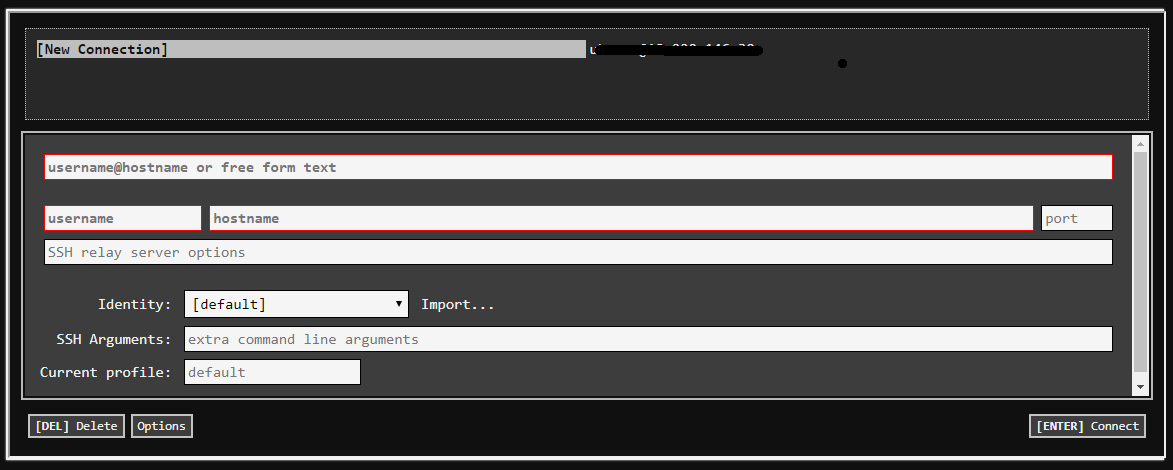
EC2 在 Secure Shell 中的认证问题: NaCl plugin exited with status code 255

EC2 一般使用.pem的 Private Key 进行认证,但是在使用 Secure Shell 中经常会遇到个问题:

Host key verification failed.
NaCl plugin exited with status code 255.
(R)econnect, (C)hoose another connection, or E(x)it?

看很多讨论说原因是:SSH 需要个 Public Key,但是我们只有一个 Private Key

很多 Solution 说需要生成一个 Public Key 之类的,但是实际上 Public Key 这儿并没有任何要求,我们只需要将自己的.pem复制一份然后扩展名改成.pub即可

比如自己的 Private Key 是123.pem那么复制一份然后命名为123.pem.pub, 然后 Import 的时候都选中即可

这看起来是个偏方不过确实有用

系列文章

优雅地乱玩 Linux

参考文献