惯性聚合 高效追踪和阅读你感兴趣的博客、新闻、科技资讯
阅读原文 在惯性聚合中打开

推荐订阅源

宝玉的分享
宝玉的分享
Apple Machine Learning Research
J
Java Code Geeks
V2EX - 技术
V2EX - 技术
Hacker News: Ask HN
Hacker News: Ask HN
T
Tailwind CSS Blog
V
Visual Studio Blog
cs.CV updates on arXiv.org
月光博客
月光博客
H
Hacker News: Front Page
D
DataBreaches.Net
GbyAI
GbyAI
Recorded Future
Recorded Future
IT之家
IT之家
H
Heimdal Security Blog
K
KPMG report finds enterprise disconnect between AI and its ROI | CIO
Schneier on Security
P
Privacy International News Feed
cs.CL updates on arXiv.org
S
Security Affairs
博客园 - 三生石上(FineUI控件)
M
MIT News - Artificial intelligence
Google Online Security Blog
L
LINUX DO - 最新话题
Google DeepMind News
The Cloudflare Blog
L
LangChain Blog
cs.AI updates on arXiv.org
腾讯CDC
The Last Watchdog
The Last Watchdog
I
Intezer
钛媒体:引领未来商业与生活新知
钛媒体:引领未来商业与生活新知
Hacker News - Newest:
Hacker News - Newest: "LLM"
Stack Overflow Blog
Stack Overflow Blog
C
Cyber Attacks, Cyber Crime and Cyber Security
U
Unit 42
H
Help Net Security
Simon Willison's Weblog
Y
Y Combinator Blog
C
CXSECURITY Database RSS Feed - CXSecurity.com
S
Schneier on Security
T
Tenable Blog
TaoSecurity Blog
TaoSecurity Blog
CTFtime.org: upcoming CTF events
小众软件
小众软件
B
Blog
S
Security @ Cisco Blogs
A
About on SuperTechFans
V
V2EX
T
The Exploit Database - CXSecurity.com

szhshp 的第三边境研究所

假设, AI 把我代替的那一刻真的到来 | szhshp 的第三边境研究所 小傻瓜都能懂的 AstrBot QQ 机器人集成 MCP 功能实战指南 | szhshp 的第三边境研究所 《智人之上: 从石器时代到 AI 时代的信息网络简史》阅读笔记 | szhshp 的第三边境研究所 iPadOS 26 无法设置空间场景图片壁纸的解决方法 | szhshp 的第三边境研究所 《一路云海》(终) | szhshp 的第三边境研究所 《一路云海》(四): 如何不按套路旅行 | szhshp 的第三边境研究所 《一路云海》(三): In Ya Mellow Tone | szhshp 的第三边境研究所 《一路云海》(二): 关西世博参观纪实 | szhshp 的第三边境研究所 《一路云海》(一): 新的征程 | szhshp 的第三边境研究所 2025 大阪世博会 [ 3 天前-先到先得 ] 阶段 场馆预约必中独家攻略 | szhshp 的第三边境研究所 Hackathon 随想 | szhshp 的第三边境研究所 一杯双皮奶 | szhshp 的第三边境研究所 Armbian + CasaOS + NAS 配置指南 | szhshp 的第三边境研究所 Docker 构建镜像报错: error getting credentials - err: exit status 1, out: `` | szhshp 的第三边境研究所 Disqus RIP! 论过高的维护成本如何治疗固执的坏习惯 | szhshp 的第三边境研究所 炸弹猫桌游变体规则 | szhshp 的第三边境研究所 《小岛经济学》阅读笔记 | szhshp 的第三边境研究所 《金钱心理学》阅读笔记 | szhshp 的第三边境研究所 为知笔记 RIP: 迁移剩余的笔记 | szhshp 的第三边境研究所 2025 博客第十年展望 - 再见我的过去 | szhshp 的第三边境研究所 我在独立游戏里面致敬的作品 | szhshp 的第三边境研究所 《How to make thing faster》阅读笔记 | szhshp 的第三边境研究所 《The Art of Clean Code》阅读笔记 | szhshp 的第三边境研究所 《Clean Architecture: A Craftsman Guide to Software Structure and Design》阅读笔记 | szhshp 的第三边境研究所 《How AI Works》阅读笔记 | szhshp 的第三边境研究所 游戏策划废案 - Project Uranus | szhshp 的第三边境研究所 游戏策划废案 - Project X | szhshp 的第三边境研究所 人生第一款独立游戏开发复盘 | szhshp 的第三边境研究所 Trap of Life | szhshp 的第三边境研究所 如果我用手搓了个暗物质雏形 | szhshp 的第三边境研究所 《Rust Programming Language》- EX - Cheatsheet | szhshp 的第三边境研究所 新的播放器上线了 | szhshp 的第三边境研究所 Cypress - End-to-End Testing: OKTA Authentication with MFA | szhshp 的第三边境研究所 VSC x VIM - 反正多学几个快捷键没有坏处 | szhshp 的第三边境研究所 两小时 Docker 速成 - Getting Started | szhshp 的第三边境研究所 《The Joy of Javascript》- 5 - Data | szhshp 的第三边境研究所 《The Joy of Javascript》- 4 - Meta Programming | szhshp 的第三边境研究所 《The Joy of Javascript》- 3 - ADT(Algebraic Data Type) | szhshp 的第三边境研究所 Web-Automation Testing | szhshp 的第三边境研究所 《The Joy of Javascript》- 2 - Functor/Monad | szhshp 的第三边境研究所 《The Joy of Javascript》- 1 - Object/Function | szhshp 的第三边境研究所 EvalError: Possible side-effect in debug-evaluate | szhshp 的第三边境研究所 前端 QA 工具链指南 - husky,commitlint,commitizen,eslint,typescript,express | szhshp 的第三边境研究所 效率工具 & 软件推荐 | szhshp 的第三边境研究所 站点开源 Project Titan | szhshp 的第三边境研究所 cmd/powershell-命令速查-Cheatsheet | szhshp 的第三边境研究所 Git-命令速查与相关问题解决-Cheatsheet & Troubleshooting | szhshp 的第三边境研究所 Tailwind.css not included in NextJS Production | szhshp 的第三边境研究所 Github GraphQL API - Data Integration | szhshp 的第三边境研究所 尝试 Windows Terminal + z.lua | szhshp 的第三边境研究所 StrokePlus.net - Powerful Hotkey Boost | szhshp 的第三边境研究所 优雅地 Hack 一台黑苹果 | szhshp 的第三边境研究所 一杯关东煮 | szhshp 的第三边境研究所 Gitee x PicGo 管理图床 | szhshp 的第三边境研究所 Create Your Own Redux (Typescript) | szhshp 的第三边境研究所 Getting Started: Ionic + Capacitor + React + Typescript + Android | szhshp 的第三边境研究所 GraphQL: File Upload & Troubleshooting | szhshp 的第三边境研究所 吉祥航空随心飞刷票工具循环查票工具 | szhshp 的第三边境研究所 NVM Windows Portable Installation | szhshp 的第三边境研究所 NextJS x Typescript - Integration & Troubleshooting | szhshp 的第三边境研究所 全站点升级 - Project Titan | szhshp 的第三边境研究所 AWS-EC2-常见问题解决-Troubleshooting | szhshp 的第三边境研究所 Workbox-Getting Started | szhshp 的第三边境研究所 《时间简史》阅读笔记 | szhshp 的第三边境研究所 《时间的秩序》阅读笔记 | szhshp 的第三边境研究所 ESLint-常见问题解决-Troubleshooting | szhshp 的第三边境研究所 站点索引 | szhshp 的第三边境研究所 个人知识库搭建 - Hexo 实现 Github/Coding 持续集成 | szhshp 的第三边境研究所 BMOB-常见问题解决-Troubleshooting | szhshp 的第三边境研究所 React + Typescript: 开启 HMR/Hot Loader | szhshp 的第三边境研究所 Yarn & NPM | szhshp 的第三边境研究所 ESLint: Typescript + React + TSX 集成 | szhshp 的第三边境研究所 《10101》EP15:过年 2020 | szhshp 的第三边境研究所 Cmder-Usage | szhshp 的第三边境研究所 Redux-DOM not refreshed | szhshp 的第三边境研究所 React Semantic UI-CheatSheet | szhshp 的第三边境研究所 Typescript: Getting Started | szhshp 的第三边境研究所 Flutter-Getting Started | szhshp 的第三边境研究所 Typescript: Access window object with type check | szhshp 的第三边境研究所 VSC Extension Development-Create A Code Formatter Extension | szhshp 的第三边境研究所 OneNote Extension-Main API | szhshp 的第三边境研究所 TortoiseGit Win10 Icon not showing correctly | szhshp 的第三边境研究所 Mongoose: aggregate() 方法实现聚合函数 | szhshp 的第三边境研究所 React In Depth - React 源码解析 - render() & Fiber | szhshp 的第三边境研究所 MongoDB x Mongoose: 实现类似 Join 的功能 | szhshp 的第三边境研究所 Disqus 评论框改造工程-实现 Disqus 代理的 Serverless 服务 | szhshp 的第三边境研究所 GUI, CLI, Terminal, Shell, TTY, Console, Bash | szhshp 的第三边境研究所 Jest Async Best Practise: No Nested Async | szhshp 的第三边境研究所 关系型数据库与非关系型数据库优缺点分析 | szhshp 的第三边境研究所 New Edge & Chromium Error - Package is invalid: 'CRX_VERSION_NUMBER_INVALID' | szhshp 的第三边境研究所 选择 GraphQL 的 N 个理由 | szhshp 的第三边境研究所 StrokePlus - 鼠标手势神器的代码编写技巧 | szhshp 的第三边境研究所 嗨,好久不见 | szhshp 的第三边境研究所 Vue + ElementUI 集成 Vue Router | szhshp 的第三边境研究所 IE8 - Unknown Runtime Error Using innerHTML & Ajax | szhshp 的第三边境研究所 React: Handling Events | szhshp 的第三边境研究所 React-Navigation Integration with Redux | szhshp 的第三边境研究所 React: States is tricky | szhshp 的第三边境研究所 《10101》EP14:小剧场 | szhshp 的第三边境研究所 ColdFusion - Basic - arguments in cffunction | szhshp 的第三边境研究所
优雅地乱玩Atom-2-插件 | szhshp 的第三边境研究所
2017-05-23 · via szhshp 的第三边境研究所

Meta

目录

前言

老规矩,玩坏了我不负责ヾ(´∀`o)+

插件安装方法:

  1. setting内部搜索安装
  2. 上github下载插件,放在atom目录下的package,重开打开软件会自动识别
  3. 使用apm命令安装,例:apm install run-in-browser

Atom插件

开发插件

主要是前端的Package 见鬼, 随便一个插件就能写一篇Post o( ̄▽ ̄)o

|Name|Functions|Comments| |----|| |Emmet||不认识这插件?你真的是程序员?| |autoprefixer|用来补充css前缀|| |docblockr|注释插件| |atom-terminal|从当前项目处运行Terminal|| |autoclose-html|自动输入尾tag|| |atom-beautify|格式整理插件|功能比较多并且比较复杂, 甚至可以Beautify on Save| |jquery-snippets|各种语言的snippets|| |markdown-writer|静态博客的写作工具||

Emmet

看一个官方的视频就能学会一切用法: https://emmet.io/

atom-beautify

https://atom.io/packages/atom-beautify#beautify-on-save

这是一个全能的格式整理插件, 支持大多数语言

主要功能

快捷键: Ctrl-Alt-B

选择代码格式化或者全部格式化

这按钮真别扭, 建议改成Ctrl+Shift+F

Beautify On Save

进入设置: Setting-Package-'atom-beautify'

然后找到对应语言, 然后开启Beautify On Save

然后任何时候只要按下Ctrl+S就会自动整理代码

体验了一下似乎依然需要微调, 例如Markdown的自动美化, 如果我设定了特殊的表格Class那么表格代码就会乱掉

markdown-writer

https://atom.io/packages/markdown-writer

这是个博客Markdown写作神器, 最重要的是这个功能还可以集成到各个博客平台

Setup

懒得翻译了看原文吧

Go to Settings (cmd-,) -> Packages -> Markdown-Writer -> Settings.

If you do not see any settings (due to a Atom’s bug), please activate Markdown-Writer using command (e.g. Open Cheat Sheet). Close and reopen the Settings page.

To manage tags/categories in front matter, please follow this setup.

To manage all configurations (e.g. project specific settings, change italic text styles), refer to this wiki document.

General Feature
  • Continue lists when you press enter.
  • Insert link (shift-cmd-k) and automatically link to the text next time.
    • Insert inline link.
    • Insert reference link with title. Use - in title field to create an empty title reference link.
    • Remove link (and its reference) after URL is deleted.
    • Search published posts by title in your blog.
  • Insert footnote (markdown-writer:insert-footnote), and edit footnote labels.
  • Insert image (shift-cmd-i), auto-detect image height/width, and optionally copy images to your site’s images directory.
  • Insert table (markdown-writer:insert-table), and a shortcut to jump to next table cell (cmd-j cmd-t).
  • Format table (markdown-writer:format-table) with table alignments.
  • Toggle headings: ctrl-alt-[1-5] to switch among H1 to H5.
  • Toggle text styles (customization supported):
    • code (cmd-')
    • bold (cmd-b)
    • italic (cmd-i)
    • strike through (cmd-h)
    • '''code block''' (shift-cmd-")
    • <kbd>key</kbd> (cmd + k)
    • - unordered list (shift-cmd-U)
    • 0. ordered list (shift-cmd-O)
    • > blockquote (shift-cmd->)
    • - [ ] task list (markdown-writer:toggle-task)
  • Jumping commands:
    • Jump to previous heading (cmd-j cmd-p)
    • Jump to next heading (cmd-j cmd-n)
    • Jump to next table cell (cmd-j cmd-t)
    • Jump to reference marker/definition (cmd-j cmd-d)
  • Markdown cheat sheet (markdown-writer:open-cheat-sheet).
  • Correct order list numbers (markdown-writer:correct-order-list-numbers).
  • Open link under cursor in browser (markdown-writer:open-link-in-browser), and works on reference links.
  • Toolbar for Markdown Writer is available at tool-bar-markdown-writer.
  • AsciiDoc support with language-asciidoc.

You can find and trigger all features in:

  • Open Command Palette (shift-cmd-P), enter Markdown Writer
  • Or, go to menubar Packages -> Markdown Writer.
Project Advanced Configuration

默认的设置可能无法满足我们对IDE的需要, 所以有一些更好的办法进行详细设置

命令面板执行Create Project Configs, 其中你可以

  1. 对默认新建的Post格式进行设置, 特别是头部内容的设定
  2. 对部分格式进行设定, 比如代码块我使用的不是MD原生的三个分隔号, 因此可以在里面进行修改
tool-bar-markdown-writer

这是一个对于markdown-writer的扩展, 可以显示一个GUI的控制栏, 比较懒不愿意记快捷键就可以使用这玩意

你需要安装以下两个Package:
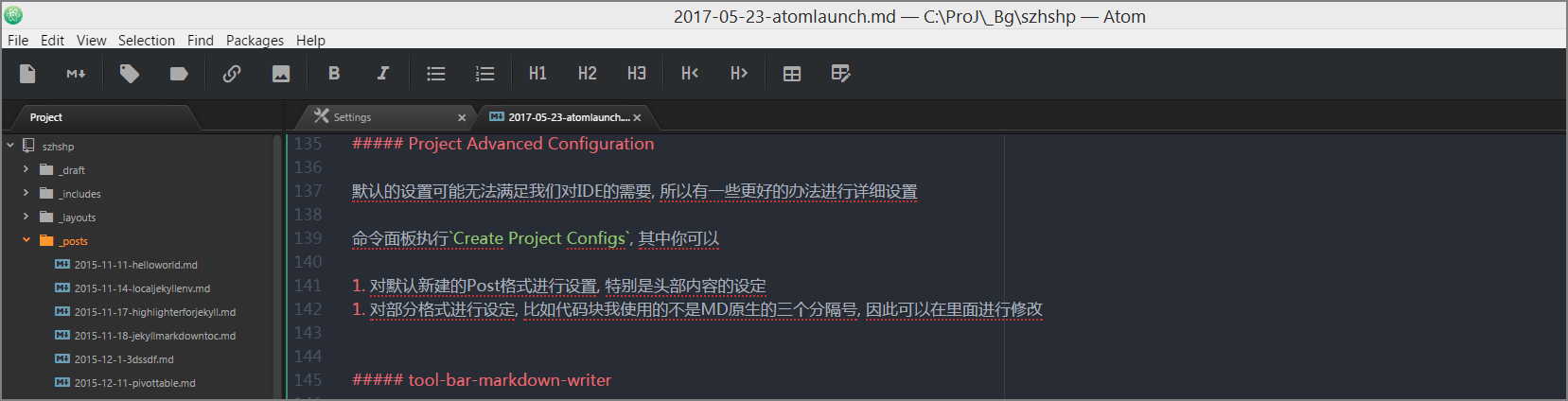
  1. markdown-writer
  2. Tool-bar

Keymap Advanced Configuration

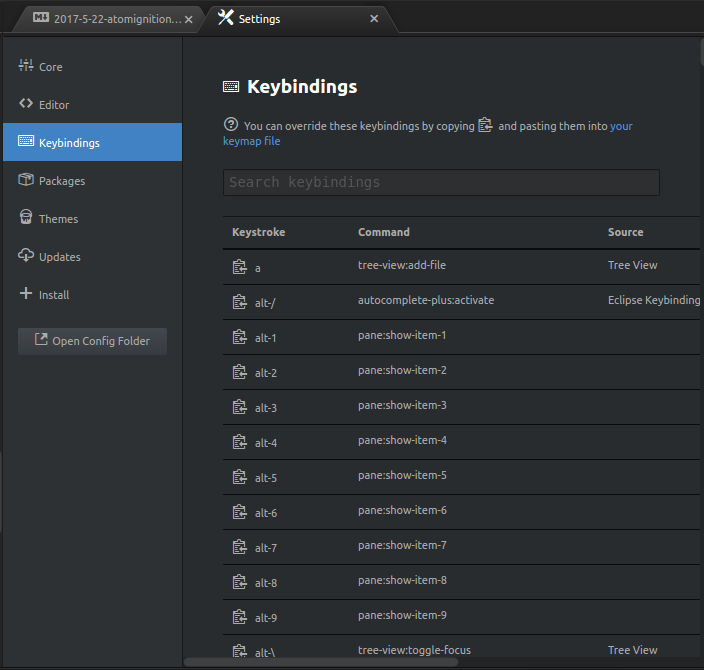
命令面板执行Create Default Keymaps

这个命令会生成一堆重载了的keymap设置到Atom的keymap

快捷键设置之后效率大有提升, 到这一步已经可以代替为知笔记的Markdown编辑器

有了快捷键谁还用上面的tool-bar? o( ̄▽ ̄)o

美化插件

|Name|Functions|Comments| |----|| |file-icons|增加许多图标,在侧边栏文件名前面的icon|| |activate-power-mode|很逗逼的编码特效,可以玩玩|

协作插件

|Name|Functions|Comments| |----|| |git-plus||几个Git的插件需要提前安装Git bash到系统| |git-control|Atom里面的Git GUI控制器| |minimap||| |markdown-Preview|| |linter|| |linter-JS|| |linter-JS-standard|| |sync-settings|配置同步插件|| |open-recent|开启最近打开的文件||

git-plus & git-control

首先要安装Git(废话)

如果Git安装失败或者环境变量没有设置的话就要到对应Package的设置里面设定 Git-Bash的路径

有时候会找不到git-plus的setting按钮, 可能是因为当初安装不完全, 卸载重装一次即可

一开始设置路径为C:\Git\bin一直失败, 后来才发现必须要详细到对应git.exe, 因此路径应该是C:\Git\bin\git.exe

这样就可以使用了

markdown-preview-enhanced

配合之前的Markdown编辑器使用, 可以快速预览

Atom自带的Markdown-Preview性能不太好, 这个插件可以解决两边滚动不同步的问题

各种Linter

这是一个对代码格式进行验证的Package

看起来很厉害因为他会将你所有的代码进行规范化验证, 如果那里不规范就会显示出来…

然鹅我觉得挺烦的, 因为每一行代码这个插件都说我不合规. o( ̄▽ ̄)o

不过可以修改规范细节, 甚至可以根据自己的需要设定规范

open-recent

这个插件可以在下一次开启Atom的时候打开最近开启的文件

默认没有这功能

sync-settings

这是一个可以同步当前Atom设置的Package, 可以让自用的电脑和工作的电脑配置进行同步

  1. Open Sync Settings configuration in Atom Settings.
  1. Create a new personal access token which has the gist scope and be sure to activate permissions: Gist -> create gists.
  2. Copy the access token to Sync Settings configuration.
  1. Create a new gist:

  • The description can be left empty. It will be set when invoking the backup command the first time.

  • Use packages.json as the filename.

  • Put some arbitrary non-empty content into the file. It will be overwritten by the first invocation of the backup command

  • Save the gist.

  1. Copy the gist id (last part of url after the username) to Sync Settings configuration.

注意gistID就是url里面一串乱七八糟的东西:

https://gist.github.com/szhshp/94a324d3a35340d7179f619638fbc1e

就是后面的94a324d3a35340d7179f619638fbc1e

然后使用命令行搜索Sync Setting就可以进行Backup和Restore了, 可以同步全部的设置,包括Package、Keymap以及StyleSheet