



Disclaimer: In 2021, there is still a place for simple setups with just one machine serving all traffic. So, no Kubernetes and no cloud load balancers in this post. Just good old Docker and Podman.
Even when you have just one physical or virtual server, it's often a good idea to run multiple instances of your application on it. Luckily, when the application is containerized, it's actually relatively simple. With multiple application containers, you get horizontal scaling and a much-needed redundancy for a very little price. Thus, if there is a sudden need for handling more requests, you can adjust the number of containers accordingly. And if one of the containers dies, there are others to handle its traffic share, so your app isn't a SPOF anymore.
The tricky part here is how to expose such a multi-container application to the clients. Multiple containers mean multiple listening sockets. But most of the time, clients just want to have a single point of entry.
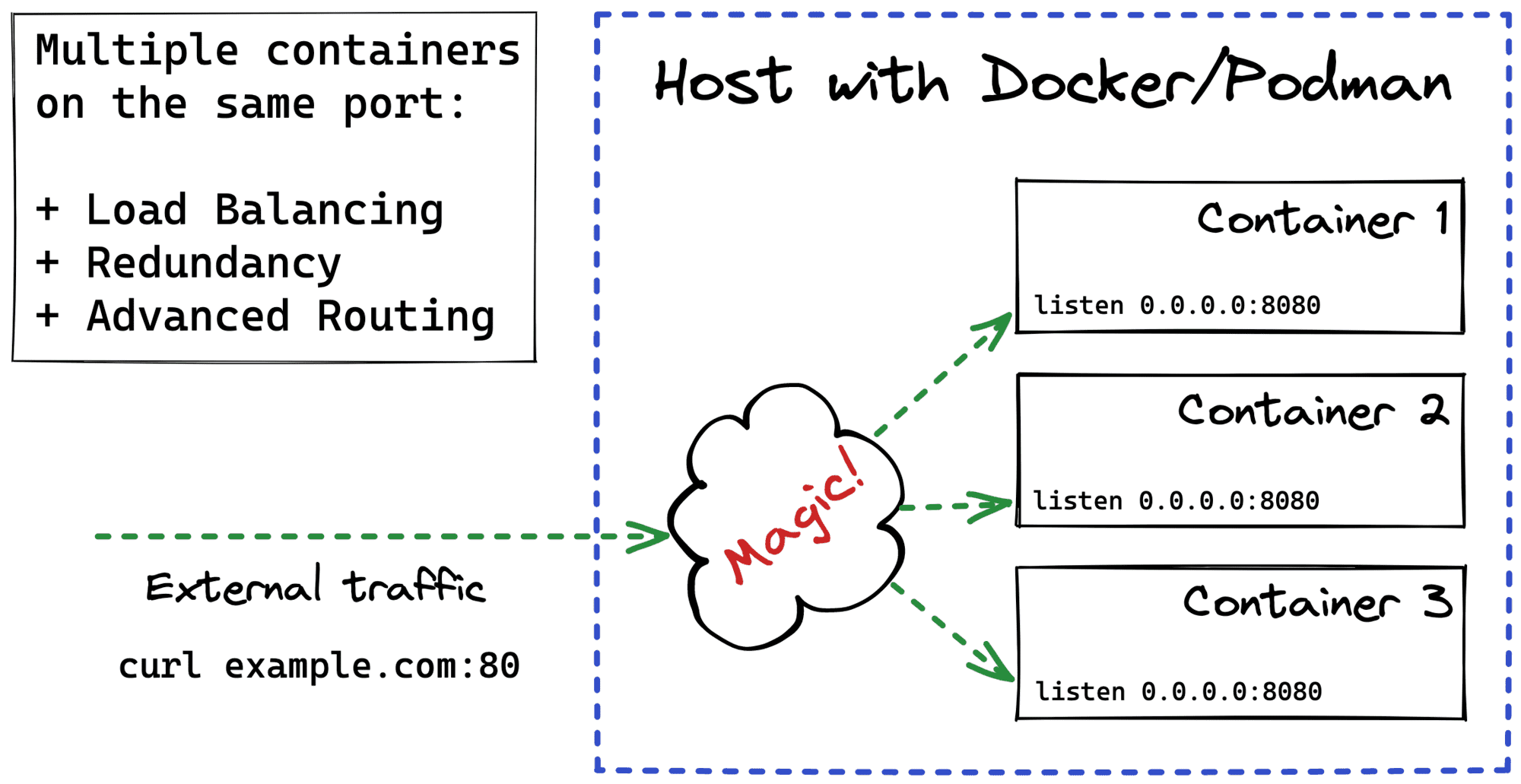
Surprisingly or not, neither Docker nor Podman support exposing multiple containers on the same host's port right out of the box.
docker-compose failing scenario with "Service specifies a port on the host. If multiple containers for this service are created on a single host, the port will clash."For instance, if you have the following docker-compose file:
version: '3'
services:
  app:
    image: kennethreitz/httpbin
    ports:
      - "80:80"  # httpbin server listens on the container's 0.0.0.0:80
And you want to scale up the app service with docker-compose up --scale app=2, you'll get the following error:
WARNING: The "app" service specifies a port on the host. If multiple containers for this service are created on a single host, the port will clash.
Starting example_app_1 ... done
Creating example_app_2 ...
Creating example_app_2 ... error

ERROR: for example_app_2  Cannot start service app: driver failed programming external connectivity on endpoint example_app_2 (...): Bind for 0.0.0.0:80 failed: port is already allocated

ERROR: for app  Cannot start service app: driver failed programming external connectivity on endpoint example_app_2 (...): Bind for 0.0.0.0:80 failed: port is already allocated
ERROR: Encountered errors while bringing up the project.
The most widely suggested workaround is to use an extra container with a reverse proxy like Nginx, HAProxy, Envoy, or Traefik. Such a proxy should know the exact set of application containers and load balance the client traffic between them. The only port that needs to be exposed on the host in such a setup is the port of the proxy itself. Additionally, since modern reverse proxies usually come with advanced routing capabilities, you can get canary and blue-green deployments or even coalesce diverse backend apps into a single fronted app almost for free.
For any production setup, I'd recommend going with a reverse proxy approach first. But in this post, I want to explore the alternatives. Are there other ways to expose multiple Docker or Podman containers on the same host's port?
The goal of the below exercise is manifold. First of all, to solidify the knowledge obtained while working on my container networking and iptables write-ups. But also to show that the proxy is not the only possible way to achieve a decent load balancing. So, if you are in a restricted setup where you can't use a proxy for some reason, the techniques from this post may come in handy.
Let's forget about containers for a second and talk about sockets in general.
To make a server socket listen() on a certain address, you need to explicitly bind() it to an interface and port. For a long time, binding a socket to an (interface, port) pair was an exclusive operation. If you bound a socket to a certain address from one process, no other processes on the same machine would be able to use the same address for their sockets until the original process closes its socket (hence, releases the port). And it's kind of reasonable behavior - an interface and port define a packet destination on a machine. Having ambiguous receivers would be bizarre.
But... modern servers may need to handle tens of thousands of TCP connections per second. A single process accept()-ing all the client connections quickly becomes a bottleneck with such a high connection rate. So, starting from Linux 3.9, you can bind an arbitrary number of sockets to exactly the same (interface, port) pair as long as all of them use the SO_REUSEPORT socket option. The operating system then will make sure that TCP connections are evenly distributed between all the listening processes (or threads).
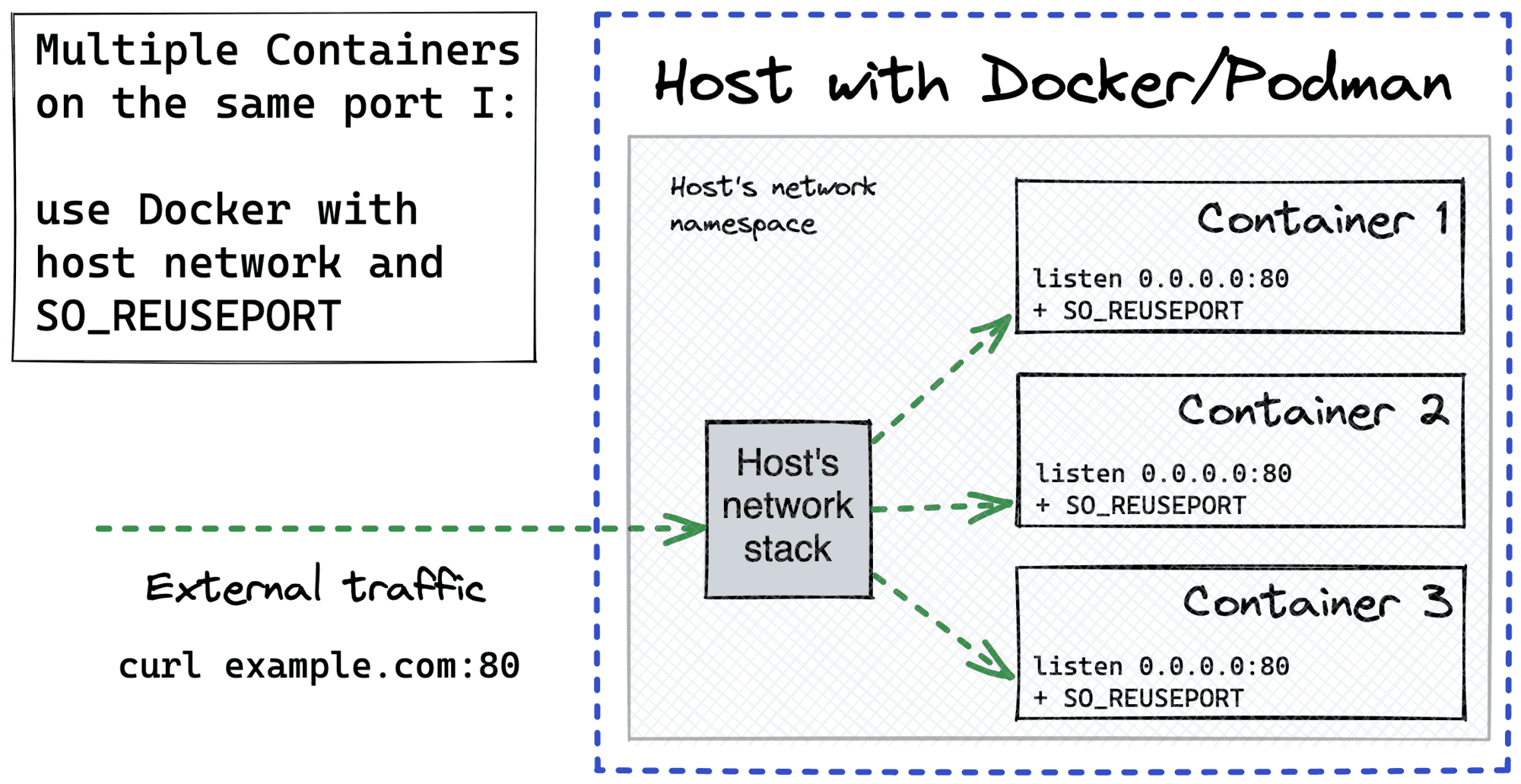
Apparently, the same technique can be applied to containers. However, the SO_REUSEPORT option works only if all the sockets reside in the same network stack. And that's obviously not the case for the default Docker/Podman approach, where every container gets its own network namespace, hence an isolated network stack.
The simplest way to overcome this is to sacrifice the isolation a bit and run all the containers in the host's network namespace with docker run --network host:
But there is a more subtle way to share a single network namespace between multiple containers. Docker allows reusing a network namespace of an already existing container while launching a new one. So, we can start a sandbox container that will do nothing but sleep. This container will originate a network namespace and also expose the target port to the host (other namespaces will also be created, but it doesn't really matter). All the application containers will then be attached to this network namespace using docker run --network container:<sandbox_name> syntax.
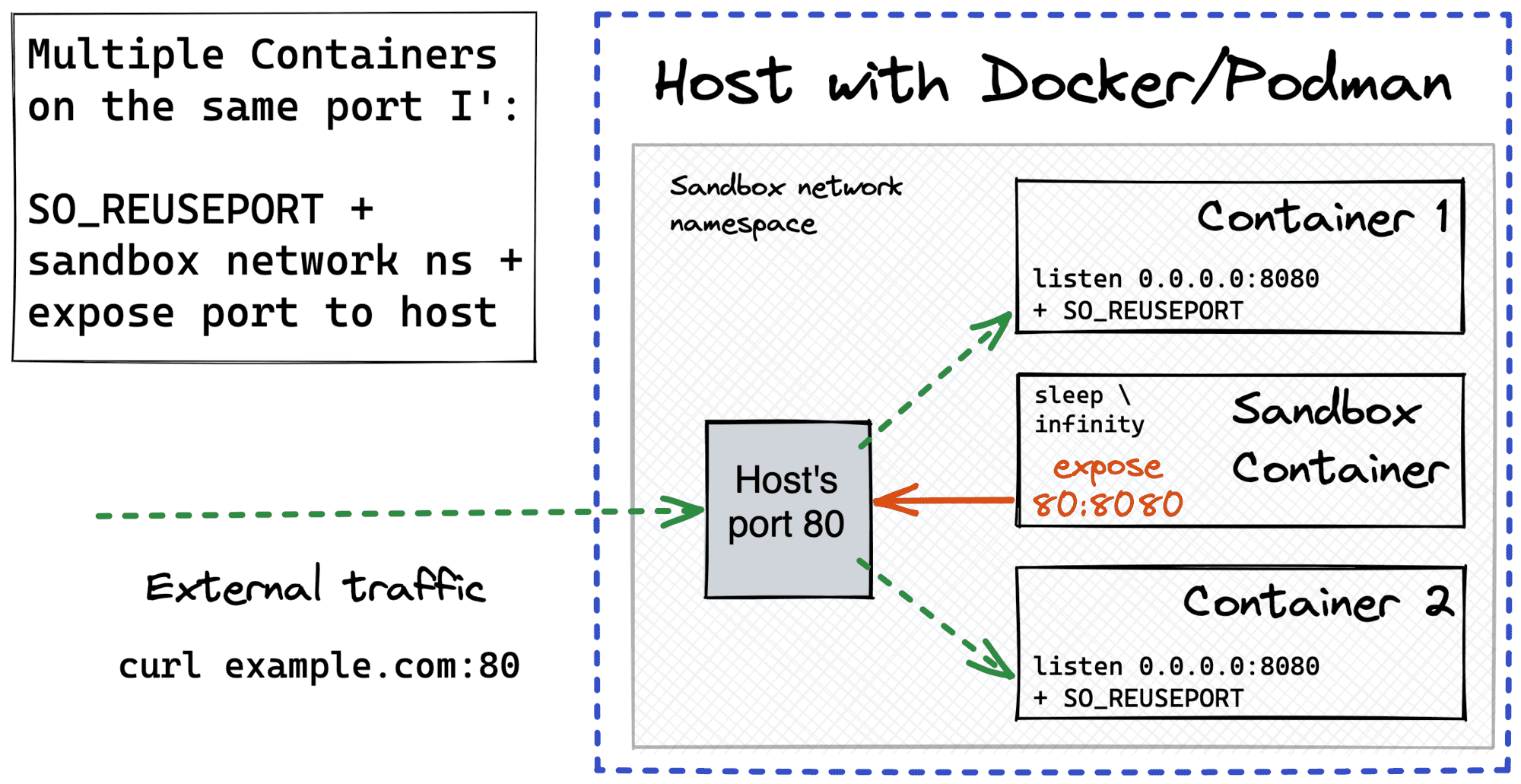
Of course, all the instances of the application server need to set the SO_REUSEPORT option, so there won't be a port conflict, and the incoming requests will be evenly distributed between the containers listening on the same port.
SO_REUSEPORT socket option.Here is an example Go server that uses the SO_REUSEPORT option. Setting socket options in Go turned out to be slightly less trivial than I expected 🙈
// http_server.go

package main

import (
    "context"
    "fmt"
    "net"
    "net/http"
    "os"
    "syscall"

    "golang.org/x/sys/unix"
)

func main() {
    lc := net.ListenConfig{
        Control: func(network, address string, conn syscall.RawConn) error {
            var operr error
            if err := conn.Control(func(fd uintptr) {
                operr = syscall.SetsockoptInt(
                    int(fd),
                    unix.SOL_SOCKET,
                    unix.SO_REUSEPORT,
                    1,
                )
            }); err != nil {
                return err
            }
            return operr
        },
    }

    ln, err := lc.Listen(
        context.Background(),
        "tcp",
        os.Getenv("HOST")+":"+os.Getenv("PORT"),
    )
    if err != nil {
        panic(err)
    }

    http.HandleFunc("/", func(w http.ResponseWriter, _req *http.Request) {
        w.Write([]byte(fmt.Sprintf("Hello from %s\n", os.Getenv("INSTANCE"))))
    })

    if err := http.Serve(ln, nil); err != nil {
        panic(err)
    }
}
Use the following Dockerfile (not for production!) to containerize the above server:
FROM golang:1.16

COPY http_server.go .

ENV GO111MODULE=off

RUN go get golang.org/x/sys/unix

CMD ["go", "run", "http_server.go"]
Build it with docker build -t http_server .
Here is a step by step instruction on how to launch the sandbox and the application containers:
# Prepare the sandbox.
$ docker run -d --rm \
  --name app_sandbox \
  -p 80:8080 \
  alpine sleep infinity

# Run first application container.
$ docker run -d --rm \
  --network container:app_sandbox \
  -e INSTANCE=foo \
  -e HOST=0.0.0.0 \
  -e PORT=8080 \
  http_server

# Run second application container.
$ docker run -d --rm \
  --network container:app_sandbox \
  -e INSTANCE=bar \
  -e HOST=0.0.0.0 \
  -e PORT=8080 \
  http_server
Testing it on a vagrant box with curl gave me the following results:
# 192.168.37.99 is the external interface of the VM.

$ for i in {1..300}; do curl -s 192.168.37.99 2>&1; done | sort | uniq -c
 158 Hello from bar
 142 Hello from foo
Pretty good distribution, huh?
To understand the technique from this section, you need to know what happens when a container's port is published on the host. At first sight, it may look like there is indeed a process listening on the host and forwarding packets to the container (scroll to the right end):
# Start a container with port 8080 published on host's port 80.
$ docker run -d --rm -p 80:8080 alpine sleep infinity

# Check listening TCP sockets.
$ sudo ss -lptn 'sport = :80'
State   Recv-Q  Send-Q  Local Address:Port  Peer Address:Port
LISTEN  0       128           0.0.0.0:80          0.0.0.0:*    users:(("docker-proxy",pid=4963,fd=4))
LISTEN  0       128              [::]:80             [::]:*    users:(("docker-proxy",pid=4970,fd=4))
In actuality, the userland docker-proxy is rarely used. Instead, a single iptables rule in the NAT table does all the heavy lifting. Whenever a packet destined to the (host, published_port) arrives, a destination address translation to (container, target_port) happens. So, the port publishing boils down to adding this iptables rule upon the container startup.
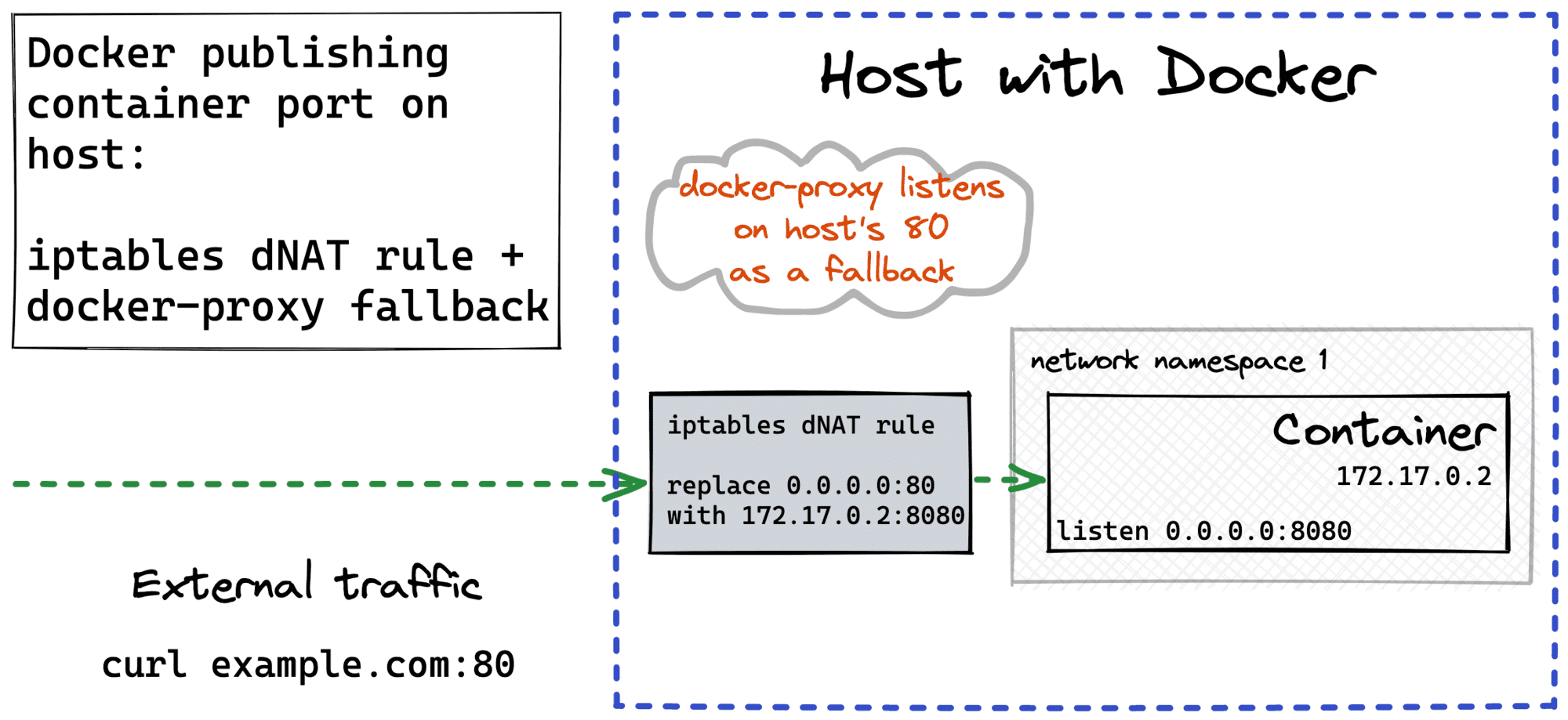
The problem with the above DNAT is that it can do only the one-to-one translation. Thus, if we want to support multiple containers behind a single host's port, we need a more sophisticated solution. Luckily, Kubernetes uses a similar trick in kube-proxy for the Service ClusterIP to Pod IPs translation while implementing a built-in service discovery.
Long story short, iptables rules can be applied with some probability. So, if you have ten potential destinations for a packet, try applying the destination address translation to the first nine one of them with just a 10% chance. And if none of them worked out, apply a fallback for the very last destination with a 100% chance. As a result, you'll get ten equally loaded destinations.
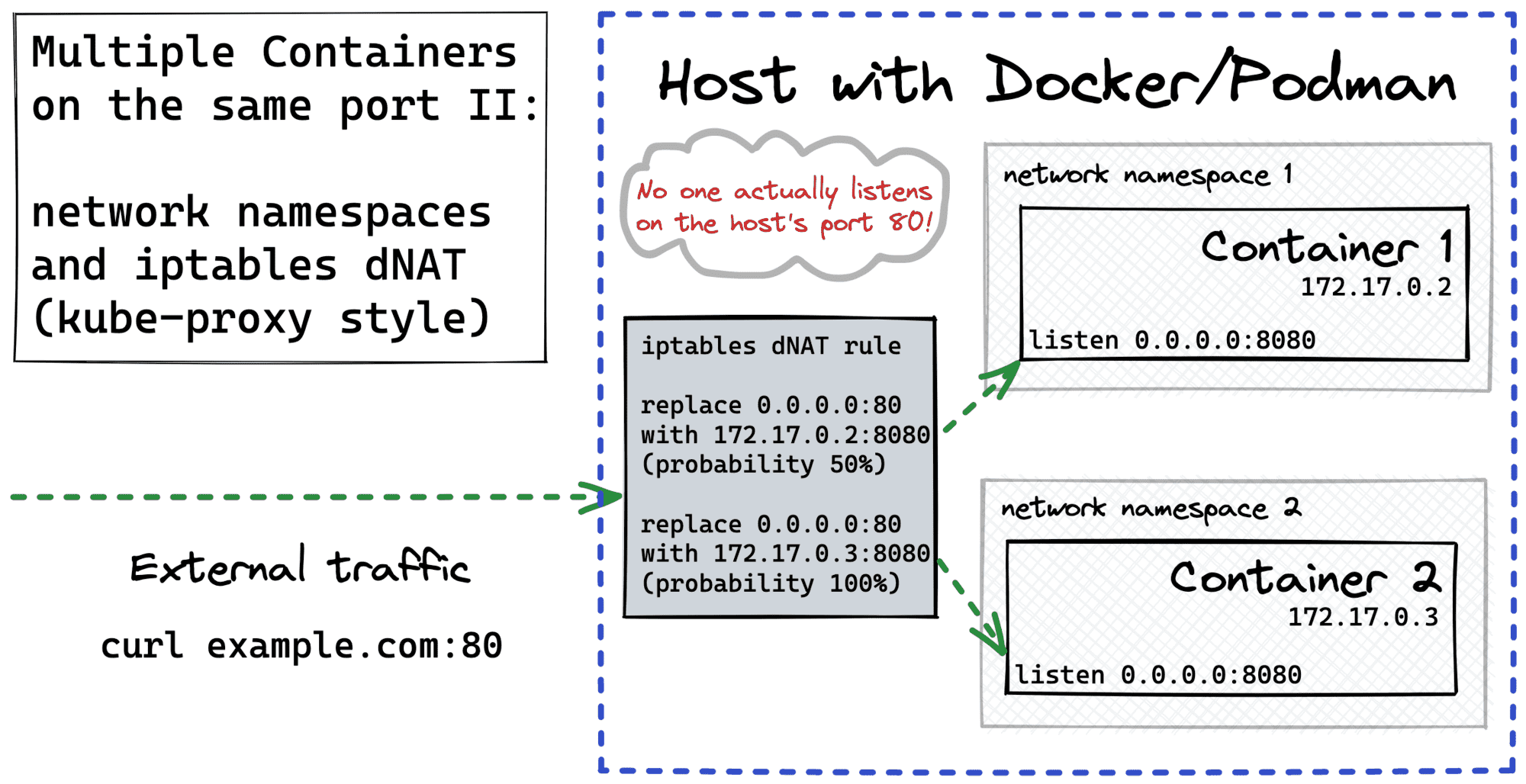
The huge advantage of this approach comparing to the SO_REUSEPORT option is that it's absolutely transparent to the application.
Here is how you can quickly try it out.
We can use a much simpler version of the test server:
// http_server.go
package main

import (
    "fmt"
    "net/http"
    "os"
)

func main() {
    http.HandleFunc("/", func(w http.ResponseWriter, _req *http.Request) {
        w.Write([]byte(fmt.Sprintf("Hello from %s\n", os.Getenv("INSTANCE"))))
    })

    if err := http.ListenAndServe(":"+os.Getenv("PORT"), nil); err != nil {
        panic(err)
    }
}
And the simplified Dockerfile:
FROM golang:1.16

COPY http_server.go .

CMD ["go", "run", "http_server.go"]
Build it with:
$ docker build -t http_server .
Run two application containers:
$ CONT_PORT=9090

$ docker run -d --rm \
  --name http_server_foo \
  -e INSTANCE=foo \
  -e PORT=$CONT_PORT \
  http_server

$ docker run -d --rm \
  --name http_server_bar \
  -e INSTANCE=bar \
  -e PORT=$CONT_PORT \
  http_server
Figure out the IP addresses of the containers:
$ CONT_FOO_IP=$(docker inspect -f '{{range.NetworkSettings.Networks}}{{.IPAddress}}{{end}}' http_server_foo)
$ echo $CONT_FOO_IP
172.17.0.2

$ CONT_BAR_IP=$(docker inspect -f '{{range.NetworkSettings.Networks}}{{.IPAddress}}{{end}}' http_server_bar)
$ echo $CONT_BAR_IP
172.17.0.3
Configure iptables DNAT rules - for local (OUTPUT) and external (PREROUTING) traffic:
$ FRONT_PORT=80

# Not secure! Use global ACCEPT only for tests.
$ sudo iptables -I FORWARD 1 -j ACCEPT

# DNAT - local traffic
$ sudo iptables -t nat -I OUTPUT 1 -p tcp --dport $FRONT_PORT \
    -m statistic --mode random --probability 1.0  \
    -j DNAT --to-destination $CONT_FOO_IP:$CONT_PORT

$ sudo iptables -t nat -I OUTPUT 1 -p tcp --dport $FRONT_PORT \
    -m statistic --mode random --probability 0.5  \
    -j DNAT --to-destination $CONT_BAR_IP:$CONT_PORT

# DNAT - external traffic
$ sudo iptables -t nat -I PREROUTING 1 -p tcp --dport $FRONT_PORT \
    -m statistic --mode random --probability 1.0  \
    -j DNAT --to-destination $CONT_FOO_IP:$CONT_PORT

$ sudo iptables -t nat -I PREROUTING 1 -p tcp --dport $FRONT_PORT \
    -m statistic --mode random --probability 0.5  \
    -j DNAT --to-destination $CONT_BAR_IP:$CONT_PORT
Testing it on a vagrant box game with curl gave me the following request distribution:
$ for i in {1..300}; do curl -s 192.168.37.99 2>&1; done | sort | uniq -c
 143 Hello from bar
 157 Hello from foo
# Clean up filter rule (traffic forwarding)
$ sudo iptables -t filter -L -n --line-numbers

# Make sure your rule is on the first line, and then drop it
$ sudo iptables -t filter -D FORWARD 1

# Clean up nat rules (destination address replacement)
sudo iptables -t nat -L -n --line-numbers

# Make sure your rules are the first ones in the chains, and then drop them:
sudo iptables -t nat -D OUTPUT 1
sudo iptables -t nat -D OUTPUT 1
sudo iptables -t nat -D PREROUTING 1
sudo iptables -t nat -D PREROUTING 1
When it comes to proxies, the most challenging part is how to deal with volatile sets of upstreams. Containers come and go, and their IP addresses are ephemeral. So, whenever a list of application containers changes, the proxy needs to update its list of upstream IPs. Docker has a built-in DNS server that maintains the up-to-date DNS records for the containers. However, Nginx doesn't refresh the DNS resolution results unless some magic with variables is applied. Configuring Envoy proxy with a STRICT_DNS cluster may show better results. However, the best results can be achieved only by dynamically updating the proxy configuration on the fly listening to Docker events.
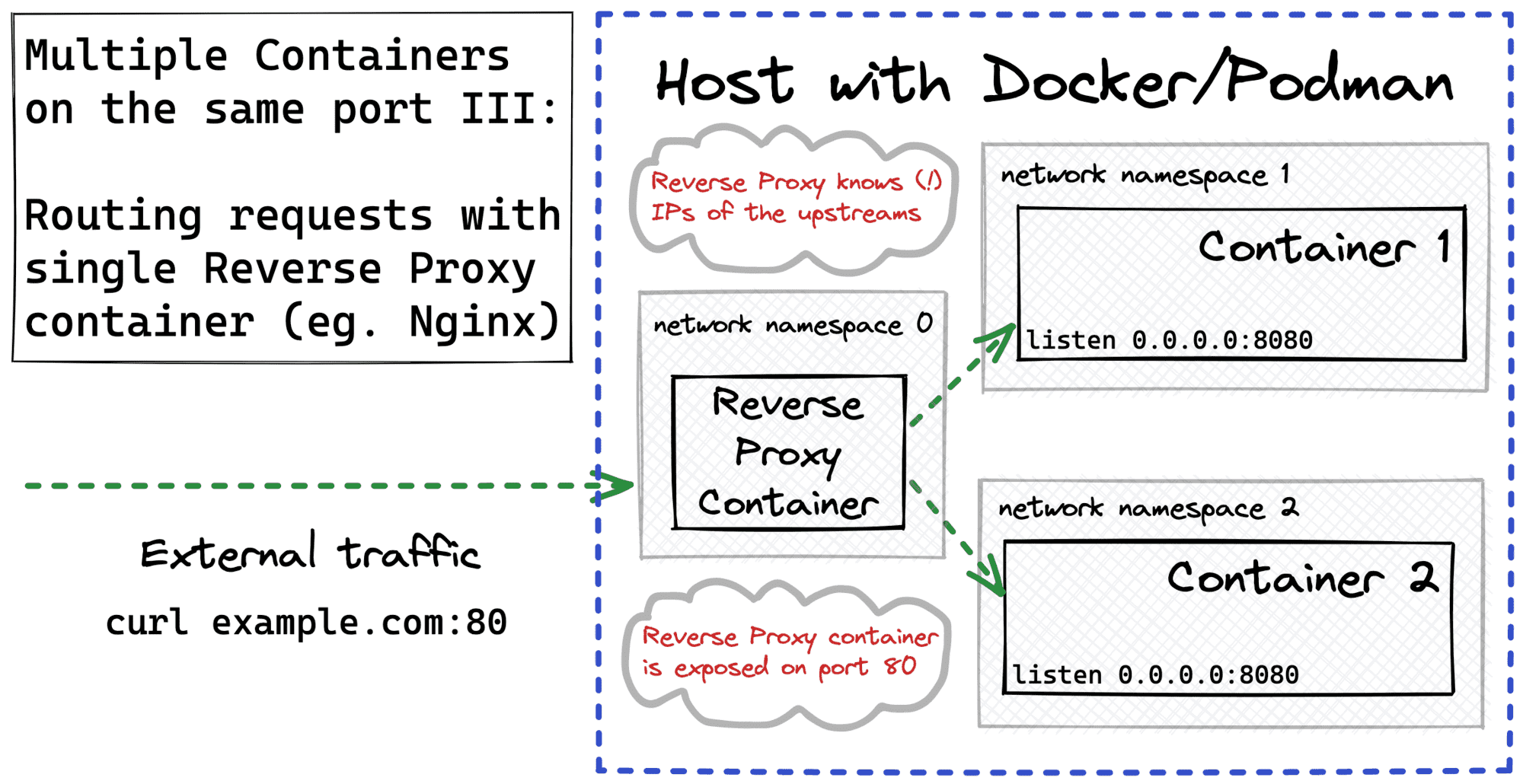
Luckily, there is a more modern proxy called Traefik with built-in support for many service discovery mechanisms, including labeled Docker containers. If you want to see Traefik in action, check out my write-up on canary container deployments.
Well, that's it for now. Good luck!
此内容由惯性聚合(RSS阅读器)自动聚合整理,仅供阅读参考。 原文来自 — 版权归原作者所有。