





Here is a little exercise to deepen your understanding of containers... through toying with them 🧸 The goal is to show that containers aren't just Linux processes, they are also Linux files!
The idea is simple - take a Linux machine equipped with the Docker daemon and run on it a bunch of well-known commands like docker create|start|exec|... keeping a close eye on the machine's filesystem and hoping for an interesting discovery or two.
Level up your server-side game — join 20,000 engineers getting insightful learning materials straight to their inbox.
First, a few words about the staging environment. Essentially, any (more or less) clean Linux machine running Docker would do. But since we want to track the created/deleted/modified files on the host's filesystem, it would be handy if we could snapshot it after every docker <command> so that these snapshots could be compared later on.
This does sound like a good use case for Docker-in-Docker. If the guinea-pig Docker daemon itself runs inside of a container, we could at any moment dump the filesystem of that container into an image layer using the standard docker commit <CONTAINER> command. And since images can be easily compared, we could compute the file-diff of two consequent snapshots using something like the container-diff tool.

The official docker:dind image wouldn't do, though, due to a certain VOLUME instruction it contains. That instruction is there for a good reason - to move the volatile and potentially massy /var/lib/docker folder out of the container's (slow and expensive) union filesystem. However, as you'll see in a moment, this folder is going to be one of the hottest locations in our experiment. So, we need to make sure /var/lib/docker is committed to the snapshot image, hence - no volumes.
$ git clone https://github.com/docker-library/docker.git
$ cd docker/20.10/dind
$ sed -i '/VOLUME/d' ./Dockerfile
$ docker build -t my-dind:origin .
Another important requirement is to keep the staging environment small and controllable. For that, we'd need to use a slim testing container image with the contents we're well aware of while experimenting with our guinea-pig Docker daemon. A FROM scratch image with a simple Go binary inside sounds like a good candidate. However, this image should be built outside of our guinea-pig Docker instance - building container images involves running temporary containers and thus may spoil the staging environment.
There are many ways to build and distribute images, but for our experiment, I ended up with probably the simplest possible setup:
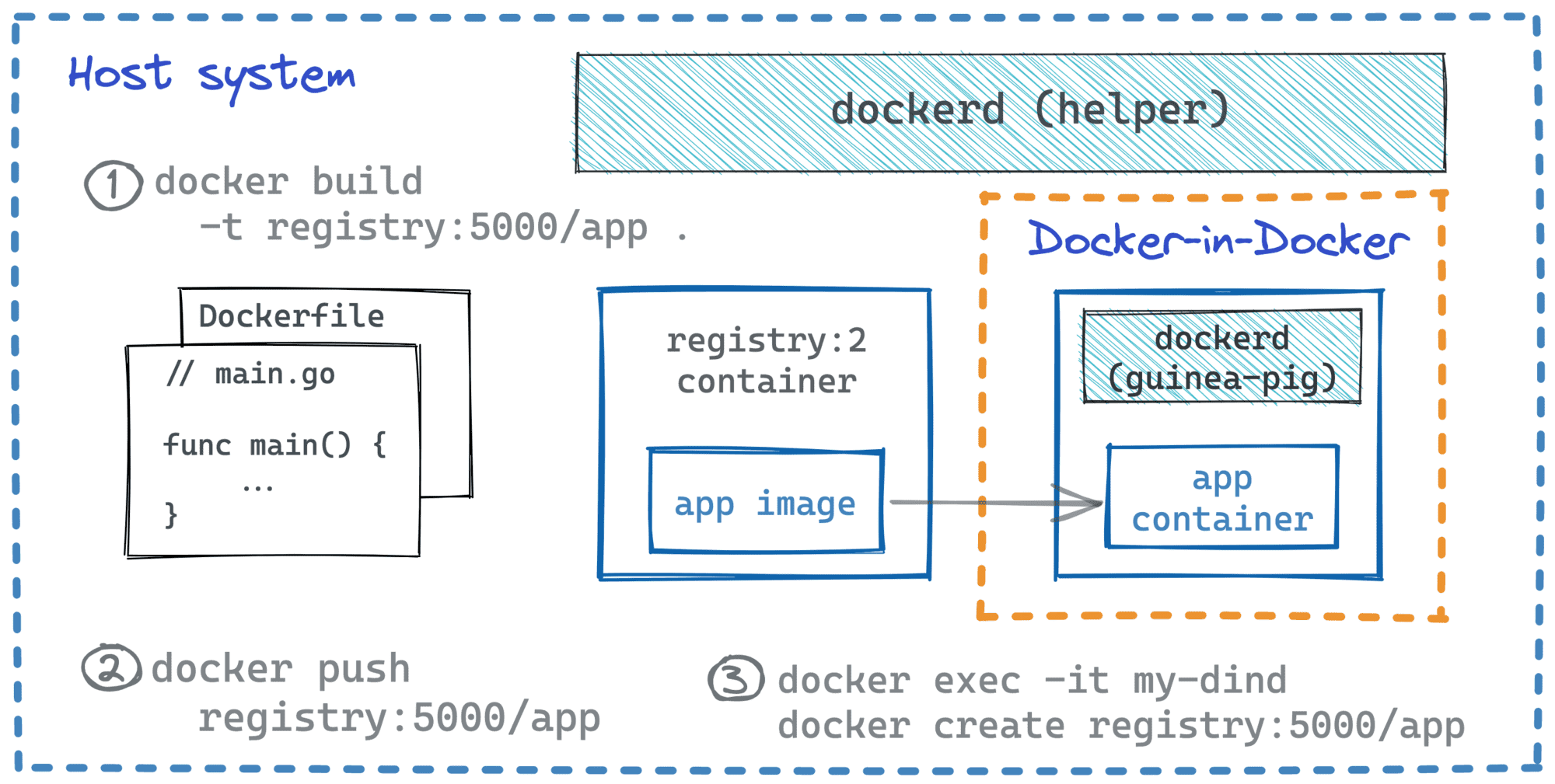
Here is how the above setup can be reproduced on any (Linux?) machine running Docker:
I actually don't use Docker on my host system. For my playgrounds, I prefer disposable virtual machines. Here is a Vagrantfile to quickly spin up a Debian box with Docker and container-diff. Drop it to a new folder, and then run vagrant up; vagrant ssh from there.
Vagrant.configure("2") do |config|
  config.vm.box = "debian/bullseye64"

  config.vm.provider "virtualbox" do |vb|
    vb.cpus = 4
    vb.memory = "4096"
  end

  config.vm.provision "shell", inline: <<-SHELL
    apt-get update
    apt-get install -y curl git cmake vim

    curl -LO https://storage.googleapis.com/container-diff/latest/container-diff-linux-amd64 && \
    install container-diff-linux-amd64 /usr/local/bin/container-diff
  SHELL

  config.vm.provision "docker"
end
# 1. Prepare config to make Docker trust the local registry:
$ cat > daemon.json <<EOF
{
  "insecure-registries" : ["my-registry:5000"]
}
EOF


# 2. Put the above piece of config into
#    the host's /etc/docker/daemon.json


# 3. Restart the host's Docker daemon:
$ sudo systemctl restart docker.service


# 4. Create a user-defined network to allow the DinD container
#    access the Registry container by its hostname:
$ docker network create skynet


# 5. Run an (insecure) local registry:
$ docker run --detach \
    --network skynet \
    --publish 5000:5000 \
    --name my-registry \
    registry:2


# 6. Make the local registry addressible from the host system:
$ REGISTRY_IP=$(docker inspect \
    -f '{{range.NetworkSettings.Networks}}{{.IPAddress}}{{end}}' \
    my-registry)
$ echo "$REGISTRY_IP my-registry" | sudo tee --append /etc/hosts


# 7. Run the guinea-pig Docker daemon using the patched DinD image:
$ docker run --detach --privileged \
    --network skynet \
    --volume `pwd`/daemon.json:/etc/docker/daemon.json \
    --name my-dind \
    my-dind:origin

# 8. Commit the initial state of the guinea-pig Docker system
#    as the starting point for further comparisons:
$ docker commit my-dind my-dind:just-started

# [Optional] See what changes have been made to my-dind
# container's filesystem during the container's startup:
$ container-diff diff --type=file \
  daemon://my-dind:origin \
  daemon://my-dind:just-started
Now, prepare the testing application(s) - a simple HTTP program and a sleep-like CLI tool:
# syntax=docker/dockerfile:1.4

# ---=== This part is just for building ===---
FROM golang:1.18 as builder

WORKDIR /

COPY <<EOF server.go
package main

import (
    "fmt"
    "log"
    "net/http"
)

func main() {
    log.Println("Starting HTTP server...")

    http.HandleFunc("/", func(w http.ResponseWriter, req *http.Request) {
        log.Println("Incoming request")
        fmt.Fprintf(w, "hello\n")
    })
    http.ListenAndServe(":8090", nil)
}
EOF

COPY <<EOF sleep.go
package main

import (
    "log"
    "time"
)

func main() {
    for {
        log.Println("Zzz...")
        time.Sleep(1 * time.Second)
    }
}
EOF

RUN CGO_ENABLED=0 go build -o server server.go
RUN CGO_ENABLED=0 go build -o sleep sleep.go


# ---=== This is the actual testing image, quite minimalistic ===---
FROM scratch

COPY --from=builder /server /server
COPY --from=builder /sleep /sleep

CMD ["/server"]
Last but not least:
docker buildx build -t my-registry:5000/my-app .
docker push my-registry:5000/my-app
For the experiment itself, I'll use two terminals simultaneously:
📦 # Terminal 1 - DinD

$ docker exec -it my-dind sh
$ docker ps
  <empty>
💻 # Terminal 2 - host system

$ docker ps
CONTAINER ID  IMAGE           COMMAND                 ...  STATUS         NAMES
d07b66a353b0  my-dind:origin  "dockerd-entrypoint.…"  ...  Up 25 minutes  my-dind
9a6addf796f6  registry:2      "/entrypoint.sh /etc…"  ...  Up 26 minutes  my-registry
docker create commandThe very first experiment - create a my-app container using the DinD Docker instance and see what files are created as a result:
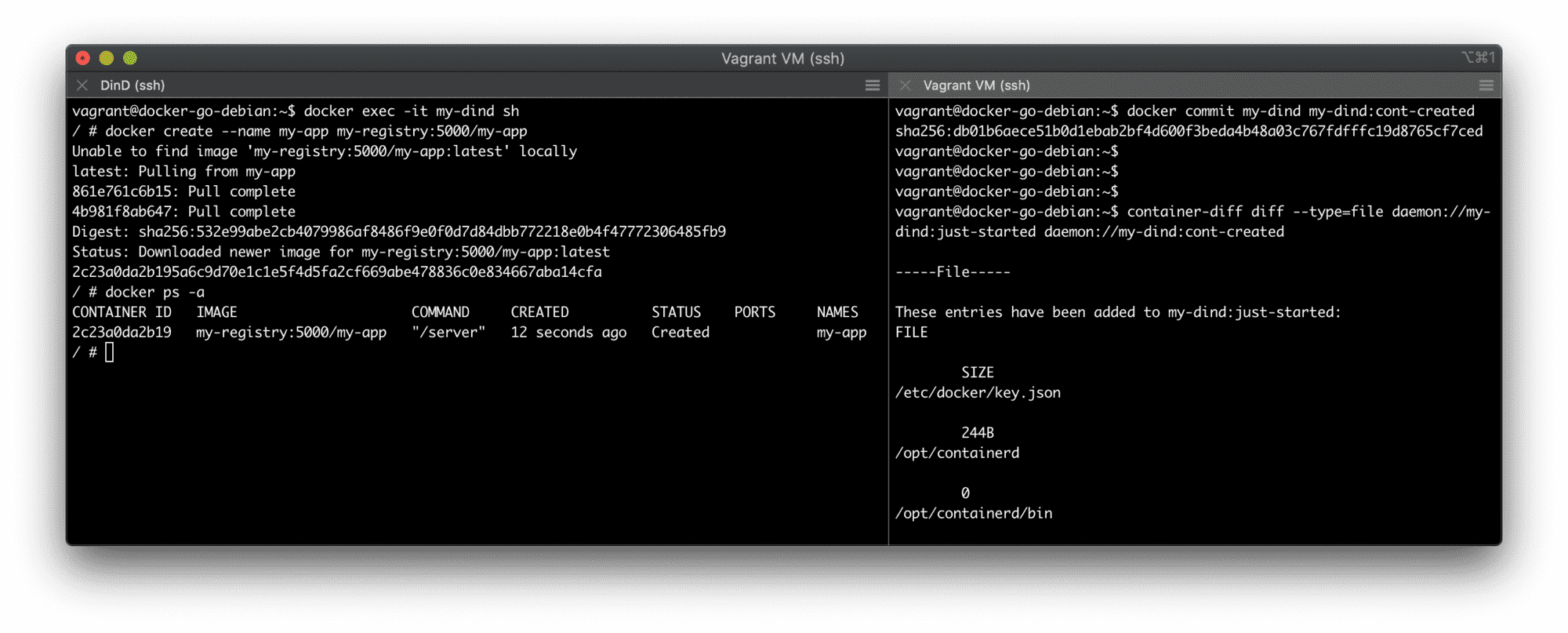
Using two terminals to conduct the experiment - DinD on the left and host on the right.
📦 # Terminal 1 (DinD)

# Create container:
$ docker create --name my-app my-registry:5000/my-app

# List existing containers:
$ docker ps -a
CONTAINER ID  IMAGE                    COMMAND    ... STATUS   NAMES
2c23a0da2b19  my-registry:5000/my-app  "/server"      Created  my-app

# List running processes:
$ ps auxf
PID   USER     TIME  COMMAND
    1 root      0:00 docker-init -- dockerd --host=unix:///var/run/docker.sock --host=tcp://0.0.
   61 root      0:00 dockerd --host=unix:///var/run/docker.sock --host=tcp://0.0.0.0:2376 --tlsv
   70 root      0:21 containerd --config /var/run/docker/containerd/containerd.toml --log-level
  176 root      0:00 sh
  232 root      0:00 ps auxf
Finding #1: docker create creates a container but doesn't create any new process!
💻 # Terminal 2 (Host)

# Snapshot the DinD container filesystem:
$ docker commit my-dind my-dind:cont-created

# Compare the current state with the previous one:
$ container-diff diff --type=file \
  daemon://my-dind:just-started \
  daemon://my-dind:cont-created

-----File-----

These entries have been added to my-dind:just-started:  # <-- looks like a bug in container-diff output
FILE
...

👉 # This group of files seems important
/var/lib/docker/buildkit/cache.db
/var/lib/docker/buildkit/containerdmeta.db
/var/lib/docker/buildkit/content
/var/lib/docker/buildkit/content/ingest
/var/lib/docker/buildkit/executor
/var/lib/docker/buildkit/metadata_v2.db
/var/lib/docker/buildkit/snapshots.db

👉 # So... This is where containers live on disk!
/var/lib/docker/containers/<CONTAINER-ID>
/var/lib/docker/containers/<CONTAINER-ID>/checkpoints
/var/lib/docker/containers/<CONTAINER-ID>/config.v2.json
/var/lib/docker/containers/<CONTAINER-ID>/hostconfig.json

👉 # And this is where images live
/var/lib/docker/image
...

👉 # Look ma', our `app` image files!
/var/lib/docker/vfs/dir/<LAYER-ID1>
/var/lib/docker/vfs/dir/<LAYER-ID1>/server
/var/lib/docker/vfs/dir/<LAYER-ID2>
/var/lib/docker/vfs/dir/<LAYER-ID2>/server
/var/lib/docker/vfs/dir/<LAYER-ID2>/sleep
...

These entries have been deleted from my-dind:just-started: None

These entries have been changed between my-dind:just-started and my-dind:cont-created:
FILE
/certs/...
Finding #2: /var/lib/docker/containers/<container-id> - that's where our containers live on disk.
Finding #3: docker create seems to be very different from runc create - no runtime bundle has been created so far!
Finding #4: Container logs aren't a thing at this stage yet. The container-diff output above is abridged, but if you're performing this exercise while reading the article, try searching for files containing the log word in their name - you won't find anything.
docker start commandTime to start the my-app container:
📦 # Terminal 1 (DinD)

$ docker start my-app

$ docker ps -a
CONTAINER ID  IMAGE                    COMMAND    ...  STATUS         NAMES
435edb948b83  my-registry:5000/my-app  "/server"       Up 21 seconds  my-app

$ ps auxf
PID   USER     TIME  COMMAND
    1 root      0:00 docker-init -- dockerd --host=unix:///var/run/docker.sock --host=tcp://0.0.0.0:2376 --tlsverify --tlscacert /certs/server/ca.pem --tlscert /certs/server/cert.pem --tlskey /certs/server/key.pem
   60 root      0:00 dockerd --host=unix:///var/run/docker.sock --host=tcp://0.0.0.0:2376 --tlsverify --tlscacert /certs/server/ca.pem --tlscert /certs/server/cert.pem --tlskey /certs/server/key.pem
   69 root      0:07 containerd --config /var/run/docker/containerd/containerd.toml --log-level info
  210 root      0:00 sh
  265 root      0:00 /usr/local/bin/containerd-shim-runc-v2 -namespace moby -id 435edb948b8360ffcbae5452fd6fc0451b5c17daf6940f63db6795c099958357 -address /var/run/docker/containerd/containerd.sock
👉284 root      0:00 /server
  320 root      0:00 ps auxf
So, what files have been created?
💻 # Terminal 2 (Host)

$ docker commit my-dind my-dind:cont-started

# Compare the current state with the previous one:
$ container-diff diff --type=file \
  daemon://my-dind:cont-created \
  daemon://my-dind:cont-started

-----File-----

These entries have been added to my-dind:cont-created:  # <-- rather in cont-started...
FILE
...

👉 # Here it goes - the OCI runtime bundle!
/run/docker/containerd/daemon/io.containerd.runtime.v2.task/moby/<CONTAINER-ID>
/run/docker/containerd/daemon/io.containerd.runtime.v2.task/moby/<CONTAINER-ID>/address
/run/docker/containerd/daemon/io.containerd.runtime.v2.task/moby/<CONTAINER-ID>/config.json
/run/docker/containerd/daemon/io.containerd.runtime.v2.task/moby/<CONTAINER-ID>/init.pid
/run/docker/containerd/daemon/io.containerd.runtime.v2.task/moby/<CONTAINER-ID>/log.json
/run/docker/containerd/daemon/io.containerd.runtime.v2.task/moby/<CONTAINER-ID>/options.json
/run/docker/containerd/daemon/io.containerd.runtime.v2.task/moby/<CONTAINER-ID>/rootfs
/run/docker/containerd/daemon/io.containerd.runtime.v2.task/moby/<CONTAINER-ID>/runtime
/run/docker/containerd/daemon/io.containerd.runtime.v2.task/moby/<CONTAINER-ID>/work
...

👉 # Yay, a new network namespace!
/run/docker/netns/0a27cf2c8dde
...

👉 # Here are the container logs go!
/var/lib/docker/containers/<CONTAINER-ID>/<CONTAINER-ID>-json.log
...
Finding #5: The OCI runtime bundle is created upon container startup, not upon container creation - noticed the familiar config.json file?
Finding #6: The bundle is created on the temporary filesystem! I'm curious now - is it always the case?
Finding #7: Container logs finally appeared, and it's just a plain file on disk (depends on the log driver, though):
📦 # Terminal 1 (DinD)

cat /var/lib/docker/containers/<CONTAINER-ID>/<CONTAINER-ID>-json.log
{"log":"2022/04/26 05:21:59 Starting HTTP server...\n","stream":"stderr","time":"2022-04-26T05:21:59.3588249Z"}
docker stop commandSo, what happens when you stop the container? Will its files be removed?
📦 # Terminal 1 (DinD)

$ docker stop my-app

$ docker ps -a
CONTAINER ID  IMAGE                    COMMAND    ...  STATUS                    NAMES
435edb948b83  my-registry:5000/my-app  "/server"       Exited (2) 2 seconds ago  my-app

$ ps auxf
PID   USER     TIME  COMMAND
    1 root      0:00 docker-init -- dockerd --host=unix:///var/run/docker.sock --host=tcp://0.0.0.0:2376 --tlsverify --tlscacert /certs/server/ca.pem --tlscert /certs/server/cert.pem --tlskey /certs/server/key.pem
   60 root      0:00 dockerd --host=unix:///var/run/docker.sock --host=tcp://0.0.0.0:2376 --tlsverify --tlscacert /certs/server/ca.pem --tlscert /certs/server/cert.pem --tlskey /certs/server/key.pem
   69 root      0:10 containerd --config /var/run/docker/containerd/containerd.toml --log-level info
  210 root      0:00 sh
  372 root      0:00 ps auxf
Obviously, stopping a container terminates its process(es), but what happens to its state?
💻 # Terminal 2 (Host)

$ docker commit my-dind my-dind:cont-stopped

# Compare the current state with the previous one:
$ container-diff diff --type=file \
  daemon://my-dind:cont-started \
  daemon://my-dind:cont-stopped

-----File-----

These entries have been added to my-dind:cont-started: None

These entries have been deleted from my-dind:cont-started:
FILE
...

👉 # So, the OCI bundle is deleted
/run/docker/containerd/daemon/io.containerd.runtime.v2.task/moby/<CONTAINER-ID>
/run/docker/containerd/daemon/io.containerd.runtime.v2.task/moby/<CONTAINER-ID>/address
/run/docker/containerd/daemon/io.containerd.runtime.v2.task/moby/<CONTAINER-ID>/config.json
/run/docker/containerd/daemon/io.containerd.runtime.v2.task/moby/<CONTAINER-ID>/init.pid
/run/docker/containerd/daemon/io.containerd.runtime.v2.task/moby/<CONTAINER-ID>/log.json
/run/docker/containerd/daemon/io.containerd.runtime.v2.task/moby/<CONTAINER-ID>/options.json
/run/docker/containerd/daemon/io.containerd.runtime.v2.task/moby/<CONTAINER-ID>/rootfs
/run/docker/containerd/daemon/io.containerd.runtime.v2.task/moby/<CONTAINER-ID>/runtime
/run/docker/containerd/daemon/io.containerd.runtime.v2.task/moby/<CONTAINER-ID>/work
...

👉 # Container's network namespace is also deleted
/run/docker/netns/0a27cf2c8dde
...

# But nothing more!
Finding #8: Stopping a container deletes the OCI runtime bundle but doesn't delete the container's state at /var/lib/docker/<container-id>, including the logs. Unless --rm was provided during the creation step, of course. So, restarting containers is possible - try docker start my-app && docker logs my-app, and you'll see the logs from both - current and previous container runs.
docker exec commandLet's repeat the experiment, but this time try to catch what happens when you execute a command in a running container:
📦 # Terminal 1 (DinD)

$ docker start my-app
...jump to the second terminal for a second:
💻 # Terminal 2 (Host)

$ docker commit my-dind my-dind:cont-restarted
...back to the DinD terminal:
📦 # Terminal 1 (DinD)

$ docker exec -it my-app /sleep
2022/04/21 19:19:52 Zzz...
2022/04/21 19:19:53 Zzz...
2022/04/21 19:19:54 Zzz...
2022/04/21 19:19:55 Zzz...
2022/04/21 19:19:56 Zzz...
📦 # Terminal 3 (also DinD)

$ ps auxf
PID   USER     TIME  COMMAND
    1 root      0:00 docker-init -- dockerd --host=unix:///var/run/docker.sock --host=tcp://0.0.0.0:2376 --tlsverify --tlscacert /certs/server/ca.pem --tlscert /certs/server/cert.pem --tlskey /certs/server/key.pem
   60 root      0:00 dockerd --host=unix:///var/run/docker.sock --host=tcp://0.0.0.0:2376 --tlsverify --tlscacert /certs/server/ca.pem --tlscert /certs/server/cert.pem --tlskey /certs/server/key.pem
   69 root      0:07 containerd --config /var/run/docker/containerd/containerd.toml --log-level info
  210 root      0:00 sh
  265 root      0:00 /usr/local/bin/containerd-shim-runc-v2 -namespace moby -id 435edb948b8360ffcbae5452fd6fc0451b5c17daf6940f63db6795c099958357 -address /var/run/docker/containerd/containerd.sock
👉284 root      0:00 /server
  320 root      0:00 ps auxf
👉363 root      0:00 /sleep
But what actually happens during docker exec?
💻 # Terminal 2 (Host)

$ docker commit my-dind my-dind:cont-exec-ing

$ container-diff diff --type=file \
  daemon://my-dind:cont-restarted \
  daemon://my-dind:cont-exec-ing

-----File-----

These entries have been added to my-dind:cont-restarted:
FILE
/run/docker/containerd/daemon/io.containerd.runtime.v2.task/moby/<CONTAINER-ID>/<SOME-OTHER-ID>.pid

These entries have been deleted from my-dind:cont-restarted: None
These entries have been changed between my-dind:cont-restarted and my-dind:cont-exec-ing: None
Well, this is surprising! I expected another temporary (and anonymous) container created under the hood for the exec session since exec is not a standard OCI runtime command but just a handy helper typically provided by Docker and alike container managers. Hypothetically, it could have been implemented by reusing the standard create and start OCI runtime commands. But it seems that the actual implementation is more lightweight than I expected. Turns out, runc (the low-level container runtime behind Docker) implements the non-standard exec command too, and evidently, it uses the same OCI runtime bundle as the primary container.
Finding #9: docker exec has almost no filesystem footprint!
Well, I hope it was a fun exercise 😊 At least for me, it became clear(er) now why half of the container management commands look like file management operations - containers are as much about files as about processes.
And if the above stuff looked intriguing but too cryptic, I have a more gradual (but much more lengthy) path for you to master the containers wizardry - go check it out:
👉 Learning Containers From The Bottom Up - Efficient Learning Path to Grasp Containers Fundamentals.
Level up your server-side game — join 20,000 engineers getting insightful learning materials straight to their inbox:
此内容由惯性聚合(RSS阅读器)自动聚合整理,仅供阅读参考。 原文来自 — 版权归原作者所有。