





UPD: This post unexpectedly made it to the Hacker News front page and sparked a fruitful discussion there. I'll try to summarize the key takeaways:
RUN apt-get update && apt-get -y upgrade in the beginning of every DockerfileBelow is the original article.
I was hacking containers recently and noticed, that Docker started featuring the docker scan command in the docker build output. I've been ignoring its existence for a while, so evidently, it was time to finally try it out.
The docker scan command uses a third-party tool, called Snyk Container. Apparently, it's some sort of a vulnerability scanner. So, I decided, mostly for the sake of fun, to scan one of my images. And it just so happened that it was a fairly basic thing:
# latest stable at the time
FROM python:3.9

RUN pip install Flask

COPY server.py server.py

ENV FLASK_APP=server.py
ENV FLASK_RUN_PORT=5000
ENV FLASK_RUN_HOST=0.0.0.0

EXPOSE 5000

CMD ["flask", "run"]
I ran docker build -t python-flask . and then docker scan python-flask. To my utter surprise, the output was huge! Here is just an excerpt:
Level up your server-side game — join 20,000 engineers getting insightful learning materials straight to their inbox.
Testing python-flask...

✗ Low severity vulnerability found in unbound/libunbound8
  Description: Improper Input Validation
  Info: https://snyk.io/vuln/SNYK-DEBIAN10-UNBOUND-534899
  Introduced through: mysql-defaults/default-libmysqlclient-dev@1.0.5
  From: mysql-defaults/default-libmysqlclient-dev@1.0.5 > mariadb-10.3/libmariadb-dev-compat@1:10.3.27-0+deb10u1 > mariadb-10.3/libmariadb-dev@1:10.3.27-0+deb10u1 > gnutls28/libgnutls28-dev@3.6.7-4+deb10u6 > gnutls28/libgnutls-dane0@3.6.7-4+deb10u6 > unbound/libunbound8@1.9.0-2+deb10u2

✗ Low severity vulnerability found in tiff/libtiff5
  Description: Out-of-Bounds
  Info: https://snyk.io/vuln/SNYK-DEBIAN10-TIFF-1079067
  Introduced through: imagemagick@8:6.9.10.23+dfsg-2.1+deb10u1, imagemagick/libmagickcore-dev@8:6.9.10.23+dfsg-2.1+deb10u1
  From: imagemagick@8:6.9.10.23+dfsg-2.1+deb10u1 > imagemagick/imagemagick-6.q16@8:6.9.10.23+dfsg-2.1+deb10u1 > imagemagick/libmagickcore-6.q16-6@8:6.9.10.23+dfsg-2.1+deb10u1 > tiff/libtiff5@4.1.0+git191117-2~deb10u2
  From: imagemagick/libmagickcore-dev@8:6.9.10.23+dfsg-2.1+deb10u1 > imagemagick/libmagickcore-6.q16-dev@8:6.9.10.23+dfsg-2.1+deb10u1 > tiff/libtiff-dev@4.1.0+git191117-2~deb10u2 > tiff/libtiff5@4.1.0+git191117-2~deb10u2
  From: imagemagick/libmagickcore-dev@8:6.9.10.23+dfsg-2.1+deb10u1 > imagemagick/libmagickcore-6.q16-dev@8:6.9.10.23+dfsg-2.1+deb10u1 > tiff/libtiff-dev@4.1.0+git191117-2~deb10u2 > tiff/libtiffxx5@4.1.0+git191117-2~deb10u2 > tiff/libtiff5@4.1.0+git191117-2~deb10u2
  and 3 more...

...

✗ High severity vulnerability found in gcc-8
  Description: Insufficient Entropy
  Info: https://snyk.io/vuln/SNYK-DEBIAN10-GCC8-469413
  Introduced through: gcc-defaults/g++@4:8.3.0-1, libtool@2.4.6-9, imagemagick@8:6.9.10.23+dfsg-2.1+deb10u1, meta-common-packages@meta
  From: gcc-defaults/g++@4:8.3.0-1 > gcc-8@8.3.0-6
  From: libtool@2.4.6-9 > gcc-8@8.3.0-6
  From: gcc-defaults/g++@4:8.3.0-1 > gcc-8/g++-8@8.3.0-6 > gcc-8@8.3.0-6
  and 23 more...

✗ High severity vulnerability found in djvulibre/libdjvulibre21
  Description: NULL Pointer Dereference
  Info: https://snyk.io/vuln/SNYK-DEBIAN10-DJVULIBRE-481572
  Introduced through: imagemagick/libmagickcore-dev@8:6.9.10.23+dfsg-2.1+deb10u1
  From: imagemagick/libmagickcore-dev@8:6.9.10.23+dfsg-2.1+deb10u1 > imagemagick/libmagickcore-6.q16-dev@8:6.9.10.23+dfsg-2.1+deb10u1 > djvulibre/libdjvulibre-dev@3.5.27.1-10 > djvulibre/libdjvulibre21@3.5.27.1-10
  From: imagemagick/libmagickcore-dev@8:6.9.10.23+dfsg-2.1+deb10u1 > imagemagick/libmagickcore-6.q16-dev@8:6.9.10.23+dfsg-2.1+deb10u1 > imagemagick/libmagickcore-6.q16-6-extra@8:6.9.10.23+dfsg-2.1+deb10u1 > djvulibre/libdjvulibre21@3.5.27.1-10
  From: imagemagick/libmagickcore-dev@8:6.9.10.23+dfsg-2.1+deb10u1 > imagemagick/libmagickcore-6.q16-dev@8:6.9.10.23+dfsg-2.1+deb10u1 > djvulibre/libdjvulibre-dev@3.5.27.1-10
  and 1 more...

✗ High severity vulnerability found in bluez/libbluetooth3
  Description: Double Free
  Info: https://snyk.io/vuln/SNYK-DEBIAN10-BLUEZ-1018718
  Introduced through: bluez/libbluetooth-dev@5.50-1.2~deb10u1
  From: bluez/libbluetooth-dev@5.50-1.2~deb10u1 > bluez/libbluetooth3@5.50-1.2~deb10u1
  From: bluez/libbluetooth-dev@5.50-1.2~deb10u1


Package manager:   deb
Project name:      docker-image|python-flask
Docker image:      python-flask
Platform:          linux/amd64

Tested 431 dependencies for known vulnerabilities, found 358 vulnerabilities.

For more free scans that keep your images secure, sign up to Snyk at https://dockr.ly/3ePqVcp
358 vulnerabilities were found in total: among them, 54 were high severity and 48 medium severity.
Taking a closer look at the scan report gave me a clue that the majority of the found vulnerabilities might have something to do with Debian (see the Info: https://snyk.io/vuln/SNYK-DEBIAN10-... bit above, lots, if not all, of items in the report have it).
Apparently, python:3.9 image is based on the full-fledged Debian 10 distributive:
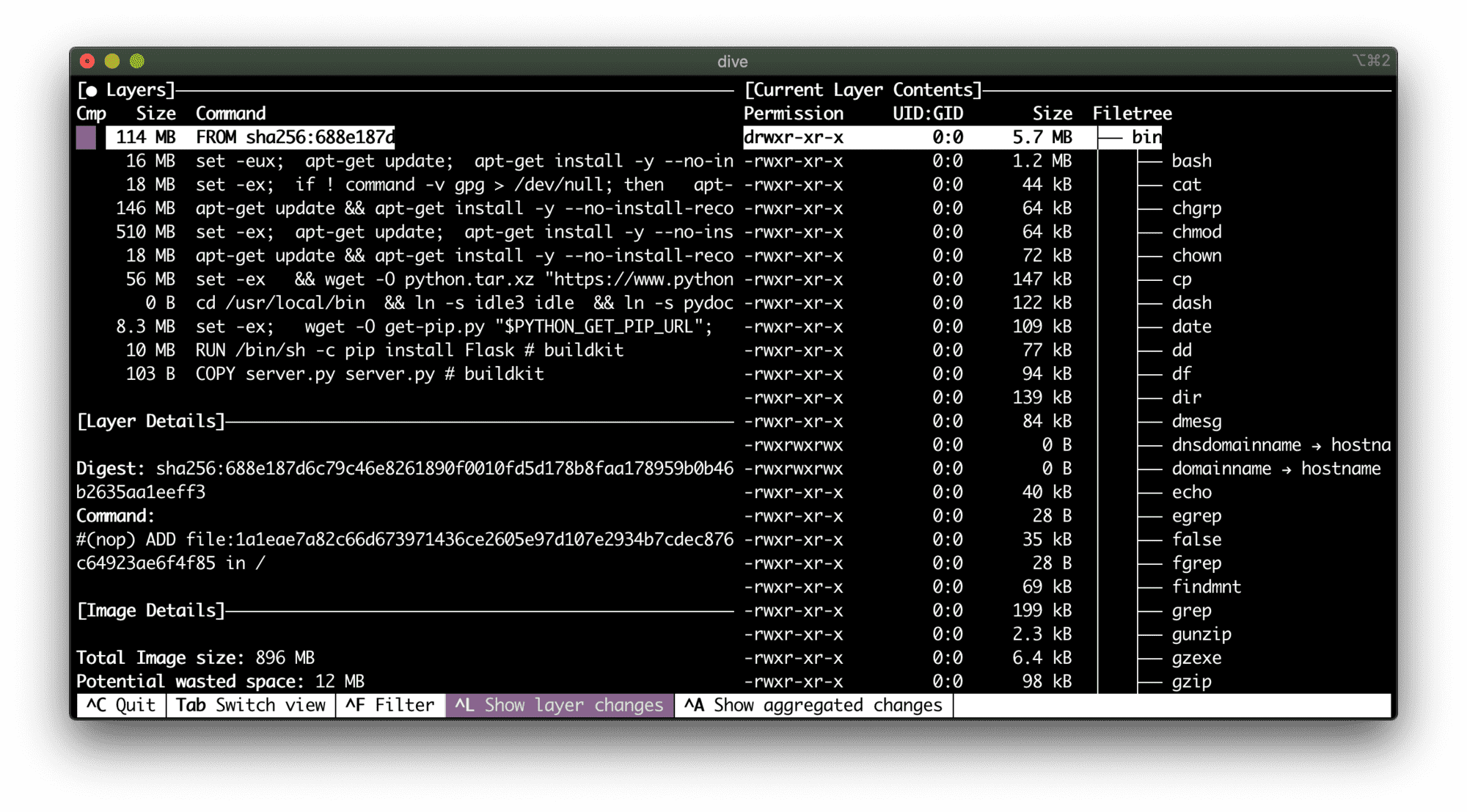
114 MB of potential security flaws.
To be honest, it was mind-blowing! I knew that the thicker our containers are, the higher the potential attack surface. But anyway, I didn't expect such a big scale.
Ok, let's try to slim down the image...
FROM python:3.9-slim

RUN pip install Flask

COPY server.py server.py

ENV FLASK_APP=server.py
ENV FLASK_RUN_PORT=5000
ENV FLASK_RUN_HOST=0.0.0.0

EXPOSE 5000

CMD ["flask", "run"]
Scanning the python:3.9-slim-based image gave me much better results:
Package manager:   deb
Project name:      docker-image|python-flask-slim
Docker image:      python-flask-slim
Platform:          linux/amd64

Tested 94 dependencies for known vulnerabilities, found 69 vulnerabilities.
69 vulnerabilities were found in total: among them, 14 were high severity and 8 medium severity.
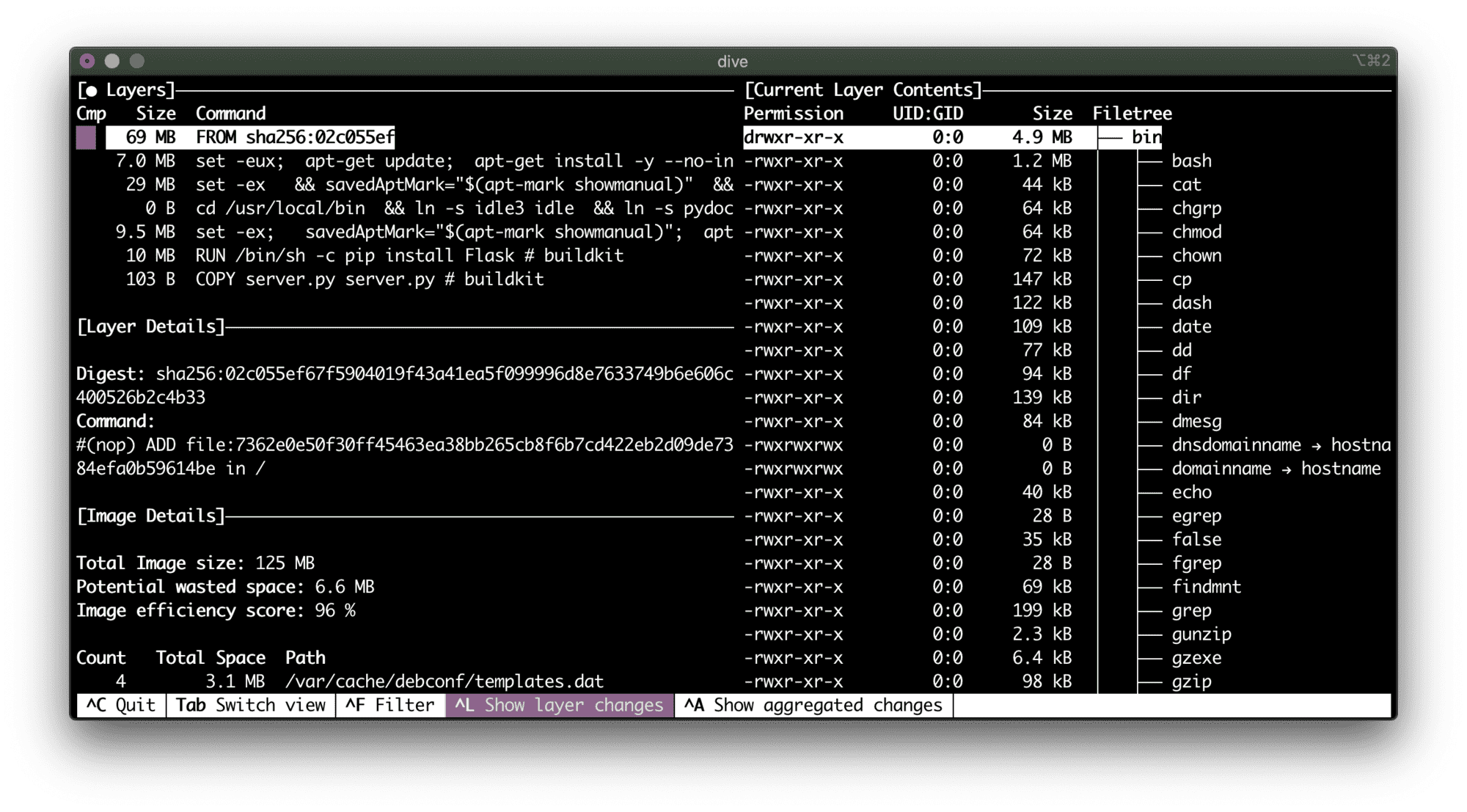
A vulnerability per megabyte of the base image...
Can we do better? Let's try python:3.9-alpine:
FROM python:3.9-alpine

RUN pip install Flask

COPY server.py server.py

ENV FLASK_APP=server.py
ENV FLASK_RUN_PORT=5000
ENV FLASK_RUN_HOST=0.0.0.0

EXPOSE 5000

CMD ["flask", "run"]
Finally! 0 known vulnerabilities!
Package manager:   apk
Project name:      docker-image|python-flask-alpine
Docker image:      python-flask-alpine
Platform:          linux/amd64

✓ Tested 37 dependencies for known issues, no vulnerable paths found.
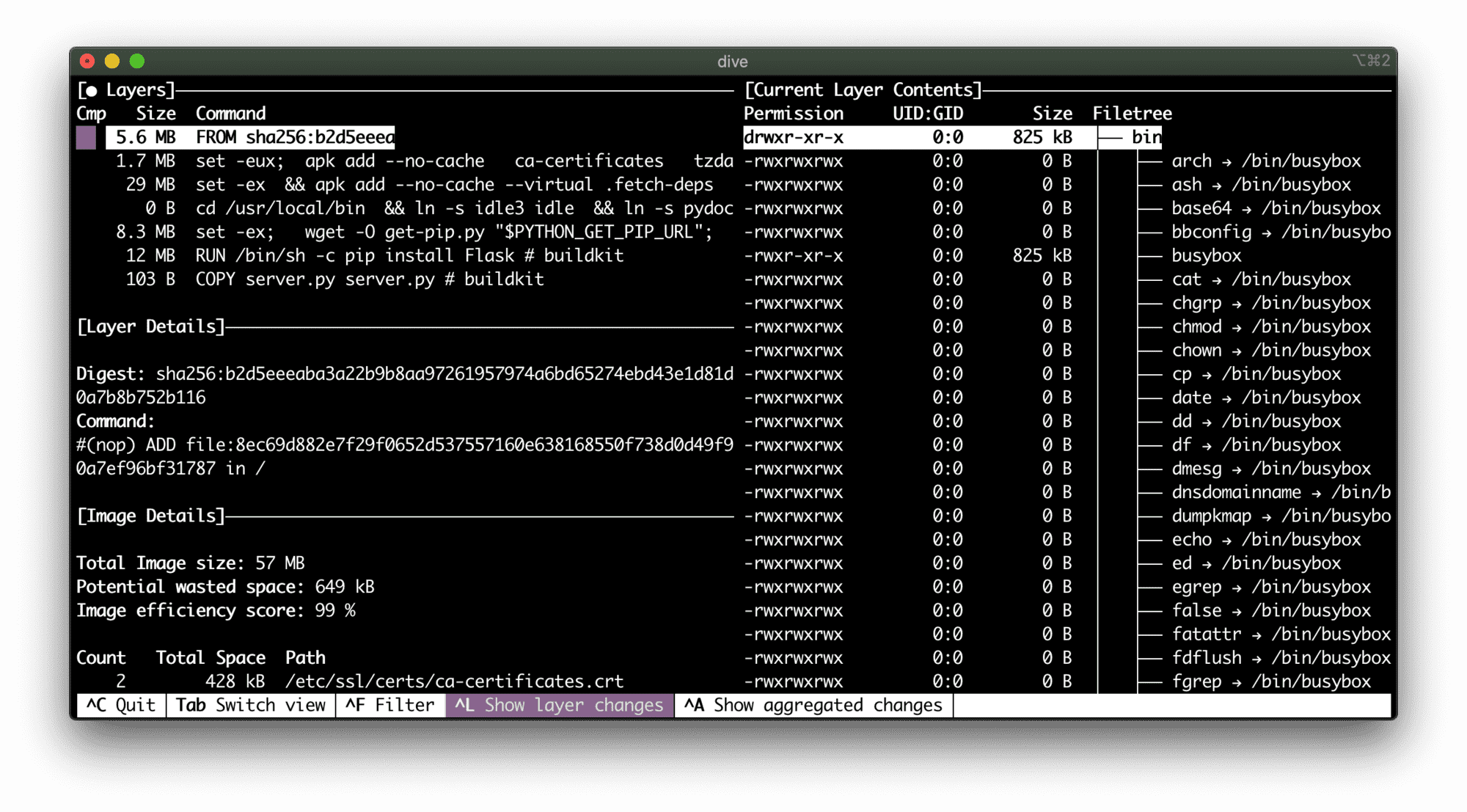
5.6 MB - Alpine rocks!
Another potential solution for the problem of bloated containers that looks promising is so-called "distroless" Docker images by Google. The project description states it's "Language focused docker images, minus the operating system". Although it'd be hard to achieve in the case of Python since its standard library relies on some higher-level OS capabilities.
It took me a while to come up with the working distroless Python image. Most of the examples out there show how to use some trivial scripts. However, installing Flask (or any other dependencies) turned out to be much tricker than I expected. Python distroless containers require multi-stage building process because the gcr.io/distroless/python3 image has neither pip nor even easy_install. At first, I was trying to utilize a virtual environment in the build image, then copy it to the runtime image, and hack the PATH variable. But it didn't work out well, because the base distroless image makes some opinionated choices on the filesystem layout:
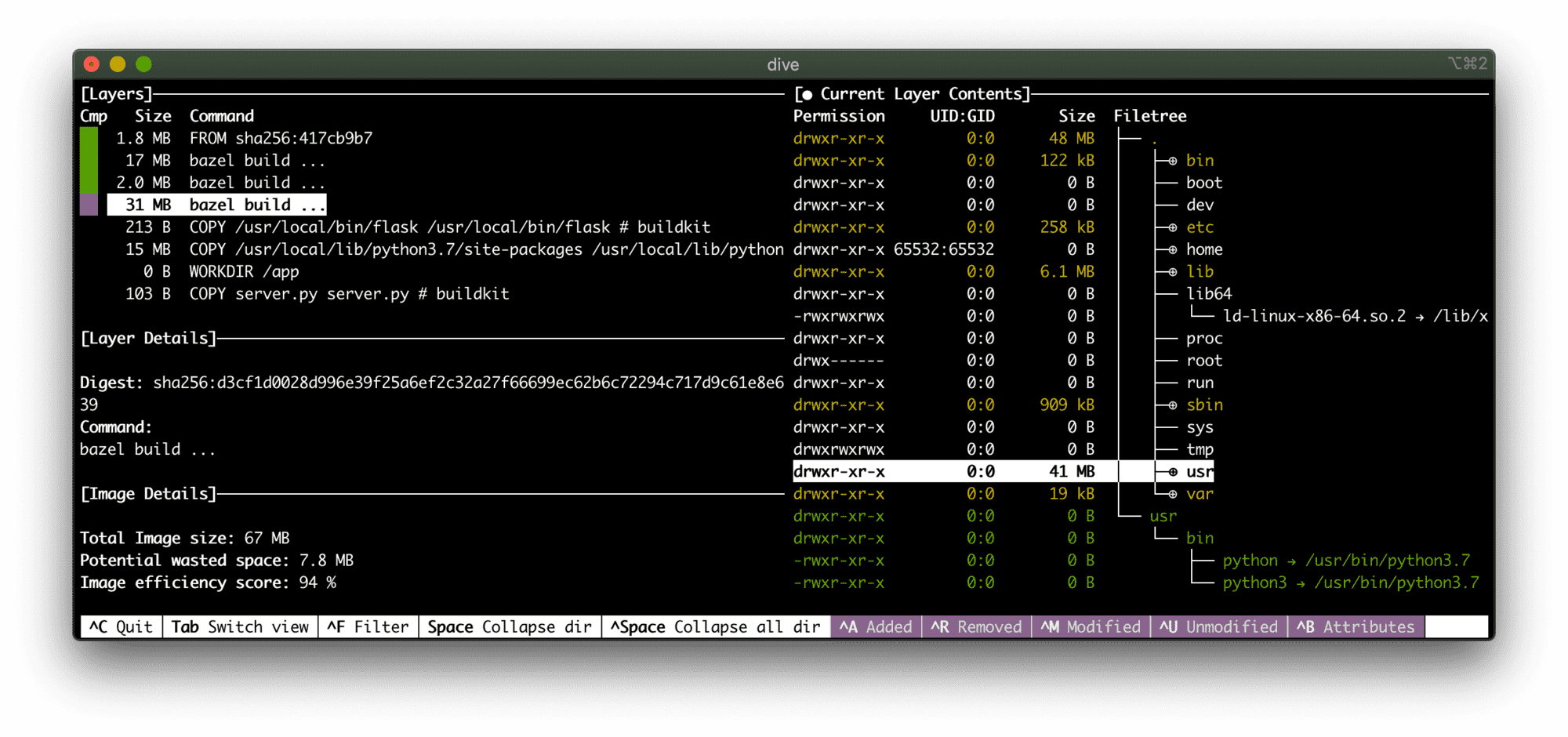
Expectedly, a Linux distr is still there, but it's thinner than even debian-slim
So, I ended up with the following Dockerfile allowing me to install Flask in a distroless Python image:
# Build image
FROM python:3.7-slim AS build-env

RUN python -m pip install Flask

# Runtime image
FROM gcr.io/distroless/python3

COPY --from=build-env /usr/local/bin/flask /usr/local/bin/flask
COPY --from=build-env /usr/local/lib/python3.7/site-packages /usr/local/lib/python3.7/site-packages

WORKDIR /app

COPY server.py server.py

# Important line!
ENV PYTHONPATH=/usr/local/lib/python3.7/site-packages

ENV FLASK_APP=server.py
ENV FLASK_RUN_PORT=5000
ENV FLASK_RUN_HOST=0.0.0.0

EXPOSE 5000

CMD ["/usr/local/bin/flask", "run"]
Scanning it with docker scan gave me the following:
Package manager:   deb
Project name:      docker-image|python-flask-distroless
Docker image:      python-flask-distroless
Platform:          linux/amd64

Tested 25 dependencies for known vulnerabilities, found 37 vulnerabilities.
So, it's just 37 vulnerabilities: 6 with high severity and 8 with medium. Sounds like a 90% reduction comparing to the original python:3.9 image! And it's even fewer vulnerabilities than in the python:3.9-slim.
Thus, our Alpine-based Python image is a winner!
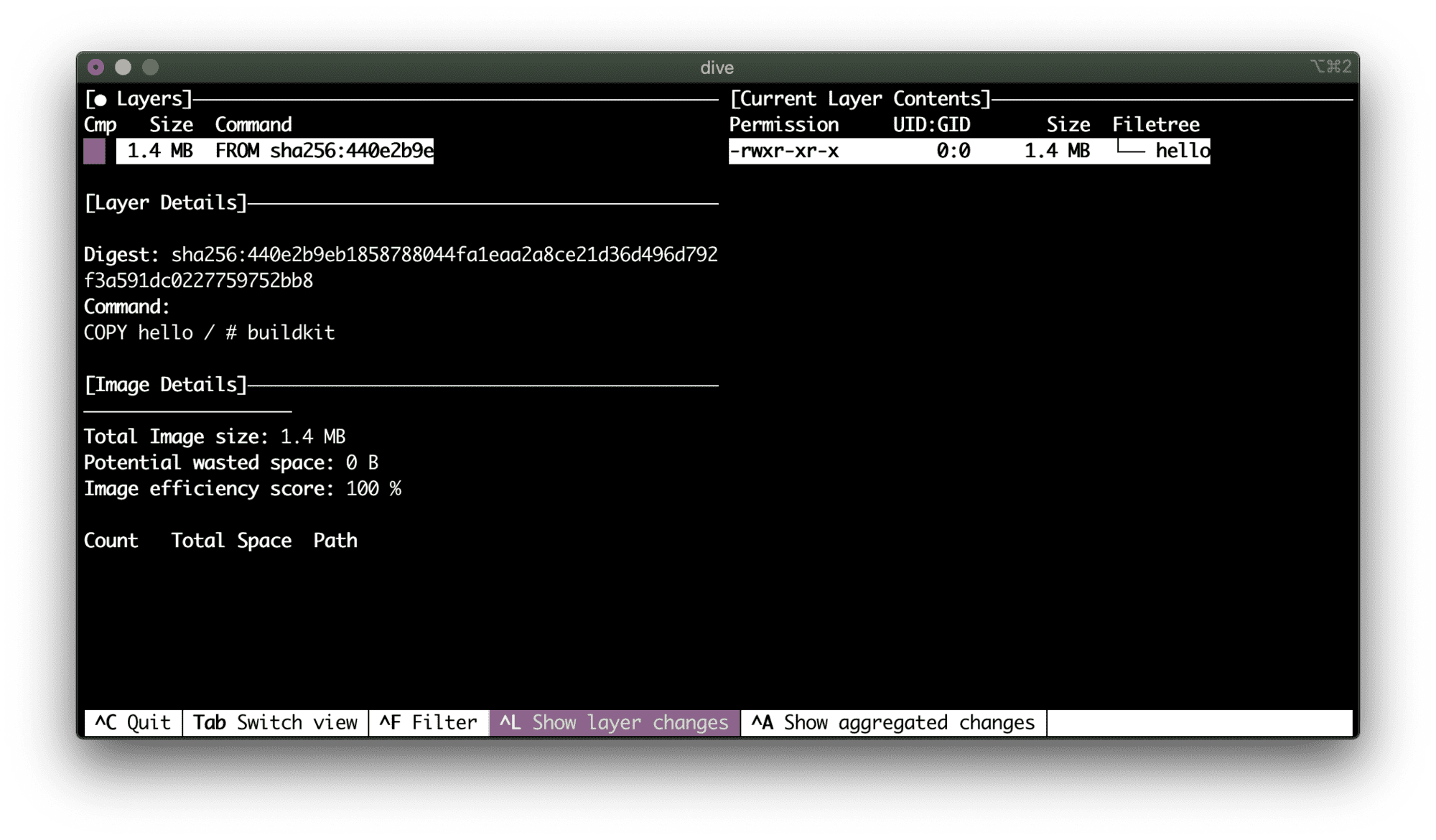
I love the idea of building container images completely from scratch, avoiding putting any distr stuff inside. But for that, you'd need a language with profound support of static builds, such as Go ❤️
FROM scratch

COPY hello /
CMD ["/hello"]
I got three looks lines... AND THAT’S IT!
Testing go-scratch...

Package manager:   linux
Project name:      docker-image|go-scratch
Docker image:      go-scratch
Platform:          linux/amd64

✓ Tested go-scratch for known vulnerabilities, no vulnerable paths found.
Well, no distr doesn't necessarily mean no vulnerabilities. But it does reduce the probability of having one.
From my experience bloated images are usually the result of either using a default FROM <fat-base> or because people intentionally put extra tools to an image for the sake of future debugging or troubleshooting.
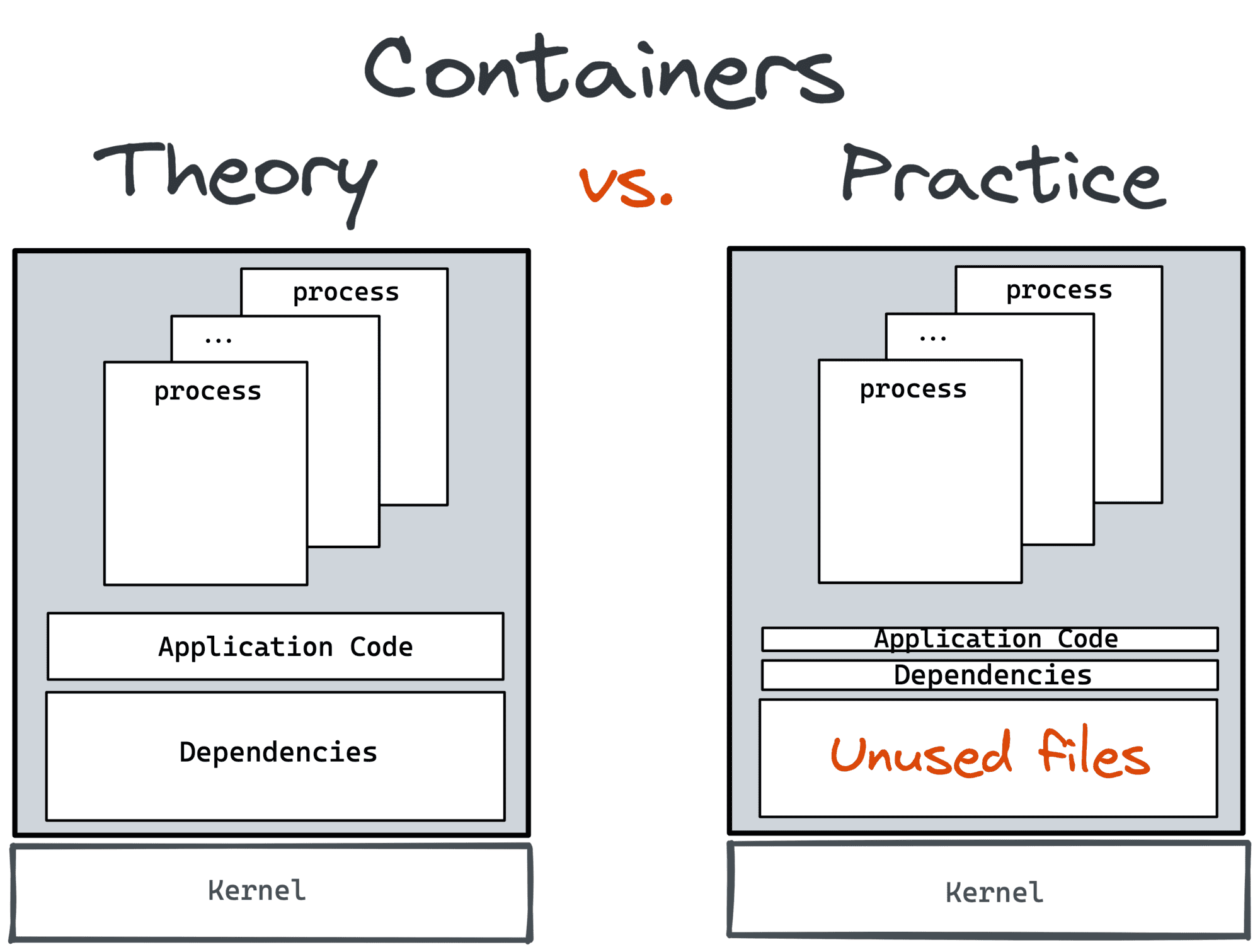
The first is probably a result of a vast marketing campaign done by Docker back in the day. To popularize containers, you'd need to give people something looking cool and handy. And being able to launch a full-fledged Linux distr (kind of) from your dev machine in under a second indeed looks very cool even today. Some local tinkering and/or experimentation benefit a lot from docker run -it ubuntu. However, I hope it was never meant for production use. But there are simply too many examples of Dockerfiles around starting FROM a full-fledged Debian, CentOS, or Ubuntu to avoid penetrating at least some of them to our production environments.
The second reason looks more legit. But I have a feeling that it's only at the first glance. Ideally, there should be another way to debug your containerized service. The way, that doesn't involve packing all the potentially needed tools into a container. Recent kubectl debug addition is good proof of that hypothesis. It allows one to inject an ephemeral container into a running pod and such a container can have all the stuff needed for debugging.
Smaller containers don't just mean faster builds and smaller disk and networking utilization, they mean safer life.
Level up your server-side game — join 20,000 engineers getting insightful learning materials straight to their inbox:
此内容由惯性聚合(RSS阅读器)自动聚合整理,仅供阅读参考。 原文来自 — 版权归原作者所有。