







嘉立创双十一金豆活动秒杀脚本
async function performFetches(requestCount, categoryAccessId, goodsDetailAccessId) {
  const url = "https://www.jlc.com/api/integral/seckill/exchangeSeckillGoods";
  const options = {
    "headers": {
      "accept": "application/json, text/plain, */*",
      "accept-language": "zh-CN,zh;q=0.9,en;q=0.8,en-GB;q=0.7,en-US;q=0.6",
      "cache-control": "no-cache",
      "content-type": "application/json",
      "pragma": "no-cache",
      "priority": "u=1, i",
      "sec-ch-ua": "\"Microsoft Edge\";v=\"137\", \"Chromium\";v=\"137\", \"Not/A)Brand\";v=\"24\"",
      "sec-ch-ua-mobile": "?0",
      "sec-ch-ua-platform": "\"Windows\"",
      "sec-fetch-dest": "empty",
      "sec-fetch-mode": "cors",
      "sec-fetch-site": "same-origin"
    },
    "referrerPolicy": "strict-origin-when-cross-origin",
    "body": JSON.stringify({ "goodsDetailAccessId": goodsDetailAccessId, "categoryAccessId": categoryAccessId, "source": 4 }),
    "method": "POST",
    "mode": "cors",
    "credentials": "include"
  };

  for (let i = 0; i < requestCount; i++) {
    console.log(`--- Performing fetch request ${i + 1}/${requestCount} for ID: ${goodsDetailAccessId} ---`);
    try {
      const response = await fetch(url, options);
      const data = await response.json();
      console.log(`Request ${i + 1} successful:`, data);
    } catch (error) {
      console.error(`Request ${i + 1} failed:`, error);
    }
  }
}

// 第1个参数是请求连续次数,第2个参数是 categoryAccessId,第3个参数是 voucherSeckillActivityDetailAccessId
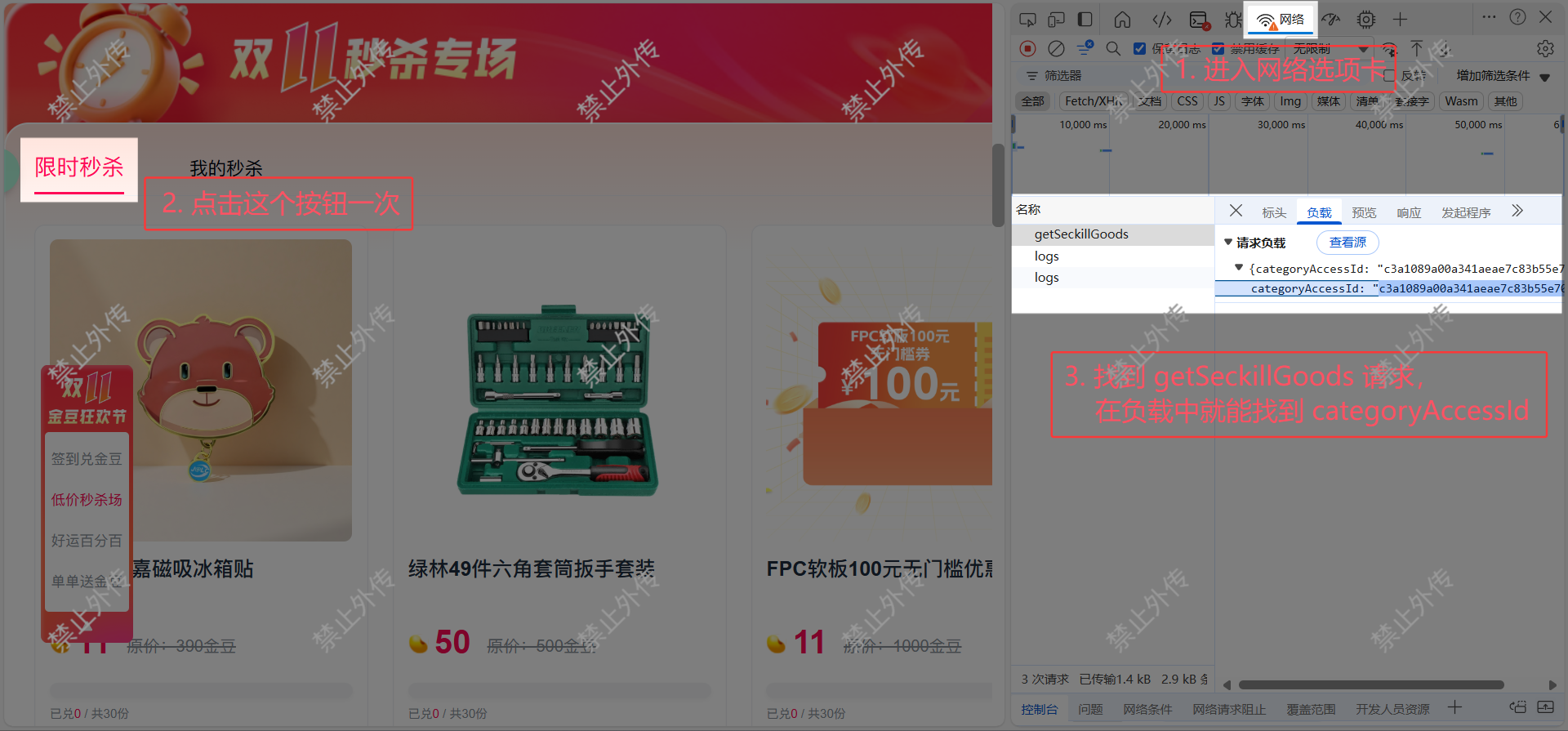
performFetches(1, "c3a1089a00a341aeae7c83b55e70523f", "db25dc2516f54e698a6bd782399d9079");按 F12 打开 DevTools 后进入“网络(Network)”选项卡,点击“限时秒杀”按钮一次
找到 getSeckillGoods 请求,在负载中就能看到 categoryAccessId
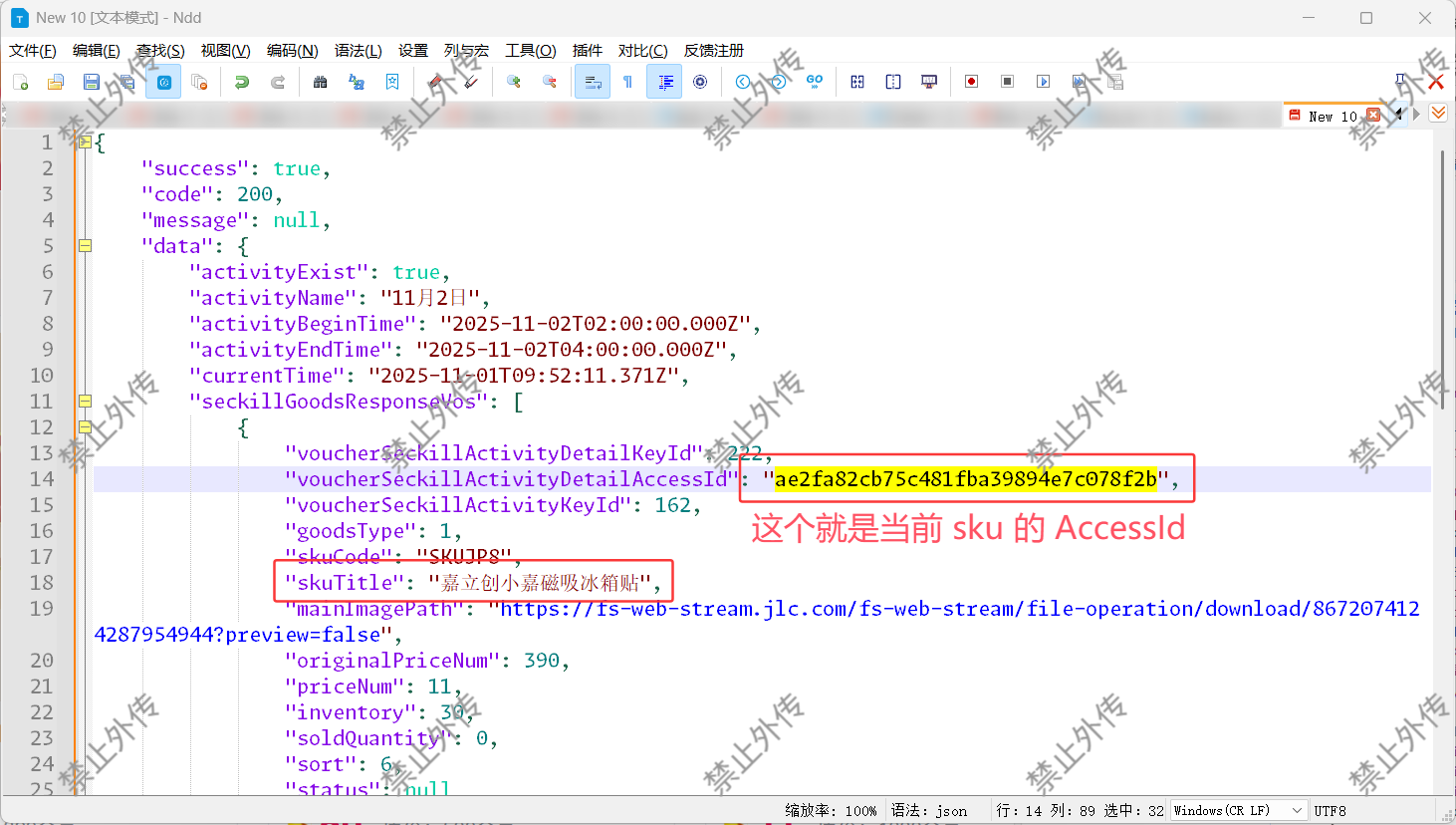
同样在这个 getSeckillGoods 请求中,在预览中可以看到当前所有 sku,展开即可看到 voucherSeckillActivityDetailAccessId
电脑端打开:https://www.jlc.com/portal/anniversary-doubleActivity
将脚本粘贴到 DevTools 的“控制台(Console)”按回车即可使用
提前填好参数,在开始秒杀前几秒运行脚本,注意设置合理的请求次数(过于频繁可能被封禁)
此内容由惯性聚合(RSS阅读器)自动聚合整理,仅供阅读参考。 原文来自 — 版权归原作者所有。