惯性聚合 高效追踪和阅读你感兴趣的博客、新闻、科技资讯
阅读原文 在惯性聚合中打开

推荐订阅源

N
News | PayPal Newsroom
U
Unit 42
MongoDB | Blog
MongoDB | Blog
IT之家
IT之家
A
About on SuperTechFans
Blog — PlanetScale
Blog — PlanetScale
P
Privacy & Cybersecurity Law Blog
V
V2EX
Threat Intelligence Blog | Flashpoint
Know Your Adversary
Know Your Adversary
L
LINUX DO - 热门话题
GbyAI
GbyAI
T
Threat Research - Cisco Blogs
cs.CL updates on arXiv.org
P
Palo Alto Networks Blog
Recent Commits to openclaw:main
腾讯CDC
WordPress大学
WordPress大学
K
Kaspersky official blog
The GitHub Blog
The GitHub Blog
Spread Privacy
Spread Privacy
Simon Willison's Weblog
D
DataBreaches.Net
cs.CV updates on arXiv.org
M
MIT News - Artificial intelligence
Exploit-DB.com RSS Feed
C
Check Point Blog
阮一峰的网络日志
阮一峰的网络日志
TaoSecurity Blog
TaoSecurity Blog
Latest news
Latest news
freeCodeCamp Programming Tutorials: Python, JavaScript, Git & More
N
News and Events Feed by Topic
NISL@THU
NISL@THU
博客园 - 【当耐特】
Microsoft Azure Blog
PCI Perspectives
PCI Perspectives
T
Threatpost
C
CXSECURITY Database RSS Feed - CXSecurity.com
Scott Helme
Scott Helme
P
Proofpoint News Feed
C
CERT Recently Published Vulnerability Notes
大猫的无限游戏
大猫的无限游戏
Help Net Security
Help Net Security
C
Cybersecurity and Infrastructure Security Agency CISA
H
Hackread – Cybersecurity News, Data Breaches, AI and More
W
WeLiveSecurity
小众软件
小众软件
S
Secure Thoughts
T
The Exploit Database - CXSecurity.com
F
Full Disclosure

Mux Blog - Video technology and more

How Disciple lowered its video costs with Mux | Mux New Mux Robots workflows: Better captions, dubbed audio, and deeper insights | Mux How Cutsio is making massive video libraries searchable | Mux Making it easier for agents to understand video: Introducing Find Scenes and Shots | Mux React Native needs a new video player | Mux Protect your prod environment: New rate limit controls | Mux Mux Robots Directives: less plumbing, more automation | Mux Fine-tuning a multimodal model for video intelligence | Mux How Mux helped Fuertafit make smarter product decisions | Mux Using Mux Robots to organize my archive of 90s-era VHS home videos | Mux The death of the to-do app | Mux One click content moderation dashboard with Mux Robots | Mux Introducing Mux Robots: Hosted AI workflows for Mux Video | Mux How Wellfound built AI video interviews in a weekend | Mux Simple pricing doesn't work for infrastructure | Mux Ship your next Mux integration from the terminal | Mux Your video is more valuable on Mux | Mux How HubSpot scaled video infrastructure — and built AI tools on top | Mux The new Mux Convex component | Mux That's no video — it's an array | Mux ‘It's so much better’: Why Punchpass switched from Vimeo to Mux | Mux Video.js v10 Beta: Hello, World (again) | Mux
How Mux detects shot boundaries | Mux
https://www.mux.com/team/grzegorz-gronkowski · 2026-06-26 · via Mux Blog - Video technology and more

Shots is a new Mux Video primitive that generates a manifest of shot boundaries and representative shot images for any assets. It's the foundation for a brand new Mux Robots workflow, Find Scenes. Read Victor's post about how the Mux Robots team used Shots to detect scenes.

In this post, we'll go into more detail on the algorithm behind Shots.

LinkThe goal

The algorithm must detect the boundaries of each shot. It should be a simple, one-pass algorithm that uses a limited amount of resources. We can’t always avoid invalid results, but we tolerate false positives more than false negatives.

LinkBasic metrics

In order to detect shots within a video, we need to analyze pixel changes between each frame. FFmpeg exposes three basic metrics to help us calculate the differences between them. Let’s start with the definitions of basic metrics that FFmpeg exposes natively:

LinkSum of absolute differences

High difference in luminance means there was a visible change in two consecutive frames. That is a good indicator for possible shot change.

LinkMean Average Frame Difference:

LinkShot change score (MAFD with values normalized to 0-100):

LinkFirst approach: Set a threshold for score

Setting a threshold for score is the most straightforward approach and actually the one that FFmpeg uses. The problems begin once we try to find the threshold value. There is no value that would work for every case. It should be higher for dynamic shots without cuts. On the other hand we need a lower value when a new shot starts, but it is quite similar to the previous one.

Choosing different thresholds for different videos would require much more complex analysis, so that is not an option for a single-pass algorithm.

Assuming we prefer false positives, the threshold would be low. Low threshold means more frames flagged as shot changes. The result is almost no false negatives, but there are way too many false positives.

LinkSecond approach: Search for peaks

Another approach would be to search for short peaks in shot change score. We set a threshold for a ratio of current score to moving average for three previous frames. This eliminated the threshold sensitivity problem from the first approach. Still, there was one problematic case. When a scene is static for an extended period, the moving average of scores approaches zero. Any subsequent small change produces a disproportionately large ratio, causing false positives.

LinkSolution

Both previous approaches created way too many false positives, but those false positives were not overlapping. Each algorithm detected them in different places.

The best solution was to combine both approaches. The final algorithm assumes that shot change happens when BOTH algorithms detect a shot change. The precise definition of shot change is:

This approach gives very good results and is resource-efficient. It works in one pass, using only the last three values.

LinkExample

Red wine being poured into a wine glass in slow motion, with visible bubbles and foam forming at the surface. A second empty wine glass is partially visible in the background. The scene is shot on a dark, moody background with warm, dramatic lighting.

There are three shots in this video. That means exactly two shot changes should be detected.

First approach gives one more false positive in the middle.
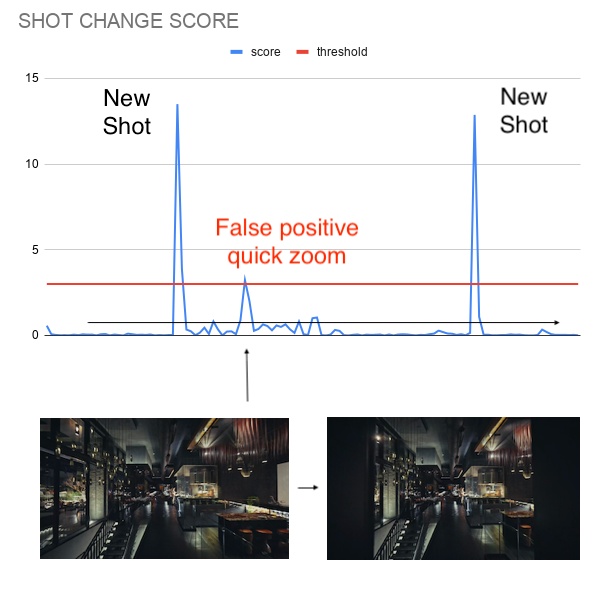
A shot change score graph showing a blue score line and a red threshold line. Two spikes in the blue line cross the threshold and are labeled "New Shot" on the left and right. A smaller spike in the middle is labeled "False positive quick zoom" in red, indicating a spike that crossed the threshold due to a quick zoom rather than an actual shot change. Below the graph, two video frames of a dimly lit bar or restaurant interior are shown side by side with an arrow between them, illustrating the subtle camera movement that triggered the false positive.

Second approach gives two false positives, but in different places
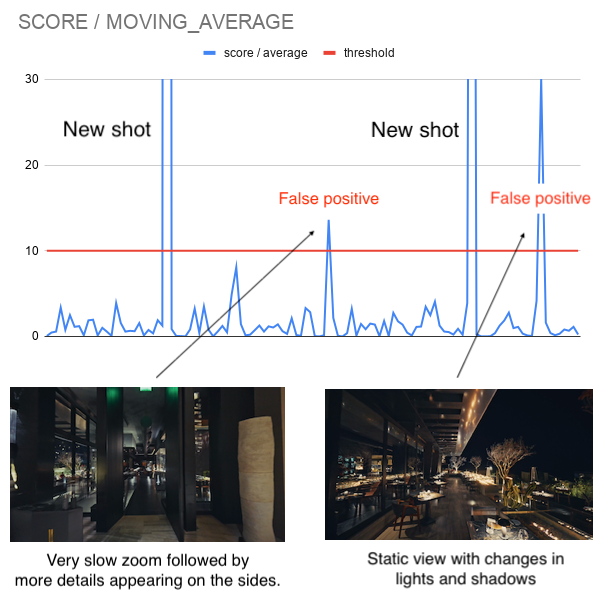
A line chart titled "Score / Moving Average" with a blue score/average line and a red threshold line at 10. Two tall spikes are labeled "New shot" and two smaller threshold-crossing spikes are labeled "False positive" in red with arrows. Below the chart, two video stills are shown: a dark restaurant interior captioned "Very slow zoom followed by more details appearing on the sides," and a dimly lit dining space captioned "Static view with changes in lights and shadows."

After combining both approaches we get exactly two shot boundaries.
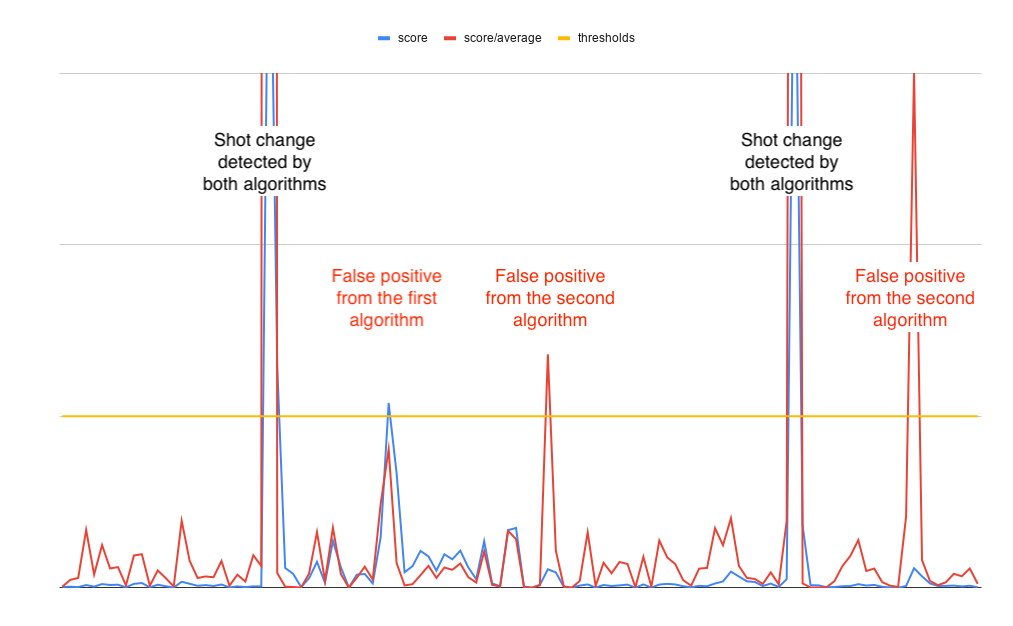
A combined line chart showing three series: blue (score), red (score/average), and yellow (threshold). Two tall spikes are labeled "Shot change detected by both algorithms." Three smaller spikes that cross the threshold are labeled in red as false positives — one from the first algorithm and two from the second algorithm.

LinkKnown failure cases

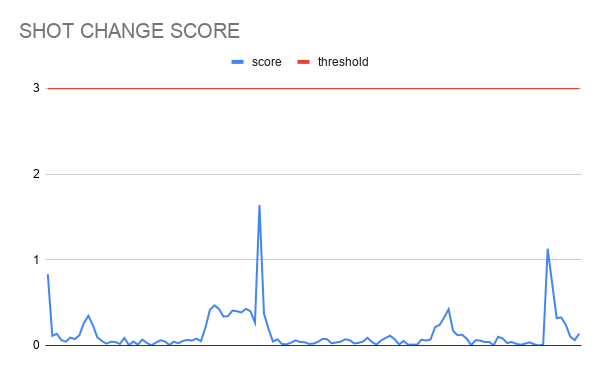
This algorithm works well. Still, there are some videos where it fails. There is one known case that creates false negatives - smooth transitions.

A GIF of a peaceful, sunlit animated scene featuring a mossy hill with a small cave entrance, surrounded by trees with dappled light filtering through the leaves.

A line chart titled "Shot Change Score" with a blue score line and a red threshold line at 3. The blue line remains well below the threshold throughout, with the highest spike barely reaching 1.6, indicating no shot changes detected.

A line chart titled "Score / Moving Average" with a blue score/average line and a red threshold line at 10. All blue line activity stays well below the threshold, with the highest spike reaching around 7, indicating no shot changes were detected.

The score changes are gradual and never spike above threshold. There is no simple algorithmic solution for this case. It would require at least a basic understanding of the content of each shot to distinguish a smooth transition from a true shot change.

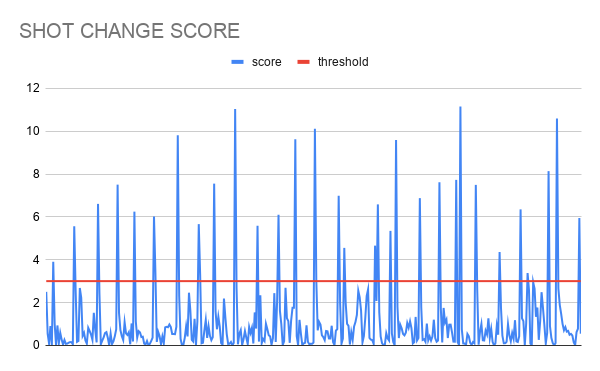
The most problematic case with the algorithm returning a false positive is a video with flashing lights. The best example may be a video made with a phone camera at a concert. There is one long shot, but this algorithm will detect a shot change during each flash.

A slow-motion GIF of a crowd at a concert or club event, shot from behind. Hands are raised against a backdrop of dramatic blue stage lighting with light beams cutting through haze above the crowd.

A line chart titled "Shot Change Score" with a blue score line and a red threshold line at approximately 3. The blue line is highly active throughout, with numerous spikes frequently crossing the threshold, making it difficult to distinguish true shot changes from noise.

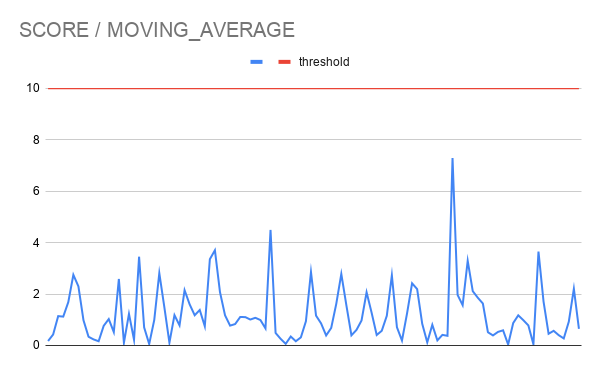
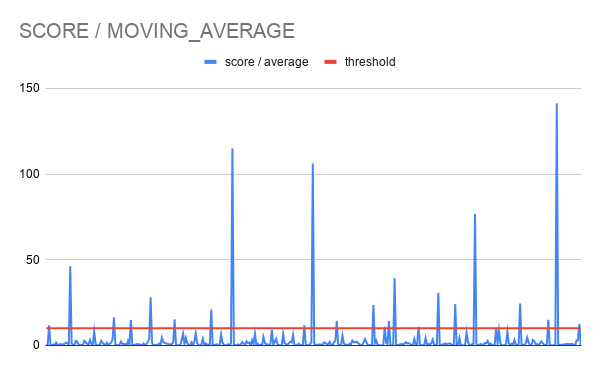
A line chart titled "Score / Moving Average" showing a blue score/average line and a red threshold line near zero. Multiple spikes of varying heights rise above the baseline, with the tallest reaching around 115 and 145. Most spikes cross well above the threshold.

There are some more interesting cases like a slideshow covering only part of the screen or a sharp change in zoom. These are edge cases that fall outside the algorithm's scope by design.

Learn more about how to use Shots in our guide.

Leave your wallet
where it is

No credit card required to get started.