




惯性聚合 高效追踪和阅读你感兴趣的博客、新闻、科技资讯
阅读原文 在惯性聚合中打开

推荐订阅源

L
LangChain Blog
V
V2EX
爱范儿
爱范儿
freeCodeCamp Programming Tutorials: Python, JavaScript, Git & More
Martin Fowler
Martin Fowler
OSCHINA 社区最新新闻
OSCHINA 社区最新新闻
Apple Machine Learning Research
WordPress大学
WordPress大学
有赞技术团队
有赞技术团队
宝玉的分享
宝玉的分享
Last Week in AI
Last Week in AI
让小产品的独立变现更简单 - ezindie.com
罗磊的独立博客
小众软件
小众软件
Vercel News
Vercel News
博客园 - 司徒正美
阮一峰的网络日志
阮一峰的网络日志
V
Visual Studio Blog
J
Java Code Geeks
P
Proofpoint News Feed
MongoDB | Blog
MongoDB | Blog
B
Blog
美团技术团队
量子位

Last Blog

CMU 15-213 Attack Lab GAMES101 [1] Affine Transformation & Projection CMU 15-213 Bomblab CMU 15-213 [1] Scribe.cx 2 - 对话与持久化存储 关于 X11 与 Wayland 的剪贴板同步问题 关于 X11 与 Wayland 的剪贴板同步问题 Scribe.cx 1 - 跨浏览器的插件侧板控制 Page Assist 2025 年终总结 2025 年终总结 Linuxqq 粘贴板同步问题 关于所谓“配置工程师” 记一次小端序内存的实际体现 CS110L L3 - Memory Safety in Rust CS110L L2 - Program Analysis CS110L L1 - Safety in System Programming 在 Neovim(v0.10+) 上使用 arduino-language-server PA3 - Batch Processing System 2024 年终总结 Arcaea 曲名匹配器 PA W9 - Linking & Loading Hyprland 二周目 Hyprland 二周目 PA2 Part 2 - Emulated Hardware Device PA W8 - IO Devices Learn C the Hard Way PA2 Part 1 - Instruction Set Implementation & KLIB Learning Makefile with PA 阅读 MQTTX 项目:Protobuf Test Case
Arcaea 曲名匹配器
Last · 2024-12-21 · via Last Blog

前言

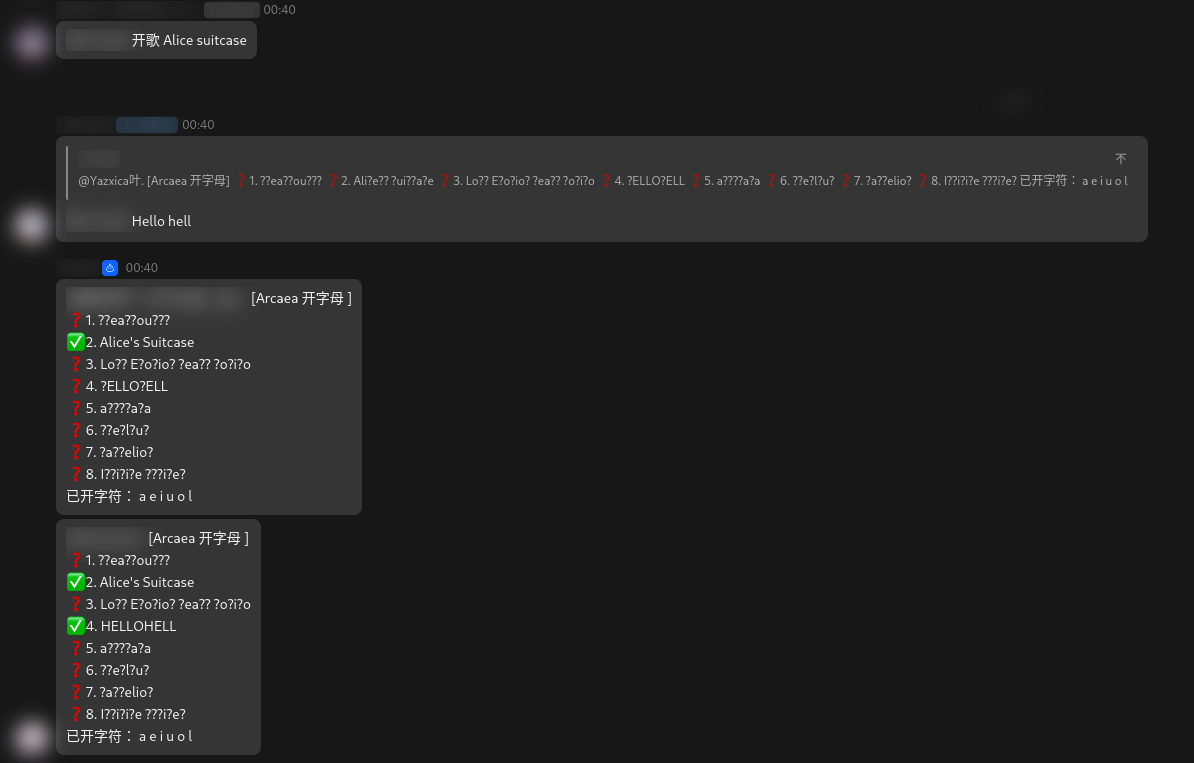
  • 今日突然在一个 A 科群里发现群友正在用一个机器人玩猜歌名的游戏(Arcaea 开字母),如下图:
    screenshot_21122024_030422.jpg

  • 本古董 A 科玩家已经退坑了四年,最近回坑看着这多出来的几百首新曲实在是无能为力(南村群童欺我老无力),于是想着能不能写一个 Python 程序帮助我匹配。(绝不是想要作弊

正文

爬虫

  • 想要做到匹配曲名,首先当然是需要有一个完整的曲名库作为数据源。我首先想到的方法是爬取 Arcaea Fandom - Songs by Date 页面中的曲名。尝试后发现,该页面的 HTML 组织稍有混乱,难以匹配所有的曲目。

  • 具体来说,该页面中包含了曲目名称的 HTML 元素是这样的:

    1
    <a href="/wiki/Memory_Forest" title="Memory Forest">Memory Forest</a>
    • 于是我尝试用以下代码来匹配它:

      1
      2
      3
      4
      5
      6
      7
      8
      9
      10
      a_tags = soup.find_all("a", href=re.compile(r"^/wiki/"), title=True)
      for a_tag in a_tags:
      title_value = a_tag["title"]
      song_title = a_tag.text.strip()
      if (
      song_title.lower() == title_value.lower()
      and song_title not in false_titles
      and song_title not in songs
      ):
      songs.append(a_tag.text)
    • 很快我就发现,有些曲目的 HTML 源码并不能被匹配到,例如:

      1
      2
      3
      <a href="/wiki/%CE%9C" title="Μ">µ</a>
      ...
      <a href="/wiki/Genesis_(Iris)" title="Genesis (Iris)">Genesis</a>
    • 实际爬取到的曲目数量仅有 424 首,与实际的 465 首相差甚远。

climb_fandom
1
2
3
4
5
6
7
8
9
10
11
12
13
14
15
16
17
18
19
20
21
22
23
24
25
26
27
28
29
30
31
32
33
34
35
36
37
38
39
40
41
42
43
44
45
46
47
48
49
50
51
52
53
54
55
56
57
58
59
import re

import requests
from bs4 import BeautifulSoup

url = "https://arcaea.fandom.com/wiki/Songs_by_Date#List_of_songs"


headers = {
"User-Agent": (
"Mozilla/5.0 (Windows NT 10.0; Win64; x64) "
"AppleWebKit/537.36 (KHTML, like Gecko) "
"Chrome/114.0.0.0 Safari/537.36"
),
"Accept-Language": "en-US,en;q=0.9",
"Referer": "https://www.google.com",
}
false_titles = ["Songs by Pack", "Songs by Level"]
missing_titles = ["Genesis", "μ"]


def main() -> None:
songs = []

try:

response = requests.get(url, headers=headers)
response.raise_for_status()


soup = BeautifulSoup(response.text, "html.parser")


a_tags = soup.find_all("a", href=re.compile(r"^/wiki/"), title=True)
for a_tag in a_tags:
title_value = a_tag["title"]
song_title = a_tag.text.strip()
if (
song_title.lower() == title_value.lower()
and song_title not in false_titles
and song_title not in songs
):
songs.append(a_tag.text)

for t in missing_titles:
songs.append(t)

print(
f"Climb complete. Grabbed {len(songs)} songs. This may include false title."
)
with open("songs.txt", "w") as file:
file.write("\n".join(songs))

except requests.exceptions.RequestException as e:
print("An error occurred while requesting the URL:", e)


if __name__ == "__main__":
main()

可以看到,其中定义了列表 false_titlesmissing_titles 来手动剔除错误的匹配结果以及添加缺少的结果。


  • 然后我突然想起来,网易云上有个 Arcaea 电台

  • 不同于一般网站,网易云不知用什么方法使得其音乐列表无法被 requests 库获取,无法使用一般的 bs4 & requests 经典组合爬取。猜测是使用了网页脚本刷新内容。

  • 本人倒是在很久以前写过的一个网易云爬虫,使用的是 cloudmusic 库。该库已经很久没人维护和使用了,而且似乎也不支持电台查询。

  • 于是我便谷歌了一下网易云的爬虫方案,找到了一个使用 selenium 自动化测试框架模拟浏览器的方法:

    1
    2
    3
    4
    5
    6
    7
    8
    9
    10
    11
    12
    13
    14
    15
    16
    17
    18
    19
    20
    21
    22
    23
    24
    25
    26
    27
    28
    29
    30
    31
    32
    33
    34
    35
    36
    37
    38
    39
    40
    41
    42
    43
    44
    45
    46
    47
    48
    49
    from random import randint

    from selenium import webdriver
    from selenium.webdriver.chrome.options import Options
    from selenium.webdriver.common.by import By

    base_url = "https://music.163.com/#/djradio?id=350746079&order=1&_hash=programlist&limit=100&offset="
    output_file = "./songs.txt"


    def main():
    songs = []

    chrome_options = Options()


    chrome_options.add_argument("--headless")
    browser = webdriver.Chrome(chrome_options)


    for page in range(5):
    print(f"Grabbing from page {page + 1}...")


    browser.get(base_url + str(page * 100))


    rand_wait = randint(3, 6)
    print(f"waiting for {rand_wait} secs...")
    browser.implicitly_wait(rand_wait)

    browser.switch_to.frame("contentFrame")

    song_list = browser.find_elements(
    By.XPATH, '//*[contains(@href, "program?id=")]'
    )

    for song in song_list:
    if song.text not in songs:
    songs.append(song.text)

    print(f"Writing to file: {output_file}...")
    with open(output_file, "w") as file:
    file.write("\n".join(songs))
    print("Done.")


    if __name__ == "__main__":
    main()
  • 其中,电台内每个曲目的 HTML 源码如下所示:

    1
    <a href="/program?id=1368523734" title="Memory Forest">Memory Forest</a>
  • 此处可采用如下方式进行匹配:

    1
    2
    3
    song_list = browser.find_elements(
    By.XPATH, '//*[contains(@href, "program?id=")]'
    )
  • 经简单观察和测试,并未发现多余的结果。

模式匹配

  • 来自群机器人的题目形式如同 ?e?e?i?(Genesis)。

  • 在 ChatGPT 的帮助下快速的完成了如下的代码:

    1
    2
    3
    4
    5
    6
    7
    8
    9
    10
    11
    12
    13
    14
    15
    16
    17
    18
    19
    20
    21
    22
    23
    24
    25
    26
    27
    28
    29
    30
    31
    32
    33
    34
    35
    36
    37
    38
    39
    40
    41
    42
    43
    44
    45
    46
    47
    48
    49
    50
    51
    52
    53
    54
    55
    56
    57
    58
    59
    60
    61
    62
    63
    64
    65
    66
    67
    68
    69
    70
    71
    72
    73
    74
    75
    76
    77
    78
    79
    80
    81
    82
    83
    84
    85
    86
    87
    88
    89
    90
    91
    92
    93
    94
    95
    96
    97
    98
    99
    100
    101
    102
    103
    104
    105
    106
    107
    108
    import argparse
    import re

    from colorama import Fore, Style, init

    DEFAULT_FILE_PATH = "./songs.txt"
    all_songs = []


    def init_songs(file_path) -> None:
    with open(file_path, "r") as file:
    for line in file:
    all_songs.append(line.strip())


    def match_pattern(pattern: str) -> None:
    match_list = []
    try:
    regex = re.compile(pattern.replace("?", "."))
    except Exception as e:
    print(Fore.RED + "Unable to parse pattern." + Style.RESET_ALL)
    return

    for s in all_songs:
    if regex.fullmatch(s):
    match_list.append(s)

    if len(match_list) == 0:
    print(Fore.RED + "No result found." + Style.RESET_ALL)
    return

    matched_num = len(match_list)

    if matched_num >= 10:
    print(
    Fore.LIGHTYELLOW_EX
    + f"Found {matched_num}(>= 10) songs, display all? (y/N)"
    )
    choice = input()
    if choice.lower() != "y":
    print("Skipped.")
    return

    print(Fore.GREEN + f"Matched {len(match_list)} song(s):" + Style.RESET_ALL)
    for t in match_list:
    print(t)


    def main() -> None:

    init()

    parser = argparse.ArgumentParser(description="Process args.")
    parser.add_argument(
    "-f",
    "--songs-file",
    type=str,
    default=DEFAULT_FILE_PATH,
    help="File contains all songs of Arcaea",
    )
    parser.add_argument("-b", "--batch", action="store_true", help="Run in batch mode")

    args = parser.parse_args()


    print(
    Fore.LIGHTMAGENTA_EX
    + f"Using {args.songs_file} as song list."
    + Style.RESET_ALL
    )
    init_songs(args.songs_file)
    if len(all_songs) <= 400:
    print(
    Fore.RED
    + "Initialization Failed. Too few songs.(<= 400, should be around 450)"
    + Style.RESET_ALL
    )
    return

    if args.batch:

    print(Fore.RED + "Batch mode is not supported yet." + Style.RESET_ALL)
    return

    print(Fore.YELLOW + "\033[1mInput pattern to start match." + Style.RESET_ALL)
    print(Fore.LIGHTCYAN_EX + "Pattern is case sensitive." + Style.RESET_ALL)
    print(
    Fore.LIGHTCYAN_EX
    + "Pattern ends with `+` indicates an uncertain length."
    + Style.RESET_ALL
    )
    print("Type Q/q to quit.")

    while True:
    usr_input = input()
    if usr_input.lower() == "q":
    print("Goodbye.")
    break

    pattern = usr_input
    if usr_input[-1] == "+":
    pattern = pattern[:-1] + ".*"

    match_pattern(pattern)


    if __name__ == "__main__":
    main()
  • 程序启动后进入一个循环中,持续接受用户输入并与文件中的曲名作匹配。

  • 如果用户输入的模式串以 + 结束,则在模式串最后添加一个 .* 来匹配不定长度的曲名。

Batch_Mode

可以看到,代码中存在一个未完成的 batch mode
我本来是打算将他用于批量匹配曲名的,但是刚开始实现不久我就发现,在 Hyprland 环境下我的 linuxqq-nt-bwrap 无法将其中的内容复制到系统的粘贴板上。但是我却能够将系统粘贴板中的东西粘贴到 qq 里,颇为神奇。。

结束

  • 写的很爽,但是为此熬夜这么晚似乎不是很值得。
  • Title: Arcaea 曲名匹配器
  • Author: Last
  • Created at : 2024-12-21 03:00:14
  • Link: https://blog.imlast.top/2024/12/20/arcaea-song-matcher/
  • License: This work is licensed under CC BY-NC-SA 4.0.

On this page

Arcaea 曲名匹配器

  1. 前言
  2. 正文
    1. 爬虫
    2. 模式匹配
  3. 结束