
惯性聚合 高效追踪和阅读你感兴趣的博客、新闻、科技资讯
阅读原文 在惯性聚合中打开

推荐订阅源

IT之家
IT之家
T
Tailwind CSS Blog
V
V2EX
阮一峰的网络日志
阮一峰的网络日志
H
Help Net Security
OSCHINA 社区最新新闻
OSCHINA 社区最新新闻
腾讯CDC
GbyAI
GbyAI
酷 壳 – CoolShell
酷 壳 – CoolShell
H
Hackread – Cybersecurity News, Data Breaches, AI and More
Last Week in AI
Last Week in AI
A
About on SuperTechFans
L
LangChain Blog
Engineering at Meta
Engineering at Meta
F
Fortinet All Blogs
G
Google Developers Blog
The Cloudflare Blog
云风的 BLOG
云风的 BLOG
D
Docker
博客园 - 聂微东
博客园 - 司徒正美
Recent Announcements
MyScale Blog
MyScale Blog
U
Unit 42

WAYJAM

告别 NPM Token:迁移到 Trusted Publishing 全记录 Sing-box:IPv6 优先出站与 Netflix 强制 IPv6 分流 [All In One] HomeLab 虚拟化 iKuai + Mihomo - IPv6 支持 [All In One] HomeLab 虚拟化 iKuai + Mihomo LiteLLM 多模型 API 中转 MacOS Bootstrp with Nix Fluency Support Full Rss [All In One] PVE 中 OpenWrt LXC 重启问题 Tabby 终端配置以及配置全平台同步 Cloudflare Tunnel + Nginx Proxy Manager:服务穿透 PVE 7 升级 8 笔记 PVE 安装 Android x86 & 安装 Magisk Fly.io 部署 Artalk 评论系统 [All In One] HomeLab 2023 搭建总结 [All In One] 轻量的文件 & 媒体服务器配置 [All In One] R71s 主机散热改造 [All In One] PVE LXC 安装 OpenWrt 软路由以及网络规划 [All In One] 安装 Proxmox VE 7.4 从零开始配置Rime - 2023 Self Hosted Bitwarden + Cloudfare HTTPS Debian NFS Server 以及 MacOS Client AdguardHome 和 Clash 透明代理配合使用 使用 Kind 部署 Prow 手记 BackBlaze B2 + Cloudfare Worker 图床 PicGo Amazon S3 插件 自动给模板生成 Inline-Svg Hugo Theme WeUI 发布! Hugo Theme Fluency 发布! Docker Clash 和 透明代理 有限状态机与分布式熔断器
路由器内网IPV6地址分配
2014-03-22 · via WAYJAM

适用环境

  • 路由OpenWrt固件有IPV6模块
  • 原生IPV6环境

方案

我采用的是6relayd,这也是相对方便的方案。

6relayd is a daemon for serving and relaying IPv6 management protocols to configure clients and downstream routers. 6relayd provides server services for RA, stateless and stateful DHCPv6, DHCPv6-PD and can be used to relay RA, DHCPv6 and NDP between routed (non-bridged) interfaces in case no delegated prefixes are provided by the upstream router.

当然还有其他的方案,如openwrt下的ipv6单一地址做网关(附mentohust、njitclient)

软件包准备

opkg intall (ipv6的各种内核模块)
opkg install 6relayd
opkg install odhcp6c(用于获取IPV6地址)

路由获取IPV6地址

默认的wan端口是获取IPV4地址的,要获取IPV6地址,我们需要新建一个接口"wan6",协议为"DHCPv6 client",包含以下接口为自定义接口"@wan",或者直接在配置文件加入vi /etc/config/network:

config interface 'wan6'
        option proto 'dhcpv6'
        option ifname '@wan'
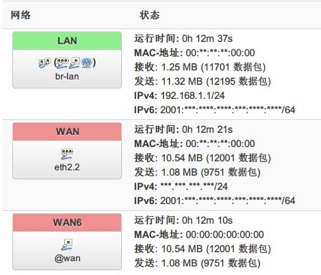
路由获取IPV6地址

内网分配IPV6地址

编辑6relayd的配置文件vi /etc/config/6relayd,反注释或者加入配置:

config server relay
        option master   'wan'
        option network  'lan'
        option rd       'relay'
        option dhcpv6   'relay'
        option ndp      'relay'

然后 /etc/init.d/6relayd start 或者在luci web界面开启6relayd服务。
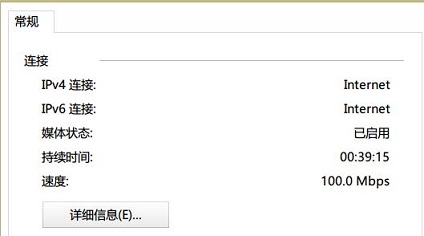
内网电脑成功获取IPV6地址