

惯性聚合 高效追踪和阅读你感兴趣的博客、新闻、科技资讯
阅读原文 在惯性聚合中打开

推荐订阅源

SecWiki News
SecWiki News
I
InfoQ
The Cloudflare Blog
人人都是产品经理
人人都是产品经理
博客园 - Franky
T
Tailwind CSS Blog
让小产品的独立变现更简单 - ezindie.com
量子位
博客园_首页
罗磊的独立博客
V
V2EX
李成银的技术随笔
大猫的无限游戏
大猫的无限游戏
钛媒体:引领未来商业与生活新知
钛媒体:引领未来商业与生活新知
T
True Tiger Recordings
Vercel News
Vercel News
Cyberwarzone
Cyberwarzone
Cisco Talos Blog
Cisco Talos Blog
F
Fox-IT International blog
D
Darknet – Hacking Tools, Hacker News & Cyber Security
M
Microsoft Research Blog - Microsoft Research
Know Your Adversary
Know Your Adversary
爱范儿
爱范儿
The Register - Security
G
Google Developers Blog
The Hacker News
The Hacker News
Malwarebytes
Malwarebytes
S
Securelist
博客园 - 三生石上(FineUI控件)
Jina AI
Jina AI
T
Threat Research - Cisco Blogs
T
The Exploit Database - CXSecurity.com
S
SegmentFault 最新的问题
博客园 - 叶小钗
F
Fortinet All Blogs
Apple Machine Learning Research
宝玉的分享
宝玉的分享
博客园 - 聂微东
T
Threatpost
博客园 - 【当耐特】
D
Docker
P
Privacy & Cybersecurity Law Blog
www.infosecurity-magazine.com
G
GRAHAM CLULEY
V
Visual Studio Blog
C
Cisco Blogs
IT之家
IT之家
S
Security Archives - TechRepublic
Latest news
Latest news
阮一峰的网络日志
阮一峰的网络日志

Librehat的部落格

Install Citrix Receiver for Linux in Toolbox – Librehat的部落格 Soft AP on Linux with WPS – Librehat的部落格 My Attempts to Integrate Home Assistant with ADT UK – Librehat的部落格 Citrix Receiver UK Keyboard Layout Issue on Linux and Chrome OS – Librehat的部落格 部落格迁移到甲骨文云 – Librehat的部落格 Home Assistant Core Setup on Banana Pi M5 – Librehat的部落格 Flatpak Wine 微信安装手记 – Librehat的部落格 FydeOS上手体验 – Librehat的部落格 Banana Pi M5 Pro Quick Review – Librehat的部落格
Chrome OS Flex on Samsung Galaxy Book Pro 360 Dual Boot – Librehat的部落格
2024-02-24 · via Librehat的部落格

Happy Chinese New Year (Year of Dragon/Loong) to you all!

A New Year’s surprise from Google. The latest version of Chrome OS Flex finally supports Samsung Galaxy Book Pro 360 to an extent that can be used as a daily driver.

Hardware Compatibility

To clarify, I’m using an original (first-gen) Samsung Galaxy Book Pro 360 (16G RAM, i7 11th Gen CPU). The Chome OS Flex version I’m currently using is:

Google Chrome: Version 121.0.6167.188 (Official Build) (64-bit)
Platform: 15699.66.0 (Official Build) stable-channel reven
Channel: stable-channel
Firmware Version:
ARC enabled: false
ARC:
Enterprise enrolled: false
Developer mode: true

Linux Kernel version is now 5.15, which explains the better hardware compatibility.
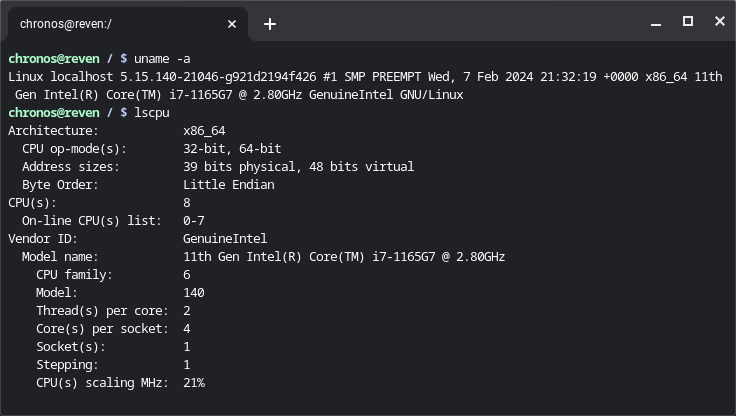
Linux Kernel version is 5.15.140 in Chrome OS Flex 121

What’s Working

  • WiFi
  • Audio
  • Bluetooth
  • Display Brightness Control
  • Touchscreen
  • Tablet Mode Switch
  • Touchpad
  • Camera

Essentially, almost everything :)

What’s Not Working

  • Fingerprint Sensor. This is not something that works in a regular Linux distribution anyway, so not a big surprise here.
  • Suspend/Resume (Sleep). I’m currently unsure whether this is caused by Chrome OS Flex itself or linuxloops (see Dual Boot below), but my laptop will hang when it tries to wake up from sleeping (after closing lid). A simple workaround is to configure Chrome OS Flex to just turn off the display rather than sleep.

Dual Boot

If you have two hard disks installed (the original/first-gen Galaxy Book Pro 360 has an additional slot), you could use the official installer to install it to the second disk, then restore your GRUB2 and add an entry to it.

If you don’t have two disks but still want to dual boot (or multi-boot) Chrome OS Flex and other OSes (e.g. Windows, or some Linux distributions), then you can use linuxloops from @sebanc (the same author of brunch). Essentially, it creates a disk image, to which GRUB2 can boot. Just follow the instructions from the GitHub project and use Chrome OS Flex as the distribution. Once the command finishes, you’ll have a GRUB2 menuentry to add.