







关于“应用程序设置”: 前往MSDN查看
默认提供的 SettingsProvider 不允许我们修改应用程序设置的配置文件的路径,这就导致了以下问题:
要解决上述问题,就需要由我们自己来定义在哪里存储应用程序设置
MSDN给出的方法是:自己实现一个 SettingsProvider
“应用程序设置” 在 C# 2.0 就已经被引入,但网上关于 SettingsProvider 的轮子并不多,我自己找到了一个比较完整的,用 vb.net 写的轮子,并人力翻译成了 c#,代码如下:
using System;
using System.Collections;
using System.Configuration;
using System.Collections.Specialized;
using System.Xml;
using System.Windows.Forms;
using System.IO;

namespace Kenvix
{
    public class AppConfigProvider : SettingsProvider
    {
        const string SettingsRootNode = "Settings"; // XML Root Node
        const bool SkipRoamingCheck = false; //if true, all settings will be forcely marked as Roaming

        /// <summary>
        /// Used to determine where to store the settings
        /// </summary>
        /// <returns></returns>
        public virtual string GetAppSettingsPath()
        {
            return (new FileInfo(Application.ExecutablePath)).DirectoryName; //Use application path
        }

        /// <summary>
        /// Used to determine the filename to store the settings
        /// </summary>
        /// <returns></returns>
        public virtual string GetAppSettingsFilename()
        {
            return ApplicationName + ".config";
        }


        public override void Initialize(string name, NameValueCollection col)
        {
            base.Initialize(ApplicationName, col);
        }

        public override string ApplicationName
        {
            get
            {
                return Application.ProductName;
            }
            set { }
        }

        /// <summary>
        /// Iterate through the settings to be stored
        /// Only dirty settings are included in propvals, and only ones relevant to this provider
        /// </summary>
        /// <param name="context"></param>
        /// <param name="propvals"></param>
        public override void SetPropertyValues(SettingsContext context, SettingsPropertyValueCollection propvals)
        {
            foreach (SettingsPropertyValue propval in propvals)
                SetValue(propval);

            SettingsXML.Save(Path.Combine(GetAppSettingsPath(), GetAppSettingsFilename()));
        }

        public override SettingsPropertyValueCollection GetPropertyValues(SettingsContext context, SettingsPropertyCollection props)
        {
            // Create new collection of values
            SettingsPropertyValueCollection values = new SettingsPropertyValueCollection();

            // Iterate through the settings to be retrieved
            foreach (SettingsProperty setting in props)
            {
                SettingsPropertyValue value = new SettingsPropertyValue(setting);
                value.IsDirty = false;
                value.SerializedValue = GetValue(setting);
                values.Add(value);
            }
            return values;
        }

        private XmlDocument m_SettingsXML = null;

        private XmlDocument SettingsXML
        {
            get
            {
                // If we dont hold an xml document, try opening one.
                // If it doesnt exist then create a new one ready.
                if (m_SettingsXML == null)
                {
                    m_SettingsXML = new XmlDocument();

                    try
                    {
                        m_SettingsXML.Load(Path.Combine(GetAppSettingsPath(), GetAppSettingsFilename()));
                    }
                    catch (Exception)
                    {
                        // Create new document
                        XmlDeclaration dec = m_SettingsXML.CreateXmlDeclaration("1.0", "utf-8", string.Empty);
                        m_SettingsXML.AppendChild(dec);

                        XmlNode nodeRoot;

                        nodeRoot = m_SettingsXML.CreateNode(XmlNodeType.Element, SettingsRootNode, "");
                        m_SettingsXML.AppendChild(nodeRoot);
                    }
                }

                return m_SettingsXML;
            }
        }

        private string GetValue(SettingsProperty setting)
        {
            string ret = "";

            try
            {
                if (IsRoaming(setting))
                    ret = SettingsXML.SelectSingleNode(SettingsRootNode + "/" + setting.Name).InnerText;
                else
                    ret = SettingsXML.SelectSingleNode(SettingsRootNode + "/" + Environment.MachineName + "/" + setting.Name).InnerText;
            }
            catch (Exception)
            {
                if (setting.DefaultValue != null)
                    ret = setting.DefaultValue.ToString();
                else
                    ret = "";
            }

            return ret;
        }

        private void SetValue(SettingsPropertyValue propVal)
        {
            XmlElement MachineNode;
            XmlElement SettingNode;

            // Determine if the setting is roaming.
            // If roaming then the value is stored as an element under the root
            // Otherwise it is stored under a machine name node
            try
            {
                if (IsRoaming(propVal.Property))
                    SettingNode = (XmlElement)SettingsXML.SelectSingleNode(SettingsRootNode + "/" + propVal.Name);
                else
                    SettingNode = (XmlElement)SettingsXML.SelectSingleNode(SettingsRootNode + "/" + Environment.MachineName + "/" + propVal.Name);
            }
            catch (Exception)
            {
                SettingNode = null;
            }

            // Check to see if the node exists, if so then set its new value
            if (SettingNode != null)
                SettingNode.InnerText = propVal.SerializedValue.ToString();
            else if (IsRoaming(propVal.Property))
            {
                // Store the value as an element of the Settings Root Node
                SettingNode = SettingsXML.CreateElement(propVal.Name);
                SettingNode.InnerText = propVal.SerializedValue.ToString();
                SettingsXML.SelectSingleNode(SettingsRootNode).AppendChild(SettingNode);
            }
            else
            {
                // Its machine specific, store as an element of the machine name node,
                // creating a new machine name node if one doesnt exist.
                try
                {
                    MachineNode = (XmlElement)SettingsXML.SelectSingleNode(SettingsRootNode + "/" + Environment.MachineName);
                }
                catch (Exception)
                {
                    MachineNode = SettingsXML.CreateElement(Environment.MachineName);
                    SettingsXML.SelectSingleNode(SettingsRootNode).AppendChild(MachineNode);
                }

                if (MachineNode == null)
                {
                    MachineNode = SettingsXML.CreateElement(Environment.MachineName);
                    SettingsXML.SelectSingleNode(SettingsRootNode).AppendChild(MachineNode);
                }

                SettingNode = SettingsXML.CreateElement(propVal.Name);
                SettingNode.InnerText = propVal.SerializedValue.ToString();
                MachineNode.AppendChild(SettingNode);
            }
        }

        /// <summary>
        /// Determine if the setting is marked as Roaming
        /// </summary>
        /// <param name="prop"></param>
        /// <returns></returns>
        private bool IsRoaming(SettingsProperty prop)
        {
            if (SkipRoamingCheck) return true;
            foreach (DictionaryEntry d in prop.Attributes)
            {
                Attribute a = (Attribute)d.Value;
                if (a is SettingsManageabilityAttribute)
                    return true;
            }
            return false;
        }
    }

}
GetAppSettingsPath() 的返回值为 设置存储目录
GetAppSettingsFilename() 的返回值为 设置文件名
SkipRoamingCheck 是否跳过漫游属性检测,无特殊需求建议为 true
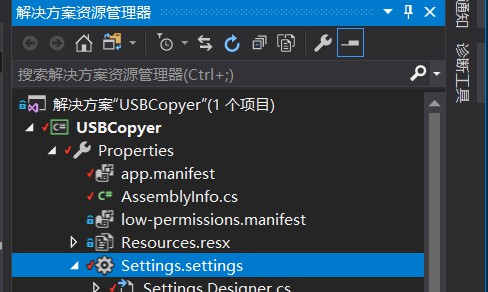
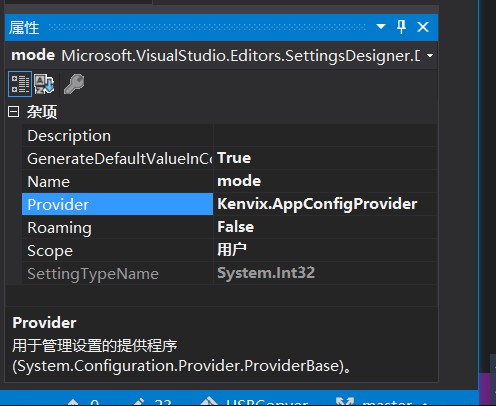
使用上述代码的方法非常简单,只需:
此内容由惯性聚合(RSS阅读器)自动聚合整理,仅供阅读参考。 原文来自 — 版权归原作者所有。