


惯性聚合 高效追踪和阅读你感兴趣的博客、新闻、科技资讯
阅读原文 在惯性聚合中打开

推荐订阅源

Hacker News - Newest:
Hacker News - Newest: "LLM"
H
Hacker News: Front Page
cs.AI updates on arXiv.org
Exploit-DB.com RSS Feed
T
Threatpost
NISL@THU
NISL@THU
L
LINUX DO - 最新话题
T
The Exploit Database - CXSecurity.com
Schneier on Security
I
Intezer
T
The Blog of Author Tim Ferriss
Know Your Adversary
Know Your Adversary
S
Secure Thoughts
U
Unit 42
aimingoo的专栏
aimingoo的专栏
L
LangChain Blog
B
Blog RSS Feed
Forbes - Security
Forbes - Security
D
DataBreaches.Net
D
Docker
M
MIT News - Artificial intelligence
F
Full Disclosure
N
News and Events Feed by Topic
T
Tor Project blog
MyScale Blog
MyScale Blog
博客园 - 叶小钗
SecWiki News
SecWiki News
IT之家
IT之家
云风的 BLOG
云风的 BLOG
freeCodeCamp Programming Tutorials: Python, JavaScript, Git & More
Microsoft Security Blog
Recent Commits to openclaw:main
量子位
The Register - Security
T
Threat Research - Cisco Blogs
博客园 - 聂微东
T
Troy Hunt's Blog
K
KPMG report finds enterprise disconnect between AI and its ROI | CIO
Security Latest
Security Latest
N
News and Events Feed by Topic
Google DeepMind News
Attack and Defense Labs
N
News | PayPal Newsroom
S
Security @ Cisco Blogs
P
Proofpoint News Feed
S
Securelist
PCI Perspectives
PCI Perspectives
美团技术团队
V
V2EX
P
Privacy & Cybersecurity Law Blog

Kenvix's Blog

实现带有Nvidia GPU+Rootless Podman+Docker+Systemd+自动驱动注入支持的systemd nspawn容器 | Kenvix's Blog 手动保留常用端口,解决 Windows 端口被 Hyper-V / WinNAT 占用的问题 免Telent/TTL屏蔽运营商新版光猫的远控、TR069和RMS,获取动态随机超级管理员密码并固化权限 | Kenvix's Blog 利用Windows卷影副本(Volume Shadow)找回被覆盖和删除的数据 | Kenvix's Blog OpenWRT/DNSMasq 配置DHCP静态路由主动推送 实现流量直达和旁路由流量零代价分载 | Kenvix's Blog 解决 Windows 打开视频/图片文件夹很慢的问题 | Kenvix's Blog AltA2DP - 向支持Sony LDAC协议的耳机提供Windows下蓝牙LDAC音频编码器支持 | Kenvix's Blog (2024更新)修复黑群晖 DSM7.0 + Btrfs 存储空间/磁盘损毁/堪用 的问题 校园网白嫖思路分享:局域网中转-不花钱、不认证、高速上网 | Kenvix's Blog 在 Windows 上配置网卡多个 VLAN、多个虚拟网卡、实现单线多拨网速叠加(无需驱动支持) | Kenvix's Blog 解决视频彩铃、语音通话自动转视频通话导致打电话自动挂断的问题 | Kenvix's Blog 超低成本廉价考研教程:如何用小于¥500甚至¥300的开销考个研 | Kenvix's Blog 在 Ubuntu 21.10 上启用蓝牙 LDAC/AAC/AptX 高质量音频编码支持 在 VMware Workstation 桥接模式的网卡上让虚拟机使用 VLAN 的正确方法 在 Windows 上设置 NAT 或网络共享的正确方法——避免Wi-Fi热点无法使用 自编译 红米 AC2100 OpenWRT R21.7.26 Linux 内核结构和子系统简介 | Kenvix's Blog Java 快速读取文本 (算法竞赛适用) | Kenvix's Blog 利用 ThreadLocal + Lambda,实现有状态变量的单例模式 | Kenvix's Blog 状态压缩的动态规划问题:骨牌完全覆盖棋盘问题 | Kenvix's Blog 我的 Windows 10 2004 新增 Bug 解决办法记录 解决 Android Studio 及 IDEA 中 Gradle 错误信息乱码的问题 Kotlin 的那些骚操作 | Kenvix's Blog 在普通的 Gradle Java/Kotlin 项目中使用 BuildConfig 修复国行 MIUI 打开 Google Play 始终提示 DF-DFERH-01 的问题 解决 VSCode 持续调用 WMIC 导致一个 CPU 核心完全被占满的问题 扔鸡蛋问题 | Kenvix's Blog 计算机幻觉从入门到入土 | Kenvix's Blog Java 注解预处理 Annotation Processing & 代码生成 Ubuntu 上通过以太网分享网络连接(NAT) | Kenvix's Blog Windows 选择指定的网卡来开承载网络型热点 | Kenvix's Blog 修复升级 Windows10 版本后所有内置应用闪退+第三方应用参数错误的问题 | Kenvix's Blog 配置用于 Gradle6.x + MySQL 8 的 jOOQ 3.14 代码自动生成 (已更新) 修复 Windows 环境下的程序访问 WSL 中的 MySQL 提示 Access Denied 的问题 修复 WSL 下 PHP+FastCGI 卡死的问题 使用任意磁盘或路径保存 Windows 文件历史记录 | Kenvix's Blog [1.12.2+Mod] MoeCraft :: 自由开放的科技向公益 Mod 服务器 Kenvix's Blog 禁用使用Intel核显的Windows笔记本自动调节亮度功能 | Kenvix's Blog 真正实现Minecraft高级登录(外置登录)的几种方案 | Kenvix's Blog 谈谈神舟的两艘贼船,Z7M-KP7S1 / Z7M-KP7SC USBCopyer: 插上U盘自动按需复制文件 | Kenvix's Blog USBCopyer 回调功能详细说明 | Kenvix's Blog C# 实现自定义"应用程序设置"的配置文件(user.config)存储路径 | Kenvix's Blog Win10 资源管理器为所有格式激活“编辑”按钮并修改文本文件“编辑”按钮的编辑器 | Kenvix's Blog 留言板 | Kenvix's Blog 又一次 Hello world | Kenvix's Blog Java 学习笔记 (仍在更新) | Kenvix's Blog 在Win10 Pro下挂载NFS(网络文件系统) | Kenvix's Blog Nginx 反向代理 Aria2 JSONRPC | Kenvix's Blog (Android6.0~9.0) 清除锁屏密码 | Kenvix's Blog WordPress 更换站点地址后批量修改文章/评论中的旧地址 | Kenvix's Blog 修复一加3/3T因固件过老导致刷入ROM时提示错误7的问题 | Kenvix's Blog 修复Android DM-Verity 警告 | Kenvix's Blog 贴吧云签到 资源索引(下载|文档|插件) | Kenvix's Blog 继续监控!使用树莓派+Motion实现实时视频监控并通过浏览器查看 | Kenvix's Blog 自动获取Pixiv每日排行榜第一张图片(600x600 | 可用于博客背景图) | Kenvix's Blog 使用树莓派实现定时拍照监控并发送邮件到邮箱 | Kenvix's Blog 好压 V2.7 Beta1 绿色版——功能强大,良心的压缩软件 | Kenvix's Blog 任意语言实现读取压缩包注释 | Kenvix's Blog 自己实现QQ群自定义分享(管理员开启了群交易?) | Kenvix's Blog MoeCDN - 加速Gravatar/GoogleAPIs等无法在国内访问的资源 | Kenvix's Blog [Minecraft] WebLogin-连接到你的服务器来检查玩家是否可以登录 | Kenvix's Blog Android卡刷包提示This package is for device: ... this device is ...的解决方案 Kenvix's Blog 给EMLOG评论框加上复选框[√]防止垃圾评论 | Kenvix's Blog 欢迎使用emlog | Kenvix's Blog
在Windows下实现WireGuard动态DNS解析(DDNS)的正确方法:避免无意义的开销 | Kenvix's Blog
2023-09-30 · via Kenvix's Blog

WireGuard 隧道一旦建立后,域名就不再重新解析了,一旦服务端的 IP 发生改变,这隧道就断了。

截止文章最后修订,WireGuard 官方始终没有提供 Windows 下的动态 DNS 解析(DDNS)客户端脚本,所以说你想实现,如果你想在 Windows 下使用 WireGuard 配合经常改变 IP 的域名,你就必须要自己写一个动态 DNS 解析脚本。

我基于网上的脚本进行了一番魔改,增加了以下特性:

  • 只处理已启用的 WireGuard 隧道,没开的隧道不会处理
  • 可以作为服务安装,自带延迟功能
  • 增加各类判断条件和错误处理,以便纠错

脚本

  1. 将以下代码保存为:WireGuard-Reresolve.ps1
# Copyright (C) 2021 Max Schulze. All Rights Reserved.
# Modified by Kenvix <i@kenvix.com> @ 2023/9/15
# 
# near-literal Translation of the linux version by Jason A. Donenfeld

# to decrypt the dpapi Credentials, you have to be the same user as the wireguard tunnel service, i.e. "nt authority\system", check with "whoami"
# this script might be called by task scheduler as 
#  powershell -NoProfile -NoLogo -NonInteractive -ExecutionPolicy Bypass -Command ./WireGuard-Reresolve.ps1 -LoopRunAsCron -DelaySeconds 600
# if you want to try it in cmd, remember to elevate the user, i.e. with psexec from sysutils 
#  psexec -s -i powershell -NoPr...
#Requires -RunAsAdministrator
param(
    [switch]$LoopRunAsCron = $false,
    [int]$DelaySeconds = 600
)

Set-StrictMode -Version 3
Add-Type -AssemblyName System.Security

function WireGuard-Reresolve {
  param(
    [Parameter(Mandatory=$true)]
    [string]$File
  )

  Set-Variable CONFIG_FILE -Value $File.ToString().Trim('"')

  if (-not (Test-Path -Path $CONFIG_FILE)) {
    throw New-Object System.IO.FileNotFoundException("Wireguard Config $CONFIG_FILE File not found.", $CONFIG_FILE)
  }

  $byteCrypted = ((Get-Content -LiteralPath $CONFIG_FILE -Encoding Byte -ReadCount 0))

  $config = [System.Security.Cryptography.ProtectedData]::Unprotect($byteCrypted,$null,[System.Security.Cryptography.DataProtectionScope]::LocalMachine)

  $config = [System.Text.UTF8Encoding]::UTF8.GetString($config)

  Set-Variable Interface -Option Constant -Value $(if ($CONFIG_FILE -match '.?([a-zA-Z0-9_=+.-]{1,64})\.conf.dpapi$') { $matches[1] } else { $null })

  function process_peer () {
    if (-not $PEER_SECTION -or ($PUBLIC_KEY -eq $null) -or ($ENDPOINT -eq $null)) { return }
    if (-not ((& wg show "$INTERFACE" latest-handshakes) -replace $PUBLIC_KEY -match ('[0-9]+'))) { return }
    if (((Get-Date) - (New-Object -Type DateTime -ArgumentList 1970,1,1,0,0,0,0).AddSeconds($matches[0]).ToLocalTime()).TotalSeconds -le 135) { return }
    (& wg set "$INTERFACE" peer "$PUBLIC_KEY" endpoint "$ENDPOINT")
    reset_peer_section
  }

  function reset_peer_section () {
    Set-Variable PEER_SECTION -Value $null
    Set-Variable PUBLIC_KEY -Value $null
    Set-Variable ENDPOINT -Value $null
  }

  reset_peer_section
  Set-Variable PEER_SECTION -Value $null

  foreach ($line in $config.Split([Environment]::NewLine,[StringSplitOptions]::RemoveEmptyEntries)) 
  {
    if ($line.Trim().length -gt 0) {
      $stripped = $line.Trim() -ireplace '\#.*'
      $key = $stripped -ireplace '=.*'; $key = $key.Trim()
      $val = $stripped -ireplace '^.*?='; $val = $val.Trim()
      if ($key -match '\[.*') { process_peer; reset_peer_section; }
      if ($key -eq '[Peer]') { $PEER_SECTION = $true }
      if ($PEER_SECTION) {
        switch ($key) {
          "PublicKey" { $PUBLIC_KEY = $val; continue; }
          "Endpoint" { $ENDPOINT = $val; continue; }
        }
      }
    }
  }
  process_peer
}

function WireGuard-Reresolve-All-Active {
  Get-Service -Name "WireGuardTunnel$*" `
   | Where-Object {$_.Status -eq "Running"} `
   | ForEach-Object { $_.Name.Substring(16) } `
   | ForEach-Object { Get-ChildItem -File "$env:programfiles\wireguard\data\configurations\$_.conf.dpapi" } `
   | ForEach-Object { WireGuard-Reresolve $_.FullName}
}

if ($LoopRunAsCron) {
  echo "Running as Cron DelaySeconds=$DelaySeconds"
  while ($true) {
    WireGuard-Reresolve-All-Active
    Start-Sleep -Seconds $DelaySeconds
  }
}
  1. 按 Win+X 打开 管理员 Powershell,执行以下代码以便 允许执行脚本:
Set-ExecutionPolicy unrestricted
  1. 把脚本作为服务安装

虽然你可以把这个脚本放在计划任务里面定时执行,但是这样做的话,每次执行脚本都会初始化一个新的 Powershell 实例。不像 Linux Bash,Powershell 的初始化代价是很高的,所以说,像这种需要频繁执行的脚本,应该把它作为一个服务来运行,反正内存占用差不多才 25MB。

首先需要 shawl 来包装服务,如果有 winget 的话,直接在 管理员 Powershell 执行以下命令安装 shawl(必须全局安装):

winget install --scope=machine shawl

没有 winget 的话点上面的链接下载,然后解压到 Windows 文件夹。

【注意:如果是首次使用 winget 安装命令行软件,必须刷新环境变量或重启后才能生效】

然后,执行以下代码安装服务:

shawl add --name WireGuard-Reresolve -- powershell -NoProfile -NoLogo -NonInteractive -ExecutionPolicy Bypass -Command "C:\Work-Station\Scripts\Powershell\WireGuard-Reresolve.ps1" -LoopRunAsCron -DelaySeconds 250

其中,C:\Work-Station\Scripts\Powershell\WireGuard-Reresolve.ps1 是你的脚本存放的路径,-DelaySeconds 250 是 DDNS 解析间隔,单位是秒。

  1. 启动服务并设置开机启动

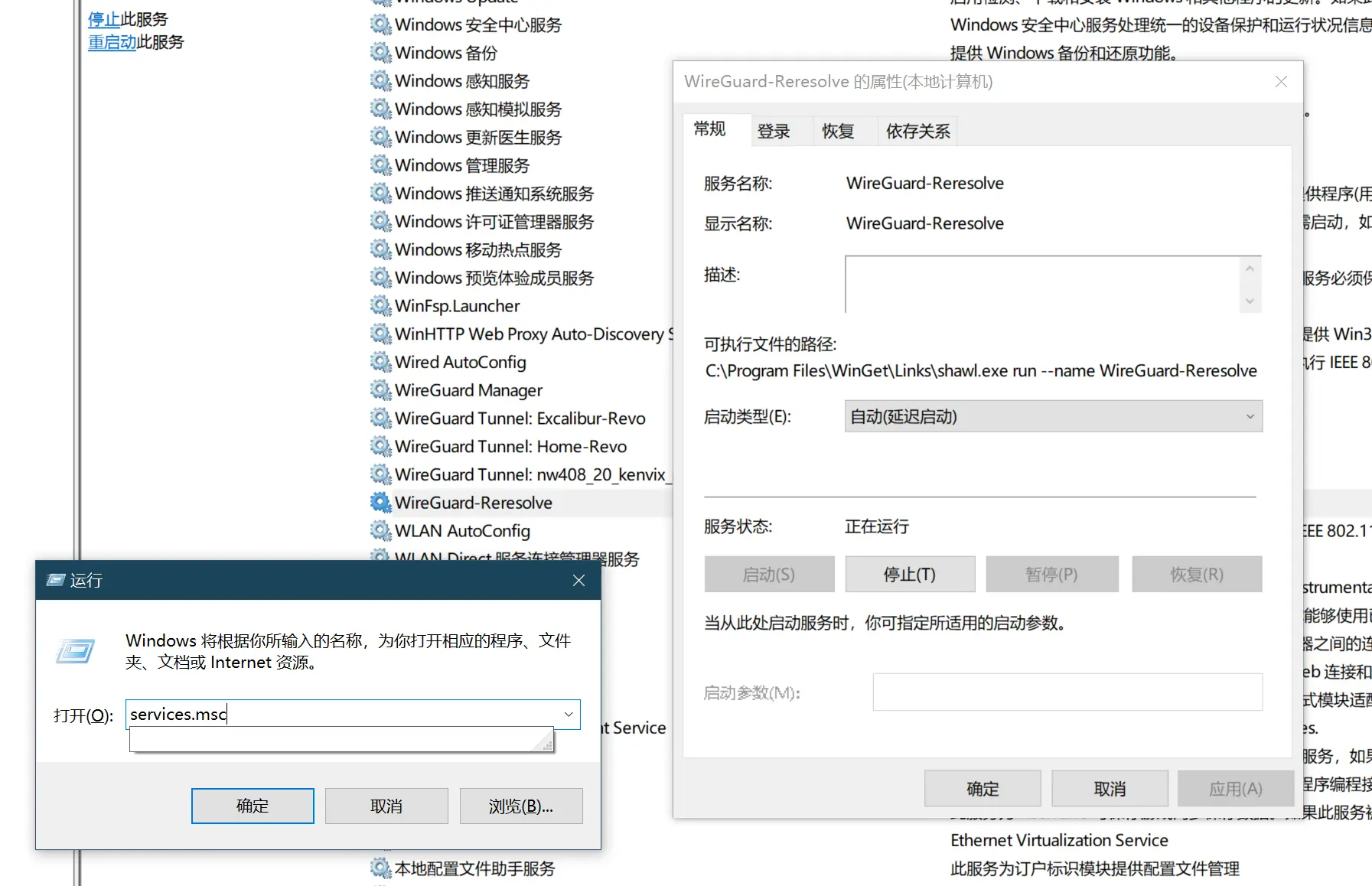
Win+R 输入 services.msc 找到 WireGuard-Reresolve 服务,右键启动,然后右键属性,设置为自动启动。
备注

  • 该脚本必须以 SYSTEM 用户身份执行,否则无法解密 WireGuard 的配置文件。
  • 若要卸载服务,可以执行以下代码:
sc.exe delete WireGuard-Reresolve

附录:Linux 下的动态 DNS 解析脚本

标准 Linux(Ubuntu, CentOS 等,不含 OpenWRT):参见此文章

对于 OpenWRT 有专用的脚本,直接在 luci 面板的计划任务里面添加:

* * * * * /usr/bin/wireguard_watchdog

并为 WireGuard 隧道的 [Peer] 字段增加一行 PersistentKeepalive = 30 即可