








by Alem Tuzlak on May 28, 2026.
Most AI apps start with one chat() call.
But as soon as you need something more complex, this all breaks apart. You either fall back to using sub-agents as tools, or you have to write your own glue and abstractions on top to make a semi-decent workflow or orchestration mechanism to power your app. This just detracts from your time to work on the features you really care about.
The model needs to draft, critique, revise, ask for approval, call another model, update state, and show the user what is happening while the run is still in progress. At that point, a one-shot chat endpoint turns into a hand-rolled workflow engine made of fetch calls, temporary state, custom SSE events, and a lot of code nobody wanted to own.
Today, TanStack introduces an experimental answer: TanStack AI Workflows & Orchestrators.
Before we go further, a fair warning!
This is not merged to main. It is not shipped, stable, or available in normal npm versions. It is a PR build you can try today through pkg.pr.new while the API is still being shaped. The goal is to get it in front of real use cases, demos, and feedback before we commit to the public API shape.
This is where you come in. We need your help. We need people to test out our workflows and our orchestration mechanisms, give us their thoughts and opinions, and help us shape the final APIs.
The goal is simple: compose multiple typed LLM and agent steps as normal TypeScript async generators, stream each step to the UI, pause for human approval, and resume through the same SSE flow.
Agents are typed wrappers around a chat() call or any async function. defineAgent gives each step an input schema, output schema, and implementation.
defineAgent wraps either a chat() call or a normal async function with input and output schemas. The workflow runtime uses those schemas to validate what enters and leaves the step, and TypeScript uses them to infer the callable shape inside a workflow. From the workflow's perspective, writer and editor are normal typed async steps.
Once agents exist, defineWorkflow composes them with yield* inside an async function*.
The interesting part is the lack of framework ceremony. TypeScript knows the input expected by agents.writer, and it knows the shape returned after the yield*.
Each yield* agents.someAgent(...) becomes a typed step. The runtime can emit lifecycle events around it, stream text while it runs, validate the result, snapshot state, and resume the generator with the typed output.
The workflow body is just TypeScript. Use if, for, while, try, await, helper functions, and whatever domain code you already have. The orchestration runtime only cares about the things you yield*.
Why async generator workflows? There are a lot of ways to model agent workflows. You can build a graph DSL. You can define nodes in JSON. You can describe a DAG and ask the runtime to interpret it. The reason we went with generator workflows is that whenever you yield the agent's step, it's streamed straight down to the client. The user sees everything in real time — tool calls, reasoning, whatever happens along the way — and by the end you just get the final output back.
Workflows run on the server. The browser consumes an event stream.
The PR adds parseWorkflowRequest, runWorkflow, and inMemoryRunStore from @tanstack/ai-orchestration. You can pipe the returned stream through the existing toServerSentEventsResponse helper from @tanstack/ai.
runWorkflow emits AG-UI-style lifecycle events for the run. That includes run and step events, state snapshots, JSON Patch state deltas, output, and errors. The UI does not need to invent its own event protocol for "writer started", "editor streamed text", "approval requested", or "run finished".
The current built-in persistence is inMemoryRunStore. That is useful for local demos and single-process evaluation. Production durability is still future-facing and experimental run-store-interface territory, especially for long pauses, deploys, restarts, and multi-node environments. But the API is there to implement your own durable run store and swap it in when you're ready.
A UI is optional. The SSE endpoint above exists so a browser can watch a run unfold, but the workflow itself is just a server-side async generator. If nothing is watching — a cron job, a queue worker, a batch script, or a plain JSON endpoint that only returns the final answer — you can run the workflow headless and never stream a single event to a client.
runWorkflow returns an async iterable, and iterating it is what drives the workflow forward. So for a headless run you drain the stream to completion, then read the final result back from the run store:
The same typed agents, schemas, state snapshots, and validation apply. You just skip toServerSentEventsResponse, the React hooks, and the browser entirely.
One caveat: a headless run has nobody to answer a yield* approve(...). If the workflow hits an approval step, it pauses and getRunState reports status: 'paused' instead of 'finished'. Server-only workflows shine when the pipeline runs end to end on its own. If you need a human in the loop, either resume the paused run programmatically with an approval result or keep a UI connected.
On the client, WorkflowClient, useWorkflow, and useOrchestration consume the streamed events and keep local run state updated.
There is also useOrchestration for the same runtime with orchestration vocabulary. If your mental model is "run a workflow", use useWorkflow. If your mental model is "let a router pick the next agent", use useOrchestration.
Human-in-the-loop control is not a side channel in this PR.
When workflow code calls yield* approve(...), the runtime emits an approval-requested event, persists the paused run in the run store, and closes the SSE response. The HTTP request is done. The server does not keep a socket open while a user thinks, checks a diff, or gets approval from someone else.
When the client calls approve(), it POSTs back to the same endpoint with the run id and approval result. runWorkflow resumes the generator and the next SSE response continues from the paused point.
That means approvals, revisions, and denial feedback can be modeled in the workflow itself:
The same event stream also carries state snapshots and JSON Patch deltas, so a UI can show a live state inspector, a timeline, or a draft preview without waiting for the final result.
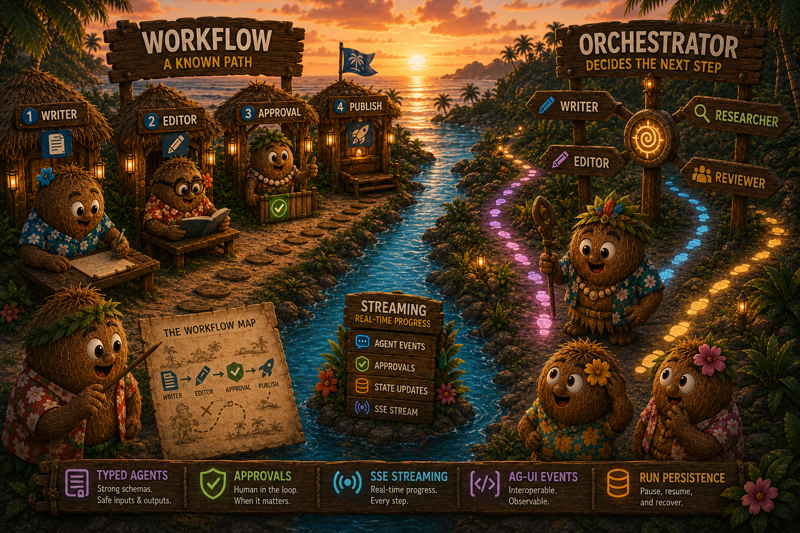
Use a workflow when you know the pipeline.
Writer, then editor, then approval is a workflow. Extract topics, draft outline, expand sections is a workflow. Run static checks, ask for approval, deploy to staging, ask again, deploy to production is a workflow.
Use an orchestrator when the next step should be selected turn by turn.
defineOrchestrator is a thin wrapper over workflows, so the workflow behavior already described applies the same way to orchestrators. It uses the same runtime pieces: typed agents, streaming steps, state snapshots, approvals, SSE transport, and React hooks.
The body is a router. The router looks at input, mutable state, and the previous result, then returns the next agent to run. When the router is done, it returns the final output.
Routers may also yield if their decision needs async work, but their return value is the important part: either the next { agent, input } pair to run or { done, output } when orchestration is complete.
That gives you the same behavior with a different control-flow style. A workflow puts the sequence directly in the generator body. An orchestrator puts the next-step decision in a router.
If you are building multi-step AI product flows, this is the moment to test the shape. This is a PR build meant for evaluation, demos, and feedback — the public API can still change before stabilization.
Install the PR packages directly from pkg.pr.new:
Full documentation for this PR lives on the GitHub branch, not the released TanStack docs site:
Then share demos, feedback, and rough edges on PR 542 before the API stabilizes.
此内容由惯性聚合(RSS阅读器)自动聚合整理,仅供阅读参考。 原文来自 — 版权归原作者所有。