惯性聚合 高效追踪和阅读你感兴趣的博客、新闻、科技资讯
阅读原文 在惯性聚合中打开

推荐订阅源

V
V2EX
P
Proofpoint News Feed
D
DataBreaches.Net
C
Check Point Blog
L
LangChain Blog
量子位
美团技术团队
Vercel News
Vercel News
人人都是产品经理
人人都是产品经理
N
Netflix TechBlog - Medium
V
Visual Studio Blog
Microsoft Security Blog
博客园 - 【当耐特】
MongoDB | Blog
MongoDB | Blog
Cyber Security Advisories - MS-ISAC
freeCodeCamp Programming Tutorials: Python, JavaScript, Git & More
Last Week in AI
Last Week in AI
The GitHub Blog
The GitHub Blog
奇客Solidot–传递最新科技情报
奇客Solidot–传递最新科技情报
U
Unit 42
腾讯CDC
M
MIT News - Artificial intelligence
Microsoft Azure Blog
Blog — PlanetScale
Blog — PlanetScale

Proxmox Support Forum

[SOLVED] - Github Auth for Mirrors-Kernel Repo? [Automation] Mass migration tool for MS Win11/Server Proxmox GUI hang - not response is it possible to reject or quarantine spam based on conditions I set ? The PVENode task list in PVE9 is partially obscured due to the terminal font being too large. About 100% error reporting due to pveproxy.service hooks Kubernetes overlay networking breaks when upgrading from PVE 9.1 to PVE 9.2.3 Zentraler Speicher No space left on device Combine datastore and direct file archival to tape Kernel panic VFS: Unable to mount root fs on unknown-block (0,0) sobald ein 7.x Kernel verwendet wird. How to migrate disk of a VM from one ZFS to another Windows Server 2025 fails to boot after PVE 9.2 / Linux 7.0 Kernel upgrade Cannot Install Proxmox on T610 Poweredge with H700 PERC card sdn Config. gateway not reachable How to safely change domain/FQDN? Welche Filterquote erreicht ihr? NFS Share status unknown on 2 of 5 nodes Can't connect to PVE9 consoles [solved] Can't connect to PVE9 consoles [solved] [SOLVED] - Use secondary network for PVE commands Created cluster, one node storage gone BUG: proxmox mail gateway FROM = null bypass spam filtering Moving existing PBS from VMWare workstation to PVE cluster Does eBGP SDN fabric support external peering? Bug: PDM 1.1 not recognizing valid license status Proxmox GUI hang - not response PVE crashes unexpectedly Proxmox Backup Server 4.2 released! Advice
Re-IP'd Hosts to a new network ssh finds old IP's and won...
invalid@exam · 2026-06-13 · via Proxmox Support Forum

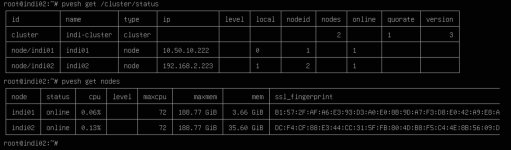
I recently did a network upgrade for my office. We installed new switches and wanted to consolidate and re-ip to a 10.50.x.x. from a 192.168.x.x numbered IPv4 network. Everything appeared to go fine up until we got the two node development proxmox cluster. We changed the IPs fine, the cluster we had some tweaking to do but ultimately it appeared to be working fine. Then we did a pve cluster status and it shows node2 is reporting the old IP, even though the cluster nodes all report the correct 10.50.x.x IPs.

What is also weird and we can't find a resolution for it so far is when we use the UI to open a shell on node 2 ssh complains there is no route and details the old IP address not the new one. For the life of us we can't find any remaining fragments of text in any config files or DNS cache or anything that would retain this information but for some reason SSH is stuck on the old IP.

I've attached two images the first showing the cluster status, the second showing the ssh banner when we try to open node 2's shell from node 1.

We are running 9.2.3 and performed all upgrades prior to changing the IP's, so we are as up to date as possible, as of the writing of this thread.

  • PVE Cluster Status.jpg

    PVE Cluster Status.jpg

    189.7 KB · Views: 2

  • PVE Shell access from Node 1 to Node 2.jpg

    PVE Shell access from Node 1 to Node 2.jpg

    94.4 KB · Views: 2

Hi @Palathius, welcome to the forum

the cluster we had some tweaking to do but ultimately it appeared to be working fine

It would be great if you mentioned more details on the steps you took to change PVE networking, in particular "tweaking".

There is an orderly process to this, and it sounds like you may have missed a step. You may want to check /etc/pve/corosync.conf


Blockbridge : Ultra low latency all-NVME shared storage for Proxmox - https://www.blockbridge.com/proxmox

Hi,

no you have to change the ip in up to three files, dependence on your setup.
/etc/network/interfaces
/etc/hosts
/etc/pve/corosync.conf (only on one node necessary)

After you change them on both nodes, reboot both nodes.

Have you double checked?

Here is a synopsis of what we did as part of our Re-IP exercise.

Proxmox Cluster IP Migration Summary

Environment

  • Proxmox VE 9.2.3
  • Two-node cluster:
    • indi01
    • indi02

Original Management Network

  • indi01: 192.168.2.222
  • indi02: 192.168.2.223
  • Gateway: 192.168.2.1

New Management Network

  • indi01: 10.50.10.222
  • indi02: 10.50.10.223
  • Gateway: 10.50.10.1

Files Modified

  1. /etc/network/interfaces
    • Updated management IP addresses.
    • Updated default gateway.
  2. /etc/hosts
    • Updated hostname-to-IP mappings for both cluster nodes.
  3. /etc/pve/corosync.conf
    • Updated:
      • ring0_addr: 192.168.2.222 → 10.50.10.222
      • ring0_addr: 192.168.2.223 → 10.50.10.223
    • Incremented:
      • config_version: 2 → config_version: 3

Initial Migration Procedure

  1. Updated the network configuration files on both nodes.
  2. Updated /etc/hosts on both nodes.
  3. Updated /etc/pve/corosync.conf.
  4. Rebooted both cluster nodes.
  5. Verified both nodes came online using their new IP addresses.
  6. Verified node-to-node ICMP connectivity using both IP addresses and hostnames.

Commands Executed During Troubleshooting

Verification:

  • getent hosts indi01
  • getent hosts indi02
  • pvecm status
  • pvecm nodes
  • corosync-cfgtool -s
  • corosync-cmapctl | grep members
  • corosync-cmapctl | grep ring0_addr
  • pvesh get /cluster/status
  • pvesh get /nodes

Cluster Recovery Actions

  • systemctl restart corosync
  • pvecm expected 1
  • systemctl restart corosync
  • pvecm status

Certificate / Service Refresh Attempts

  • pvecm updatecerts --force
  • systemctl restart pve-cluster
  • systemctl restart pvedaemon
  • systemctl restart pveproxy

These steps were executed multiple times during troubleshooting but did not resolve the issue described below.

Current Verified State

Corosync Runtime

  • corosync-cmapctl | grep members

returns:

  • runtime.members.1.ip = 10.50.10.222<br>runtime.members.2.ip = 10.50.10.223

and
corosync-cmapctl | grep ring0_addr
returns:

  • 10.50.10.222<br>10.50.10.223

Hostname Resolution

  • getent hosts indi02

returns:

  • 10.50.10.223 indi02.dglab.local indi02

Cluster Status
pvecm status

  • Quorum restored
  • Both nodes online
  • Corosync healthy

Issue Remaining
pvesh get /cluster/status
returns:

  • node/indi01 -&gt; 10.50.10.222<br>node/indi02 -&gt; 192.168.2.223

even though:

  • Corosync runtime reports 10.50.10.223
  • Hostname resolution reports 10.50.10.223
  • Node-to-node connectivity is working on 10.50.10.x

Operational Impact

Cross-node management functions continue attempting to connect to the old address:

  • ssh: connect to host 192.168.2.223 port 22: No route to host

Examples include:

  • Opening a shell on indi02 from the indi01 GUI
  • Other node-to-node management operations routed through the Proxmox management layer

Additional Investigation Performed

Reviewed:
/etc/hosts<br>/etc/pve/corosync.conf<br>/etc/pve/.members<br>/etc/pve/nodes<br>/etc/pve/priv
and verified:

  • No remaining references to 192.168.2.223 were found in the active Corosync configuration.
  • Corosync runtime reflects only the new 10.50.10.x addresses.
  • The stale address appears to originate from data returned through:

pvesh get /cluster/status
which remains inconsistent with the Corosync runtime state.

What is the context of "/etc/pve/.members" ?

Have you "egrep -R old_ip /etc" ?

I'd reboot both nodes again - at the same time.


Blockbridge : Ultra low latency all-NVME shared storage for Proxmox - https://www.blockbridge.com/proxmox