Hi... Hope everybody is ok!
I had have noticed something weird... Or, perhaps, is just the way it is...
I have 3 nodes, with 3 nic, 2x 1g and 1x 10G.
So I went ahead and create a vxlan and a zone like that:
Code:
pve101:/etc/pve/sdn# cat vnets.cfg
vnet: vxnet1
        zone vxzone
        tag 100000
        vlanaware 1

pve101:/etc/pve/sdn# cat zones.cfg
vxlan: vxzone
        ipam pve
        mtu 9000
        peers 172.18.0.20 172.18.0.30
The IPs 172.18.0 are using the 10G SPF nic. In this IP there is only cluster communications, which, I believe, is very light.
The MTU 9000 is not set etiher in the physical NIC or in the switch!
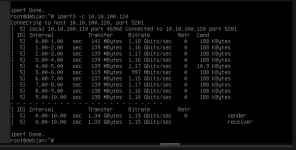
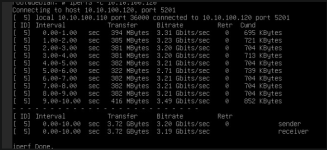
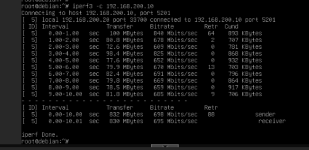
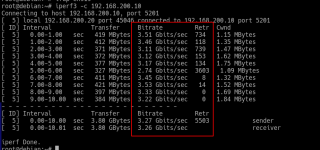
But only with MTU 9000 in the SDN, and MTU 8950 in the VM NIC configuration (virtio) I could get 3G of transfer using iperf3 as a test between the 2 vms.
Without MTU 9000/8950, i.e., using the default 1500 I could get only 1.2, 1.3 G.
My question is why?
Is there something in the SDN that hold the speed of the nics?
Sorry if I dont do myself clear enought.
Does iperf directly between the two IPs show the same result?
Hi.. Thanks for reply.
This is the result of iperf on the real nic, on the hosts:
-----------------------------------------------------------
Server listening on 5201 (test #1)
-----------------------------------------------------------
Accepted connection from 172.18.0.10, port 33718
[ 5] local 172.18.0.20 port 5201 connected to 172.18.0.10 port 33728
[ ID] Interval Transfer Bitrate
[ 5] 0.00-1.00 sec 1.09 GBytes 9.38 Gbits/sec
[ 5] 1.00-2.00 sec 1.09 GBytes 9.39 Gbits/sec
[ 5] 2.00-3.00 sec 1.09 GBytes 9.39 Gbits/sec
[ 5] 3.00-4.00 sec 1.09 GBytes 9.39 Gbits/sec
[ 5] 4.00-5.00 sec 1.09 GBytes 9.39 Gbits/sec
[ 5] 5.00-6.00 sec 1.09 GBytes 9.39 Gbits/sec
[ 5] 6.00-7.00 sec 1.09 GBytes 9.39 Gbits/sec
[ 5] 7.00-8.00 sec 1.09 GBytes 9.39 Gbits/sec
[ 5] 8.00-9.00 sec 1.09 GBytes 9.39 Gbits/sec
[ 5] 9.00-10.00 sec 1.09 GBytes 9.39 Gbits/sec
- - - - - - - - - - - - - - - - - - - - - - - - -
[ ID] Interval Transfer Bitrate
[ 5] 0.00-10.00 sec 10.9 GBytes 9.39 Gbits/sec receiver
-----------------------------------------------------------
Server listening on 5201 (test #2)
-----------------------------------------------------------
Does your NIC support VXLAN offloading / is it enabled?
Do you mean this ethtool -k <NIC> tx-udp_tnl-segmentation on tx-udp_tnl-csum-segmentation on command?
I am not sure.
This is on the hosts, right?
According to the bellow command, it is "on" on both hosts:
pve101:~# ethtool -k ens1 |grep -i udp
tx-udp_tnl-segmentation: on
tx-udp_tnl-csum-segmentation: on
tx-udp-segmentation: on
rx-udp_tunnel-port-offload: off [fixed]
rx-udp-gro-forwarding: off
pve101:~# ssh pve102 ethtool -k ens1 |grep -i udp
tx-udp_tnl-segmentation: on
tx-udp_tnl-csum-segmentation: on
tx-udp-segmentation: on
rx-udp_tunnel-port-offload: off [fixed]
rx-udp-gro-forwarding: off
pve101:~#
Can you try setting the MTU to 1450 for the VXLAN zone and the guests? (instead of 1500) Since VXLAN adds an overhead so I'd assume the host needs to fragment the packets before transferring and the receiving end needs to reassemble. Maybe that's already the solution.
Can you try setting the MTU to 1450 for the VXLAN zone and the guests? (instead of 1500) Since VXLAN adds an overhead so I'd assume the host needs to fragment the packets before transferring and the receiving end needs to reassemble. Maybe that's already the solution.
As I state before, with 8950 I got around 3 G/s, but with 1450 the bitrate transfer drop to around 1 G/S!
As I state before, with 8950 I got around 3 G/s, but with 1450 the bitrate transfer drop to around 1 G/S!
Ah, sorry I misinterpreted your initial post that you used 1500 on the zone rather than 1450. Have you double-checked that MTU is properly set up everywhere? VXLAN generally is quite sensitive to fragmentation. You could use e.g. Wireshark along the path / at the receiving end to see if there are any fragmented packets.
You can also retry with the -P X flag for iperf, to check if there aren't any potential issues with e.g. irq balancing due to there being only 1 VXLAN flow (even though the 9000 MTU result indicates differently).
Do you mean this ethtool -k <NIC> tx-udp_tnl-segmentation on tx-udp_tnl-csum-segmentation on command?
Yes, according to [1] those are the tunables that can be used for VXLAN traffic specifically - but it seems to be correctly set up in your case.
ok...
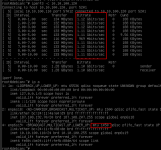
Another thing I noticed is when I tag the nic in the VM, I get around 1 GB/s and without the tag, I get around 3 GB/s.
But I need use tag on the VM NIC, in order to isolate the traffic.
Another question is if the switch need some special configuration regards VxLAN or fragmentation on/off?
When the VMs that is using VXLAN are in the same physical hosts, the bitrate hits 10G!
That makes sense, since it is not using the VXLAN interface then at all but only the local bridge.
Can you post the full output of ip a on both nodes where the VMs are located and also indicate the IDs of the affected VMs?
Actually, I am using the SDN feature of Proxmox with VXLAN on three hosts connected to a 10G switch.
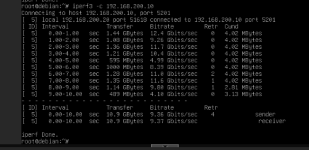
I’m using iperf3 from host to host, and it gives 10 Gbit/s throughput, but from guest to guest on two different hosts, it gives around 3 Gbit/s.
I checked the MTU and set it to 9000 on the hosts and 1550 on the bridge.
Actually, I am using the SDN feature of Proxmox with VXLAN on three hosts connected to a 10G switch.
I’m using iperf3 from host to host, and it gives 10 Gbit/s throughput, but from guest to guest on two different hosts, it gives around 3 Gbit/s.
I checked the MTU and set it to 9000 on the hosts and 1550 on the bridge.