

惯性聚合 高效追踪和阅读你感兴趣的博客、新闻、科技资讯
阅读原文 在惯性聚合中打开

推荐订阅源

S
Secure Thoughts
罗磊的独立博客
T
The Blog of Author Tim Ferriss
人人都是产品经理
人人都是产品经理
博客园 - 叶小钗
Last Week in AI
Last Week in AI
美团技术团队
Google Online Security Blog
Application and Cybersecurity Blog
D
Docker
G
Google Developers Blog
大猫的无限游戏
大猫的无限游戏
酷 壳 – CoolShell
酷 壳 – CoolShell
小众软件
小众软件
月光博客
月光博客
L
LINUX DO - 最新话题
cs.AI updates on arXiv.org
CTFtime.org: upcoming CTF events
W
WeLiveSecurity
H
Heimdal Security Blog
Vercel News
Vercel News
SecWiki News
SecWiki News
Forbes - Security
Forbes - Security
Blog — PlanetScale
Blog — PlanetScale
Google DeepMind News
Exploit-DB.com RSS Feed
www.infosecurity-magazine.com
TaoSecurity Blog
TaoSecurity Blog
T
Troy Hunt's Blog
A
About on SuperTechFans
C
Check Point Blog
S
Security Affairs
Hacker News - Newest:
Hacker News - Newest: "LLM"
AI
AI
WordPress大学
WordPress大学
K
KPMG report finds enterprise disconnect between AI and its ROI | CIO
Help Net Security
Help Net Security
博客园_首页
The Last Watchdog
The Last Watchdog
S
SegmentFault 最新的问题
Hugging Face - Blog
Hugging Face - Blog
Security Archives - TechRepublic
Engineering at Meta
Engineering at Meta
cs.CV updates on arXiv.org
I
Intezer
K
Kaspersky official blog
M
MIT News - Artificial intelligence
J
Java Code Geeks
G
GRAHAM CLULEY
P
Palo Alto Networks Blog

In Pursuit of Simplicity

A Genius AI Product design: Reddit translation The Essence of Prompt Engineering is the Art of Asking Questions A Story About Bypassing Air Canada's In-flight Network Restrictions A Telegram Spam Blocker Bot Based On Bayesian Algorithm Reflections on Ten Years of Programming TIL: Git Blame with Following Rewind your Github summary How to share resource between CDK stacks Topological Sort
TIL: Git Conditional Configs
Ramsay Leung · 2024-04-08 · via In Pursuit of Simplicity

Every Git user will have probably been asked to set up their Git at the first time:

1
2
git config --global user.name "Ramsay Leung"
git config --global user.email ramsayleung@gmail.com

The above command will simply add the user.name and user.email value into your ~/.gitconfig file

1
2
3
4
5
6
7
8
> cat ~/.gitconfig
[user]
    name = Ramsay Leung
    email = ramsayleung@gmail.com
[core]
    quotepath = false
[init]
    defaultBranch = master

You could also specify --local argument to writes the config values to .git/config in whatever project you’re currently in.

If you need to simultaneously contribute to your work and open source project on the same laptop, with different Git config values, e.g.(company email address for work-specific projects, personal email address for open source project), what should you do?

You could definitely set up work-specific config as global config, then set up personal config with --local for every personal project separately. It works, but tedious and easy to mess-up.

Fortunately, starting from Git version 2.13, Git supports conditional configuration includes, you are capable of setting up different configs for different repositories.

If you add the following config to your global config file:

1
2
3
4
5
[includeIf "gitdir:~/projects/oss/"]
    path = ~/.gitconfig-oss

[includeIf "gitdir:~/projects/work/"]
    path = ~/.gitconfig-work

Then Git will look in the ~/.gitconfig-oss files for values only if the project you are currently working on matches ~/projects/oss/.

Caution: If you forget to specify the “/” at the end of the git dir, e.g. “~/projects/oss”, Conditional Config won’t work!

Therefore, you could have a “work” directory and work-specific config here and an “oss” directory with values for your open source projects, etc.
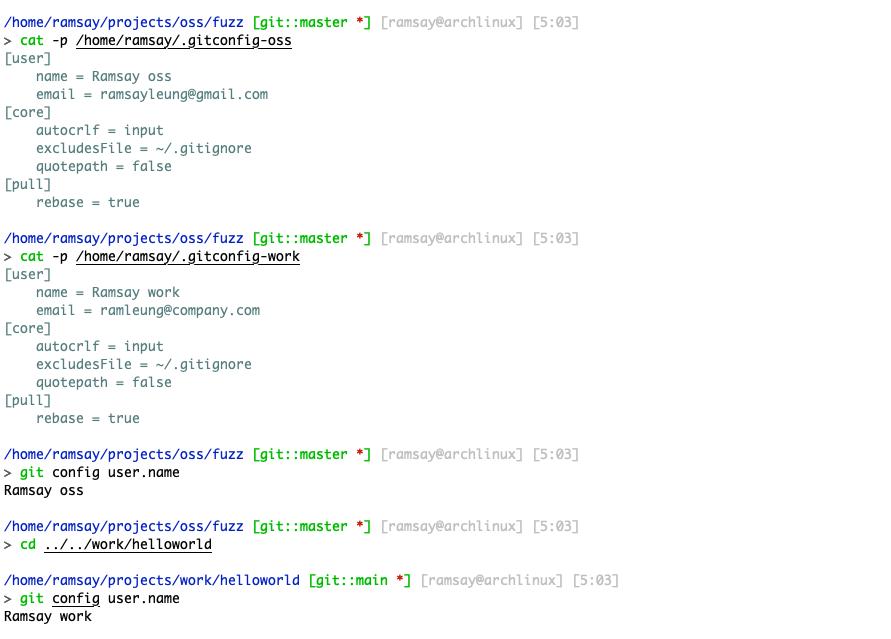
Git also supports other filters more than gitdir, you could specify a branch name as an include filter with onbranch

1
2
3
4
  ; include only if we are in a worktree where foo-branch is
; currently checked out
[includeIf "onbranch:foo-branch"]
        path = foo.inc

Check out the Git docs for more details