








My DevOps journey kicked off when we started to develop Datree - an open-source CLI tool that aims to help DevOps engineers to prevent Kubernetes misconfigurations from reaching production. One year later, seeking best practices and more ways to avoid misconfigurations became my way of life.
When I first learned about Argo CD, using Argo without knowing its pitfalls and complications didn't make sense to me. After all, it's probable that misconfiguring it can easily cause the next production outage.
In this article, we'll explore some of the best practices of Argo that I've found and learn how we can validate our custom resources against these best practices.
retryStrategy (i.e. {})Project: Argo Workflows
Best practice: The user can specify a retryStrategy that will dictate how failed or errored steps are retried in a workflow. Providing an empty retryStrategy (i.e. retryStrategy: {}) will cause a container to retry until completion and eventually cause OOM issues.
Project: Argo Workflows
Best practice: All pods in a workflow run with a service account specified in the workflow.spec.serviceAccountName. If omitted, Argo will use the default service account of the workflow's namespace. This provides the workflow (i.e. the pod) the ability to interact with the Kubernetes API server. This allows attackers with access to a single container to abuse Kubernetes by using the AutomountServiceAccountToken. If, by any chance, the option for AutomountServiceAccountToken was disabled, then the default service account that Argo will use won't have any permissions, and the workflow will fail.
It's recommended to create dedicated user-managed service accounts with the appropriate roles.
part-of: argocd exists for ConfigMapsProject: Argo CD
Best practice: Related ConfigMap resources that aren't labeled with app.kubernetes.io/part-of: argocd, won't be used by Argo CD.
When installing Argo CD, its atomic configuration contains a few services and configMaps. For each specific kind of ConfigMap and Secret resource, there is only a single supported resource name (as listed in the above table) - if you need to merge things, you need to do it before creating them. It's essential to annotate your ConfigMap resources using the label app.kubernetes.io/part-of: argocd; otherwise, Argo CD will not be able to use them.
Project: Argo Workflows
Best practice: As an alternative to specifying sequences of steps in Workflow, you can define the workflow as a directed-acyclic graph (DAG) by specifying the dependencies of each task. The DAG logic has a built-in fail fast feature to stop scheduling new steps as soon as it detects that one of the DAG nodes has failed. Then it waits until all DAG nodes are completed before failing the DAG itself. The FailFast flag default is true. If set to false, it will allow a DAG to run all branches of the DAG to completion (either success or failure), regardless of the failed outcomes of branches in the DAG.
Resources: more info and examples of this feature are here.
Project: Argo Rollouts
Best practice: For every Rollout, we can define a list of steps. Each step can have one of two fields: setWeight and pause. The setWeight field dictates the percentage of traffic that should be sent to the canary, and the pause literally instructs the rollout to pause.
Under the hood, the Argo controller uses these steps to manipulate the ReplicaSets during the rollout. When the controller reaches a pause step for a rollout, it will add a PauseCondition struct to the .status.PauseConditions field. If the duration field within the pause struct is set, the rollout will not progress to the next step until it has waited for the value of the duration field. However, if the duration field has been omitted, the rollout might wait indefinitely until the added pause condition will be removed.
revisionHistoryLimitProject: Argo Rollouts
Best practice: The .spec.revisionHistoryLimit is an optional field that indicates the number of old ReplicaSets which should be retained in order to allow rollback. These old ReplicaSets consume resources in etcd and crowd the kubectl get rs output. The configuration of each Deployment revision is stored in its ReplicaSets; therefore, once an old ReplicaSet is deleted, you lose the ability to roll back to that revision of Deployment.
By default, ten old ReplicaSets will be kept. However, its ideal value depends on the frequency and stability of new Deployments. Setting this field to zero means that all old ReplicaSets with 0 replicas will be cleaned up. In this case, a new Deployment rollout cannot be undone since its revision history is cleaned up.
scaleDownDelaySeconds to 30s to ensure IP table propagation across the nodes in a clusterProject: Argo Rollouts
Best practice: When the rollout changes the selector on service, there is a propagation delay before all the nodes update their IP tables to send traffic to the new pods instead of the old. Traffic will be directed to the old pods if the nodes have not been updated yet during this delay. To prevent the packets from being sent to a node that killed the old pod, the rollout uses the scaleDownDelaySeconds field to give nodes enough time to broadcast the IP table changes. If omitted, the Rollout waits 30 seconds before scaling down the previous ReplicaSet.
It's recommended to set scaleDownDelaySeconds to a minimum of 30 seconds to ensure that the IP table propagation across the nodes in a cluster. The reason is that Kubernetes waits for a specified time called the termination grace period. By default, this is 30 seconds.
Project: Argo Workflows
Best practice: retryStrategy is an optional field of the Workflow CRD that provides controls for retrying a workflow step. One of the fields of retryStrategy is retryPolicy, which defines the policy of NodePhase statuses that will be retried (NodePhase is the condition of a node at the current time).The options for retryPolicy can be either: Always, OnError, or OnTransientError. In addition, the user can use an expression to control more of the retries.
What's the catch?
retryPolicy=Always is too much. The user only wants to retry on system-level errors (e.g., the node dying or being preempted), but not on errors occurring in user-level code since these failures indicate a bug. In addition, this option is more suitable for long-running containers than workflows which are jobs.
retryPolicy=OnError doesn't handle preemptions: retryPolicy=OnError handles some system-level errors like the node disappearing or the pod being deleted. However, during graceful Pod termination, the kubelet assigns a Failed status and a Shutdown reason to the terminated Pods. As a result, node preemptions result in node status "Failure", not "Error" so preemptions aren't retried.
retryPolicy=OnError doesn't handle transient errors: classifying a preemption failure message as a transient error is allowed; however, this requires retryPolicy=OnTransientError. (see also, TRANSIENT_ERROR_PATTERN).
We recommend setting retryPolicy: "Always" and using the following expression:
lastRetry.status == "Error" or (lastRetry.status == "Failed" and asInt(lastRetry.exitCode) not in [0])
progressDeadlineAbort set to true, especially if progressDeadlineSeconds has been setProject: Argo Rollouts
Best practice: A user can set progressDeadlineSeconds which states the maximum time in seconds in which a rollout must make progress during an update before it is considered to be failed.
If rollout pods get stuck in an error state (e.g., image pull back off), the rollout degrades after the progress deadline is exceeded, but the bad replica set/pods aren't scaled down. The pods would keep retrying, and eventually, the rollout message would read ProgressDeadlineExceeded: The replica set has timed out progressing. To abort the rollout, the user should set both progressDeadlineSeconds and progressDeadlineAbort, with progressDeadlineAbort: true.
Project: Argo CD
Best practice: In each repository, all Application and AppProject manifests should match the same metadata.namespace—depending on how you installed Argo CD.
If you deployed Argo CD in the typical deployment, under the hood, Argo CD creates two ClusterRoles and ClusterRoleBinding that reference the argocd namespace by default. In this case, it's recommended not only to ensure all Argo CD resources match the namespace of the Argo CD instance but also to use the argocd namespace. Otherwise, you need to update the namespace reference in all Argo CD internal resources.
However, suppose you deployed Argo CD for external clusters (in “Namespace Isolation Mode”) instead of ClusterRole and ClusterRoleBinding. In that case, Argo creates Roles and associated RoleBindings in the namespace where Argo CD was deployed. The created service account is granted a limited level of access to manage, so for Argo CD to function as desired, access to the namespace must be explicitly granted. In this case, it's recommended to make sure all the resources, including the Application and AppProject, use the correct namespace of the ArgoCD instance.
I'm a GitOps believer. I believe that you should handle every Kubernetes resource the same as your source code, especially if you are using helm/kustomize. So, the way I see it, we should automatically check our resources on every code change.
You can write your policies using languages like Rego or JSONSchema and use tools like OPA ConfTest or different validators (for example, ‣) to scan and validate our resources on every change. Additionally, if you have one GitOps repository, Argo plays a significant role in providing a centralized repository to develop and version control your policies.
However, writing policies might be a pretty challenging task, especially with Rego.
Another way would be to look for tools like ‣, which already come with predefined policies, YAML schema validation, and best practices for Kubernetes and Argo.
The Datree CLI runs automatic checks on every resource in a given path. After the check is completed, Datree displays a detailed output of any violation or misconfiguration it finds, with guidelines on how to fix it:
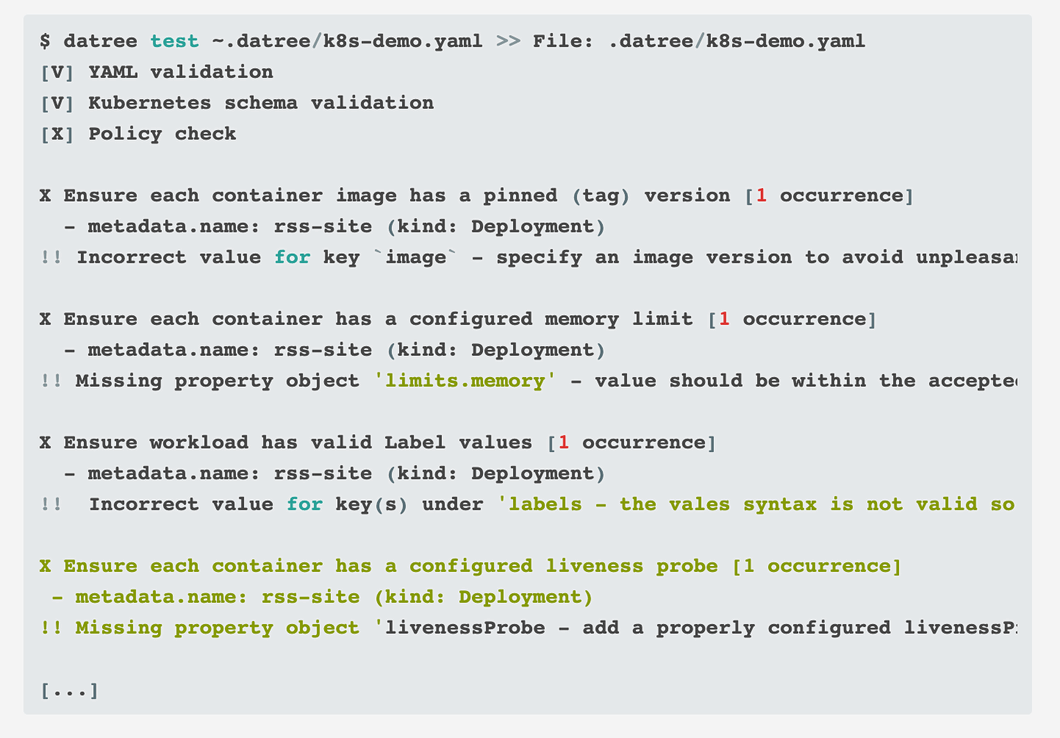
kubectl datree test -- -n argocd
You can use the Datree kubectl plugin to validate your resources after deployments, get ready for future version upgrades and monitor the overall compliance of your cluster.
Disclaimer number #2: I'm a big shift-left believer. I believe that the sooner you identify the problem, the less likely it can take your production down.
The way I see it, one of the biggest challenges of shifting left Kubernetes knowledge is to provide guidance, support, and communicate the policies. The ultimate way to face this issue is by providing clear guidelines on every failure. This is why one of my favorite features in the Datree CLI might be the “Message On Fail” which is a text (that can be changed from the centralized policy dashboard) with guidelines on how to fix every misconfiguration.
You can use Datree in the CI, as a local testing library, or even as a pre-commit hook. To use datree, you first need to install the CLI on your machine and then execute it with the following command:
As I mentioned above, the CLI runs automatic checks on every resource in the given path. Under the hood, each automatic check includes three steps:
In my opinion, governing policies are only the beginning of achieving reliability, security, and stability for your Kubernetes cluster. I was surprised to find out that centralized policy management might also be a key solution for resolving the DevOps vs. Development deadlock once and for all.
Check out the Datree open source project - I highly encourage you to review the code and submit a PR, and don't hesitate to reach out 😊
此内容由惯性聚合(RSS阅读器)自动聚合整理,仅供阅读参考。 原文来自 — 版权归原作者所有。