


惯性聚合 高效追踪和阅读你感兴趣的博客、新闻、科技资讯
阅读原文 在惯性聚合中打开

推荐订阅源

Attack and Defense Labs
aimingoo的专栏
aimingoo的专栏
月光博客
月光博客
D
Darknet – Hacking Tools, Hacker News & Cyber Security
K
Kaspersky official blog
Threat Intelligence Blog | Flashpoint
Stack Overflow Blog
Stack Overflow Blog
T
Threatpost
AWS News Blog
AWS News Blog
小众软件
小众软件
美团技术团队
L
Lohrmann on Cybersecurity
Hacker News: Ask HN
Hacker News: Ask HN
Security Latest
Security Latest
Jina AI
Jina AI
Hacker News - Newest:
Hacker News - Newest: "LLM"
宝玉的分享
宝玉的分享
A
Arctic Wolf
M
MIT News - Artificial intelligence
Scott Helme
Scott Helme
爱范儿
爱范儿
The Cloudflare Blog
博客园 - 聂微东
云风的 BLOG
云风的 BLOG
博客园 - 叶小钗
有赞技术团队
有赞技术团队
The GitHub Blog
The GitHub Blog
T
The Blog of Author Tim Ferriss
I
InfoQ
V
Visual Studio Blog
N
Netflix TechBlog - Medium
Latest news
Latest news
C
CERT Recently Published Vulnerability Notes
T
Tenable Blog
H
Heimdal Security Blog
www.infosecurity-magazine.com
Cisco Talos Blog
Cisco Talos Blog
L
LINUX DO - 最新话题
博客园 - 三生石上(FineUI控件)
CTFtime.org: upcoming CTF events
Application and Cybersecurity Blog
T
Threat Research - Cisco Blogs
S
Secure Thoughts
The Hacker News
The Hacker News
S
Schneier on Security
博客园 - 【当耐特】
T
The Exploit Database - CXSecurity.com
博客园_首页
N
News | PayPal Newsroom
cs.CL updates on arXiv.org

Learn Cloud Native

Agentgateway rate limiting for agents | Learn Cloud Native Local development with coding agents on Kubernetes using Signadot | Learn Cloud Native cuenv: one typed file for your whole project | Learn Cloud Native Preflight: AI Code Review Before You Push Anatomy of AI Agents Accessing Google Drive from Next.js Deploying to Fly.io using Dagger and Github Top Cloud-Native & Kubernetes Certifications [2026 Guide] Rapid microservices development with Signadot How to prepare for Istio certified associate exam (ICA) Global Rate Limiting in Istio with Envoy Rate Limit Service My Journey with Istio: From Incubation to Graduation Cilium Network Policy Tutorial: Secure Kubernetes Step by Step Kubernetes Networking: How kube-proxy and iptables Work Istio ServiceEntry: DNS vs. STATIC Resolution & Endpoints Explained Apply an Istio DestinationRule Globally (Mesh-Wide) Istio Rate Limiting: Configure a Local Rate Limiter in Envoy How to expose custom ports on Istio ingress gateway Portainer Tutorial: A Web UI for Kubernetes & Containers Traefik Proxy 2.x and TLS 101 Kubernetes CLI (kubectl) tips you didn't know about Setting up SSL certificates with Istio Gateway ArgoCD Best Practices You Should Know 在 OCI Ampere A1 计算实例上运行 AI Running AI On OCI Ampere A1 Instance How to Deploy Traefik Proxy Using Flux and GitOps Principles Firebase Emulators with Next.js: Local Setup Guide Running Hugo on free Ampere VM (Oracle Cloud Infrastructure) How to use kwatch to detect crashes in Kubernetes clusters Continuous profiling in Kubernetes using Pyroscope Monitoring containers with cAdvisor Creating a Kubernetes cluster in Google Cloud (LAB) Your first Kubernetes Pod and ReplicaSet (LABS) Container Lifecycle Hooks Maybe Convert Wasm Extension Config? GetIstio - CLI, training, and community Attach multiple VirtualServices to Istio Gateway Kubernetes Volumes Explained: Keep Data Beyond the Pod Send a Slack message when Docker images are updated Kubernetes Network Policy Ambassador Container Pattern Start Kubernetes Release Sidecar Container Pattern Kubernetes Init Containers Deploying multiple Istio Ingress Gateways Branch by Abstraction Pattern The Strangler Pattern Kubernetes Development Environment with Skaffold Securing Kubernetes Ingress with Ambassador and Let's Encrypt All About the Ingress Resource How to quarantine Kubernetes pods? Getting started with Kubernetes Horizontal partitioning in MongoDB Docker image tagging scheme Six things to keep in mind when working with Dockerfiles Beginners guide to Docker Beginners guide to gateways and proxies Deploy and Operate Multiple Istio Meshes in one Kubernetes Cluster Managing service meshes with Meshery Circuit Breaking in Istio Explained Build and push your Docker images using Github Actions Kubernetes and Istio service mesh workshop materials Build Netlify-like deployment for React app using Kubernetes pods Six exciting enhancements in Istio 1.4.0 Fallacies of Distributed Systems CAP Theorem Explained Master the Kubernetes CLI (kubectl) - Cheatsheet Minikube Basics and How to Get Started with Kubernetes 5 Tips to Be More Productive with Kubernetes What are sticky sessions and how to configure them with Istio? Debugging Kubernetes applications using Istio Kubernetes Ingress and Istio Gateway Resource Zero Downtime Releases using Kubernetes and Istio Traffic Mirroring with Istio Service Mesh
Expose a Kubernetes service on your own custom domain
Peter Jausovec · 2018-09-28 · via Learn Cloud Native

You have finally deployed your application to Kubernetes and you bought a cool domain name — ever wondered how to point your cool domain like www.mydomain.com, but cooler, to an application running inside Kubernetes? Well, read on and I'll try to explain how to do just that!

What do you need?

Before we get started, make sure you have the following:

  • Kubernetes cluster and access to it (i.e. so you can deploy stuff)
  • Your application running in the Kubernetes cluster
  • Registered domain name (I am using Name.com for my domains, but any other registrar works as well)
  • Helm

Note

Note: I am using the word application to represent your code that runs in your cluster and you want to access it through the domain name. Your code is running inside of a Docker image and a Kubernetes pod that's part of a deployment and is exposed through a Kubernetes service. But application is what I'll use to refer to all this.

Here are the rough steps to follow to hook up the domain with your service:

  • Create an Ingress resource
  • Deploy the Ingress controller
  • Update the domain records to point to the clusters

Accessing Kubernetes from the outside

A Kubernetes resource called Ingress is what manages external access to the applications running inside the cluster. With ingress, you can define rules that tell Kubernetes how to route external traffic to your application. Here's how an example Ingress resource looks like:

apiVersion: extensions/v1beta1
kind: Ingress
metadata:
  name: my-ingress
  annotations:
    kubernetes.io/ingress.class: nginx
spec:
  rules:
    - host: www.mycoolapp.mydomain.com
      http:
        paths:
          - path: /
            backend:
              serviceName: mycoolapp
              servicePort: 80

However, this resource alone is not enough — you also need a controller that knows how to direct the traffic. I will be using the Nginx Ingress Controller, but there are others you could use as well (check out more docs on different ingresses). We will be using Helm to deploy the nginx-ingress chart like this:

helm install stable/nginx-ingress

The above command takes care of installing the NGINX controller and a default backend. Default backend is an ‘app' that the ingress will point to by default or in case there are no services defined. As part of the NGINX controller you will also get a service with type LoadBalancer — this is where we you point your domain to.

Note

Note that there are a plethora of buttons and knobs you can adjust and twist when deploying the controller — there's a whole list of them here.

With the NGINX ingress controller deployed, let's figure out what the IP address of the cluster is by running this command:

kubectl get services --all-namespaces

Above command will list out all Kubernetes services running in all namespaces. What you are interested in is any service of type LoadBalancer and any service that has an external IP set (it's usually the same service). Here's how a sample output of the command would look like:

virtuous-gopher is the name Helm picked for the Nginx controller

The value that's grayed out next to the *nginx-ingress-controller service in the image above is what you need. This is the IP address you will point your domain to.

Or, if you want to be more fancy, you can also run the command below that will filter all services by their type (LoadBalancer) and return you the name and the IP address:

kubectl get svc --all-namespaces -o jsonpath='{range .items[?(@.spec.type=="LoadBalancer")]}{.metadata.name}:{.status.loadBalancer.ingress[0].ip}{"\n"}{end}'

Pointing your domain to the cluster

Depending on where you registered your domain, the steps might be a bit different, but the gist is the same — you need to create an A and CNAME DNS records to point your domain (host) to the cluster.

My registrar is Name.com, but I am pretty sure other registrars have some good docs on how to do this as well.

Heavily redacted view of the DNS records for my domain

Here's what I did: on Name.com I went to my domain and opened the DNS records tab. From there, I was able to add an A record with the host called www.mycoolapp.mydomain.com and as an answer, I entered my clusters IP address.

Similarly, I created a CNAME record and pointed mycoolapp.mydomain.com to the cluster host name (usually, you can find this in your cloud providers settings). You don't have to provide a CNAME, an A record is enough. Note that if you don't provide the CNAME, then mycoolapp.mydomain.com will not resolve to your application!

Test it out!

Fire up your favorite terminal or browser and navigate to mycoolapp.mydomain.com. Tadaaa — you should be able to get a response back (in my case, the application I deployed was a simple NGINX container, thus the default NGINX page)
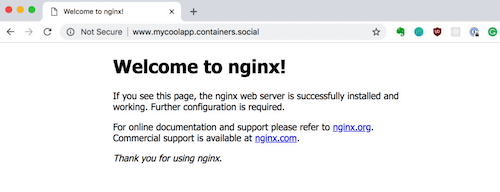
Yes, I own containers.social domain… and bunch more that I'll never use