


惯性聚合 高效追踪和阅读你感兴趣的博客、新闻、科技资讯
阅读原文 在惯性聚合中打开

推荐订阅源

cs.CV updates on arXiv.org
博客园 - 【当耐特】
OSCHINA 社区最新新闻
OSCHINA 社区最新新闻
L
LangChain Blog
雷峰网
雷峰网
WordPress大学
WordPress大学
S
Security Affairs
腾讯CDC
freeCodeCamp Programming Tutorials: Python, JavaScript, Git & More
Recent Commits to openclaw:main
Hacker News: Ask HN
Hacker News: Ask HN
T
Tailwind CSS Blog
SecWiki News
SecWiki News
罗磊的独立博客
The Last Watchdog
The Last Watchdog
博客园 - 三生石上(FineUI控件)
N
Netflix TechBlog - Medium
Hugging Face - Blog
Hugging Face - Blog
T
Tor Project blog
V
Vulnerabilities – Threatpost
Microsoft Azure Blog
cs.AI updates on arXiv.org
奇客Solidot–传递最新科技情报
奇客Solidot–传递最新科技情报
GbyAI
GbyAI
M
MIT News - Artificial intelligence
Help Net Security
Help Net Security
MongoDB | Blog
MongoDB | Blog
AWS News Blog
AWS News Blog
L
LINUX DO - 热门话题
P
Palo Alto Networks Blog
Threat Intelligence Blog | Flashpoint
Simon Willison's Weblog
博客园 - Franky
Security Latest
Security Latest
G
GRAHAM CLULEY
C
CERT Recently Published Vulnerability Notes
H
Heimdal Security Blog
Recent Announcements
Apple Machine Learning Research
W
WeLiveSecurity
The Cloudflare Blog
B
Blog RSS Feed
B
Blog
Vercel News
Vercel News
T
Threatpost
小众软件
小众软件
H
Help Net Security
Jina AI
Jina AI
T
Threat Research - Cisco Blogs
Google DeepMind News

Learn Cloud Native

Local development with coding agents on Kubernetes using Signadot | Learn Cloud Native cuenv: one typed file for your whole project | Learn Cloud Native Preflight: AI Code Review Before You Push Anatomy of AI Agents Accessing Google Drive from Next.js Deploying to Fly.io using Dagger and Github Top Cloud-Native & Kubernetes Certifications [2026 Guide] Rapid microservices development with Signadot How to prepare for Istio certified associate exam (ICA) Global Rate Limiting in Istio with Envoy Rate Limit Service My Journey with Istio: From Incubation to Graduation Cilium Network Policy Tutorial: Secure Kubernetes Step by Step Kubernetes Networking: How kube-proxy and iptables Work Istio ServiceEntry: DNS vs. STATIC Resolution & Endpoints Explained Apply an Istio DestinationRule Globally (Mesh-Wide) Istio Rate Limiting: Configure a Local Rate Limiter in Envoy How to expose custom ports on Istio ingress gateway Portainer Tutorial: A Web UI for Kubernetes & Containers Traefik Proxy 2.x and TLS 101 Kubernetes CLI (kubectl) tips you didn't know about Setting up SSL certificates with Istio Gateway ArgoCD Best Practices You Should Know 在 OCI Ampere A1 计算实例上运行 AI Running AI On OCI Ampere A1 Instance How to Deploy Traefik Proxy Using Flux and GitOps Principles Firebase Emulators with Next.js: Local Setup Guide Running Hugo on free Ampere VM (Oracle Cloud Infrastructure) How to use kwatch to detect crashes in Kubernetes clusters Continuous profiling in Kubernetes using Pyroscope Monitoring containers with cAdvisor Creating a Kubernetes cluster in Google Cloud (LAB) Your first Kubernetes Pod and ReplicaSet (LABS) Container Lifecycle Hooks Maybe Convert Wasm Extension Config? GetIstio - CLI, training, and community Attach multiple VirtualServices to Istio Gateway Kubernetes Volumes Explained: Keep Data Beyond the Pod Kubernetes Network Policy Ambassador Container Pattern Start Kubernetes Release Sidecar Container Pattern Kubernetes Init Containers Deploying multiple Istio Ingress Gateways Branch by Abstraction Pattern The Strangler Pattern Kubernetes Development Environment with Skaffold Securing Kubernetes Ingress with Ambassador and Let's Encrypt All About the Ingress Resource How to quarantine Kubernetes pods? Getting started with Kubernetes Horizontal partitioning in MongoDB Docker image tagging scheme Six things to keep in mind when working with Dockerfiles Beginners guide to Docker Beginners guide to gateways and proxies Deploy and Operate Multiple Istio Meshes in one Kubernetes Cluster Managing service meshes with Meshery Circuit Breaking in Istio Explained Build and push your Docker images using Github Actions Kubernetes and Istio service mesh workshop materials Build Netlify-like deployment for React app using Kubernetes pods Six exciting enhancements in Istio 1.4.0 Fallacies of Distributed Systems CAP Theorem Explained Master the Kubernetes CLI (kubectl) - Cheatsheet Minikube Basics and How to Get Started with Kubernetes 5 Tips to Be More Productive with Kubernetes What are sticky sessions and how to configure them with Istio? Debugging Kubernetes applications using Istio Kubernetes Ingress and Istio Gateway Resource Zero Downtime Releases using Kubernetes and Istio Traffic Mirroring with Istio Service Mesh Expose a Kubernetes service on your own custom domain
Send a Slack message when Docker images are updated
Peter Jausovec · 2020-10-14 · via Learn Cloud Native

The Kubernetes labs that are part of the Start Kubernetes course run as multiple Docker images inside a Kubernetes cluster. I wanted a way to notify the users when I push new Docker images to the registry. That way, they can restart the Pods and get the updated images.

The Azure container registry I use to host the images allows me to create webhooks. Whenever you push or delete an image, the container registry sends a JSON payload to a URL of my choosing.

For the course, I am using a Slack workspace. Slack also has support for apps. You can create and add apps to Slack workspaces and give them permission to post messages, for example. One of the Slack apps' features is the ability to use [incoming webhooks](https://api.slack.com/messaging/webhooks) to post messages to a Slack channel.

For example, you can configure a channel for the incoming webhook and then use a POST request like the one below to send a message to that channel:

curl -X POST -H 'Content-type: application/json' --data '{"text":"Hello, World!"}' https://hooks.slack.com/services/[somethingsomething]

Here's a diagram that shows what I wanted to achieve:
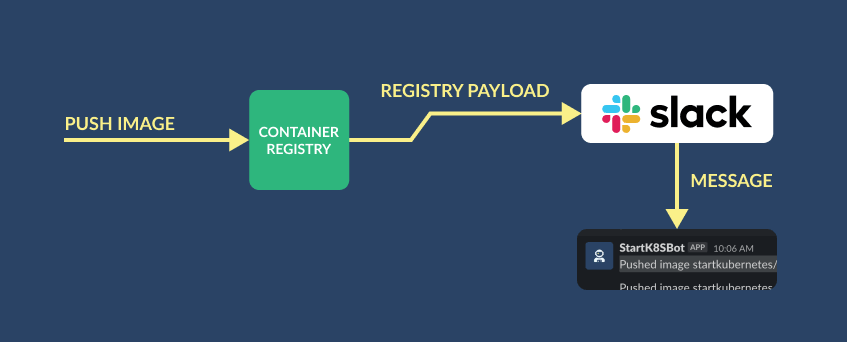
Registry webhook to Slack

The issue I ran into quickly was that I couldn't control the payload that the container registry sends. You can only configure the URL and the headers you want to send. The container registry sends a payload that looks like this:

{
  "id": "673aeeaa-6493-41d3-bcdd-68242942bcb0",
  "timestamp": "2020-10-14T00:15:02.82330594Z",
  "action": "push",
  "target": {
    "mediaType": "application/vnd.docker.distribution.manifest.v2+json",
    "size": 1778,
    "digest": "sha256:a71f5e4bf56c05a3d6264b8ef4d3bb4c90b4b0af579fedb6ccb68ea59f597435",
    "length": 1778,
    "repository": "startkubernetes/sk-web",
    "tag": "1"
  },
  "request": {
    "id": "adbc2757-8d80-49ac-af5f-ec30e5147bdf",
    "host": "myregistry.azurecr.io",
    "method": "PUT",
    "useragent": "docker/19.03.13+azure go/go1.13.15 git-commit/bd33bbf0497b2327516dc799a5e541b720822a4c kernel/5.4.0-1026-azure os/linux arch/amd64 UpstreamClient(Docker-Client/19.03.13+azure \\(linux\\))"
  }
}

However, Slack is expecting a different looking payload. In its simplest form, the Slack message payload looks like this:

{
  "text": "This is my message"
}

Note

Slack also has a Block Kit Builder that allows you to build more complex messages.

In any case, I needed an intermediary that does the following:
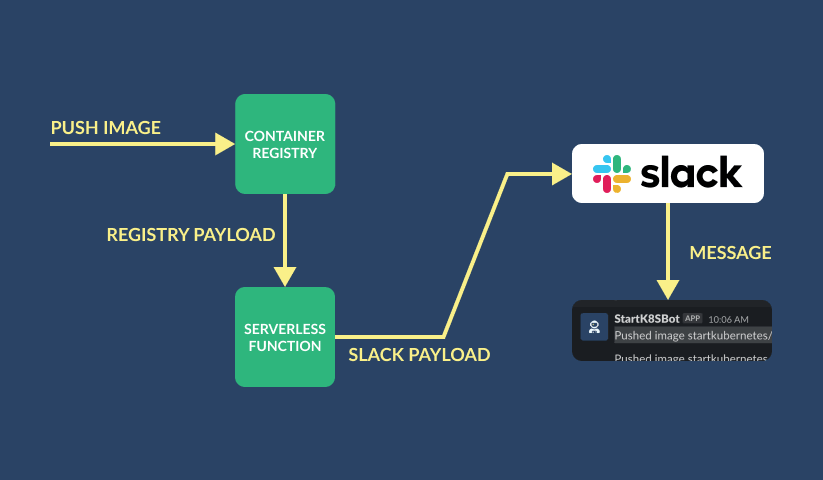
  • Accepts the container registry payload
  • Extracts the information (repository, tag, and a timestamp)
  • Creates payload that Slack understands
  • Sends the payload to the Slack incoming webhook URL.
Registry to Function to Slack

That seemed like a perfect use case for a serverless function. The function has an endpoint, and I can use that in the container registry webhook. The webhook sends the container registry payload to my function. In the function, I can write any code I want, modify the payload, and then it to the Slack webhook.

To create the function, I downloaded the Azure Functions VS Code extension, logged in, and I was able to do everything from my editor.

Here's how the function looks like:

const axios = require('axios');
const slackUrl = 'https://hooks.slack.com/services/[somethingsomething]';

module.exports = async function (context, req) {
  let message = JSON.stringify(req.body);

  if (
    req.body.hasOwnProperty('target') &&
    req.body.hasOwnProperty('timestamp')
  ) {
    const {
      target: { repository, tag },
      timestamp,
    } = req.body;
    message = `Pushed image ${repository}:${tag} (${timestamp})`;
  } else {
    context.res = {
      status: 500,
      body: req.body,
    };
    return;
  }

  axios
    .post(
      slackUrl,
      { text: message },
      {
        headers: {
          'content-type': 'application/json',
        },
      }
    )
    .then((response) => {
      context.res = { body: response.body };
    })
    .catch((err) => {
      context.res = {
        status: 500,
        body: err,
      };
      context.done();
    });
};

I deployed the function, then updated the container registry webhook to send the payloads to the function URL, and that was it. The container registry webhook has the option of sending a Ping to the endpoint. That way you, can test out the connection. Similarly, if I wanted to test the function-to-Slack connection, I could either send a POST request directly to the Slack, or manually invoke the function.

Every time I make changes to the labs or any code, and when I merge a PR to the main branch, the Github action builds the images and pushes them to the registry. Then, registry takes over, sends the payload to the function and sends the message to a Slack channel.