








Posted on tirsdag, oktober 4, 2022 in Hal9k, Planets, Sysadmin'ing
4 years ago I posted a 4 year review of the Olimex LIME2. It seems that the lifetime of power supplies is approximately 4 years as now another power supply died, and this time also the SD-card was expiring. The LIME2 lives on however!
It was a bit hard to notice, because the battery pack of the LIME2 kept it running pretty well even with the poor power supply. So, better monitoring of the battery pack is also on the todo list.
Recovering the SD-card was relatively easy with minimal dataloss, when out of the LIME2:
$ sudo ddrescue /dev/mmcblk0 backup.img
# Put in a new SD-card
$ sudo dd if=backup.img of=/dev/mmcblk0 bs=16M
I have done this a couple of times with other SD-cards from Raspberry PIs, and though there is the potential for dataloss it is usually minimal. This time a few blocks were lost.
I took the opportunity to upgrade the Debian install while the system was offline anyway. Upgrading was generally painless, following the usual Debian method. I went through the Buster release just to be sure:
$ vim /etc/apt/sources.list
# replace all "stretch" with "buster" :%s/stretch/buster
$ apt update && apt upgrade && apt full-upgrade
$ reboot

$ vim /etc/apt/sources.list
# replace all "buster" with "bullseye" :%s/buster/bullseye
$ apt update && apt upgrade && apt full-upgrade
$ reboot
The only tricky part is booting the new kernel. Since that always fails for me on the first try, I always hookup the serial console. For future reference, this is how to hookup the serial console (which is TTL 3.3V):
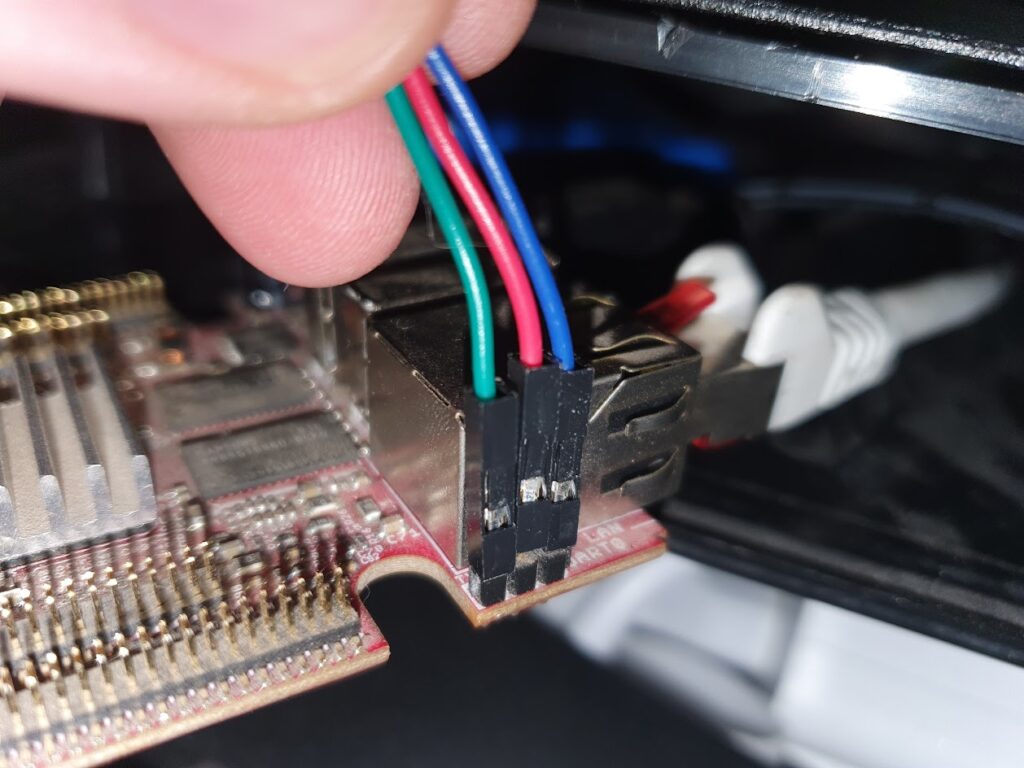
Now, of course the boot failed. I tried getting the flash-kernel package to work for my setup, but for historical reasons I have a separate boot partition. In the end I derived a simple bootscript from that package, that boots from p1 but loads the kernel, fdt and initrd from p2:
setenv bootargs  ${bootargs} console=ttyS0,115200 root=/dev/mmcblk0p2 rootwait panic=10

#setenv fk_kvers '4.19.0-21-armmp-lpae'
setenv fk_kvers '5.10.0-18-armmp-lpae'
setenv fdtpath dtb-${fk_kvers}

load mmc 0:2 ${kernel_addr_r} /boot/vmlinuz-${fk_kvers}
load mmc 0:2 ${fdt_addr_r} /boot/${fdtpath}
load mmc 0:2 ${ramdisk_addr_r} /boot/initrd.img-${fk_kvers}
bootz ${kernel_addr_r} ${ramdisk_addr_r}:${filesize} ${fdt_addr_r}
The script can be manually input over the serial terminal, and thereby tested out.
The only downside is it needs to be manually updated after each kernel upgrade. To activate the uboot bootscript:
$ mount /dev/mmcblk0p1 /mnt/
$ cd /mnt
# ensure boot.cmd is as above
$ mkimage -C none -A arm -T script -d boot.cmd boot.scrAfter upgrading to a recent 5.X mainline Linux kernel the battery pack is exposed in the sysfs filesystem:
$ cat /sys/class/power_supply/axp20x-battery/voltage_now
4070000 # 4.07 V
$ cat /sys/class/power_supply/axp20x-ac/voltage_now
4933000 # 4.93 V
I setup a couple of alerting rules for these in my home monitoring setup, so hopefully the next time the LIME2 defeats a power supply I’ll get notified.
I can still warmly recommend the LIME2. It is still available, and even a bit cheaper nowadays at 40 EUR + VAT, and still a little workhorse that just keeps on going.
此内容由惯性聚合(RSS阅读器)自动聚合整理,仅供阅读参考。 原文来自 — 版权归原作者所有。