




Posted on lørdag, oktober 28, 2023 in Hal9k, Planets
First part of this series is here, covering the reverse engineering of the DRTV Chromecast App.
I wanted the physical appearance to be extremely minimalistic, with slight references to various cubes from videogames. Because it is a remote control, it of course has to be wireless and battery-powered.
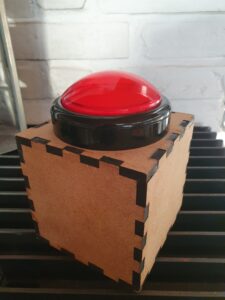
The box is lasercut from 6 mm MDF, and with a giant red arcade button on top with a red LED inside.
The electronics inside is a battery-powered Wemos D1, along with 4 x 18650 Lithium battery cells. After some experimentation on the response time, which is primarily dominated by the time it takes to reconnect to the WiFi network, I initially only used “light sleep”. This resulted in a battery time of just over a week, which is okay, but not great.
In order to preserve battery deep sleep would be really nice. The problem is deep sleep on the Wemos can only be interrupted by a reset. The idea was to use a MOSFET (in this case an N-channel logic level mosfet, IRFZ44N) for the Wemos to be able to select whether a press of the button should reset it, or it should just register on a pin as normal.
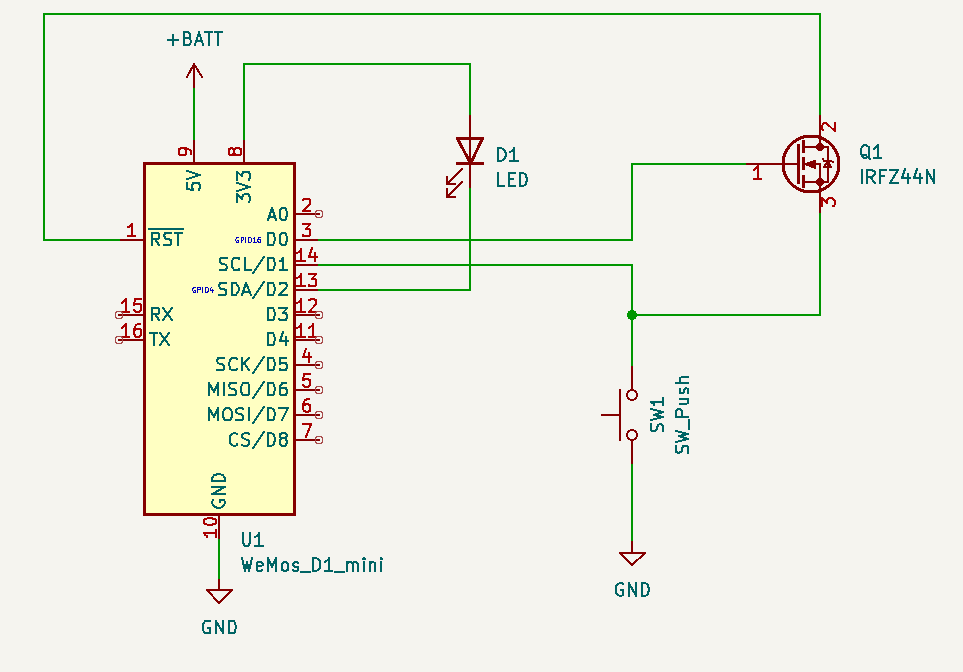
This circuit allows RST to be pulled low by the button, as long as D0 is high. Luckily, D0 is high during deep sleep, so as long as the Arduino code keeps D0 low button presses will not reset — but can still be registered by reading pin D1.
This works out “responsively enough” because the initial start has some delay due to the Chromecast initializing the app and loading media. Any subsequent button presses within the 30 seconds the Arduino stays awake are instant though. With this setup the battery life is not a problem – I’ve only had to charge it once. As a bonus feature/bug whenever the battery gets low the Wemos will trigger a bit sporadically: this causes “Fantus-bombing” where Fantus will just randomly start; quite quickly thereafter the Fantus-button is being charged 😉
The Wemos itself is not powerful enough to do all the pyChromecast communication needed, so I setup a small Raspberry Pi to handle that part. Since I didn’t want to spend too much time and effort setting up the communication between them, I ended up using a trick from my youth: UDP broadcasting. Because UDP is datagram-oriented you can send a UDP packet to the broadcast address (255.255.255.255) and then it will be received by all hosts on the local area network: no configuration needed. In Arduino code it looks like:
  Udp.begin(31337);
  Udp.beginPacket("255.255.255.255", 31337);
  Udp.write("emergency-button\n");
Udp.endPacket();(Full Arduino code available here.)
At this point I had a UDP packet that I could receive on the Raspberry Pi, and it was just a matter of writing a small server program to listen, receive and process those UDP commands. However, at this point a thought entered my mind, that derailed the project for a while:
Why write my own server to parse and execute commands, when Bash is already fully capable of doing exactly that with more flexibility than I could ever dream of? And netcat is perfectly capable of receiving UDP packets? This is a UNIX system, after all, and UNIX is all about combining simple commands in pipelines — each doing one thing well.
The diabolical simplicity of just executing commands directly from the network was a bit too insecure though. This is where Bash Restricted mode enters the project: I wouldn’t rely on it for high security (since it is trying to “enumerate badness“), but by locking down the PATH of commands that are allowed to execute it should be relatively safe from most of the common bypass techniques:
netcat -u -k -l 31337 | PATH=./handlers/ /bin/bash -rThe project was now fully working: press the button, Fantus starts. Press it while Fantus is playing: Fantus pauses. Press it while Fantus is paused: Fantus resumes. The little human was delighted about his new powers over the world, and pressed the button to his hearts content (and his parents slight annoyance at times).
(Full code for handler available here.)
But wouldn’t it be cool if the little human had a (limited) choice in what to view?…
此内容由惯性聚合(RSS阅读器)自动聚合整理,仅供阅读参考。 原文来自 — 版权归原作者所有。