


by Jordan Fulghum, June 2025
Like most devs, I've spent the last six months adjusting to this new AI-assisted coding world. Very quickly vibecoding has become my default way of working, but I find that existing tools fall short during this transition.
Current IDEs feel compromised:
What I think I've realized is that we've approached this backward. Instead of forcing conversational interactions onto traditional IDE architectures, we need tools built primarily around conversation. We're currently in the "horseless carriage" phase of software development.
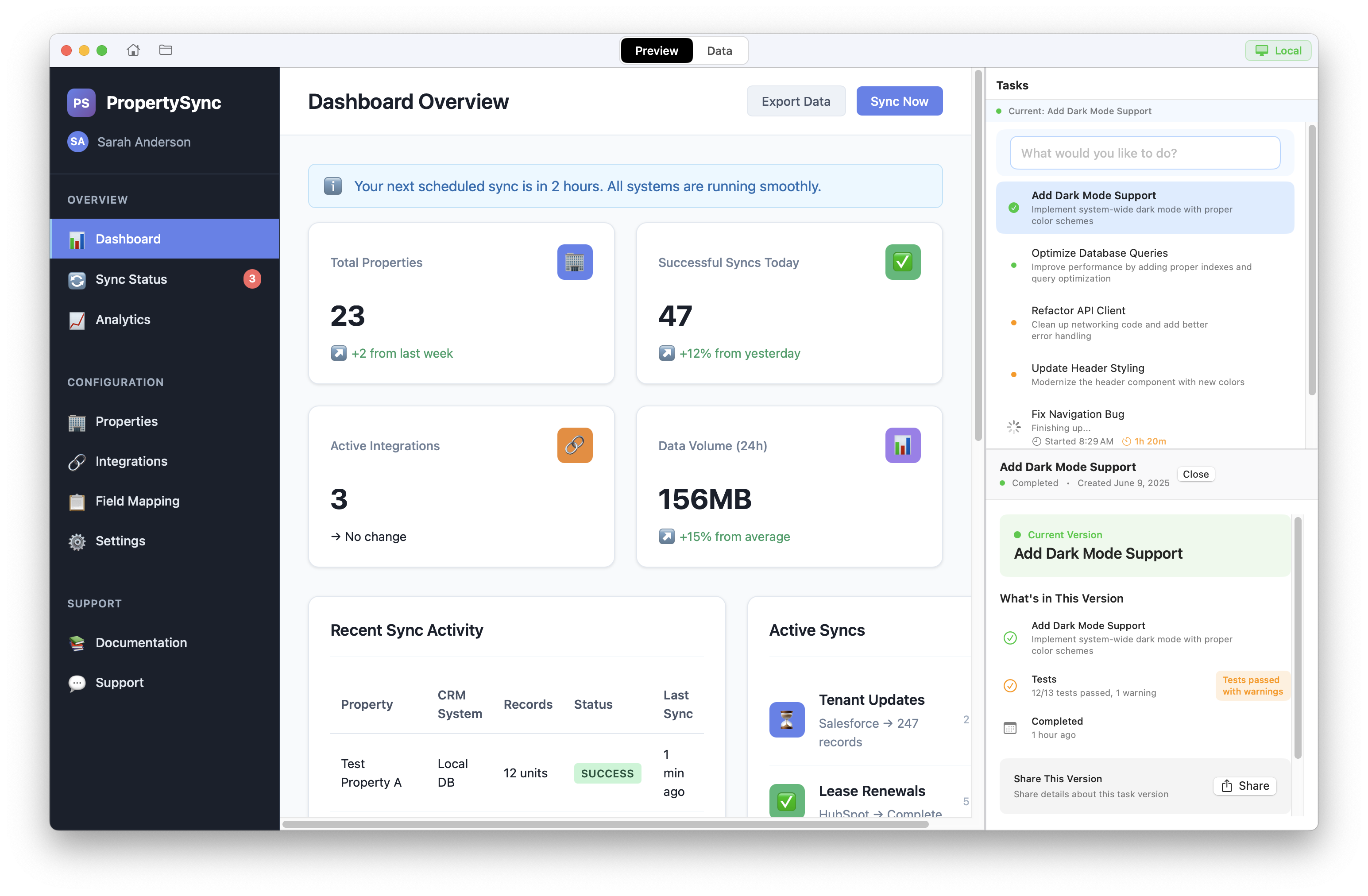
The core IDE, showing a demo SaaS app ("PropertySync") in the preview pane
I prototyped a native Mac IDE from scratch, centered around the reality of modern application development—conversations with an LLM as the primary interface. The core insight is that coding today isn't about managing files and directories but about managing context, intent, and tasks. You're constantly navigating between questions like "show me this," "change that," and "make it work."
A new prompt kicks off the task workflow: automatically tracked via a transparent implementation plan.
The atomic unit of work isn't a file or a project—it's a task. Think feature branches, but richer. Here's the core loop:
Multiple tasks run concurrently, each managing their own context and state. Reverting or undoing a deployment is as simple as a single click.
Vibecoding increases my ambition level, and I consequently am creating more new projects/repositories than ever. But LLMs haven't yet made it easier to start building new apps; picking a stack, running the right commands, getting the database schema and system architecture framed out before writing views, etc.
If there's not a project open, starter templates are outcome-oriented and get you going
Here, getting started isn't staring at a blank file. Instead, you choose outcome-oriented templates (SaaS app, ecommerce store, REST API, blog platform) or simply describe your goal in plain English. The IDE recognizes your intent, suggests appropriate tech stacks, sets up scaffolding automatically, and creates implementation plan markdown files for tracking progress.
The dominant element in the IDE is a visual preview of your application, instead of a file editor. There's no separation between "writing code," "conversing with AI," and "viewing outcomes." Context naturally flows among these interactions, and literally seeing the changes in real-time creates a super fast iteration cycle.
The IDE includes a native database viewer and admin panel (I always loved this about e.g. Django). You can explore your data schema and visualize records. A built-in chatbot assistant provides insights directly from your data context, like having an analyst embedded in your environment.
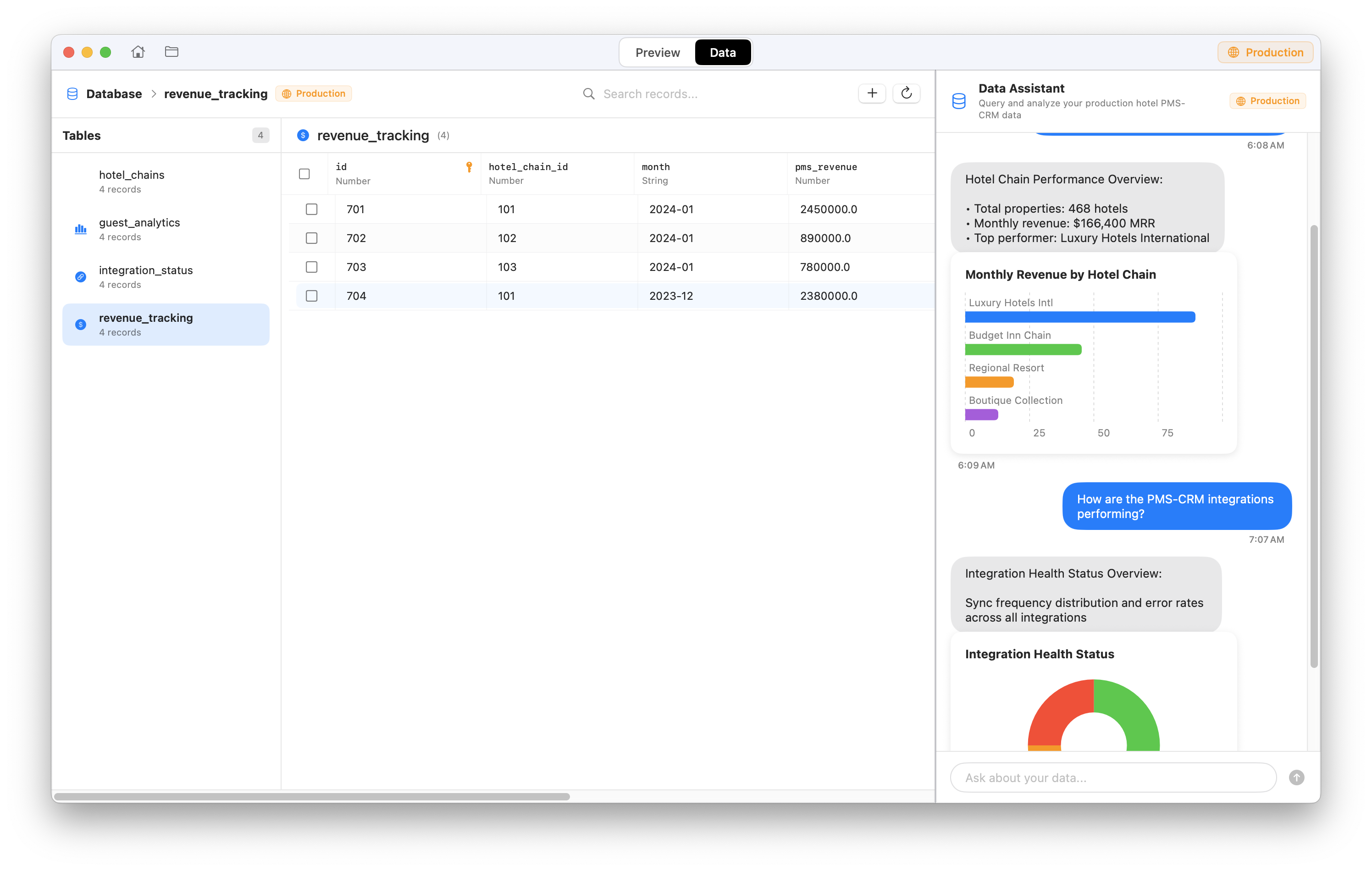
A native database view, with a chatbot that has your data as context, because why not?
I suspect many vibecoders struggle with traditional environment management (the whole 'hey guys look at this new app i built: http://localhost:3000' meme). Tasks can be promoted to production, or reverted with one click. I also built an intuitive local-to-production toggle—think Stripe's test mode switch but for your app. Flip the switch to seamlessly view live data, users, and everything else, then toggle back safely to local development.
Production view shows 'tasks' as 'app versions'.
Instead of the conventional write-compile-debug cycle, this approach fosters fluid collaboration, like sketching and refining ideas in real-time. Your IDE becomes a genuine partner rather than an advanced typewriter. It's more like managing a team of engineers working in parallel.
When building this, I couldn't help but fondly recall tools like Coda, where every part—from CSS to HTML to preview—felt unified. Similarly, Canva democratized desktop publishing, turning previously complex tasks into accessible, intuitive processes with the right level of abstractions that lowered the barrier to entry.
Application development is undergoing similar democratization. Our tools should follow suit and embrace the conversational, iterative, and collaborative ways we code today.
This IDE is still very much a prototype—rough around the edges and full of assumptions—but building it helped clarify what I actually want from my tools.
If you have thoughts or want to jam on this idea, reach out! I'm at jordan@fulghum.io.
此内容由惯性聚合(RSS阅读器)自动聚合整理,仅供阅读参考。 原文来自 — 版权归原作者所有。