


惯性聚合 高效追踪和阅读你感兴趣的博客、新闻、科技资讯
阅读原文 在惯性聚合中打开

推荐订阅源

博客园 - 叶小钗
J
Java Code Geeks
奇客Solidot–传递最新科技情报
奇客Solidot–传递最新科技情报
阮一峰的网络日志
阮一峰的网络日志
爱范儿
爱范儿
量子位
N
Netflix TechBlog - Medium
博客园 - 聂微东
博客园 - Franky
aimingoo的专栏
aimingoo的专栏
The Cloudflare Blog
T
The Blog of Author Tim Ferriss
MyScale Blog
MyScale Blog
Google DeepMind News
小众软件
小众软件
博客园 - 三生石上(FineUI控件)
C
Check Point Blog
钛媒体:引领未来商业与生活新知
钛媒体:引领未来商业与生活新知
B
Blog
Engineering at Meta
Engineering at Meta
Microsoft Azure Blog
博客园_首页
H
Hackread – Cybersecurity News, Data Breaches, AI and More
腾讯CDC

Comments for TrueNAS – Open Enterprise Storage

How to Set Up and Install TrueNAS CORE Yes, You Can (Still) Virtualize TrueNAS TrueNAS enables Container Storage and Kubernetes | TrueNAS - Open Enterprise Storage TrueNAS 12.0-U2 is Released | TrueNAS - Open Enterprise Storage OpenZFS 2.0 Ships First on TrueNAS | TrueNAS - Open Enterprise Storage TrueNAS 12.0-U1 is Scheduled for early December | TrueNAS - Open Enterprise Storage iXsystems TrueNAS M60 Recognized as SDC Awards Storage Hardware Innovation of the Year Finalist | TrueNAS - TrueNAS 12.0 is Released! The TrueNAS Mini X and Mini X+ are here! Cross-Site Disaster Recovery with TrueNAS TrueNAS SCALE Release Plan | TrueNAS - Open Enterprise Storage iXsystems Unveils Industry's Fastest OpenZFS Storage System with Launch of TrueNAS M60 | TrueNAS - Open TrueNAS 12.0 BETA2 Showcases Performance Improvements | TrueNAS - Open Enterprise Storage Be One of the First to Test Drive TrueNAS 12.0 BETA | TrueNAS - Open Enterprise Storage TrueNAS is Multi-OS New-New TrueNAS Logo Unveiled | TrueNAS - Open Enterprise Storage Recession Proof Storage | FreeNAS 11.3-U3.1 Now Available - Issue #80 | TrueNAS - Open Enterprise Storage Open Source Infrastructure is Recession-Proof | TrueNAS - Open Enterprise Storage Understanding How OpenZFS Keeps Your Data Safe | TrueNAS - Open Enterprise Storage You Can Influence the TrueNAS CORE Roadmap! | TrueNAS - Open Enterprise Storage TrueNAS CORE is the new FreeNAS Setting Up Users, Permissions, and ACLs on FreeNAS | TrueNAS - Open Enterprise Storage TrueNAS Updates for VMware vSphere 7 | TrueNAS - Open Enterprise Storage How to Set Up Windows SMB Shares on FreeNAS | TrueNAS - Open Enterprise Storage FreeNAS and TrueNAS are Unifying Introducing the FreeNAS Mini E+ and All-Flash Minis | TrueNAS - Open Enterprise Storage Plex Permissions in FreeNAS 11.3 | TrueNAS - Open Enterprise Storage Latest TrueNAS and FreeNAS Release Delivers Wizards, Plugins, and Accelerated Replication | TrueNAS - Open How To Back Up Google Drive to FreeNAS | TrueNAS The Official FreeNAS Hardware Guide | TrueNAS - Open Enterprise Storage
How To Enable Wireguard on FreeNAS 11.3 | TrueNAS - Open ...
iX Team · 2020-01-21 · via Comments for TrueNAS – Open Enterprise Storage

WireGuard is quickly gaining popularity in the VPN marketplace due to its speed, simplicity, and modern cryptography standards. Starting with FreeNAS version 11.3-RC1, it is possible to connect your NAS directly to a WireGuard network with a few easy steps.
We get started on this by creating some custom tunables to enable the WireGuard service and give it a default interface. To do this you must first navigate to System -> Tunables -> Add.
Enable the WireGuard service by adding “wireguard_enable” -> “YES” in rc.conf.
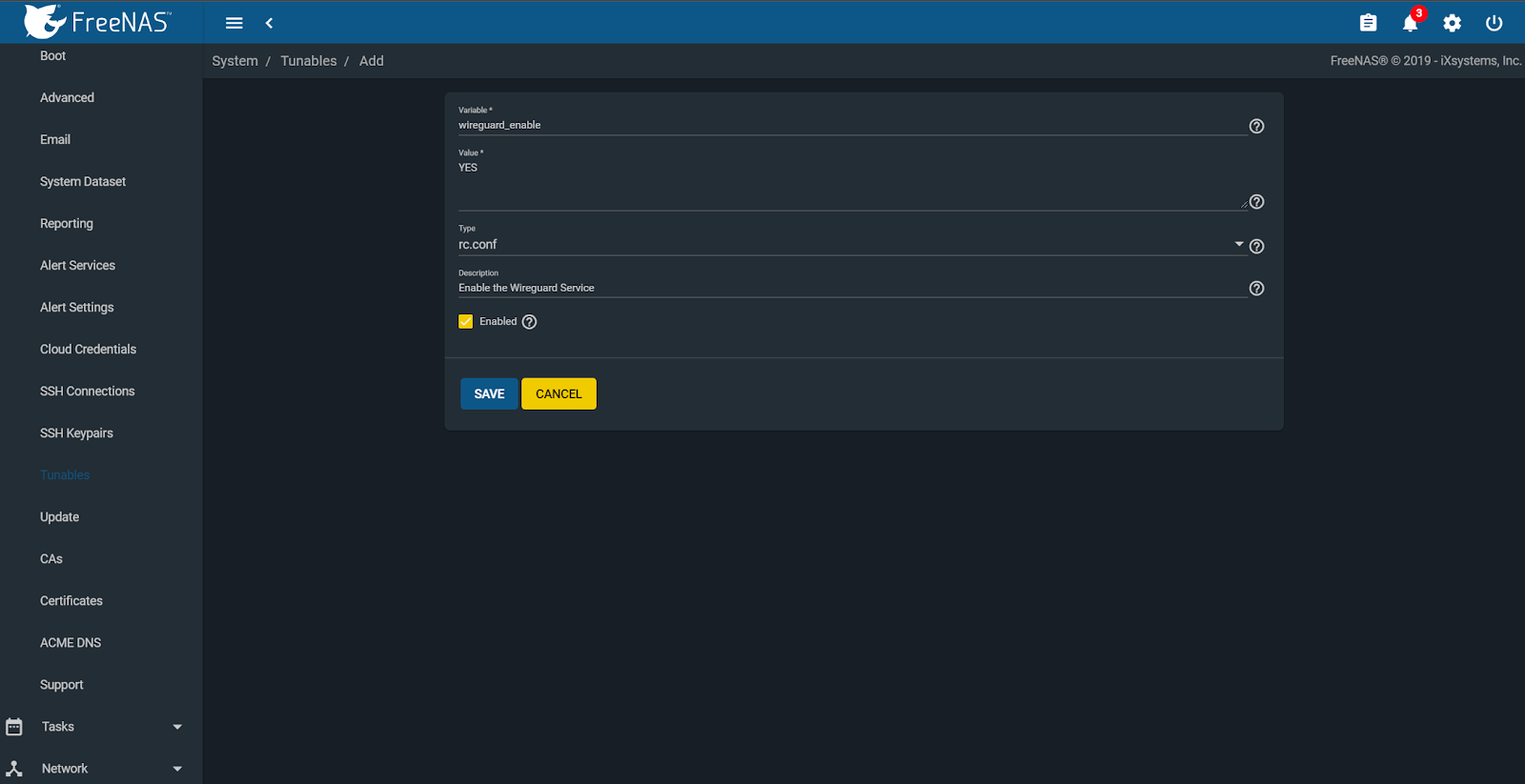
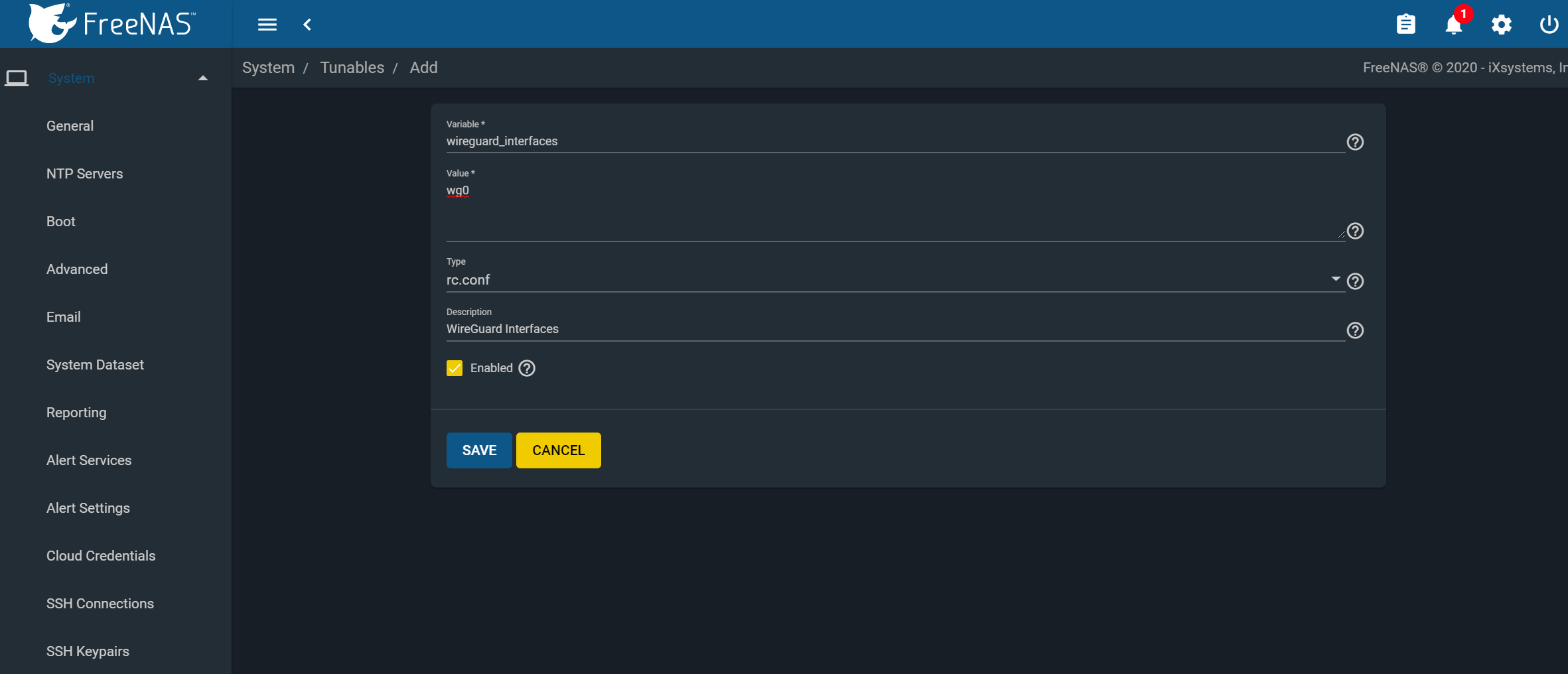
Next, create another tunable and add “wireguard_interfaces” -> “wg0” in rc.conf.
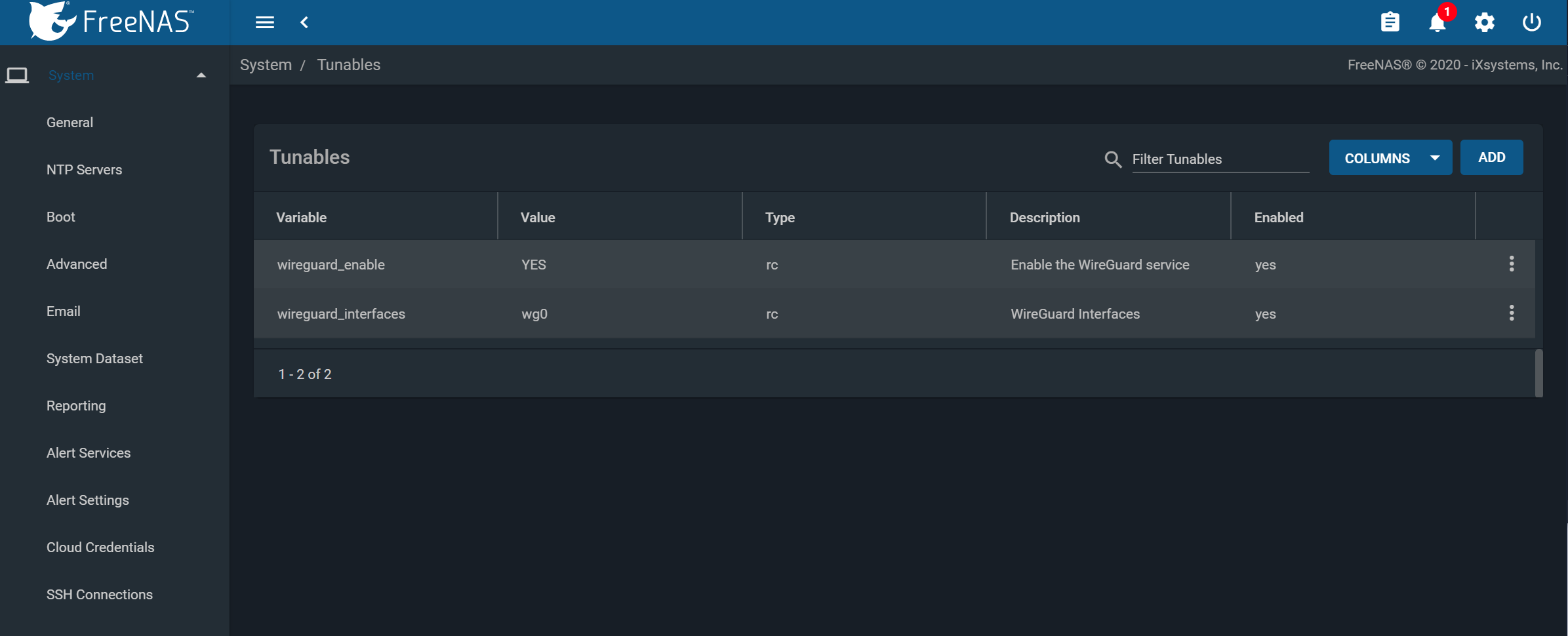
When finished, you should have the following two variables set and enabled.
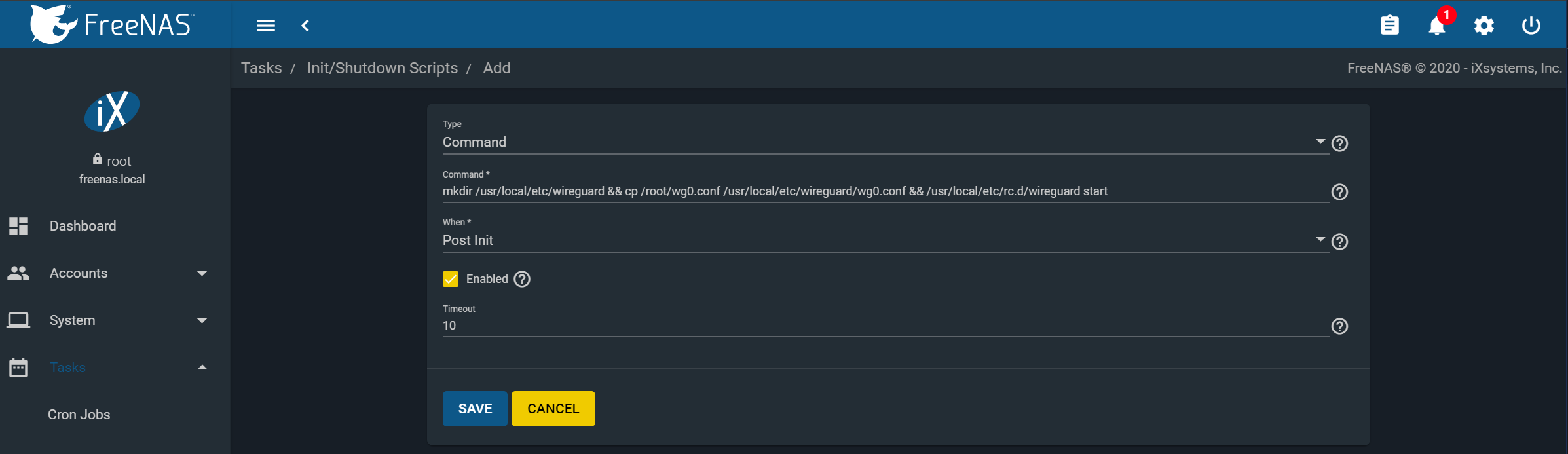
Next, we will need to create a post-init script that will place the WireGuard config into the correct location at startup. Navigate to Tasks -> Init/Shutdown Scripts -> Add.
Create the following command and set it to run at post-init:
“mkdir /usr/local/etc/wireguard && cp /root/wg0.conf /usr/local/etc/wireguard/wg0.conf && /usr/local/etc/rc.d/wireguard start”
You can configure the /root/wg0.conf file and apply a WireGuard configuration to attach to whatever WireGuard network you define. It can be a single point-to-point to anything running WG, or even with full routing. Example use cases are:
  • Access data on a NAS from your Remote Laptop
  • Linking NAS to NAS for replication
  • Attaching a managed NAS to a remote network
  • Access to your NAS from your smartphone


We need to create the /root/wg0.conf which will contain the specific WireGuard configuration to apply at boot. This configuration is beyond the scope of this article, but there are quickstart guides and tutorials available online as well as the built-in ‘wg-quick’manpage.
Once you have a valid /root/wg0.conf, rebooting the system should bring up the WireGuard interface, and you’ll see a ‘wg0’ device in the output of ‘ifconfig’.
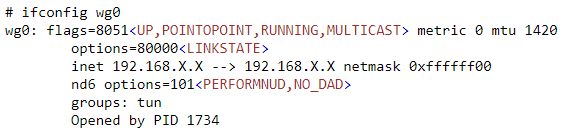
Congratulations, you have successfully linked your FreeNAS system to a secure WireGuard tunnel!