








Read part two of the Zfs Pool Performance series here
The layout of a ZFS storage pool has a significant impact on system performance under various workloads. Given the importance of picking the right configuration for your workload and the fact that making changes to an in-use ZFS pool is far from trivial, it is important for an administrator to understand the mechanics of pool performance when designing a storage system.
To quantify pool performance, we will consider six primary metrics:
For the sake of comparison, we’ll use an example system with 12 drives, each one sized at 6TB, and say that each drive does 100MB/s streaming reads and writes and can do 250 read and write IOPS. We will visualize how the data is spread across the drives by writing 12 multi-colored blocks, shown below. The blocks are written to the pool starting with the brown block on the left (number one), and working our way to the pink block on the right (number 12).
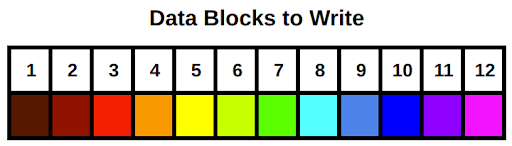
Note that when we calculate data rates and IOPS values for the example system, they are only approximations. Many other factors can impact pool access speeds for better (compression, caching) or worse (poor CPU performance, not enough memory).
There is no single configuration that maximizes all six metrics. Like so many things in life, our objective is to find an appropriate balance of the metrics to match a target workload. For example, a cold-storage backup system will likely want a pool configuration that emphasizes usable storage space and fault tolerance over the other data-rate focused metrics.
Let’s start with a quick review of ZFS storage pools before diving into specific configuration options. ZFS storage pools are comprised of one or more virtual devices, or vdevs. Each vdev is comprised of one or more storage providers, typically physical hard disks. All disk-level redundancy is configured at the vdev level. That is, the RAID layout is set on each vdev as opposed to on the storage pool. Data written to the storage pool is then striped across all the vdevs. Because pool data is striped across the vdevs, the loss of any one vdev means total pool failure. This is perhaps the single most important fact to keep in mind when designing a ZFS storage system. We will circle back to this point in the next post, but keep it in mind as we go through the vdev configuration options.
Because storage pools are made up of one or more vdevs with the pool data striped over the top, we’ll take a look at pool configuration in terms of various vdev configurations. There are three basic vdev configurations: striping, mirroring, and RAIDZ (which itself has three different varieties). The first section will cover striped and mirrored vdevs in this post; the second post will cover RAIDZ and some example scenarios.
Striped vdev
A striped vdev is the simplest configuration. Each vdev consists of a single disk with no redundancy. When several of these single-disk, striped vdevs are combined into a single storage pool, the total usable storage space would be the sum of all the drives. When you write data to a pool made of striped vdevs, the data is broken into small chunks called “blocks” and distributed across all the disks in the pool. The blocks are written in “round-robin” sequence, meaning after all the disks receive one row of blocks, called a stripe, it loops back around and writes another stripe under the first. A striped pool has excellent performance and storage space efficiency, but absolutely zero fault tolerance. If even a single drive in the pool fails, the entire pool will fail and all data stored on that pool will be lost.
The excellent performance of a striped pool comes from the fact that all of the disks can work independently for all read and write operations. If you have a bunch of small read or write operations (IOPS), each disk can work independently to fetch the next block. For streaming reads and writes, each disk can fetch the next block in line synchronized with its neighbors. For example, if a given disk is fetching block n, its neighbor to the left can be fetching block n-1, and its neighbor to the right can be fetching block n+1. Therefore, the speed of all read and write operations as well as the quantity of read and write operations (IOPS) on a striped pool will scale with the number of vdevs. Note here that I said the speeds and IOPS scale with the number of vdevs rather than the number of drives; there’s a reason for this and we’ll cover it in the next post when we discuss RAID-Z.
Here’s a summary of the total pool performance (where N is the number of disks in the pool):
N-wide striped:
Let’s apply this to our example system, configured with a 12-wide striped pool:
12-wide striped:
Below is a visual depiction of our 12 rainbow blocks written to this pool configuration:
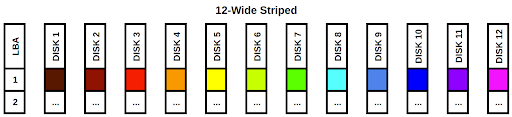
The blocks are simply striped across the 12 disks in the pool. The LBA column on the left stands for “Logical Block Address”. If we treat each disk as a column in an array, each LBA would be a row. It’s also easy to see that if any single disk fails, we would be missing a color in the rainbow and our data would be incomplete. While this configuration has fantastic read and write speeds and can handle a ton of IOPS, the data stored on the pool is very vulnerable. This configuration is not recommended unless you’re comfortable losing all of your pool’s data whenever any single drive fails.
Mirrored vdev
A mirrored vdev consists of two or more disks. A mirrored vdev stores an exact copy of all the data written to it on each one of its drives. Traditional RAID-1 mirrors usually only support two drive mirrors, but ZFS allows for more drives per mirror to increase redundancy and fault tolerance. All disks in a mirrored vdev have to fail for the vdev, and thus the whole pool, to fail. Total storage space will be equal to the size of a single drive in the vdev. If you’re using mismatched drive sizes in your mirrors, the total size will be that of the smallest drive in the mirror.
Streaming read speeds and read IOPS on a mirrored vdev will be faster than write speeds and IOPS. When reading from a mirrored vdev, the drives can “divide and conquer” the operations, similar to what we saw above in the striped pool. This is because each drive in the mirror has an identical copy of the data. For write operations, all of the drives need to write a copy of the data, so the mirrored vdev will be limited to the streaming write speed and IOPS of a single disk.
Here’s a summary:
N-way mirror:
For our first example configuration, let’s do something ridiculous and create a 12-way mirror. ZFS supports this kind of thing, but your management probably will not.
1x 12-way mirror:
Let’s look at this configuration visually:
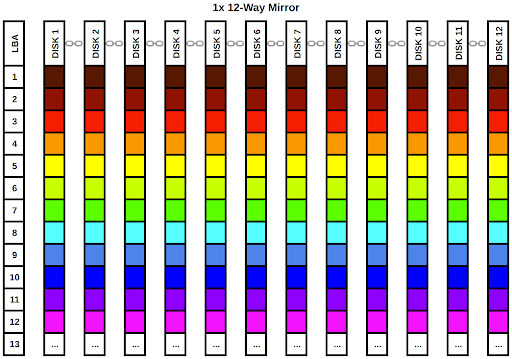
As we can clearly see from the diagram, every single disk in the vdev gets a full copy of our rainbow data. The chainlink icons between the disk labels in the column headers indicate the disks are part of a single vdev. We can lose up to 11 disks in this vdev and still have a complete rainbow. Of course, the data takes up far too much room on the pool, occupying a full 12 LBAs in the data array.
Obviously, this is far from the best use of 12 drives. Let’s do something a little more practical and configure the pool with the ZFS equivalent of RAID-10. We’ll configure six 2-way mirror vdevs. ZFS will stripe the data across all 6 of the vdevs. We can use the work we did in the striped vdev section to determine how the pool as a whole will behave. Let’s first calculate the performance per vdev, then we can work on the full pool:
1x 2-way mirror:
Now we can pretend we have 6 drives with the performance statistics listed above and run them through our striped vdev performance calculator to get the total pool’s performance:
6x 2-way mirror:
Again, we will examine the configuration from a visual perspective:
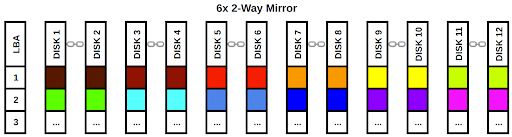
Each vdev gets a block of data and ZFS writes that data to all of (or in this case, both of) the disks in the mirror. As long as we have at least one functional disk in each vdev, we can retrieve our rainbow. As before, the chain link icons denote the disks are part of a single vdev. This configuration emphasizes performance over raw capacity but doesn’t totally disregard fault tolerance as our striped pool did. It’s a very popular configuration for systems that need a lot of fast I/O. Let’s look at one more example configuration using four 3-way mirrors. We’ll skip the individual vdev performance calculation and go straight to the full pool:
4x 3-way mirror:
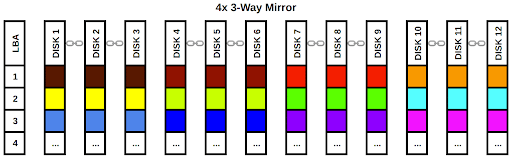
While we have sacrificed some write performance and capacity, the pool is now extremely fault tolerant. This configuration is probably not practical for most applications and it would make more sense to use lower fault tolerance and set up an offsite backup system.
Striped and mirrored vdevs are fantastic for access speed performance, but they either leave you with no redundancy whatsoever or impose at least a 50% penalty on the total usable space of your pool. In the next post, we will cover RAIDZ, which lets you keep data redundancy without sacrificing as much storage space efficiency. We’ll also look at some example workload scenarios and decide which layout would be the best fit for each.
Jason Rose, Sales Engineer
To learn more about ZFS and vdev layouts, get the book FreeBSD Mastery: Advanced ZFS by Michael Lucas and Allan Jude.
此内容由惯性聚合(RSS阅读器)自动聚合整理,仅供阅读参考。 原文来自 — 版权归原作者所有。