







NOTE: This is historical content that may contain outdated information.
Hundreds of thousands of FreeNAS systems are deployed around the world and can now be used as a turnkey backup solution with Asigra. Users can run the Asigra Plugin for FreeNAS to enable fully agentless backup of all the devices on their network.
Asigra automatically gathers data from desktops, laptops, servers, mobile devices, and even cloud sources. Backup data is compressed, encrypted, and deduplicated before being sent to your FreeNAS system for safekeeping.
Asigra also incorporates a sophisticated signature-less malware detection engine that identifies and quarantines unauthorized or malicious embedded code, including unknown and zero-day attacks, from penetrating backup and replication streams. By continually scanning backup data, ransomware attacks can be detected and prevented automatically.
Asigra Backup Features
For more information about the Asigra product, please refer to the datasheet.
Free Community Version
The Asigra Plugin for FreeNAS is free to download and use without any purchase or contract along with FreeNAS version 11.2-U4 or later. The Asigra Plugin for FreeNAS provides backup capability for up to 10 systems and 10 cloud accounts at no charge, which is perfect for small businesses or as a trial of the Asigra functionality for broader use. The free license of the Asigra Plugin for FreeNAS is available with community-based support. Fully supported Asigra subscription services are also available for larger enterprise use.
The Asigra platform relies on two primary components: the DS-System (hosted by the FreeNAS plugin) and the DS-Client (which can be hosted in some other Windows- or Linux-based environment). The DS-Client will fetch data from local endpoints and transmit that backup data to the DS-System on the FreeNAS. The DS-Client can also hold backup data on its own local storage, but this local backup is limited to 1TB in the community edition of the plugin. By connecting the DS-Client to the DS-System, the backup set size is unlimited. The Asigra DS-System setup guides below go into more detail on how to properly connect the two services.
The standard Asigra license is based on the number of systems and cloud accounts backed up. For information about pricing, please contact Asigra at info@asigra.com.
Asigra for Enterprise Use
Asigra on TrueNAS enterprise storage systems was released in September 2018 with version 11.1-U7. Since that time, many enterprise customers have deployed Asigra TrueNAS systems to back up their critical infrastructure.
Installing the Asigra Plugin for FreeNAS
The Asigra Plugin for FreeNAS is installed like any other FreeNAS plugin. A typical small business deployment for the Asigra FreeNAS plugin will look like the diagram below. The Asigra plugin on FreeNAS acts as the Asigra DS-System (Storage Target) and an Asigra DS-Client (Backup Agent) is deployed as a VM on a server or on a FreeNAS unit. The same FreeNAS unit can also perform both Asigra functions for a small business environment.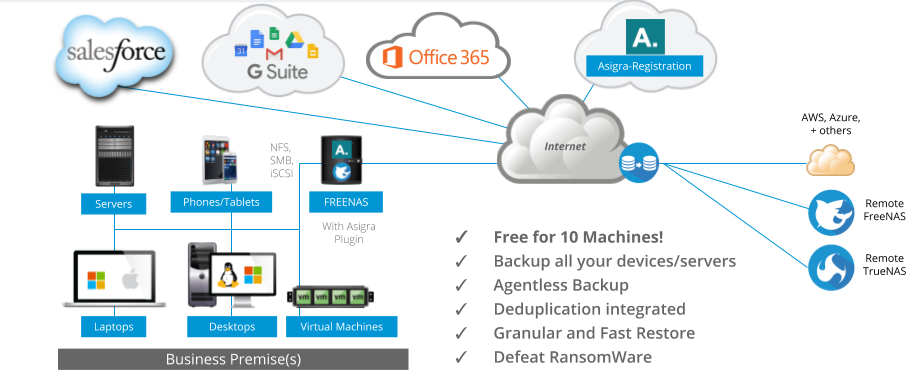
Before installing the Asigra Plugin for FreeNAS, ensure that your FreeNAS system is running version 11.2-U4 or later.
1. Log in to your FreeNAS web UI.
2. Expand the Plugins menu on the left navigation bar, and click Available.
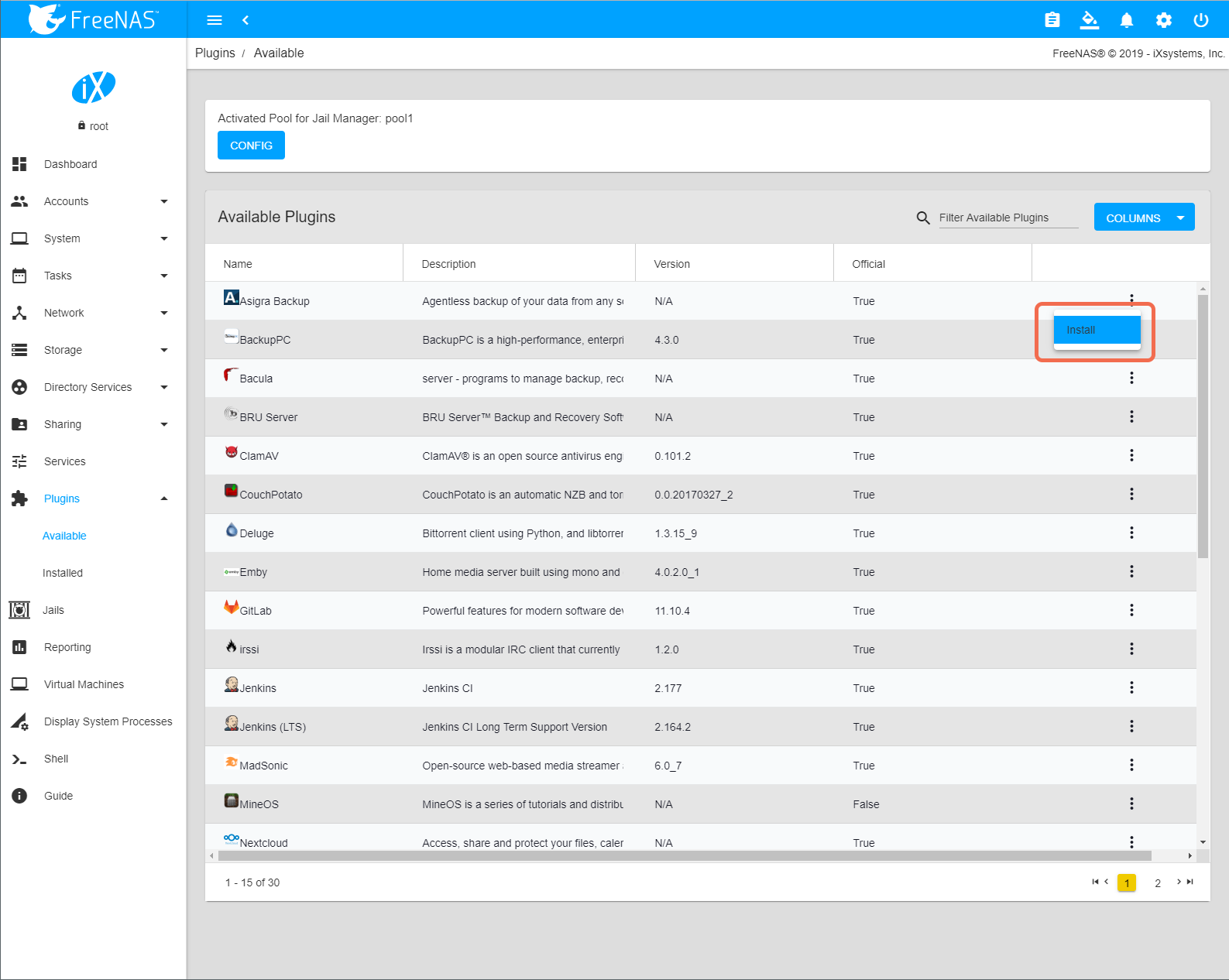
3. Under Available Plugins, click the three dots beside the Asigra Backup plugin, and then click Install.
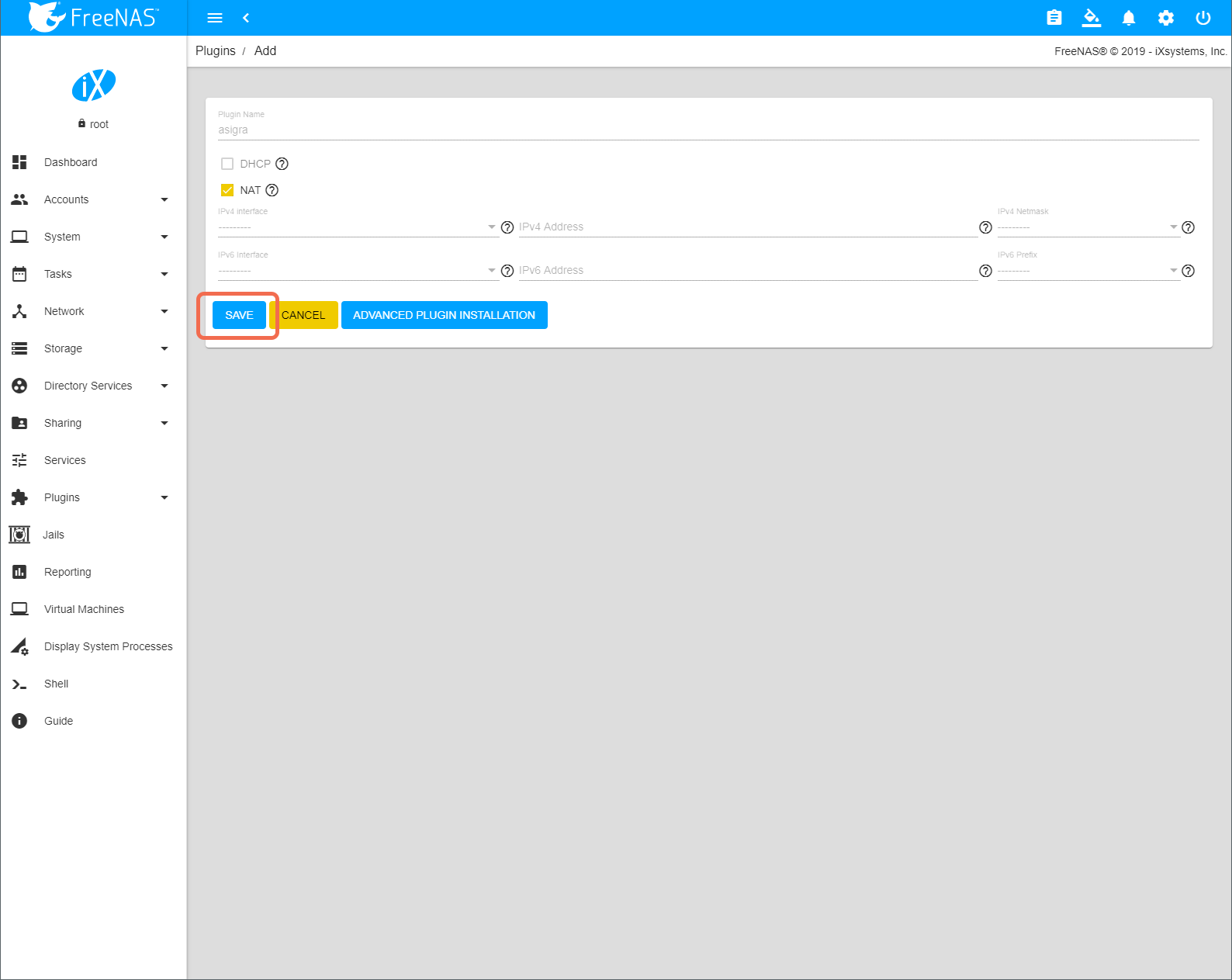
4. On the plugin configuration screen, you can optionally configure additional settings for the Asigra DS-System plugin jail. When you are finished, click Save.
Note: The Asigra plugin supports DHCP or a static IP address for its jail, but a static IP address is recommended. To set a static IP address, clear the DHCP box, select an IPv4 interface, and then enter an IP address and netmask. When you are finished, click Save.
5. When the installation is complete, expand the Plugins menu on the left navigation bar, and click Installed.
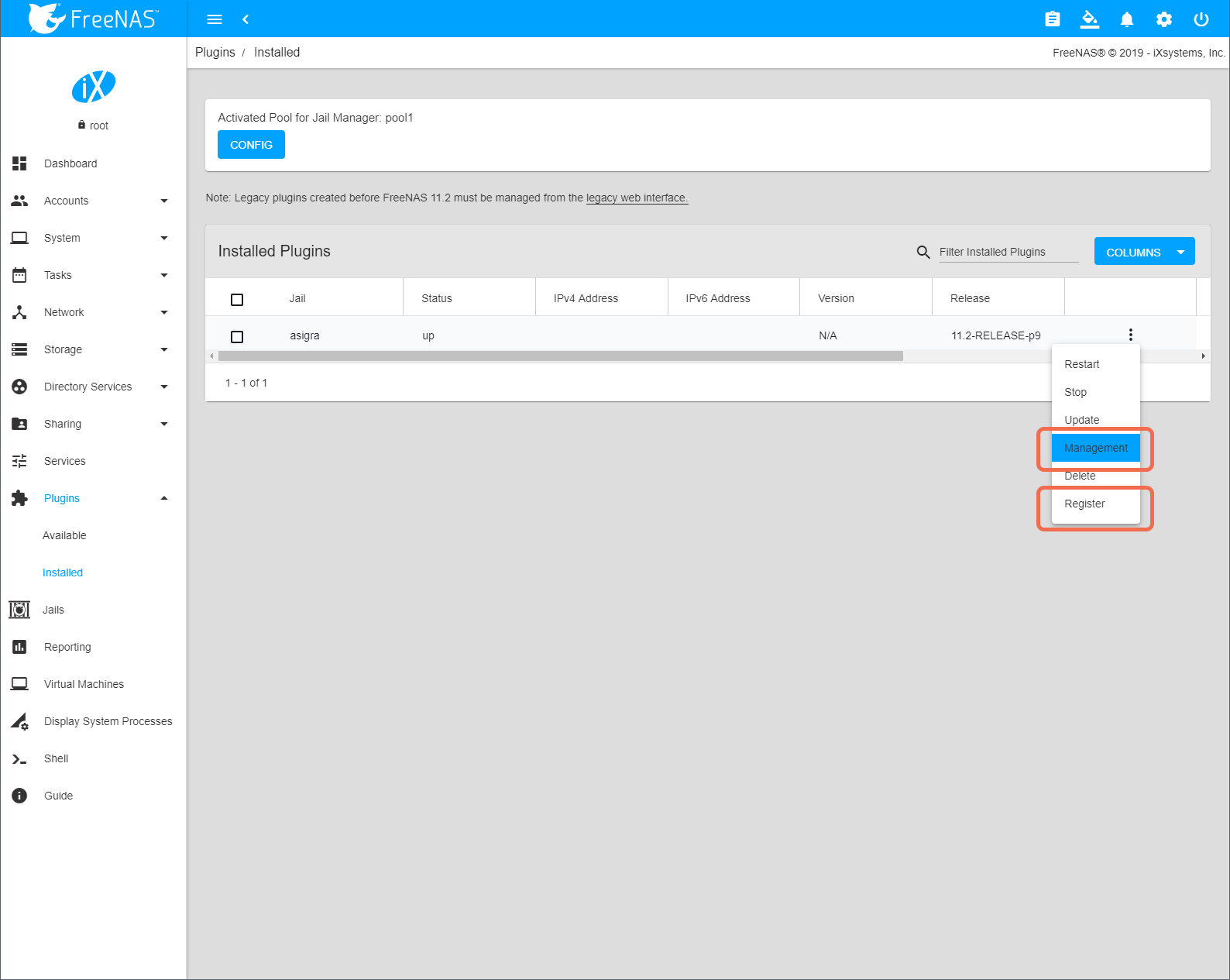
6. Under Installed Plugins, click the three dots beside the Asigra plugin, and then click Register.
Once the installation is complete, select ‘Available’ from the ‘Plugins’ menu on the left navigation bar and the Asigra plugin will be listed. You can click the three dots on the right side of the row to control the plugin. Start by selecting “Register” in this menu to create your free trial login information on Asigra’s site. You can then launch the Management interface by selecting “Management”:
7. Follow the instructions on the the Asigra Plugin for FreeNAS registration page to create and register your free Asigra Plugin for FreeNAS trial account.
8. After you have completed the registration process, under Installed Plugins, click the three dots beside the Asigra plugin, and then click Management.
This will download and launch the Java-based DS-System management interface (DS-Operator) and you can begin using the Asigra Plugin for FreeNAS.
For additional information on using the Asigra platform, please refer to the following user guides:
FreeNAS and TrueNAS with Integrated Asigra Backup
iXsystems is committed to providing the community with an excellent open source platform for storage and plugins. FreeNAS is increasingly popular with home users, in labs, and with SOHO deployments, while TrueNAS appliances continue to deliver great value to enterprises, universities, schools, studio design houses, and other organizations. With Asigra backup now available on both platforms, everyone can enjoy enterprise backup with turnkey simplicity!
此内容由惯性聚合(RSS阅读器)自动聚合整理,仅供阅读参考。 原文来自 — 版权归原作者所有。