


惯性聚合 高效追踪和阅读你感兴趣的博客、新闻、科技资讯
阅读原文 在惯性聚合中打开

推荐订阅源

WordPress大学
WordPress大学
A
About on SuperTechFans
小众软件
小众软件
Hugging Face - Blog
Hugging Face - Blog
奇客Solidot–传递最新科技情报
奇客Solidot–传递最新科技情报
博客园 - 叶小钗
博客园 - 聂微东
博客园 - Franky
Apple Machine Learning Research
罗磊的独立博客
量子位
博客园 - 三生石上(FineUI控件)
Recent Announcements
The GitHub Blog
The GitHub Blog
B
Blog RSS Feed
T
The Blog of Author Tim Ferriss
GbyAI
GbyAI
云风的 BLOG
云风的 BLOG
Last Week in AI
Last Week in AI
宝玉的分享
宝玉的分享
B
Blog
钛媒体:引领未来商业与生活新知
钛媒体:引领未来商业与生活新知
Stack Overflow Blog
Stack Overflow Blog
Cyber Security Advisories - MS-ISAC

Comments for TrueNAS – Open Enterprise Storage

How to Set Up and Install TrueNAS CORE Yes, You Can (Still) Virtualize TrueNAS TrueNAS enables Container Storage and Kubernetes | TrueNAS - Open Enterprise Storage TrueNAS 12.0-U2 is Released | TrueNAS - Open Enterprise Storage OpenZFS 2.0 Ships First on TrueNAS | TrueNAS - Open Enterprise Storage TrueNAS 12.0-U1 is Scheduled for early December | TrueNAS - Open Enterprise Storage iXsystems TrueNAS M60 Recognized as SDC Awards Storage Hardware Innovation of the Year Finalist | TrueNAS - TrueNAS 12.0 is Released! The TrueNAS Mini X and Mini X+ are here! Cross-Site Disaster Recovery with TrueNAS TrueNAS SCALE Release Plan | TrueNAS - Open Enterprise Storage iXsystems Unveils Industry's Fastest OpenZFS Storage System with Launch of TrueNAS M60 | TrueNAS - Open TrueNAS 12.0 BETA2 Showcases Performance Improvements | TrueNAS - Open Enterprise Storage Be One of the First to Test Drive TrueNAS 12.0 BETA | TrueNAS - Open Enterprise Storage TrueNAS is Multi-OS New-New TrueNAS Logo Unveiled | TrueNAS - Open Enterprise Storage Recession Proof Storage | FreeNAS 11.3-U3.1 Now Available - Issue #80 | TrueNAS - Open Enterprise Storage Open Source Infrastructure is Recession-Proof | TrueNAS - Open Enterprise Storage Understanding How OpenZFS Keeps Your Data Safe | TrueNAS - Open Enterprise Storage You Can Influence the TrueNAS CORE Roadmap! | TrueNAS - Open Enterprise Storage TrueNAS CORE is the new FreeNAS Setting Up Users, Permissions, and ACLs on FreeNAS | TrueNAS - Open Enterprise Storage TrueNAS Updates for VMware vSphere 7 | TrueNAS - Open Enterprise Storage How to Set Up Windows SMB Shares on FreeNAS | TrueNAS - Open Enterprise Storage FreeNAS and TrueNAS are Unifying Introducing the FreeNAS Mini E+ and All-Flash Minis | TrueNAS - Open Enterprise Storage Latest TrueNAS and FreeNAS Release Delivers Wizards, Plugins, and Accelerated Replication | TrueNAS - Open How To Back Up Google Drive to FreeNAS | TrueNAS How To Enable Wireguard on FreeNAS 11.3 | TrueNAS - Open Enterprise Storage The Official FreeNAS Hardware Guide | TrueNAS - Open Enterprise Storage
Plex Permissions in FreeNAS 11.3 | TrueNAS - Open Enterpr...
iX Team · 2020-02-19 · via Comments for TrueNAS – Open Enterprise Storage

NOTE: This is historical content that may contain outdated information.


Plex Media Server is a popular Plugin available for FreeNAS, allowing the user to stream media directly from their FreeNAS system. Because Plugins reside inside a jail, Plex must have access to the media files to be shared which are generally stored in a separate dataset that is mounted inside the Plex Plugin jail. A media dataset can also be mounted in multiple jails to allow access to other Plugins like Radarr, Sonarr, or Sabnzbd to manage and share the centralized media.
Once Plex is installed, its permissions will be in a default state set during the initial creation of a dataset on FreeNAS. Unless otherwise modified, this means the dataset will be owned by the user “root” and group “wheel”. Because Plex Media Server runs as the user “plex” in the default configuration, Plex will not be able to read or write to the media dataset and thus not be able to access the media files stored there. To create an ACL for the media dataset with the correct Plex user ID, first verify that user ID by running id plex in the Plugin Jail’s shell. This should be 972; with that information, launch the FreeNAS 11.3 ACL manager:

      1. Click the three dots next to the media dataset; in this example, it is called “media”
      2. Select “Edit ACL”
      3. Click the “Add ACL Item” button. A new section will appear at the bottom of the list of existing ACL items.
      4. Fill in the following:
        Who: User
        User: 972 (Don't worry if it says "Could not find a username for this ID")
        ACL Type: Allow
        Permissions Type:
        Basic Permissions: Full Control
        Flags Type: Basic
        Flags: Inherit
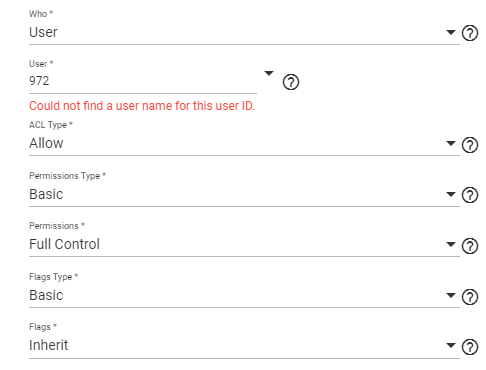
      5. If files already exist in the dataset, select the “Apply permissions recursively” checkbox.
      6. Click “Save”
      7. Add media in Plex Media Server through its web interface as normal

Other popular Plugin user ID’s include:

  • Radarr = 352
  • Sonarr = 351
  • Transmission = 921
  • Sabnzbd = 350

Visit the General Plugin Discussion in the FreeNAS Forums for more information and enjoy your media serving with FreeNAS!