惯性聚合 高效追踪和阅读你感兴趣的博客、新闻、科技资讯
阅读原文 在惯性聚合中打开

推荐订阅源

S
Security Affairs
S
Schneier on Security
T
Tenable Blog
G
GRAHAM CLULEY
Latest news
Latest news
D
Darknet – Hacking Tools, Hacker News & Cyber Security
A
Arctic Wolf
I
Intezer
Cyberwarzone
Cyberwarzone
T
The Exploit Database - CXSecurity.com
T
Tailwind CSS Blog
K
Kaspersky official blog
Blog — PlanetScale
Blog — PlanetScale
C
Cyber Attacks, Cyber Crime and Cyber Security
T
Threat Research - Cisco Blogs
爱范儿
爱范儿
Exploit-DB.com RSS Feed
博客园 - 叶小钗
让小产品的独立变现更简单 - ezindie.com
Recent Commits to openclaw:main
P
Palo Alto Networks Blog
WordPress大学
WordPress大学
freeCodeCamp Programming Tutorials: Python, JavaScript, Git & More
博客园 - 司徒正美
The Cloudflare Blog
Help Net Security
Help Net Security
罗磊的独立博客
博客园 - 聂微东
Jina AI
Jina AI
Project Zero
Project Zero
钛媒体:引领未来商业与生活新知
钛媒体:引领未来商业与生活新知
L
LINUX DO - 最新话题
V
V2EX
人人都是产品经理
人人都是产品经理
美团技术团队
博客园 - 【当耐特】
Spread Privacy
Spread Privacy
J
Java Code Geeks
Threat Intelligence Blog | Flashpoint
Security Latest
Security Latest
The Last Watchdog
The Last Watchdog
Stack Overflow Blog
Stack Overflow Blog
雷峰网
雷峰网
S
Securelist
Forbes - Security
Forbes - Security
博客园 - 三生石上(FineUI控件)
Microsoft Azure Blog
P
Privacy International News Feed
宝玉的分享
宝玉的分享
C
CERT Recently Published Vulnerability Notes

Comments for TrueNAS – Open Enterprise Storage

How to Set Up and Install TrueNAS CORE Yes, You Can (Still) Virtualize TrueNAS TrueNAS enables Container Storage and Kubernetes | TrueNAS - Open Enterprise Storage TrueNAS 12.0-U2 is Released | TrueNAS - Open Enterprise Storage OpenZFS 2.0 Ships First on TrueNAS | TrueNAS - Open Enterprise Storage TrueNAS 12.0-U1 is Scheduled for early December | TrueNAS - Open Enterprise Storage iXsystems TrueNAS M60 Recognized as SDC Awards Storage Hardware Innovation of the Year Finalist | TrueNAS - TrueNAS 12.0 is Released! The TrueNAS Mini X and Mini X+ are here! Cross-Site Disaster Recovery with TrueNAS TrueNAS SCALE Release Plan | TrueNAS - Open Enterprise Storage iXsystems Unveils Industry's Fastest OpenZFS Storage System with Launch of TrueNAS M60 | TrueNAS - Open TrueNAS 12.0 BETA2 Showcases Performance Improvements | TrueNAS - Open Enterprise Storage Be One of the First to Test Drive TrueNAS 12.0 BETA | TrueNAS - Open Enterprise Storage TrueNAS is Multi-OS New-New TrueNAS Logo Unveiled | TrueNAS - Open Enterprise Storage Recession Proof Storage | FreeNAS 11.3-U3.1 Now Available - Issue #80 | TrueNAS - Open Enterprise Storage Open Source Infrastructure is Recession-Proof | TrueNAS - Open Enterprise Storage Understanding How OpenZFS Keeps Your Data Safe | TrueNAS - Open Enterprise Storage You Can Influence the TrueNAS CORE Roadmap! | TrueNAS - Open Enterprise Storage TrueNAS CORE is the new FreeNAS Setting Up Users, Permissions, and ACLs on FreeNAS | TrueNAS - Open Enterprise Storage TrueNAS Updates for VMware vSphere 7 | TrueNAS - Open Enterprise Storage How to Set Up Windows SMB Shares on FreeNAS | TrueNAS - Open Enterprise Storage FreeNAS and TrueNAS are Unifying Introducing the FreeNAS Mini E+ and All-Flash Minis | TrueNAS - Open Enterprise Storage Plex Permissions in FreeNAS 11.3 | TrueNAS - Open Enterprise Storage Latest TrueNAS and FreeNAS Release Delivers Wizards, Plugins, and Accelerated Replication | TrueNAS - Open How To Enable Wireguard on FreeNAS 11.3 | TrueNAS - Open Enterprise Storage The Official FreeNAS Hardware Guide | TrueNAS - Open Enterprise Storage December 11 Plugins Update: ClamAV Fix & CloudStack FreeNAS Mini Black Friday Sale Starts Now! - Issue #73 | TrueNAS - Open Enterprise Storage Breaking Down the FreeNAS Mini E! | TrueNAS TrueCommand Shifts to Prime Time | TrueNAS - Open Enterprise Storage AMD EPYC 7002 Powers Scalable TrueNAS Solutions FreeNAS and TrueNAS 11.3 make their Debuts October 30 Plugins Update | TrueNAS - Open Enterprise Storage Overview of Datasets and Snapshots in FreeNAS | TrueNAS - Open Enterprise Storage September 13 Plugins Update | TrueNAS - Open Enterprise Storage August 27 Plugin Updates: Security & Version Fixes July 24 Plugins Update | TrueNAS - Open Enterprise Storage Mount a TrueNAS or FreeNAS Share to a Docker Host | TrueNAS - Open Enterprise Storage TrueNAS Updates for VMware vSphere | TrueNAS - Open Enterprise Storage July 10 Plugins Update | TrueNAS - Open Enterprise Storage June 26 Plugins Update | TrueNAS - Open Enterprise Storage Open ZFS vs. Btrfs | and other file systems | TrueNAS - Open Enterprise Storage ZFS vs. OpenZFS Backup Evolved: Asigra Plugin for FreeNAS Back Up Plugins and Jails on FreeNAS | TrueNAS Take Command of Your NAS Fleet with TrueCommand™ | TrueNAS - Open Enterprise Storage Next Batch of Updated Plugins and How to Recover from Failed Plugin Updates | TrueNAS - Open Enterprise Run S3 Object Storage on FreeNAS and TrueNAS | TrueNAS - Open Enterprise Storage Sync Files to Dropbox with TrueNAS or FreeNAS February Plugin Updates & New Plugins for Testing Why SATA-DOMs Are Better than USB Drives for Booting Up Your FreeNAS System | TrueNAS - Open Enterprise Six Metrics for Measuring ZFS Pool Performance Part 2 | TrueNAS - Open Enterprise Storage Six Metrics for Measuring ZFS Pool Performance Part 1 | TrueNAS - Open Enterprise Storage TrueNAS M-Series Certified for Veeam Backup FreeNAS 11.1 is Now Available for Download! | TrueNAS FreeNAS 11.0 Released with VM & S3 Storage Support To SLOG or not to SLOG: How to best configure your ZFS Intent Log | TrueNAS - Open Enterprise Storage vCenter Web Client Plug-in for TrueNAS Now Available | TrueNAS - Open Enterprise Storage The ZFS ZIL and SLOG Demystified | TrueNAS - Open Enterprise Storage FreeNAS: A Worst Practices Guide | TrueNAS - Open Enterprise Storage FreeNAS Hardware Guide III: Pools, Performance & Cache FreeNAS vs TrueNAS FreeNAS 8.0.1‑RELEASE & Official Documentation Released
How To Back Up Google Drive to FreeNAS | TrueNAS
iX Team · 2020-01-22 · via Comments for TrueNAS – Open Enterprise Storage

NOTE: This is historical content that may contain outdated information.

Google Drive and G Suite are widely used tools for creating and sharing documents, spreadsheets, and presentations with team members. While cloud-based tools have inherent backups and replications included by the cloud provider, certain users may require additional backup or archive capabilities. For example, companies using G Suite for important work may be required to keep records for years, potentially beyond the scope of the G Suite subscription. FreeNAS and TrueNAS offer the ability to back up Google Drive easily, using the built-in cloud sync.
This blog will explain how to set up Google Drive sync with FreeNAS 11.3, as well as provide a few caveats and workarounds when backing up Google Docs and other Google created content.

Setting up Google Drive credentials
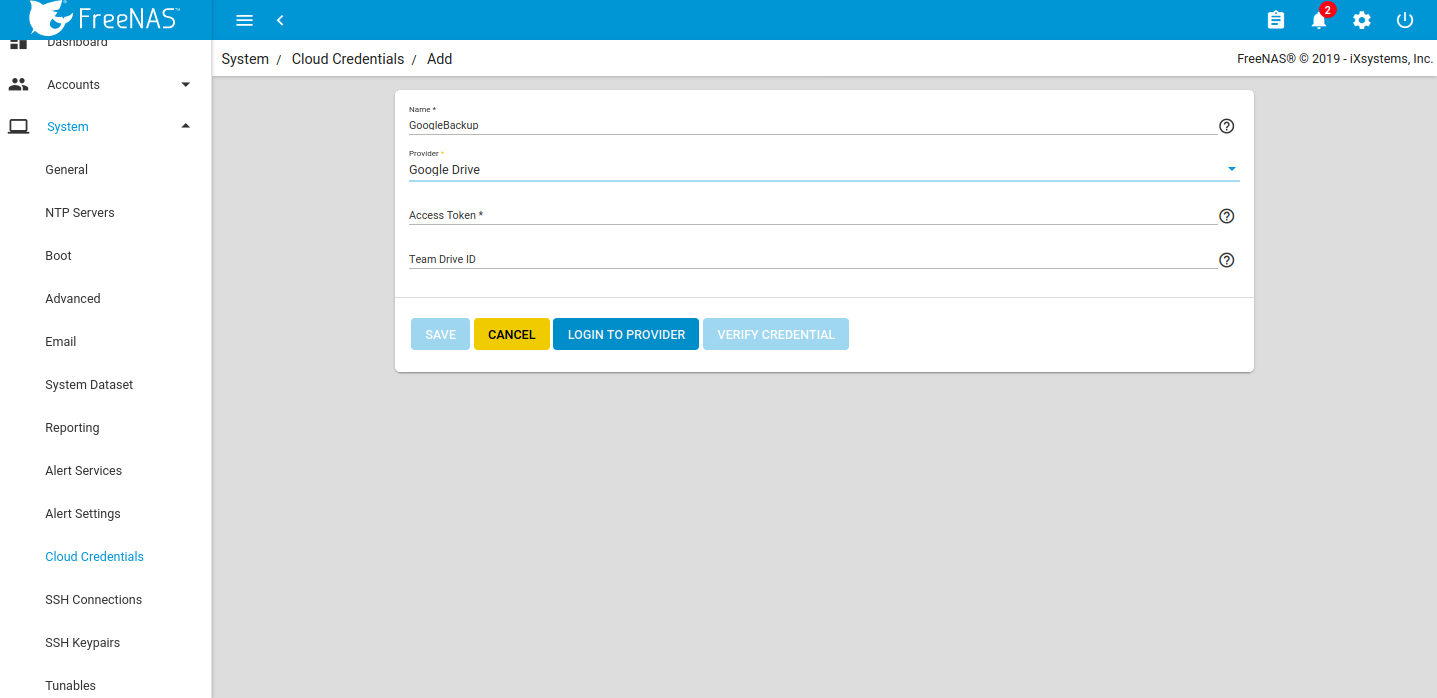
Set up the credentials under System Cloud Credentials.
Setting up Google Drive credentials

Click LOGIN TO PROVIDER and login with the appropriate Google user account. Google will request to allow access to all the Google Drive files for the FreeNAS device.
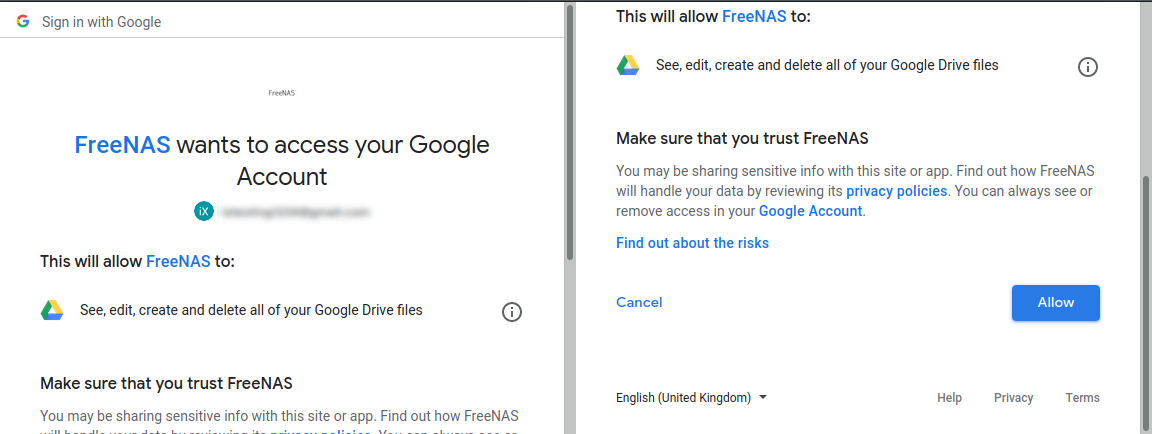
allowing access to FreeNAS device

Allow access and the appropriate access key will be inserted to the FreeNAS access token. Assign a Team ID if required, but it is not necessary in all cases. 
Click VERIFY CREDENTIAL. Once successful, click SAVE. The new cloud credentials will be visible in the web interface.
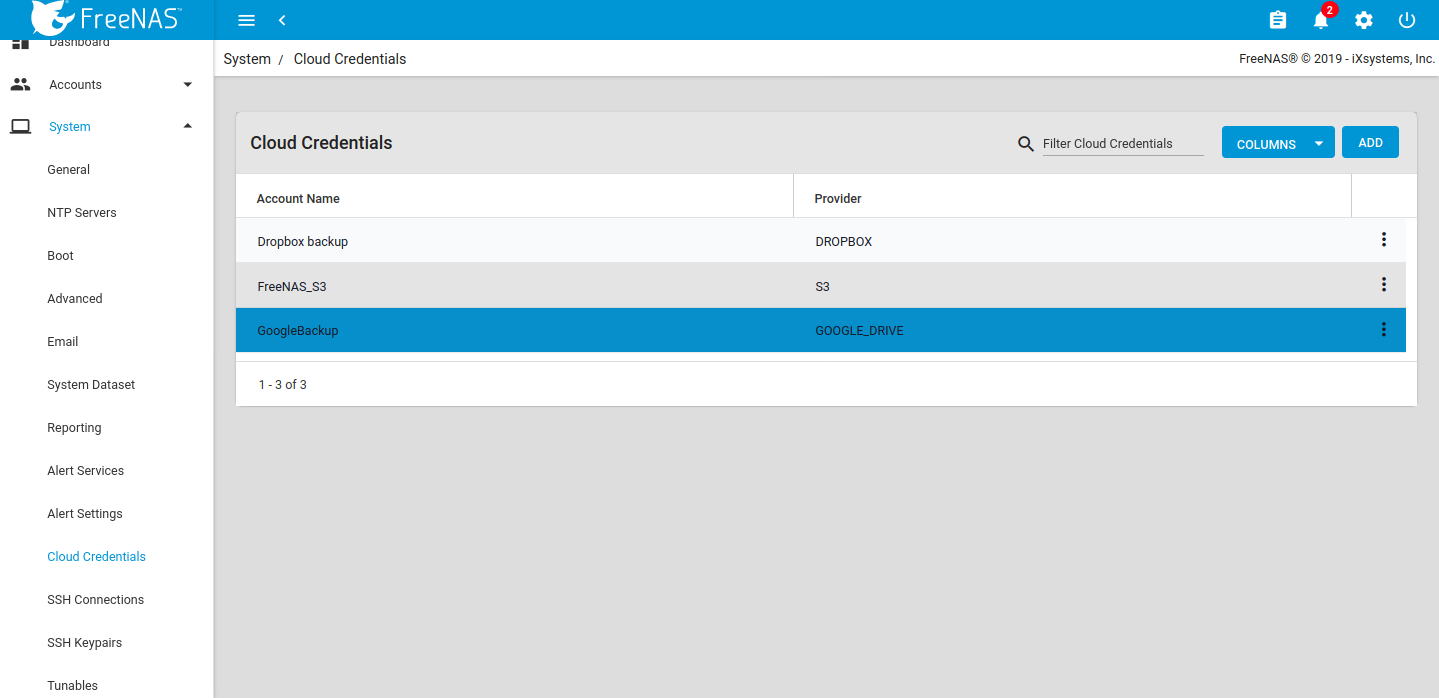
The new cloud credentials added

Set the cloud sync task

Go to Tasks Cloud Sync Tasks and set the backup time frame, frequency, and folders – both the cloud-based folder and FreeNAS dataset. Set whether the synchronization should sync all changes, just copy new files, or move files. Remove files from the cloud source or FreeNAS source depending on push or pull.
Add a description for the task and select the cloud credentials.
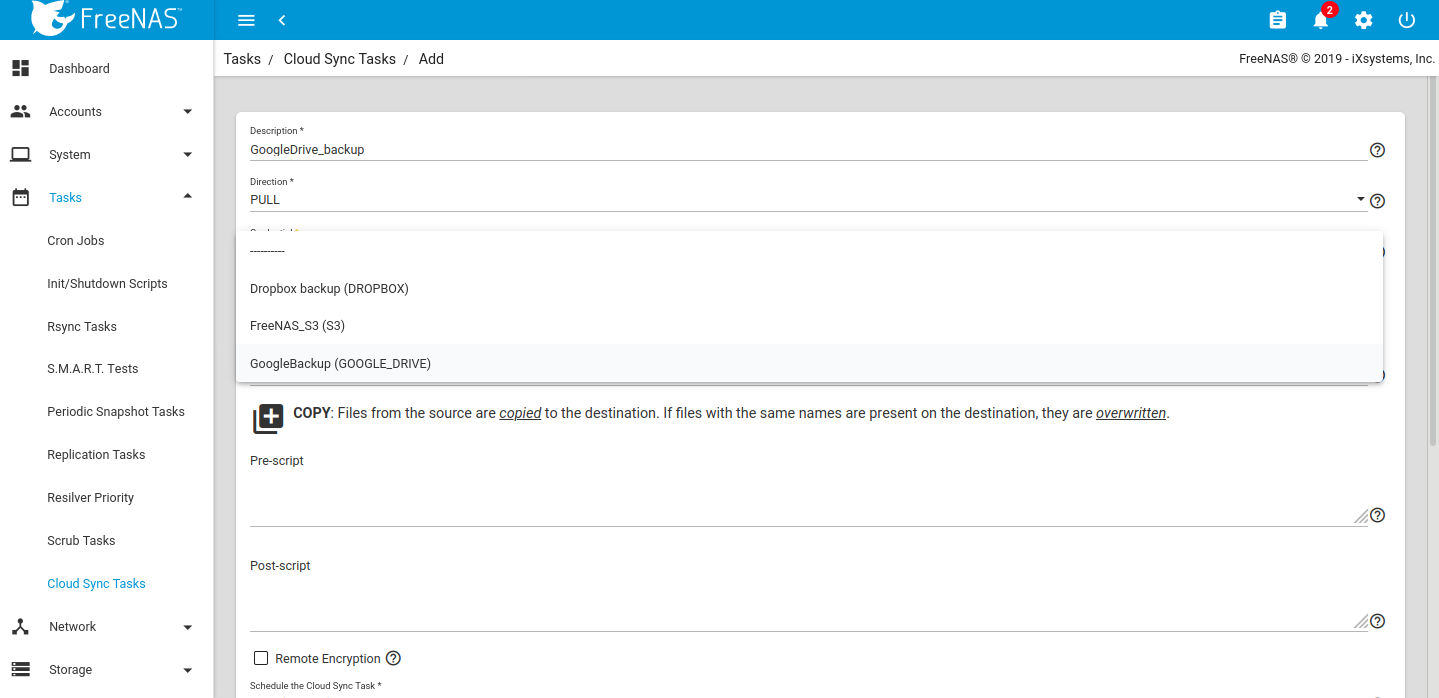
setting up cloud sync task

Choose the appropriate cloud folder target and FreeNAS storage location.
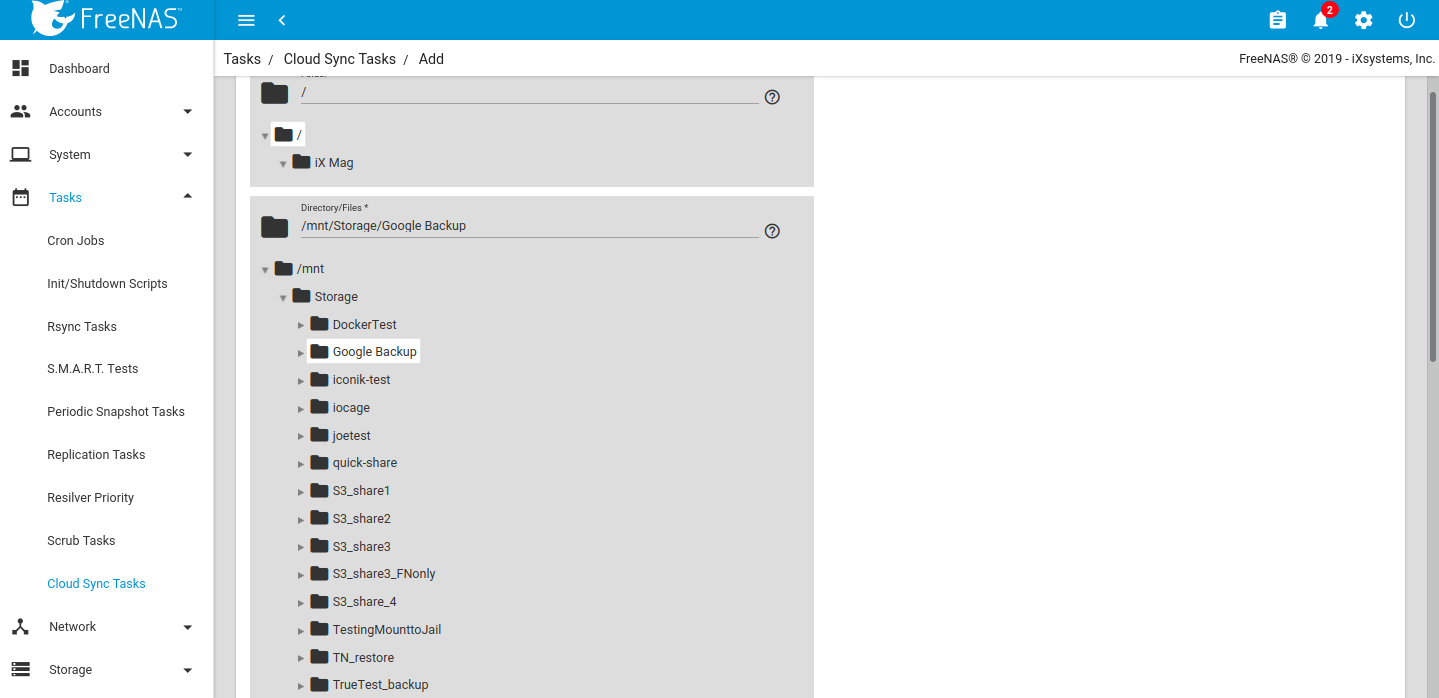
Choosing cloud folder
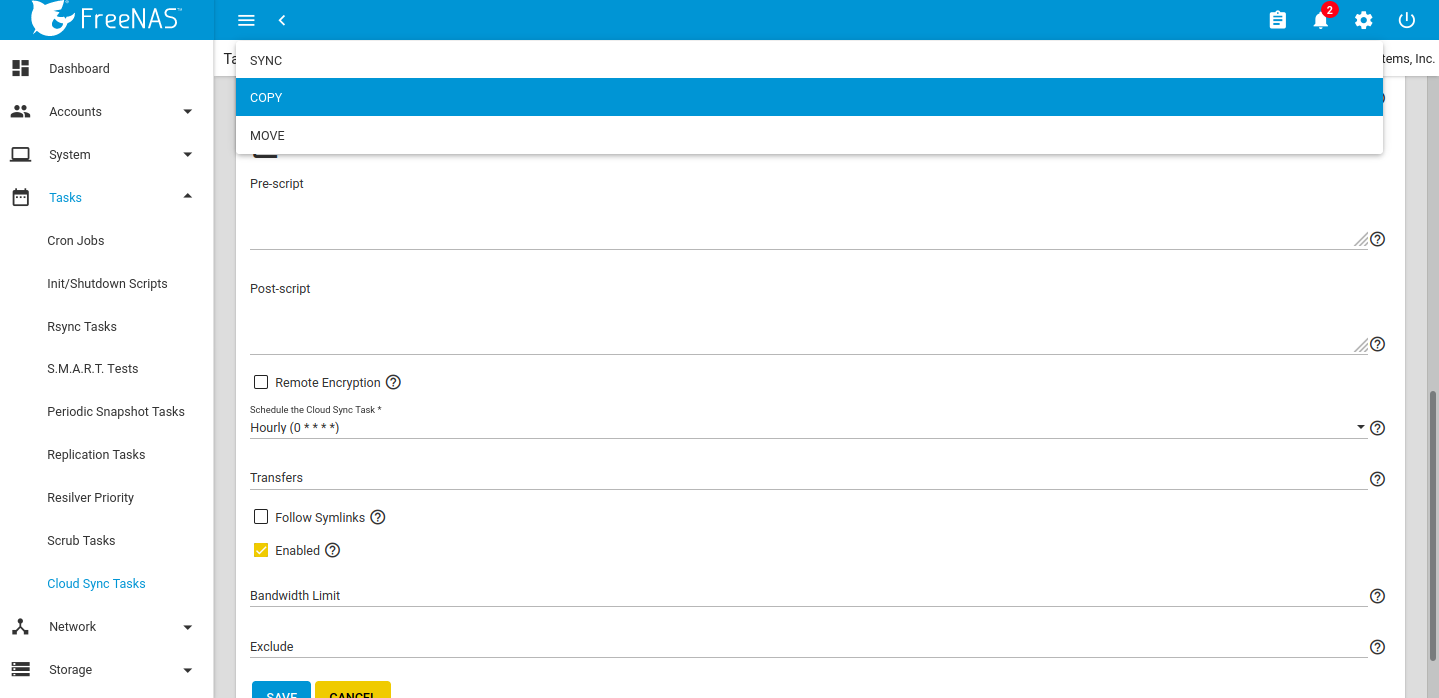
Select the file transfer mode: 

  • Sync: Keep files newly created or deleted the same.
  • Copy: Copy new files to the appropriate target (i.e., FreeNAS pulls files from Google Drive or pushes files to Google Drive).
  • Move: Copies files to the target and then delete files from the source. Using Move, users can set a folder in Google Drive for archival, and move older documents to that folder from their Drive account. Those files would then automatically get backed up to their FreeNAS storage.

Selecting file transfer mode

Once created the Task will run during the designated period of time. Edits can be made by clicking the down arrow on the right-hand side.
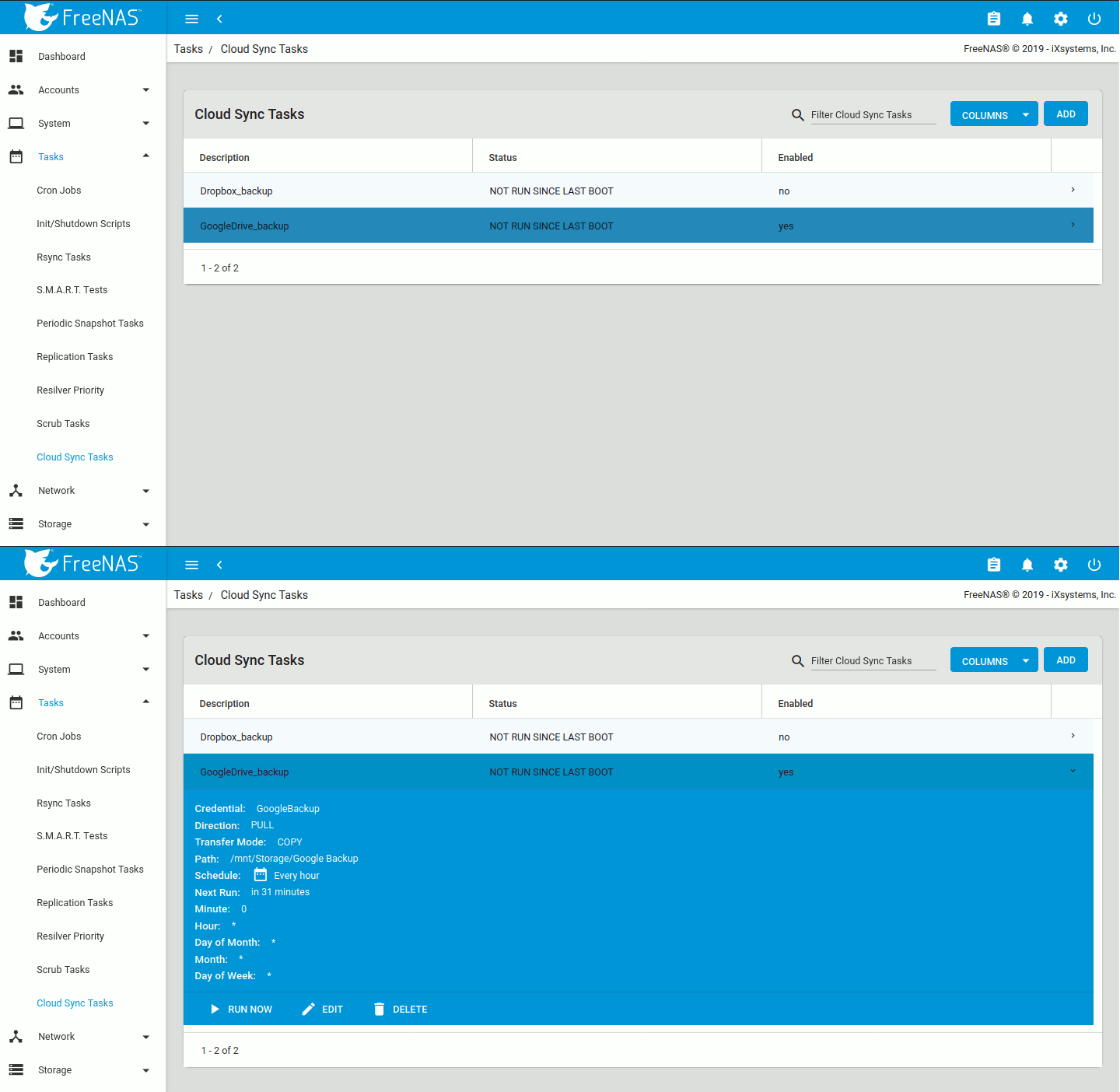
Run Now and Edit options

Clicking RUN NOW will prompt the task to start immediately and the web interface will show the status as RUNNING and SUCCESS upon completion. Details can be accessed via the Task Manager icon in the upper right-hand corner.
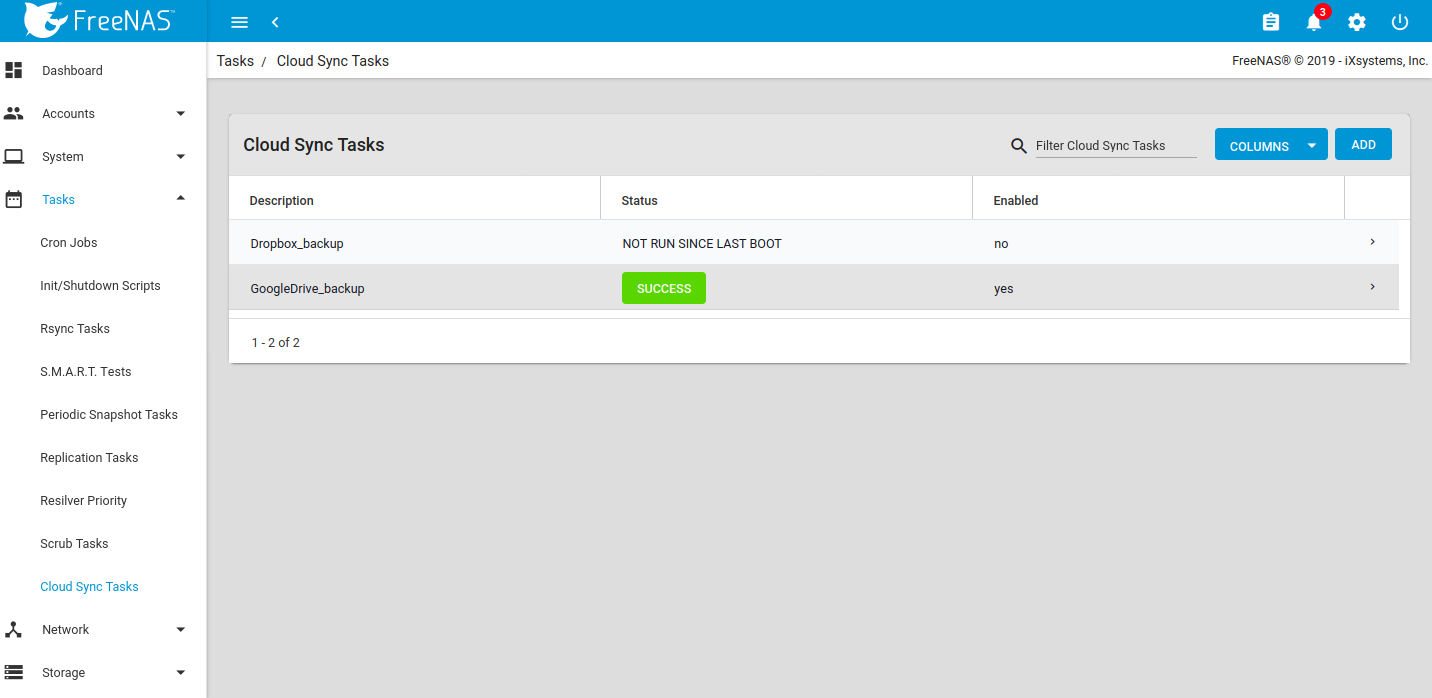
Showing Success status

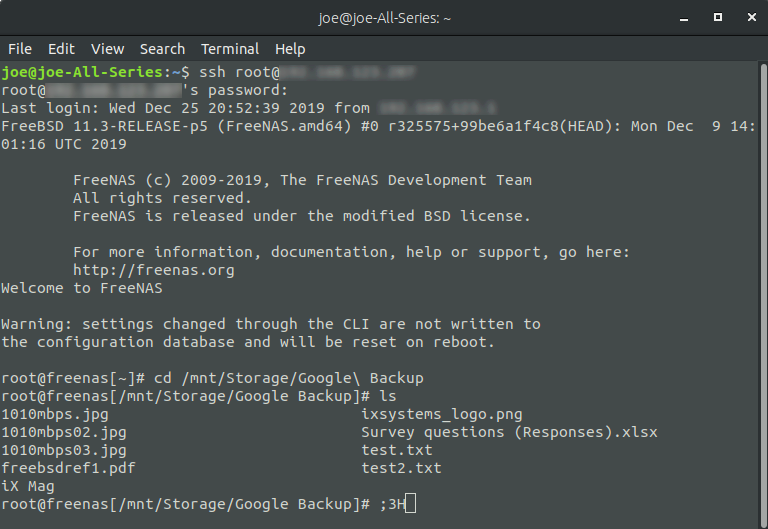
To verify success, SSH to the FreeNAS or use the built-in Shell Terminal to verify that the files are visible. 

built-in Shell Terminal to verify
prompt command window

If file access to a client PC or other device is needed, create a share to the same dataset that was set to store the cloud sync. An SMB share is used as an example. 
Go to Sharing Windows Shares (SMB) and click ADD. Choose the appropriate dataset, permissions, and settings to create a new SMB share. 
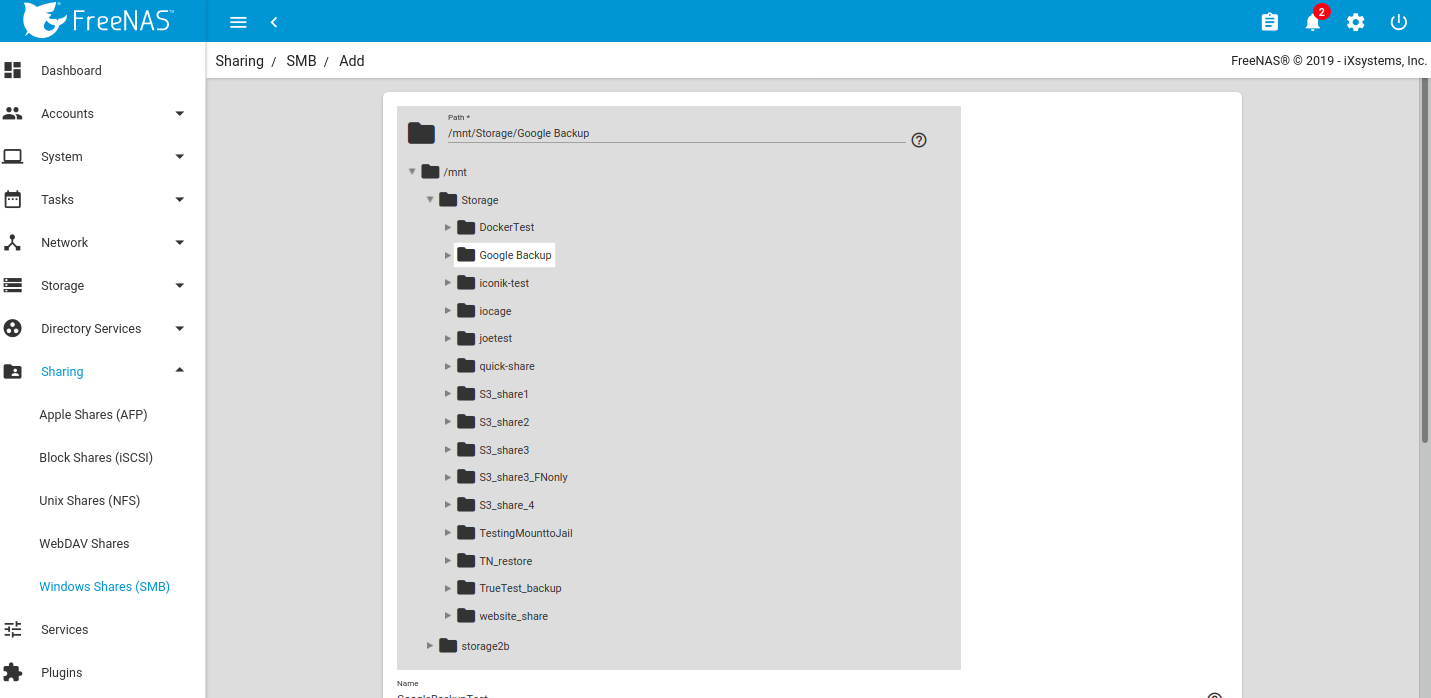
SMB Sharing

Once mounted to the client, the files should all be visible. 
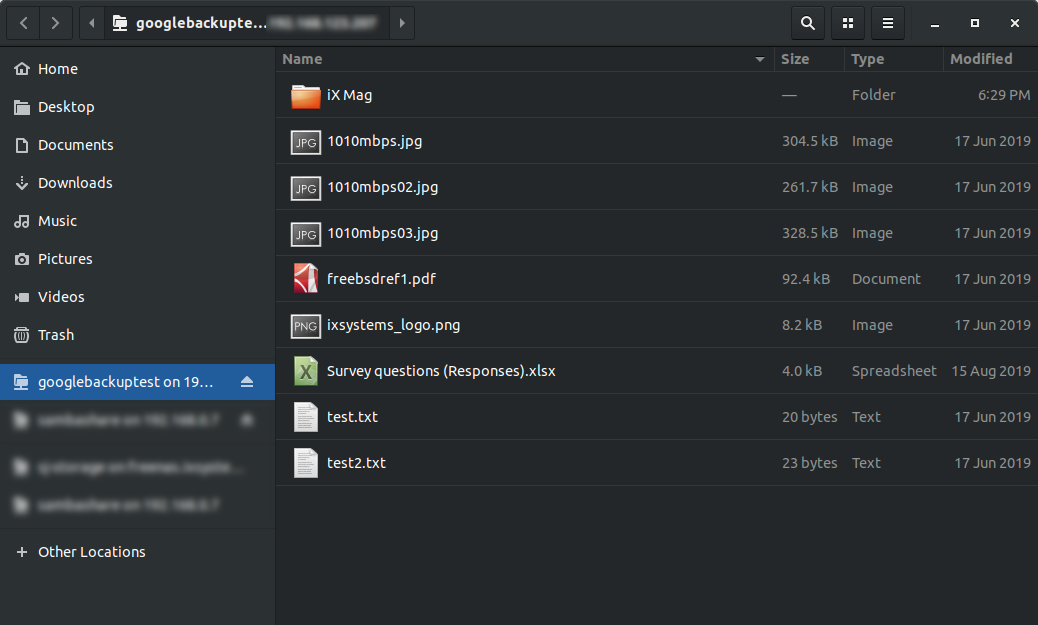
Visible files window

Working with Google created content
One caveat is that Google Docs and other files created with Google tools will have their own proprietary set of permissions and their read/write characteristics will be unknown to the system over a standard file share. Files are unreadable as a result.
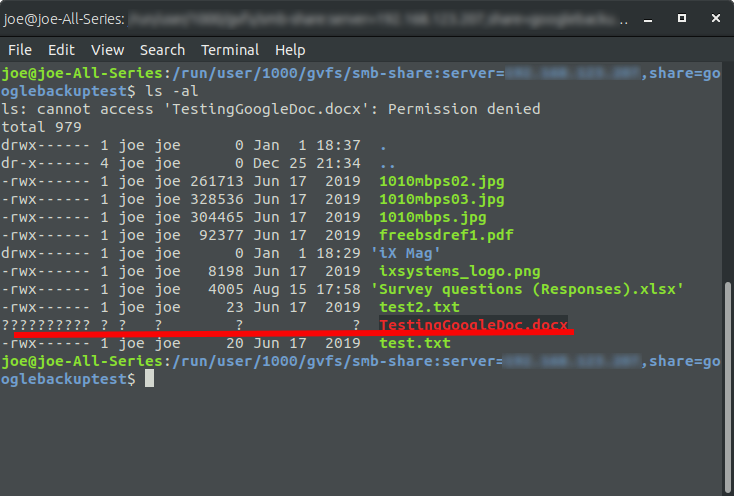
proprietary set of permissions

To allow Google created files to become readable, allow link sharing to access the files before the backup. Doing so will ensure that other users will be able to open the files with read access, make changes, and then save as another file should further edits be needed. Note that this is only necessary if the file was created using Google Docs, Google Sheets, or Google Slides; other files should not require modification of their share settings.
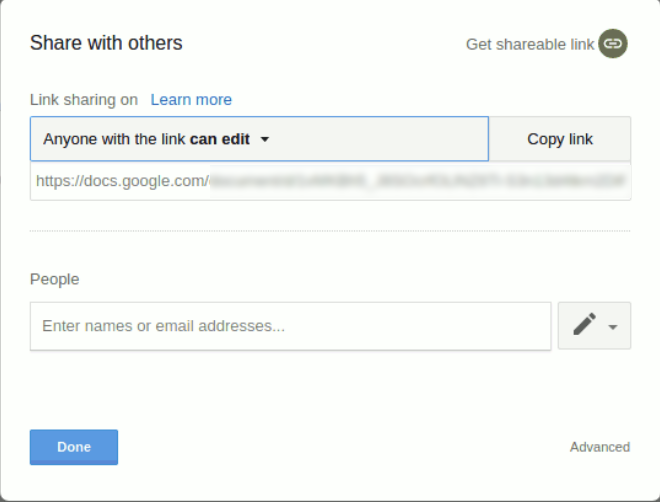
Documents link sharing
TrueNAS and FreeNAS are perfect for storing content, including cloud-based content, for the long-term. Not only is it simple to sync and backup from the cloud, but users can rest assured that their data is safe, with unlimited snapshots, copy-on-write, and built-in replication functionality.
Please contact us at https://www.ixsystems.com/contact-us/ for more information on what iXsystems can do for your organization.