





NOTE: This is historical content that may contain outdated information.

Plex Media Server is a popular Plugin available for FreeNAS, allowing the user to stream media directly from their FreeNAS system. Because Plugins reside inside a jail, Plex must have access to the media files to be shared which are generally stored in a separate dataset that is mounted inside the Plex Plugin jail. A media dataset can also be mounted in multiple jails to allow access to other Plugins like Radarr, Sonarr, or Sabnzbd to manage and share the centralized media.
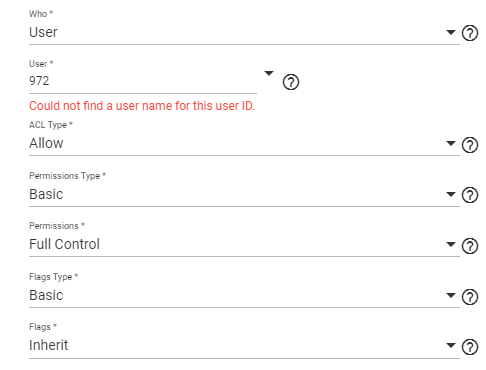
Once Plex is installed, its permissions will be in a default state set during the initial creation of a dataset on FreeNAS. Unless otherwise modified, this means the dataset will be owned by the user “root” and group “wheel”. Because Plex Media Server runs as the user “plex” in the default configuration, Plex will not be able to read or write to the media dataset and thus not be able to access the media files stored there. To create an ACL for the media dataset with the correct Plex user ID, first verify that user ID by running id plex in the Plugin Jail’s shell. This should be 972; with that information, launch the FreeNAS 11.3 ACL manager:
Who: User

User: 972 (Don't worry if it says "Could not find a username for this ID")

ACL Type: Allow

Permissions Type:

Basic Permissions: Full Control

Flags Type: Basic

Flags: Inherit
Other popular Plugin user ID’s include:
Visit the General Plugin Discussion in the FreeNAS Forums for more information and enjoy your media serving with FreeNAS!
此内容由惯性聚合(RSS阅读器)自动聚合整理,仅供阅读参考。 原文来自 — 版权归原作者所有。