








I built OpenHealth because Claude's and ChatGPT's Apple Health connectors are US-only. Drop your export.zip, get seven markdown files any LLM can read — browser, CLI, or phone-to-desktop over WebRTC.
For years I've worn an Apple Watch and let my iPhone quietly hoover up my resting heart rate, HRV, sleep stages, every workout, every nutrition log. Millions of data points. And for most of that time, when I wanted to actually ask something about my training — "am I cooked this week?", "has my recovery gotten worse since Christmas?" — I'd open ChatGPT and get an answer that was basically vibes, because it couldn't see any of the data.
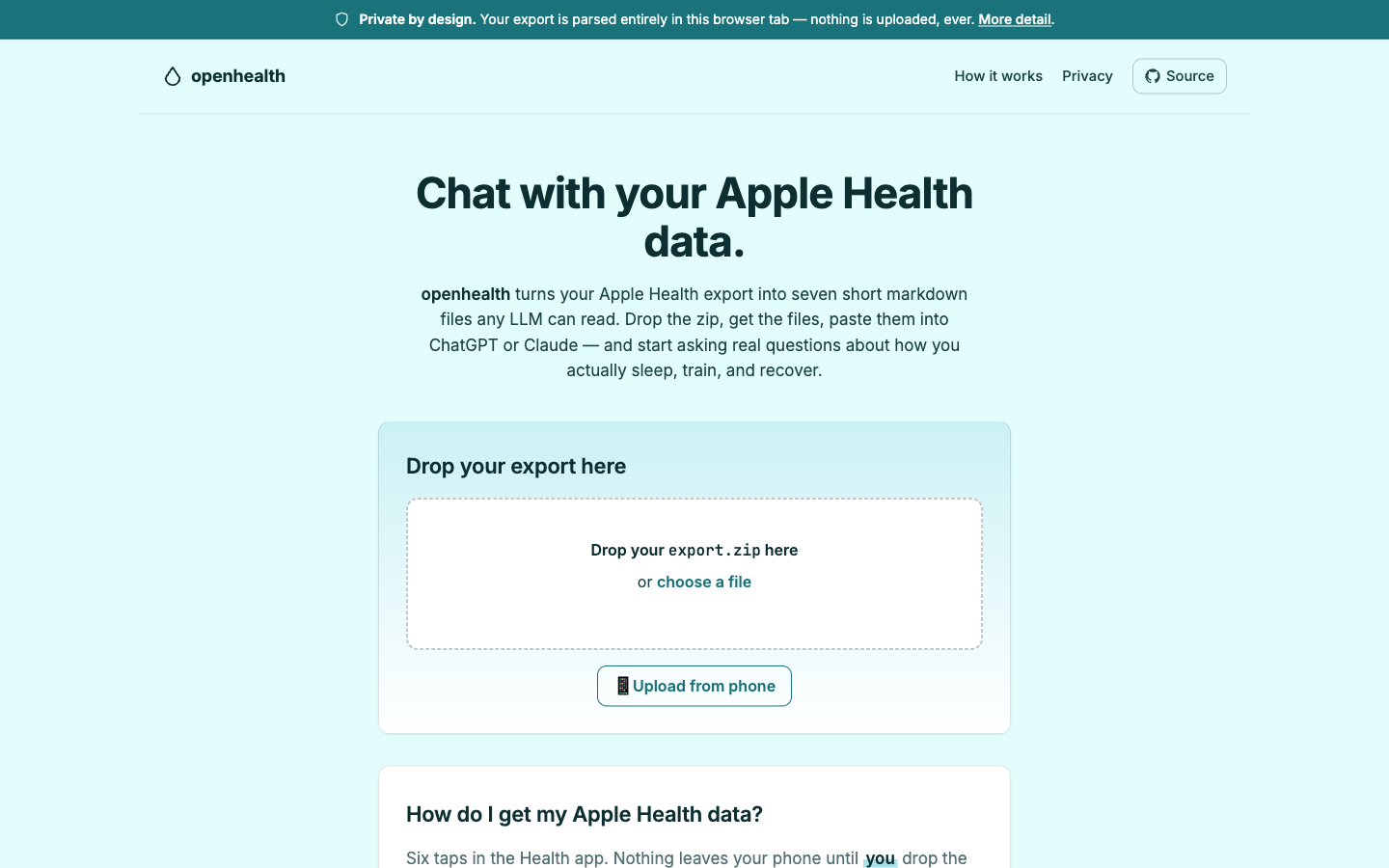
So I built openhealth. It turns your Apple Health export into seven short markdown files any LLM can read. Drop the zip in your browser at openhealth-axd.pages.dev, run the CLI, or beam the zip straight from your iPhone over WebRTC. Paste the output into Claude or ChatGPT and start asking the questions you actually wanted to ask.
What's US-only and why that's annoying
In January, Anthropic shipped an Apple Health connector for Claude. OpenAI has one in ChatGPT. Both are US-only — if you're in New Zealand like me, or the UK, EU, or Switzerland, they're not available. That's a lot of people locked out of the most natural way to use this data.
And even if you are in the US, you're letting Anthropic or OpenAI decide what the model reads, how it's framed, and what tier unlocks it. I wanted control over the whole pipeline — including which LLM I feed it into.
What I built
openhealth ships three ways.
A static web app. Drop export.zip, wait five seconds, download seven
files. The browser does the parse. There's no upload endpoint because there's no
server — the Cloudflare Pages site is static HTML plus a tiny Web Worker. Open
DevTools, watch the Network panel, nothing goes out.
A Bun-compiled CLI. openhealth ~/export.zip -o ./output gets you seven
markdown files. --bundle concatenates them into one. --clipboard pushes that
bundle straight to your system clipboard so you can paste it into any chat
window. Zero deps beyond saxes for XML and fflate for unzip — even the
argument parsing is node:util parseArgs, not Commander. One binary, put it
wherever.
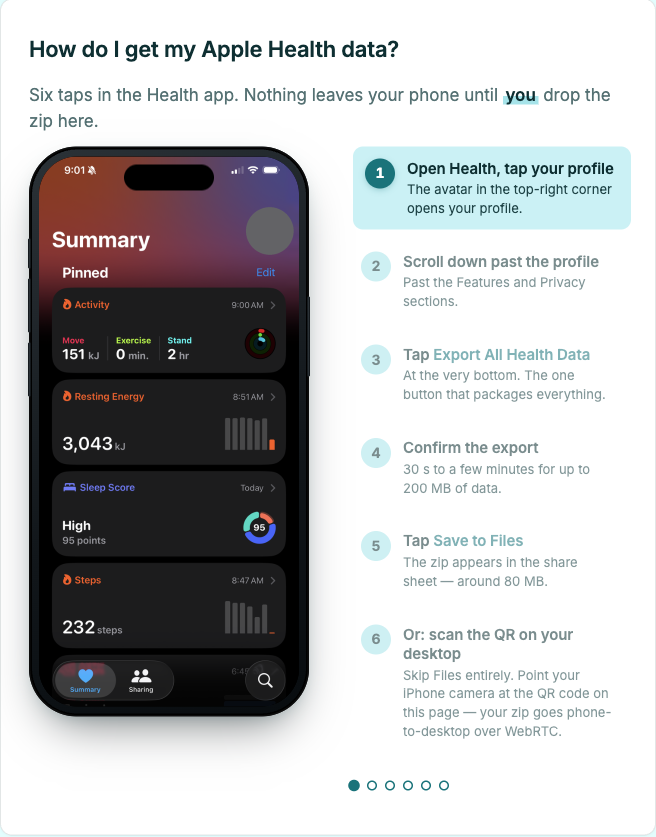
A phone-to-desktop handoff over WebRTC. The desktop site renders a QR code. Point your iPhone camera at it, Safari opens a tiny receiver page, pick the zip, and it streams directly to your desktop browser over a DataChannel. The only backend in the whole stack is a ~100-line Cloudflare Worker that relays the WebRTC handshake — it never sees a byte of your health data.
How the parse actually works
Apple's export.xml is
properly huge.
A long-term Watch user can easily have a 500MB–4GB file with millions of rows.
Most XML parsers build a tree in memory, which OOMs before they finish.
openhealth uses saxes — a streaming SAX parser in pure TypeScript. It's isomorphic, so the same parser runs in Bun, Node, and the browser. I tested it against a synthetic 169MB / 1 million-record export and it finished in about 5 seconds in Chrome, with the main-thread heap staying around 5MB because the parse runs in a Web Worker.
The rest of the core is a small pipeline: stream XML, accumulate per-record-type, roll up into weekly and monthly summaries, run each through a writer that produces one markdown file. Every writer is snapshot-tested against byte-for-byte expected output. 85 tests, TDD throughout.
What the seven files are
Each one is deliberately small and shaped to be LLM-readable:
health_profile.md— baselines, data sources, long-term averagesweekly_summary.md— current week plus a 4-week rolling comparison with week-over-week deltasworkouts.md— detailed log for the last 4 weeks: HR, duration, distance, energybody_composition.md— weight trend, recent readings, nutrition averagessleep_recovery.md— nightly stages, 8-week averages, HRV, resting HR, SpO2 trendscardio_fitness.md— running log, HR-zone distribution, walking-speed trendsprompt.md— a ready-to-paste system prompt that frames the other six as coaching input
Drop one file or all seven, depending on which chat model you're using.
What it's actually good at
Feeding real data to an LLM is a different experience from answering its questions. When Claude can see that my resting HR has crept up 4bpm over the last fortnight while my HRV has dropped and my training load stayed the same, it gives a real answer — "you're likely undercooked on recovery this week, here's what I'd change" — rather than a generic reminder to drink water.
It's especially good if you've got multiple devices in the mix. I've got data from Apple Watch, the iPhone step counter, a Withings scale, and MyFitnessPal. The parser picks the highest-trust source per metric — Apple Watch wins over iPhone for steps, Watch sleep beats AutoSleep which beats Withings, duplicate-weight entries on the same day get deduped. You feed in one zip and get one coherent picture.
Ask it about your recovery, your training load, what you might be doing wrong, how your sleep correlates with your long runs. It'll tell you — and it'll be right more often than not.
If privacy matters, go all the way
openhealth itself never uploads your data. The web app parses in your browser tab. The CLI runs locally. The WebRTC handoff stays peer-to-peer — the Cloudflare Worker that relays the handshake never sees a byte of the file. Clone the repo, diff the build output, and confirm it yourself.
When you paste the seven files into ChatGPT or Claude, they see the data. That's the trade most people will take for convenience, and it's fine. But if you don't want to make that trade, you don't have to — run the CLI and pipe the bundle into a local model:
openhealth ~/export.zip --bundle -o ./out
ollama run llama3 < ./out/openhealth.md
Ollama, llama.cpp, LM Studio, whatever you run. Your health data never leaves your laptop. The output is just markdown — it doesn't care what reads it.
That's why the shape is seven files and not an API. You pick what sees them.
I'm not a doctor. Neither is the model. Use this for thinking out loud about your own training, not diagnosing anything.
MIT, source at
github.com/jonnonz1/openhealth. Web
app at openhealth-axd.pages.dev. If you've
been sitting on a 200MB export.zip with nothing that'll open it, have a go.