


惯性聚合 高效追踪和阅读你感兴趣的博客、新闻、科技资讯
阅读原文 在惯性聚合中打开

推荐订阅源

大猫的无限游戏
大猫的无限游戏
Webroot Blog
Webroot Blog
cs.AI updates on arXiv.org
T
Threat Research - Cisco Blogs
V2EX - 技术
V2EX - 技术
L
LINUX DO - 热门话题
Google DeepMind News
Recorded Future
Recorded Future
S
Schneier on Security
I
InfoQ
Cyber Security Advisories - MS-ISAC
cs.CV updates on arXiv.org
The GitHub Blog
The GitHub Blog
S
Security @ Cisco Blogs
O
OpenAI News
W
WeLiveSecurity
Vercel News
Vercel News
阮一峰的网络日志
阮一峰的网络日志
Simon Willison's Weblog
人人都是产品经理
人人都是产品经理
Cloudbric
Cloudbric
The Last Watchdog
The Last Watchdog
The Hacker News
The Hacker News
Google Online Security Blog
OSCHINA 社区最新新闻
OSCHINA 社区最新新闻
GbyAI
GbyAI
NISL@THU
NISL@THU
T
Tailwind CSS Blog
V
Visual Studio Blog
PCI Perspectives
PCI Perspectives
K
KPMG report finds enterprise disconnect between AI and its ROI | CIO
Jina AI
Jina AI
D
DataBreaches.Net
B
Blog RSS Feed
N
News and Events Feed by Topic
N
News and Events Feed by Topic
H
Heimdal Security Blog
cs.CL updates on arXiv.org
腾讯CDC
Latest news
Latest news
V
Vulnerabilities – Threatpost
Hacker News: Ask HN
Hacker News: Ask HN
WordPress大学
WordPress大学
V
V2EX
aimingoo的专栏
aimingoo的专栏
博客园 - 司徒正美
Apple Machine Learning Research
D
Darknet – Hacking Tools, Hacker News & Cyber Security
The Register - Security
Help Net Security
Help Net Security

Menghuan1918's Blog

提升浏览器多标签页管理效率 介绍页 友链 My Arch Linux - 外观与字体 使用ray.tune进行自动调整超参数 使用Docker(MinIO)和Caddy创建图床服务 AI系统攻击手段(简要概述) RAG预处理增强:让Fastgpt/Dify召回更多东西 将PDF知识图谱化:graphrag+Doc2X+DeepSeek 如虎添翼:为gpt_academic配置searxng搜索 包管理工具UV使用指南:全面替代conda 折腾杂谈:运用Dify+xinference+ollama构建知识库 Ollama跨平台性能比拼:Windows遥遥落后 笔记软件的最终选择:Obsidian + Self-hosted LiveSync 配置DOSBox以及其窗口大小 在VSCode中配置多平台的C/C++语言支持 折腾杂谈:部署Alist并整合/服务器优化 在Linux上交叉编译出Windows可执行程序 利用MSYS2在windows上配置C/C++/openGL开发环境 强制对游戏应用FSR 折腾杂谈:Docker部署Rustdesk/切换网站框架 Speedometer 3.0分数测试(电子斗蛐蛐) 在Arch Linux下编译32位C程序出错 使用pelican以及nginx建立个人博客
折腾杂谈:部署一个网页在线状态面板/反代切换到Caddy
Menghuan1918 · 2024-05-16 · via Menghuan1918's Blog

本文内容:

  • 部署一个网页在线状态面板到子域名
  • 将网站反代服务切换到Caddy

部署一个网页在线状态面板

使用uptime-kuma可以轻松简单地部署一个网页在线状态面板~就是下面这个:
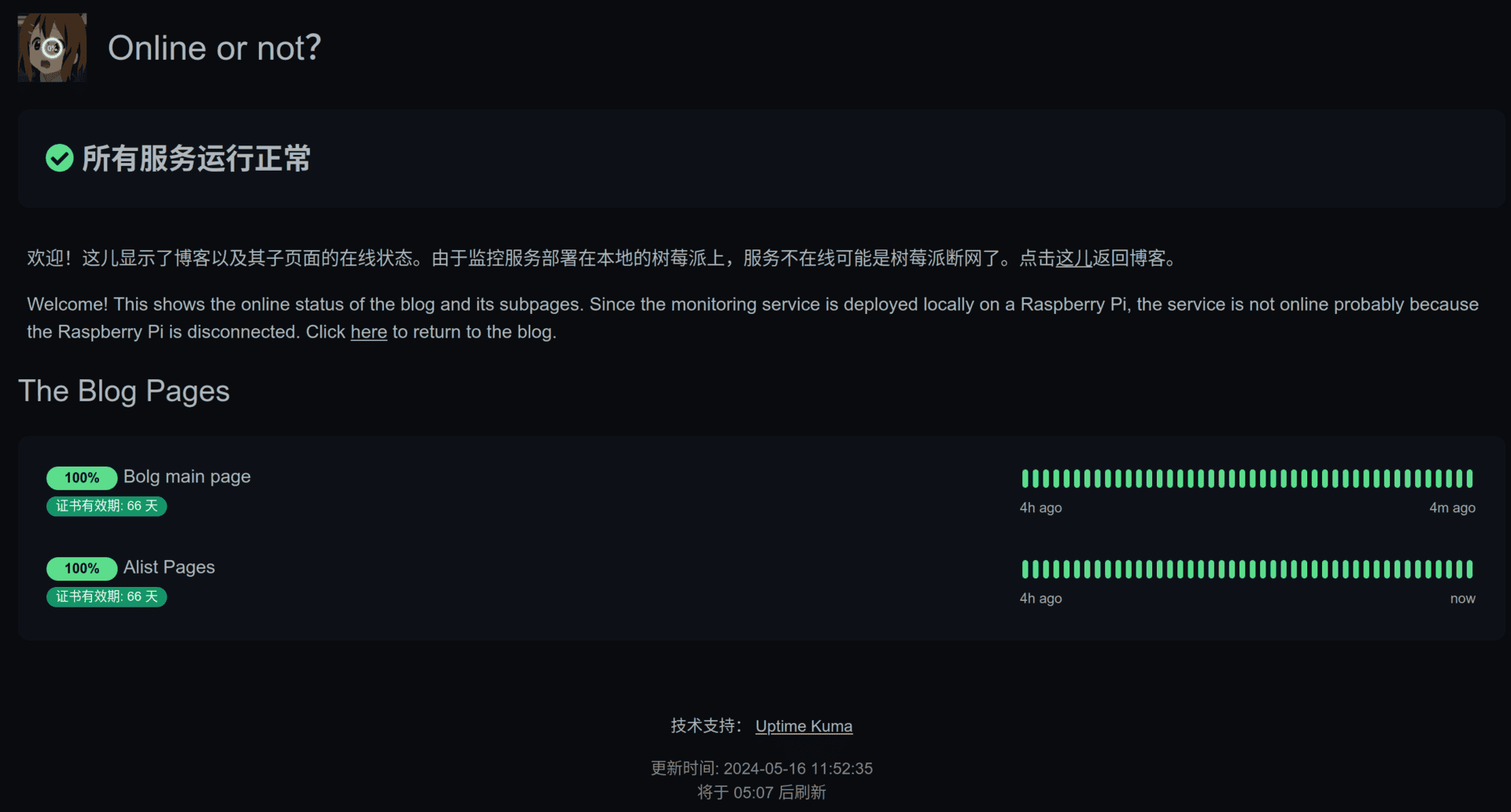
虽然没啥用,就单纯弄着玩
虽然没啥用,就单纯弄着玩

当然还是使用docker-compose部署,改写下官方给的docker指令:

version: "3.3"
services:
  uptime-kuma:
    restart: always
    ports:
      - 3001:3001
    volumes:
      - uptime-kuma:/app/data
    container_name: uptime-kuma
    image: louislam/uptime-kuma:1
volumes:
  uptime-kuma: {}

启动之后进去按步骤设置就好了。随后再将其反代到子域名上,再往网站的标题栏加一个按钮就行了。

当然这玩意儿也就图一乐呵乐呵,树莓派或者服务器两个哪个没网都会显示服务异常(怎么感觉更像是树莓派在线状态面板?)。

将反代切换到Caddy

Caddy真香,配置对比Nginx而言简单太多了

首先安装Caddy,随后编辑/etc/caddy/Caddyfile

blog.menghuan1918.com {
    root * /var/www/menghuan
    file_server
    encode gzip

    handle_errors {
        @404 {
            expression {http.error.status_code} == 404
        }
        rewrite @404 /404.html
        file_server
    }

    tls /etc/ssl/menghuan1918.pem /etc/ssl/menghuan1918.key

    route /AlistStore* {
        reverse_proxy http://127.0.0.1:5244
    }
}

www.menghuan1918.com, menghuan1918.com {
    redir https://blog.menghuan1918.com{uri} permanent
}

status.menghuan1918.com {
        reverse_proxy raspberrypi:3001
        tls /etc/ssl/menghuan1918.pem /etc/ssl/menghuan1918.key
}

就是简单地反代:本地静态网页,Alist网盘并指定证书,以及将子域名反代到面板上。