











Managing content on hundreds of websites within a single organization is a daunting challenge, particularly if you’re focused on optimizing site performance. Now imagine keeping a consistent design language across all of your sites and sharing content like news posts between them. It might seem like you’d have to compromise on something — but that’s not the case.
CloudCannon’s Site Mounting feature, together with our open-source static API generation tool Flatlake, can do it all.
Let’s see how these moving pieces fit together!
The following use case makes several assumptions, as follows:
Note that your specific use case may well diverge from the following example; if you have additional needs that aren’t covered here we’d love to hear about them! Just get in touch and we’ll see how we can help you manage your content more effectively and efficiently.
The “central repository” will be a code-only repository, stored in a git provider and synced to CloudCannon as a site.
What we’re calling a ‘site’ here is a CloudCannon entity connected to a branch of a repository. This doesn’t need to be a hosted website or produce any output files, but the site entity in CloudCannon does need to exist for the purposes of syncing files and site mounting.
Each of your websites (let’s imagine, for example, a range of departments or divisions within an organization) will also be connected to CloudCannon as a site.
In the CloudCannon configuration for each website, we can set up Site Mounting. This mounting will specify that the “central repository” should be mounted at some specific path on the website when CloudCannon builds the site. As a data flow, this would look like:
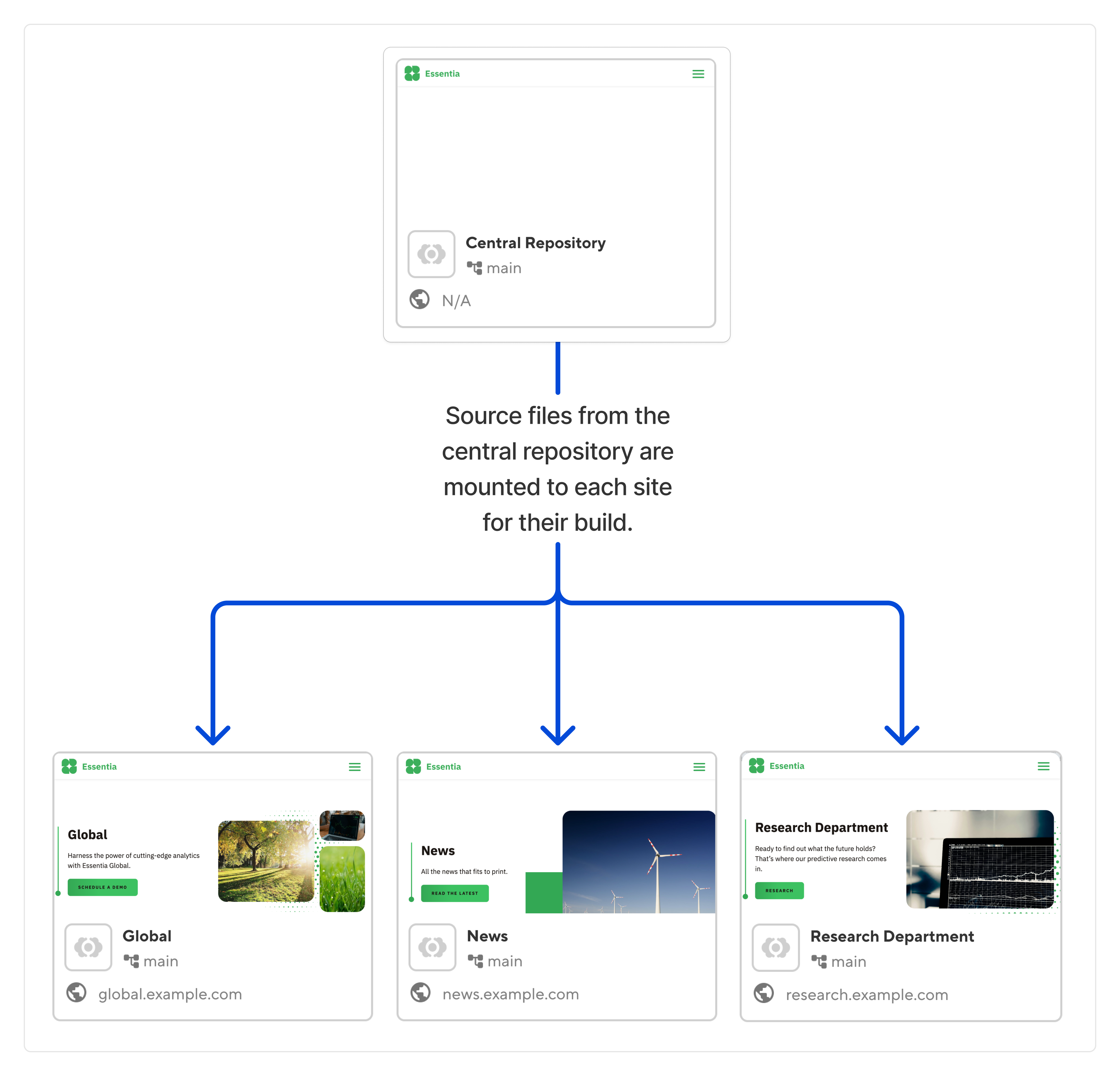
For a more concrete example, we’ll imagine that the “central repository” contains the following layout and configuration files:
layouts/
  list-page.htmlcomponents/
  card.webc
And each of your other website repositories might contain content files such as:
content/
pages/
index.md
blog.mdeleventy.config.js
cloudcannon.config.yml
We can use site mounting to download our central repository to the build image as we build each of our website repositories. For example, we can mount our central repository into a directory named common, which will give us the following folder structure at the start of the website build:
common/
layouts/
list-page.html
components/
card.webccontent/
pages/
index.md
blog.md
eleventy.config.js
cloudcannon.config.yml
(Note that in this example we’re using Eleventy; the same process can be set up for any of the supported SSGs on CloudCannon.)
By customizing the mounting configuration, or by using a prebuild or preinstall script, we can move the common files to the relevant locations in our website. In this case, we need to move components and layouts into locations where Eleventy will find them:
content/
pages/
index.md
blog.mdcomponents/
card.webc
layouts/
list-page.html
eleventy.config.js
cloudcannon.config.yml
... where content/, eleventy.config.js, and cloudcannon.config.yml were sourced from your separate site’s content repository, and components/ and layouts/ were sourced from the “central repository”.
The important aspect is that from here, the SSG build can proceed as if all files were arranged as one folder structure originally, and thus as one unified static site. All logic linking these separate repositories together is offloaded to CloudCannon and/or prebuild scripts.
While the above steps provide for connected staging and production builds, local development of connected sites can be enabled via Git submodules, symbolic links, or via another developer-approved solution that reflects the same end goal.
Our hypothetical organization needs to share content, such as news articles, between each website. For example, they may wish to show some number of posts from news.example.com on a different site, say global.example.com.
If these were the only two sites in play, we could simply use CloudCannon’s Site Mounting feature directly as described above. For example, you could mount the news site into the global site. This gives the global site the ability to load source files from the news website's repository, which it can use to render the latest news articles.
For many use cases at scale, this wouldn’t be maintainable. It would also be much less ergonomic, since every site would need to understand the source files of every other site.
Instead, we can create a data lake that is composed of the collections from all of your websites.
We'll once again use Site Mounting, but this time we'll also use Flatlake to generate a static API. This time, we will have a new site named Content Lake. This site will have a Git repository attached for the purposes of configuring the Flatlake tooling, but no content will be stored in this repository. This site in CloudCannon will be configured to mount all relevant sites for its build:
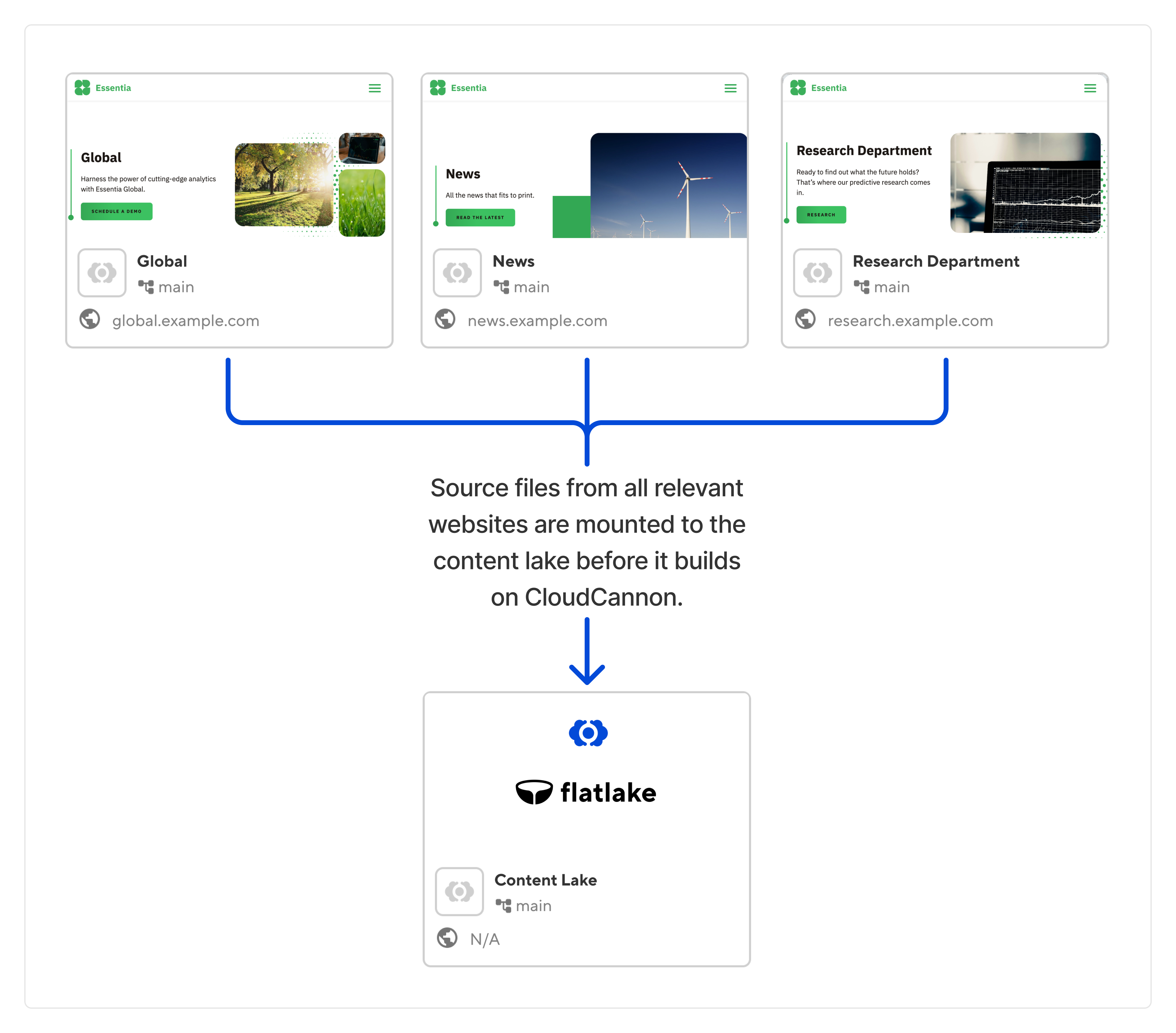
Thus, when this content lake site initiates a build on CloudCannon it will start with a folder structure such as:
news/
content/
news-post-a.md
news-post-b.mdglobal/
...
research/
...
flatlake.yml
Flatlake reads all of these content files as its input, and will produce JSON feeds aggregating the data. The output format of this can be tailored to your requirements, but a starting example might look like:
output/
  news/
    all.json
    news-post-a.json
    news-post-b.json
    aggregate/
      author/
        jane-doe/
          page-1.json
          page-2.json
          page-3.json
The job of Flatlake is to precompile the API required for you to query your data. If you want to get the latest X posts tagged by Y and Z, Flatlake is the tool to read all of your source files and produce that endpoint.
An extra benefit of CloudCannon’s Site Mounting is automatic build triggers. This means Flatlake will compile a fresh copy of your content lake whenever the mounted repositories are modified.
Now that we have the aggregate JSON files produced by Flatlake, we can tackle how each of your websites loads this information. Depending on your organization’s priorities, you can take either the fully static approach, or the classic headless approach.
The first option involves using CloudCannon’s Site Mounting. In our previous examples, we were mounting the source files from one site to the build of another.
Alternatively, Site Mounting will also allow you to mount the built files from a site. This means we can take the output files of Flatlake, and make them available as static files for every website build.
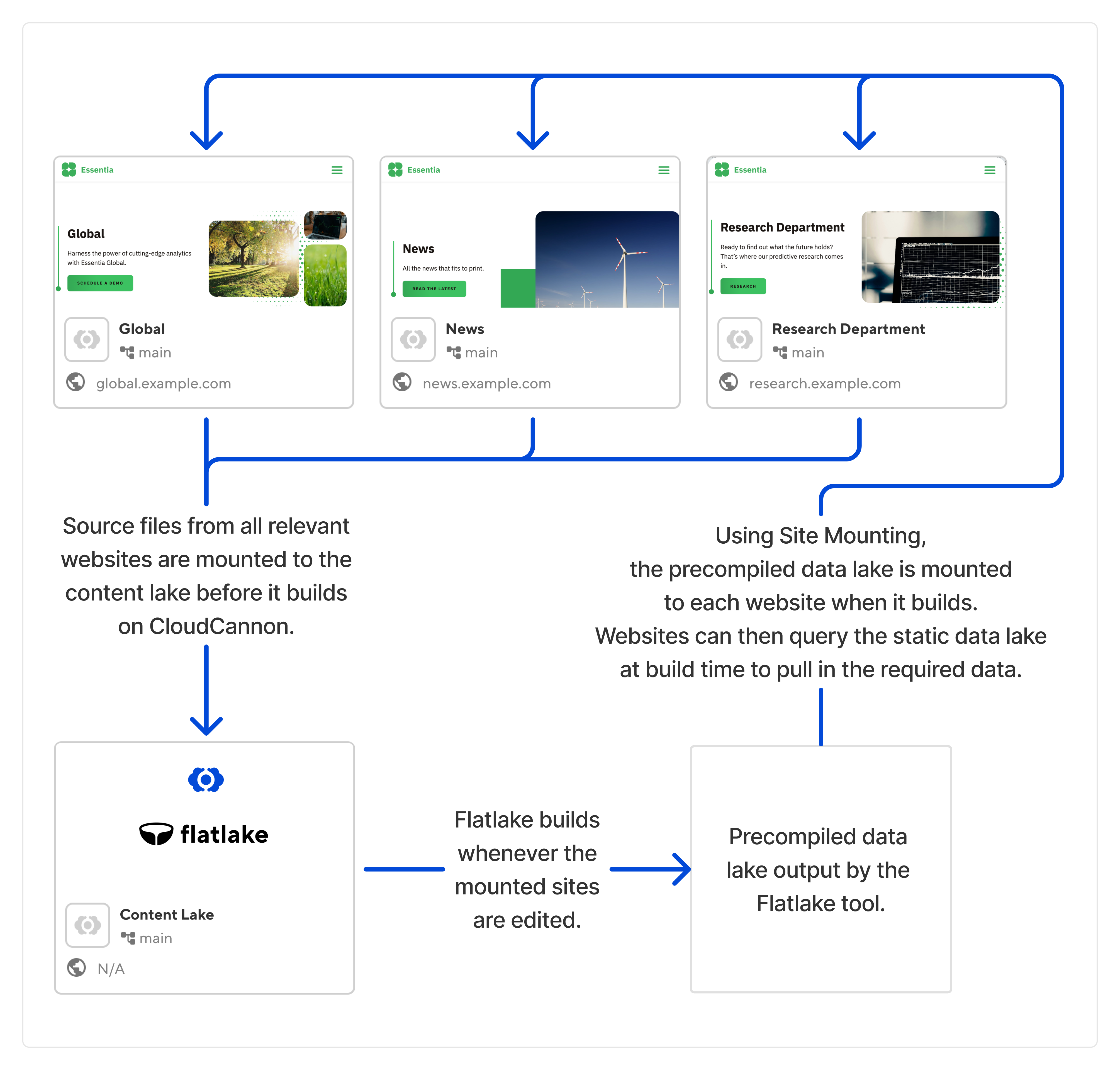
Pulling the site examples from before, our global.example.com website might now start its build with files such as:
common/
layouts/
list-page.html
components/
card.webclake/
news/
all.json
news-post-a.json
news-post-b.json
aggregate/
author/
jane-doe/
page-1.json
page-2.json
page-3.json
content/
pages/
index.md
blog.md
eleventy.config.js
cloudcannon.config.yml
Or, when files are rearranged to create one site:
content/
pages/
index.md
blog.mdcomponents/
card.webc
data/
lake/
news/
all.json
news-post-a.json
news-post-b.json
aggregate/
author/
jane-doe/
page-1.json
page-2.json
page-3.json
layouts/
list-page.html
eleventy.config.js
cloudcannon.config.yml
Once again, we see that we can mount all files together for the build, such that the Eleventy site is still a fully static site. Since Flatlake produces JSON files, and these can be placed in the data directory, the Eleventy site can simply reference this data without needing to implement dynamic content of any form. For example, calling:
import allNews from "@data/lake/news/all.json";would give you programmatic access to all the news items in the lake from any site, which can be rendered statically from any component.
By configuring Flatlake further, endpoints such as @data/lake/news/latest.json could return a smaller set of five news items, or endpoints can be created that sort news items by publish date and other parameters.
The benefit of this approach is that everything remains static, and pages have no dynamic data to fetch when loaded in a browser. Since CloudCannon’s Site Mounting integrates with our build system, editing a site will trigger a build of Flatlake, and Flatlake having new output files will trigger a build on all sites that mount the lake. In this manner, we can ensure that our data is always up to date.
Here, the files output from Flatlake are hosted as an API. For example, to get a JSON feed of all news items we could fetch https://lake.example.com/news/all.json. This is functionally equivalent to a classic headless CMS, except all queries are precompiled by Flatlake rather than resolved dynamically. (And, of course, you have full control over all of your content files — they’re not locked away in a database.)
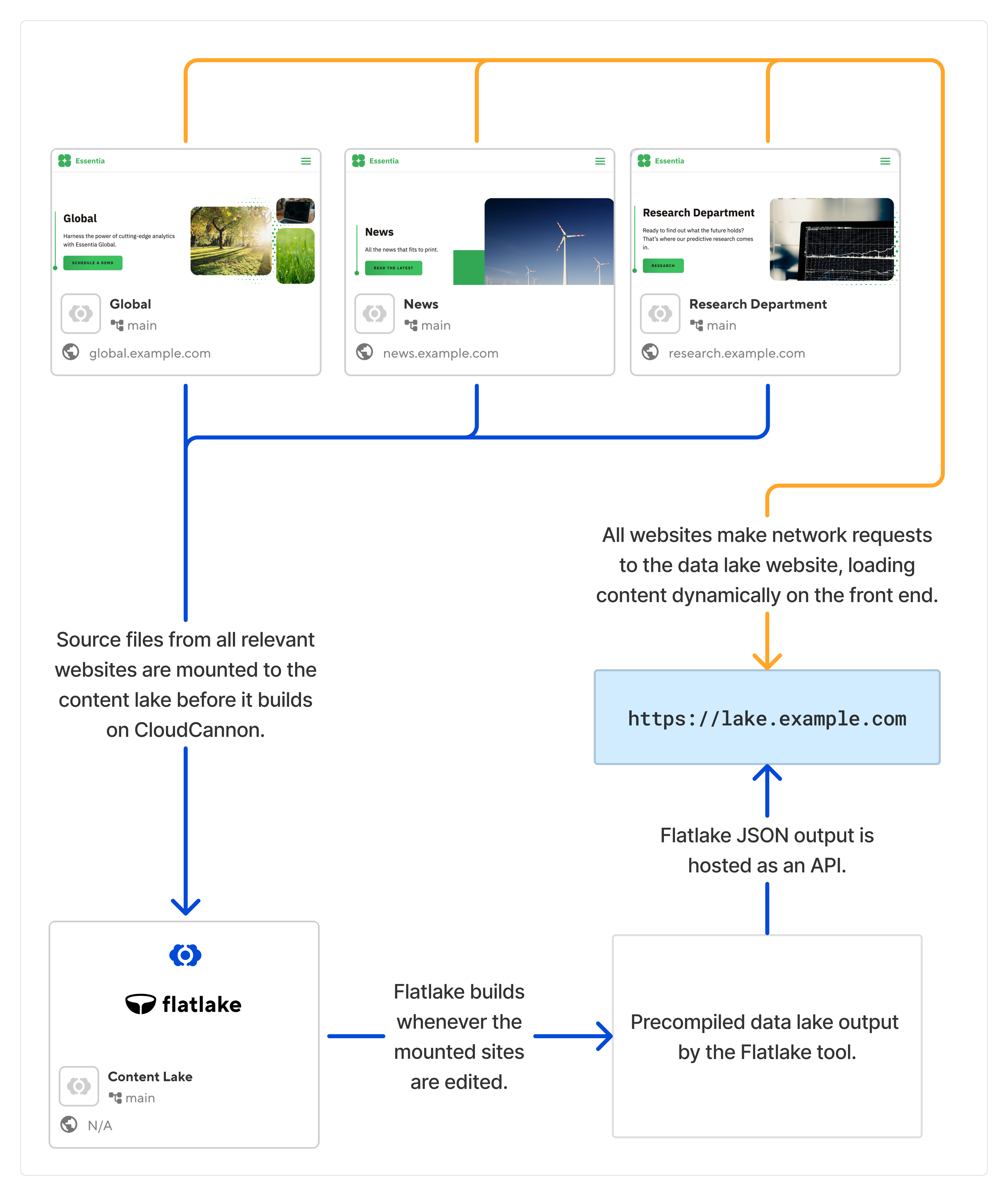
This doesn’t have to be an either-or choice — some sites could mount the content lake and use it as static files in their build, and other sites could access the same data dynamically over the network. The same Flatlake JSON output powers both.
You might not require multiple content lakes — all sites can feed into, and draw from, the one primary content lake. If you’d like to limit how many sites need to rebuild when a given content lake aggregator updates, however, you can create multiple content lakes, each with a CloudCannon build running Flatlake over some set of mounted sites.
For example, all Research department websites could mount into their own content lake, whose output is only mounted on the Research site:
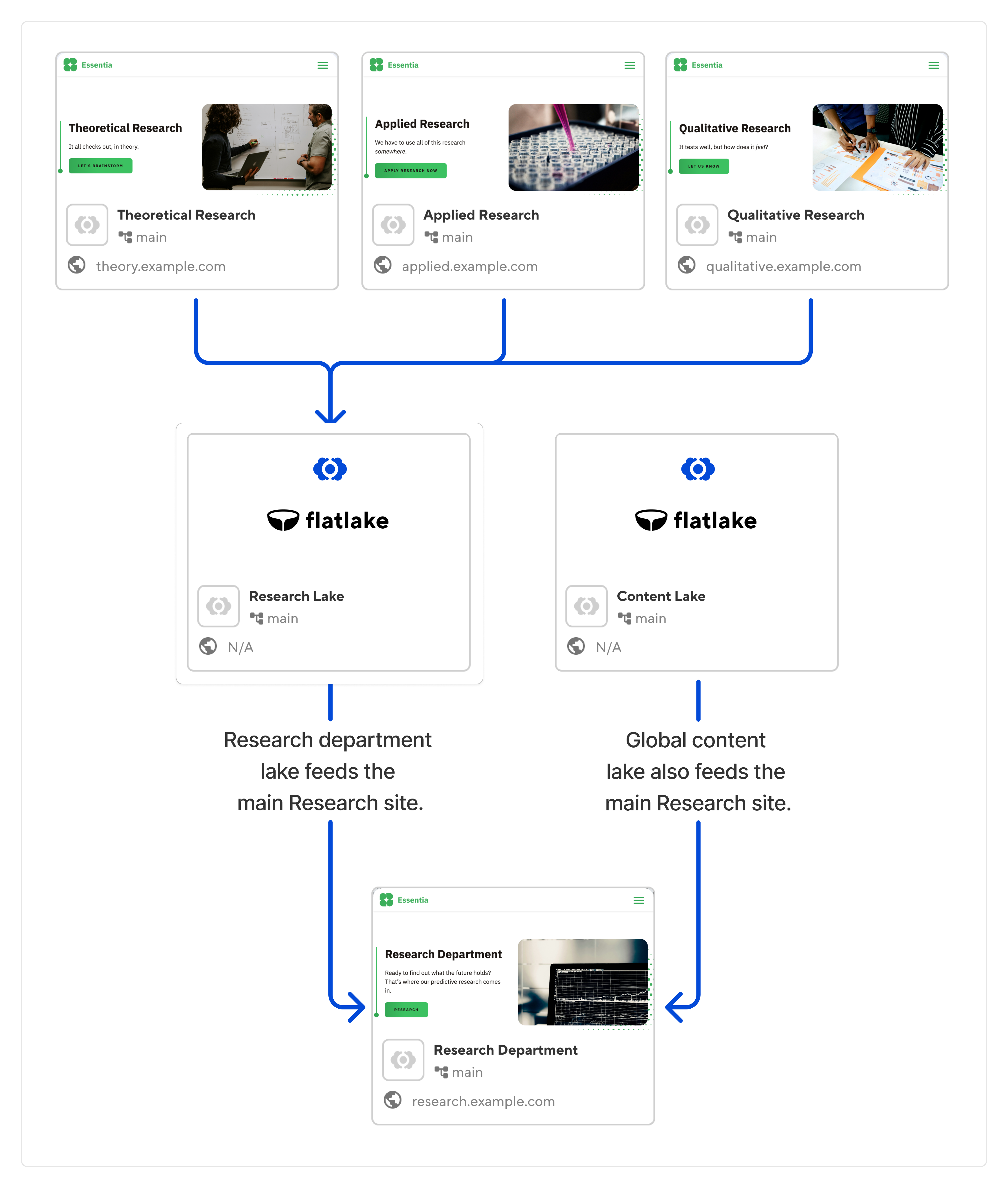
Together, Flatlake and CloudCannon’s Site Mounting solve a wide range of common problems for large organizations.
Complex content management
Large organizations often have extensive content management needs across multiple sites or sections of a site. Flatlake can solve this by performing the role of a traditional headless CMS, allowing content creators to manage content in a structured manner using markdown, JSON, YAML, etc. This simplifies content management and ensures consistency across various sections or sites.
Theme and content sharing
Businesses may have the need to share themes or content across multiple sites, such as brand elements or marketing materials. Site Mounting facilitates this by enabling the sharing of themes and content repositories among different sites. This streamlines the process of maintaining consistent branding and content across various web properties.
Dependency management
Changes in dependencies, such as theme layouts or content structure, can necessitate rebuilding multiple sites to reflect these changes accurately. Site Mounting automates this process by triggering builds for all sites using the modified dependencies, ensuring that all sites stay up-to-date and consistent with the latest changes.
Efficient website development
Traditional CMS platforms can sometimes be cumbersome for developers, especially when customizing complex functionalities or integrating with external services. Flatlake, with its static site generator-like approach, simplifies website development by allowing developers to work with familiar tools and workflows while still providing the flexibility of a headless CMS.
Scalability and performance
Static site architectures, like the one facilitated by Flatlake, offer better scalability and performance compared to traditional CMS platforms. By generating static JSON files that form an API, Flatlake enables efficient content delivery and reduces server load, making it suitable for large-scale websites with high traffic volumes.
By leveraging tools like Flatlake and Site Mounting, large organizations can address these common website challenges more effectively, streamlining content management, ensuring consistency across multiple sites, and enhancing overall development and performance.
Want to learn more? See how CloudCannon helps higher education institutions and enterprises. Any questions? We’d love to hear from you.
此内容由惯性聚合(RSS阅读器)自动聚合整理,仅供阅读参考。 原文来自 — 版权归原作者所有。