




惯性聚合 高效追踪和阅读你感兴趣的博客、新闻、科技资讯
阅读原文 在惯性聚合中打开

推荐订阅源

Hacker News: Ask HN
Hacker News: Ask HN
WordPress大学
WordPress大学
GbyAI
GbyAI
T
Tailwind CSS Blog
Know Your Adversary
Know Your Adversary
小众软件
小众软件
Security Latest
Security Latest
博客园 - 聂微东
P
Privacy International News Feed
L
Lohrmann on Cybersecurity
爱范儿
爱范儿
云风的 BLOG
云风的 BLOG
阮一峰的网络日志
阮一峰的网络日志
C
Cyber Attacks, Cyber Crime and Cyber Security
博客园 - 叶小钗
Last Week in AI
Last Week in AI
The Register - Security
奇客Solidot–传递最新科技情报
奇客Solidot–传递最新科技情报
V
Vulnerabilities – Threatpost
Jina AI
Jina AI
AWS News Blog
AWS News Blog
L
LINUX DO - 热门话题
D
Darknet – Hacking Tools, Hacker News & Cyber Security
NISL@THU
NISL@THU
Spread Privacy
Spread Privacy
Google DeepMind News
P
Palo Alto Networks Blog
S
Schneier on Security
H
Hackread – Cybersecurity News, Data Breaches, AI and More
Cyber Security Advisories - MS-ISAC
T
The Exploit Database - CXSecurity.com
月光博客
月光博客
C
CERT Recently Published Vulnerability Notes
G
GRAHAM CLULEY
N
Netflix TechBlog - Medium
量子位
K
Kaspersky official blog
T
Threatpost
Latest news
Latest news
The Cloudflare Blog
MyScale Blog
MyScale Blog
C
Cisco Blogs
T
Tor Project blog
S
Securelist
Cisco Talos Blog
Cisco Talos Blog
The GitHub Blog
The GitHub Blog
A
Arctic Wolf
T
Threat Research - Cisco Blogs
H
Help Net Security
C
CXSECURITY Database RSS Feed - CXSecurity.com

CloudCannon Blog

Building with AI: Git-based vs headless vs traditional CMS CloudCannon + Astro: performance meets powerful content management Introducing the Astro Component Starter Introducing Jetstream — built on the Astro Component Starter Why we switched to the system font stack Redesigning CloudCannon’s docs with Diátaxis, Lume, and Pagefind Make content editing more visual: upgraded Editable Regions How Configuration Mode makes building editing interfaces easy Your hosting just got an upgrade (and a price cut) Custom testing domains for professional branding Keep your content consistent with input validation Managing multilingual content in CloudCannon Simplify team publishing with conflict resolution and domain tools Open Beta: Publishing Conflict Resolution Getting started with CloudCannon and Astro: Bookshop, components, and live editing Welcome to the CloudCannon Community! Omnichannel delivery is just marketing spin from API-based CMS companies Getting started with CloudCannon and Astro: Snippets and Collections Managing digital assets in CloudCannon: a guide to smart asset storage Understanding CloudCannon's branching workflows and Projects: a complete guide What is a static website? CloudCannon’s 2024 wrapped Getting started with CloudCannon and Astro: WYSIWYG blogging Jamstack vs. WordPress: reasons to make the change The top five static site generators for 2025 (and when to use them!) Free Jekyll themes for 2025: ten great community options Eleventy (11ty) vs. Hugo The rise of static-first websites: why major brands are making the switch Watching your Core Web Vitals on Jamstack Understanding the difference between static, dynamic, and hybrid websites Looking for an alternative to Netlify CMS or Decap CMS? Designing components for your website editors: a CloudCannon case study Does my website look big in this? Six tips to lower your page weight Content is sacred — so own your revision history The eternal balancing act: load time vs. delay time Streamlined Headless Mode, Unified Configuration, and live data editing What is a headless CMS? Looking for a TinaCMS or Tina Cloud alternative? The ultimate guide to Hugo Sections Coming soon: Live config editing and data reloading Faster publishing workflows out now! Why information architecture matters for your website Website UX vs SEO: picking your battles Easily manage your multilingual Astro site in CloudCannon How you can optimize publishing workflows for your content team How you can optimize your CMS for SEO success How you can optimize your Content Editor for long-form articles How you can optimize your Visual Editor for page building Secure, swift, and stable: static sites for the financial sector Enhanced flexibility for teams with Custom Permissions Building static sites that scale The Inaugural 11ty International Symposium on Making Web Sites Real Good How to manage hundreds of connected websites with a Git-based headless CMS How we’re building CloudCannon for accessibility CloudCannon’s new editing improvements are here! Open Beta | New ways to collaborate on editing your websites Top 11 free Eleventy themes for 2024 Top 10 free Astro themes to use in 2024 Why choose a Git-based headless CMS over a monolithic DXP in 2024? Learning web development: a self-guided roadmap Partner Site of the Month: Blüthner Piano Centre, by Winteractive CloudCannon’s 2023 wrapup Let’s create a microblog with visual editing using Bookshop and Eleventy Update and visualize your branches with CloudCannon Projects What is a Git-based CMS and why you should use one CloudCannon secures SOC 2 certification The complete guide to growing your web development agency Automatically optimize your images with Eleventy Image and CloudCannon Share components and syndicate content with Site Mounting Partner Site of the Month: Cru Uncorked, by Ed Meehan New web component for responsive HTML tables Wrapping up HugoConf 2023 Partner Site of the Month: Van Dillen Antieke Bouwmaterialen, by Fulldev How to become a freelance web developer: a comprehensive guide Q3 2023: CloudCannon features and improvements 22 ways to deliver more value to your web development clients Partner Site of the Month: DC Gay Flag Football League, by Ed Cupaioli A new way to configure your CloudCannon sites CloudCannon — the official CMS partner of Eleventy Full CloudCannon support for Nuxt static sites Partner Site of the Month: Stadium Bike, by Insight Creative, Inc. HugoConf 2023, brought to you by CloudCannon DAM Support for Cloudflare R2 and DigitalOcean Spaces Eleventy (11ty) vs. Gatsby in 2023 – which SSG is best for you? How CloudCannon’s live editing works with Astro and Bookshop Partner Site of the Month: Fiducian, by Croissant & Baguette Eleventy (11ty) vs. Astro How to customize CloudCannon’s Client Sharing interface Let anyone, anywhere, edit your CloudCannon sites Top 23 free Astro themes for building out-of-this-world static sites in 2023 How Jampack optimizes our Eleventy website and improves performance Astro vs. Next.js CloudCannon.com is now built with Eleventy! Out-of-this-world support for all Astro users Introducing the CloudCannon Partner Program Full CloudCannon support for Gatsby Top 10 Free SvelteKit Themes for Building Lighting-Fast Static Sites in 2023 Enhanced CloudCannon support for Next.js users Upcoming CloudCannon Interface improvements (Open Beta) Creating sites, the Jamstack way
How to set up WYSIWYG editing with MkDocs Material
2024-11-22 · via CloudCannon Blog

MkDocs is a fantastic static site generator (SSG) for project documentation. It builds quickly, its documentation source files are written in Markdown, and its sites are configured with a single YAML file. It has a wide variety of themes (including the very popular Material theme), and best of all, its built files are pure static HTML, which can be hosted anywhere.

With over 19,000 stars on GitHub it’s clear that MkDocs has a large number of users, fans and contributors. We’re pleased to bring our collaborative editing CMS to MkDocs, so whole teams — even non-technical content team members or those just learning Markdown — can jump right in and be instantly productive. With CloudCannon’s Content Editor, you’ll be able to set up a rich text content editing experience that brings WYSIWYG editing to MkDocs’ build flow, all in a matter of minutes.

Once it's all set up, it'll be ready to edit in Markdown or rich text, and will look a little like this:

If you'd like to get a head start, we've prepared a Material-themed version of MkDocs — this repo is available at github.com/bglw/mkdocs_cloudcannon_base. Feel free to use this pre-configured demo site, or if you prefer, you can follow the simple instructions below to create and set up your own site. (And if you'd rather connect a vanilla MkDocs site, we have a preconfigured repo available at github.com/David-Large/mkdocs-cc-project.)

Let’s dig in, shall we?

1. Installing MkDocs Direct link to this section

If you already have a MkDocs site you’d like to connect to CloudCannon, skip ahead to step 2. For everyone else, we’ll start by installing MkDocs — we’re basically following the instructions at MkDocs.org, so check those out if you have more questions.

In this example I’ll add a very basic MkDocs site — two pages in Markdown format and a config file called mkdocs.yml. The build process itself will happen within CloudCannon, so there’s no need to connect the site/ folder you’d create locally when you use the build command. (I'd also recommend adding site/ to your .gitignore file.) CloudCannon also offers an easy interface for editors to add new pages themselves.

Let's install MkDocs first:

We can now create a new project, and then navigate to the docs folder within your project folder.

mkdocs new cc-project
cd cc-project/docs

You'll see that there's a single page in the docs folder, index.md. Let's add to that — create a Markdown file called about.md, and add any Markdown content you’d like. I’ve added stock MkDocs lorem ipsum for now, but we can change this later!

Jump back to your project folder, and now edit your mkdocs.yml file to reflect your nav items (and site name):

site_name: MkCloudCannon
site_url: https://example.com/
nav:
- Home: index.md
- About: about.md

If you’re serving locally you’ll be able to see that these nav items immediately populate in the navigation menu, and that the search function immediately works, searching across all of your pages with no configuration on your part. Easy.

Put these files into a new repository on your GitHub, GitLab, or Bitbucket account, and let's get ready to edit!

2. Connecting your MkDocs site to CloudCannon Direct link to this section

Connecting your site to CloudCannon is as easy as adding your Git repository, which for this sample site contains only three files — my mkdocs.yml configuration file, and my pages: docs/index.md and docs/about.md.

If you haven't already, sign up for a CloudCannon account. Once you're in, add a new site (connect your own files for this tutorial), name your site, choose your Git provider, and select your source files — your new repository. (Or mine, if you like.)

Now we've connected our site and we could view it on a free test domain on any device, but a documentation site is only as strong as its ease of editing. And how do we make editing it easier? Let's tell CloudCannon how you and your team will want to edit your site and its pages by creating a new YAML file, cloudcannon.config.yml.

You could do this manually (more on that below), but because CloudCannon knows you're building a MkDocs site, it can automatically generate your configuration file for you — and will set the default values for your site. Easy!
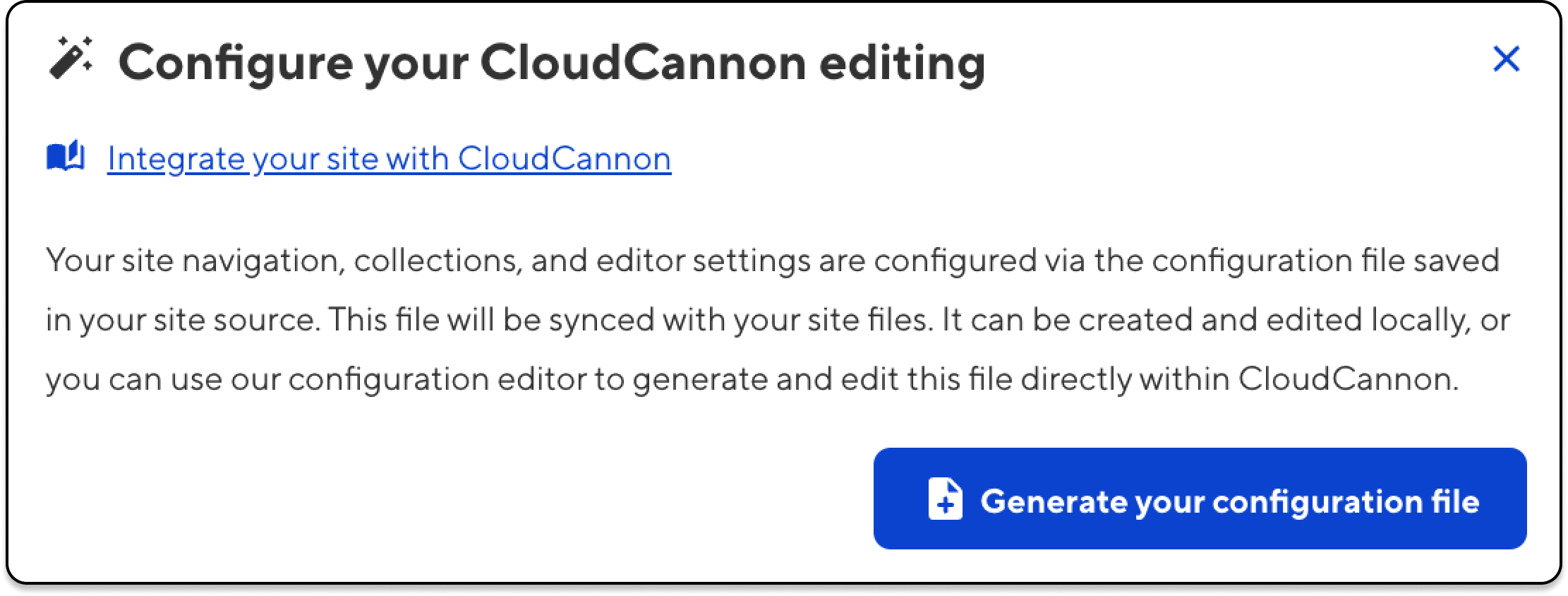
Screenshot (detail) of CloudCannon's automatic configuration for MkDocs

Now that we’ve added this cloudcannon.config.yml file to our site, CloudCannon will be able to rebuild it. Once we refresh, we’ll see that our page is now fully editable. Any saved changes will automatically trigger a new build. (You can turn this feature off and manually trigger or schedule your site builds in the settings — whatever works for you and your team.)

About your CloudCannon config file Direct link to this section

This cloudcannon.config.yml file defines what CloudCannon shows in the CMS sidebar (the pages in MkDocs’ docs folder), where new files should go, how CloudCannon should build URLs, and, most importantly for your technical writers, which rich text buttons will be available in CloudCannon’s WYSIWYG Content Editor.

Here’s the contents of my cloudcannon.config.yml file, with a few comments to make things clear:

# Which collections CloudCannon will show in the CMS sidebar
collections_config:
docs:
name: Documentation
path: "docs"
output: true
url: "/[full_slug]/" # mkdocs' default url behavior for nested files

# Where CloudCannon should put new files, and how it should build URLs
paths:
uploads: "docs" # Put new files inside the docs folder
static: "docs" # Reference files in the docs folder as /<file>

# The available buttons in the CloudCannon Content Editor
_editables:
content:
link: true
blockquote: true
bold: true
format: "p h1 h2 h3 h4 h5 h6"
italic: true
strike: true
subscript: true
superscript: true
underline: true
bulletedlist: true
indent: true
numberedlist: true
outdent: true
code: true
embed: true
horizontalrule: true
image: true
table: true
undo: true
redo: true
removeformat: true
copyformatting: true

Note that while I’ve added a lot of options for editors above, we haven’t added everything — see our documentation for defining editable regions to see all of your options.

That was easy. Now what? Direct link to this section

That brings us to the end of this short and sweet post — we’ve created a new site, brought it into CloudCannon, and defined just how CloudCannon will enable you to interact with your site and its pages. There’s a tremendous amount of power, potential, and flexibility in that cloudcannon.config.yml file, and we’ve barely scratched the surface.

If you'd like to dig into more of the deep configuration options in CloudCannon, check out our documentation on using the configuration cascade, which is a set of sources containing customizable options for the editor, each with a different scope and priority. This allows you to set global defaults and where necessary, override those for specific collections or files.

Want to discuss how CloudCannon can help bring WYSIWYG editing to your existing MkDocs site? Get in touch with us for a demo, and we'll walk you through as much detail as you'd like.

And if you come across any issues while you're dialling in your own site, please reach out to us via our support channel — we're here to help.