



This guide shows how to build a custom, customer-facing GitHub API integration that the AI agents in your product can act on, using Nango and an AI coding agent (Codex, Claude Code, Cursor, or any other).
By the end of this guide, you will have:
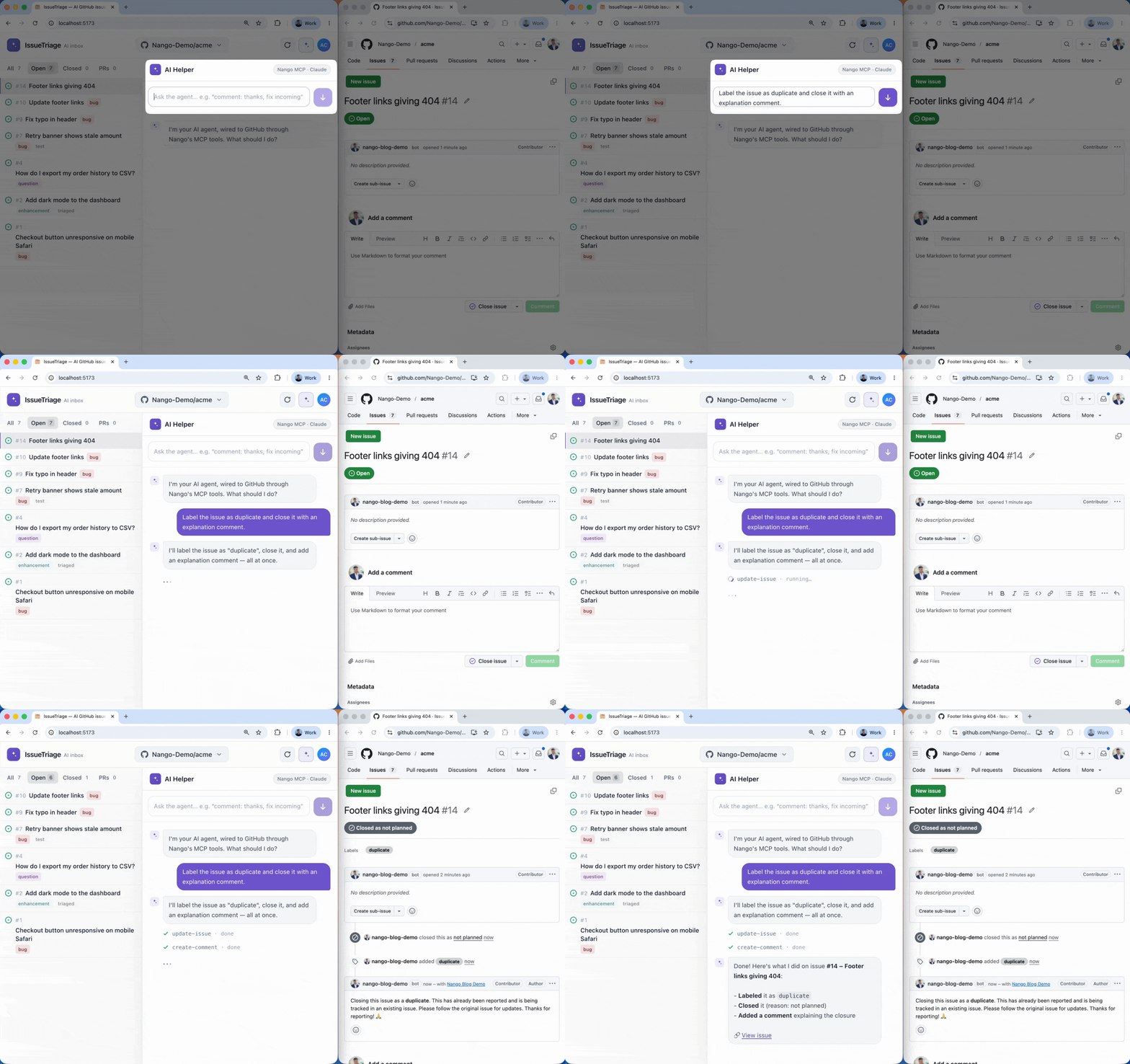
Get the working example: the complete demo (frontend, backend, nango-integrations) is on GitHub at NangoHQ/github-api-integration. Clone it to run the whole thing end to end, or follow the guide below and let Codex generate the same functions in your own project.
A GitHub API integration connects your application or agent to a customer’s GitHub data (repositories, issues, pull requests, and commits) through GitHub’s REST and GraphQL APIs. It authenticates as a GitHub App or an OAuth App, reads data into your app with scheduled syncs, writes back with actions like creating issues or commenting on pull requests, and reacts to repository events through webhooks.
Example use cases: an AI agent that triages a customer’s issues and opens pull requests, an AI code-review product that comments on PRs, a project management tool that mirrors a customer’s issues, or a developer analytics dashboard.
The GitHub REST API exposes repositories, issues, pull requests, commits, and webhooks. A production integration on top of it takes a few decisions up front, plus the infrastructure to keep them running.
The first is the auth type. For a customer-facing product, a GitHub App is usually the right call; reach for an OAuth App only when you are building a personal-developer tool that should act purely as the user.
| Capability | GitHub App | OAuth App |
|---|---|---|
| Acts as | A bot/installation | The authorizing user |
| Fine-grained permissions | Yes, per resource | No, inherits the user's scope |
| Rate limit | 5,000 to 12,500/hour (scales with org) | 5,000/hour |
| Repository access | Only repos granted at install | Every repo the user can access |
| Best for | Customer-facing products | Personal-developer tools |
See GitHub App vs. GitHub OAuth and GitHub’s own comparison for the full breakdown. The rest of the work is infrastructure:
BAD_REFRESH_TOKEN error, usually after a rotated client secret or a revoked installation. Someone has to store, refresh, and encrypt all of this.GET /repos/{owner}/{repo}/issues returns both issues and PRs, and every pull request carries a pull_request field. Filter on it or you double-count.X-Hub-Signature-256 header (an HMAC-SHA256 of the raw body using your webhook secret). You verify it with a constant-time comparison before trusting the payload, and read the event type from X-GitHub-Event.Link header (rel="next", up to 100 items per page), and some data is only practical through GitHub’s GraphQL API, which has its own point budget.Building all of this by hand takes weeks. With Nango and a coding agent like Codex, the same GitHub API integration ships in about an hour, the same workflow we used to build 200+ integrations across five APIs in 15 minutes.
Nango is the integration platform where coding agents build API integrations. An agent like Codex writes the integration as code in your repo, and Nango’s runtime runs it with managed auth, retries, and observability across 800+ APIs.
For a GitHub integration, we will use these Nango features:
github-app-oauth) with Nango’s callback URL https://api.nango.dev/oauth/callback.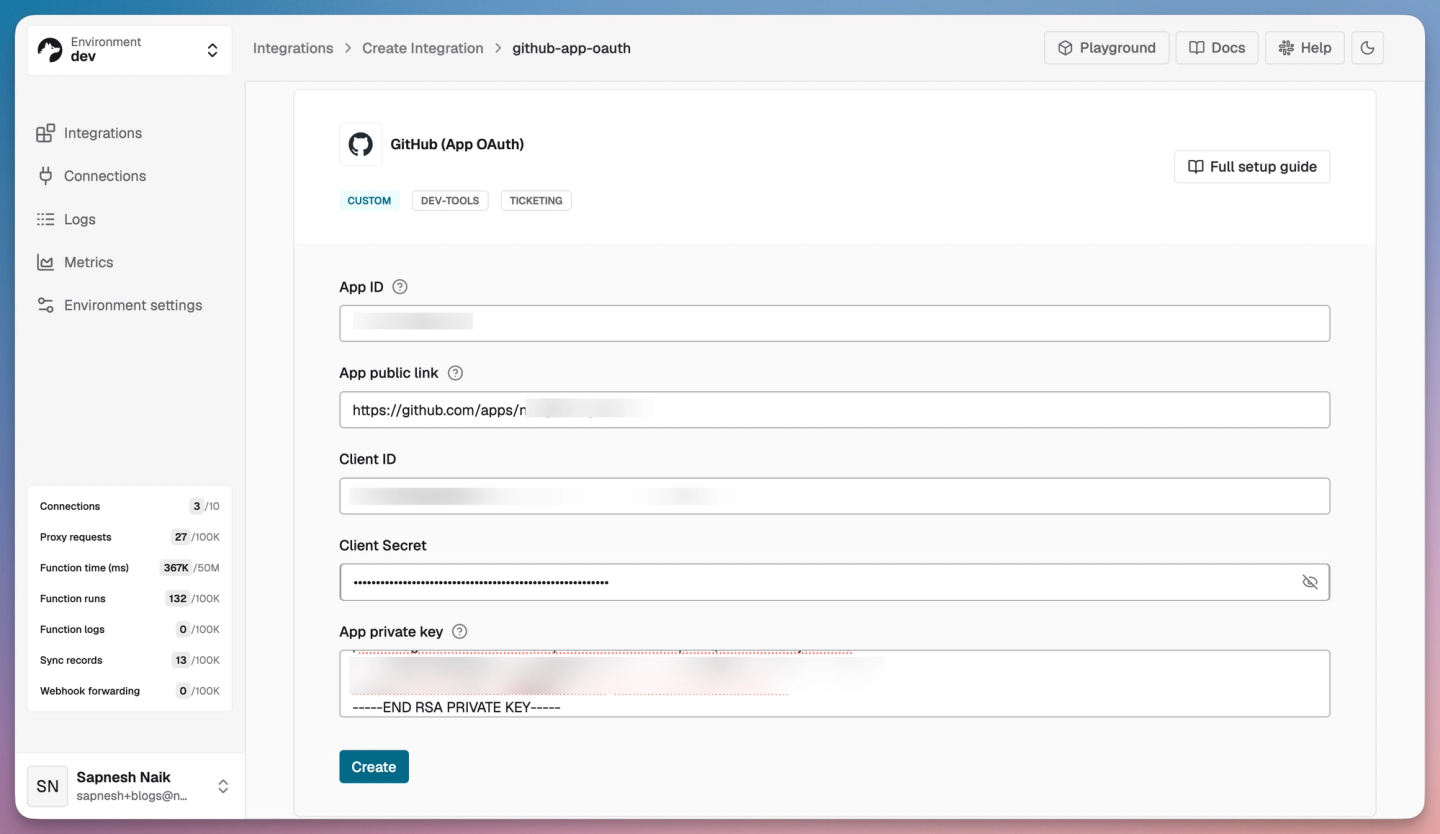
nango init: it creates a nango-integrations folder with the Nango framework bootstrapped. Set NANGO_SECRET_KEY_DEV (your dev API key, from Environment Settings in the dashboard) in nango-integrations/.env so it can test and deploy on your behalf.npx skills add NangoHQ/skills -s building-nango-functions-locally; the installer detects Codex and copies the skill to .agents/skills/, where Codex discovers it. The same skill works with Claude Code, Cursor, and other coding agents.Tip: LLM training data on Nango is often stale. Add the Nango docs MCP server alongside the skill so Codex pulls current API references while it generates code: codex mcp add nango-docs --url "https://nango.dev/docs/mcp"
A sync keeps a fresh copy of a customer’s GitHub data in your app. Here it imports the issues and pull requests from a connected repository, then refreshes on a schedule so new activity shows up without anyone clicking refresh.
You build it by prompting Codex with the Nango skill (type $ to mention a skill, or run /skills to browse):
$building-nango-functions-locally Build a Nango sync for the github-app-oauth integration that imports
the issues and pull requests from the repos a customer connects and keeps them up to date,
refreshing every hour. Integrate it with my frontend.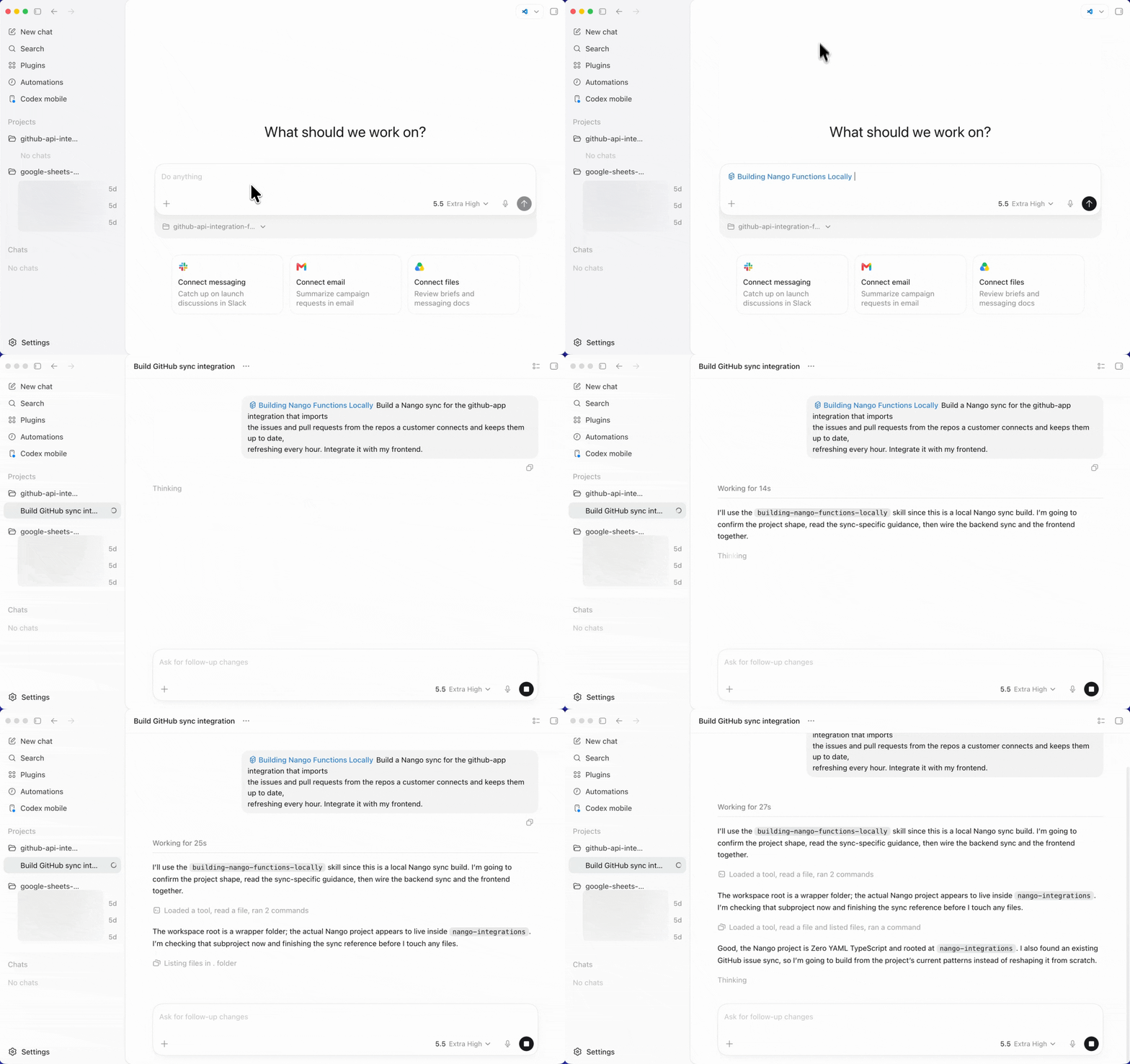
With the skill loaded, Codex:
nango dryrun.// Codex generates this sync. You do not write it by hand.
export default createSync({
description: 'Imports issues and pull requests from a connected repo and refreshes hourly.',
frequency: 'every hour',
autoStart: false, // starts once your app saves the repo metadata
models: { GithubIssue },
exec: async (nango) => {
const { owner, repo } = await nango.getMetadata();
for await (const issues of nango.paginate({
endpoint: `/repos/${owner}/${repo}/issues`,
params: { state: 'all', sort: 'updated', per_page: '100' },
})) {
// GET /issues returns pull requests too; the pull_request field tells them apart.
await nango.batchSave(issues.map(toRecord), 'GithubIssue');
}
},
});nango.paginate follows GitHub’s Link header for you, so you do not hand-roll pagination. The full sync, with the record model, incremental updates keyed on issue activity, and the onWebhook handler, is in fetch-issues-and-pull-requests.ts in the demo repo.
When Codex finishes, it deploys the sync for you (approve the deploy when it asks):
nango deploy --sync fetch-issues-and-pull-requests devBecause the prompt said to integrate the frontend, Codex also wires Nango Connect into your app: customers install your GitHub App, pick which repositories to grant, and the sync starts on its own.
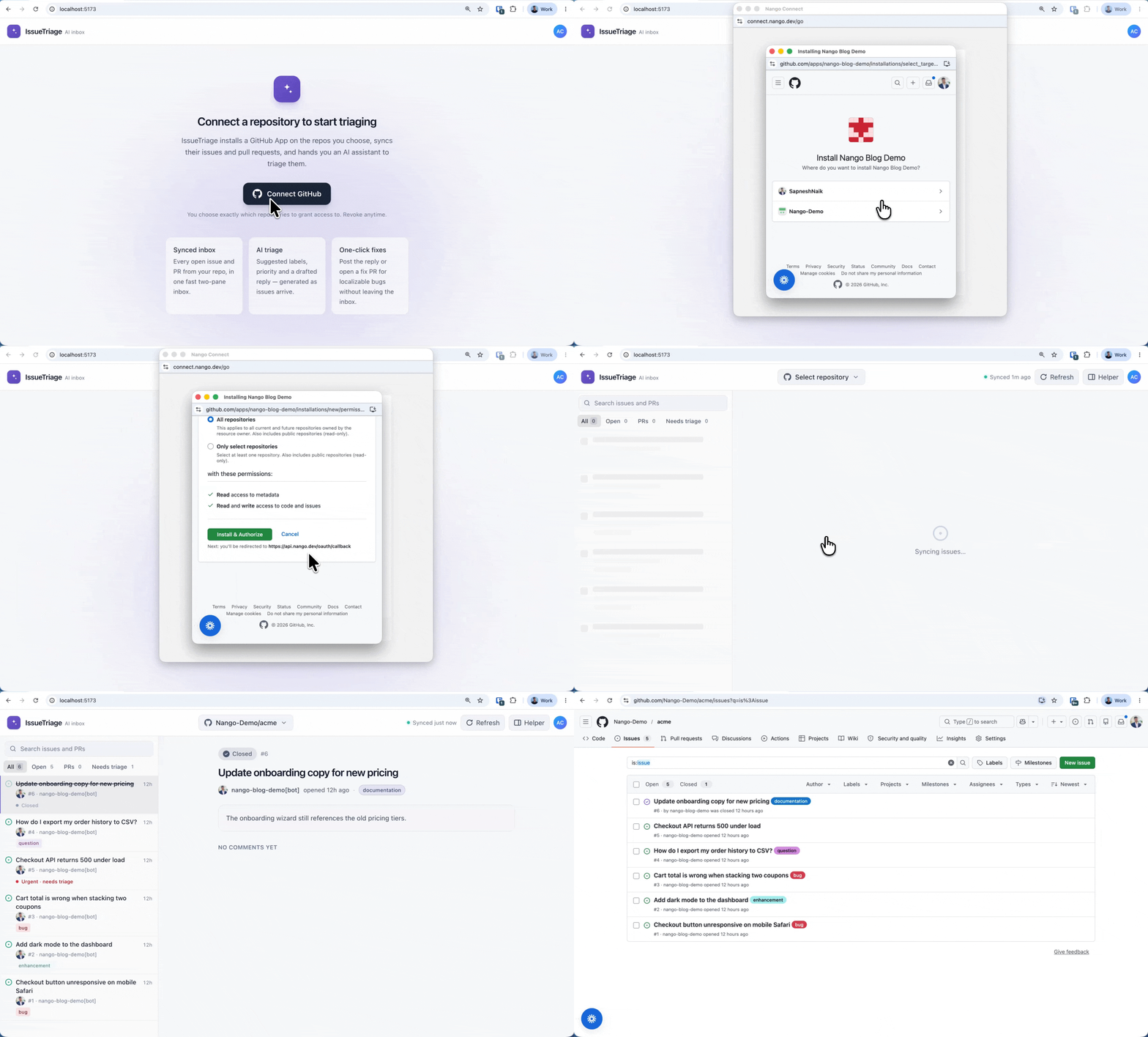
Your backend reads the synced records from Nango’s cache and serves them to your UI:
const { records } = await nango.listRecords({
    providerConfigKey: 'github-app-oauth',
    connectionId,
    model: 'GithubIssue',
});Syncs run on a schedule (every hour in this example). When a customer wants fresh data immediately, give them a refresh button that triggers the sync on demand (behind the scenes, a nango.triggerSync call) instead of waiting for the next run. The refresh endpoint that triggers the sync is in backend/server.mjs in the demo repo.
An action is a one-off operation your product or an agent triggers on demand. This is the write-back direction: an AI agent files an issue from a support ticket, posts a review summary on a pull request, or opens a fix PR. Prompt Codex to build it:
$building-nango-functions-locally Add an action to the github-app-oauth integration that creates an issue
in a customer's repo from a typed title, body, and labels.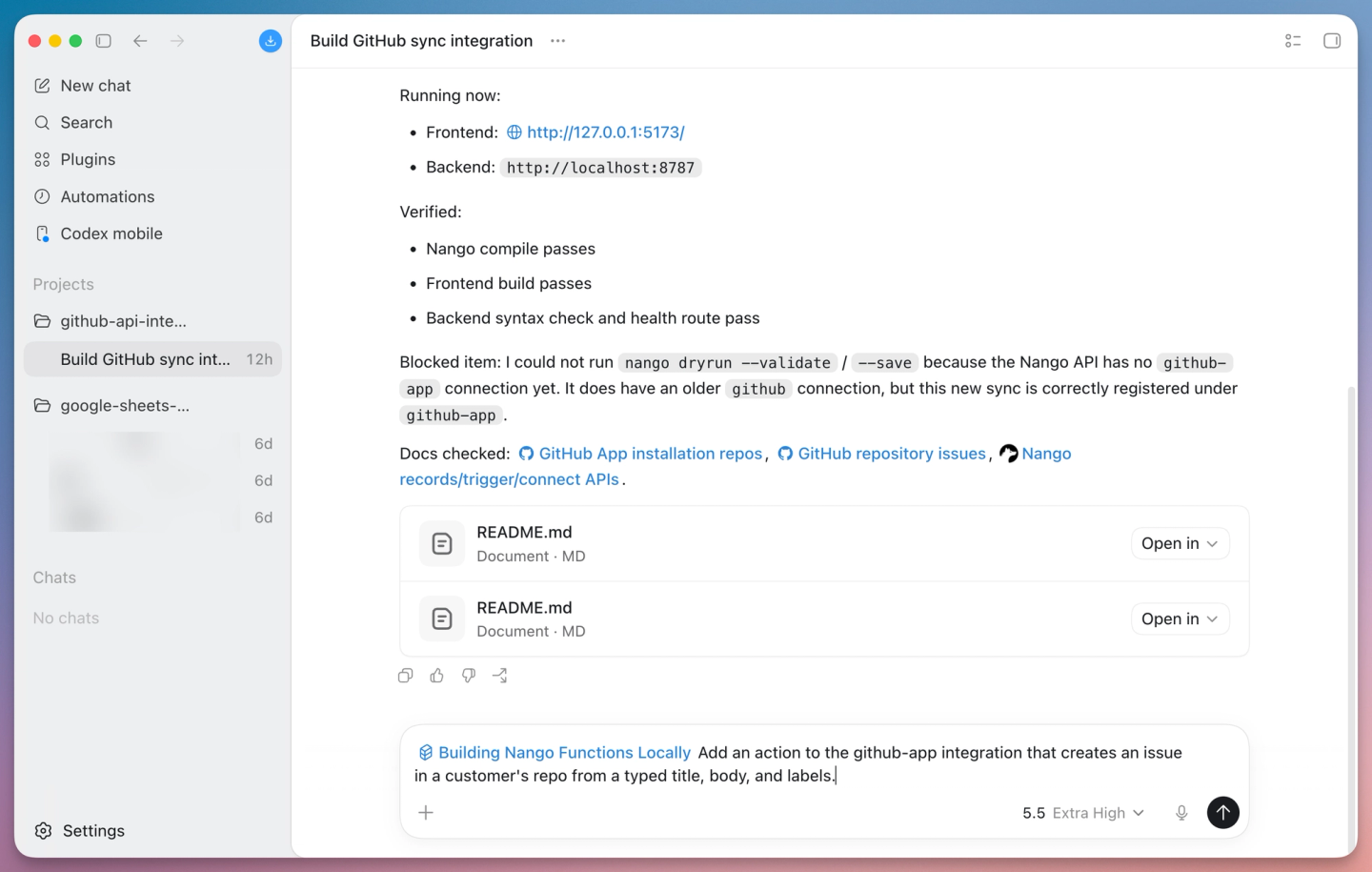
Codex writes the action, tests it by opening a real issue in your connected test repository, and deploys it when you approve. The full action is in create-issue.ts in the demo repo.
// Codex generates this action; approve the deploy when it asks.
export default createAction({
    description: 'Create an issue in the connected repo',
    retries: 0, // creating an issue is not idempotent; a blind retry could open a duplicate
    exec: async (nango, input) => {
        const res = await nango.post({
            endpoint: `/repos/${input.owner}/${input.repo}/issues`,
            data: { title: input.title, body: input.body, labels: input.labels },
        });
        return { number: res.data.number, url: res.data.html_url };
    },
});
On retries: 0: creating an issue is not idempotent, so re-running the whole action after an unknown failure could open the same issue twice. Rate-limited requests are safe because they wrote nothing, and Nango’s proxy retries those for you.
Deploy it the same way (Approve when Codex asks to deploy):
nango deploy --action create-issue dev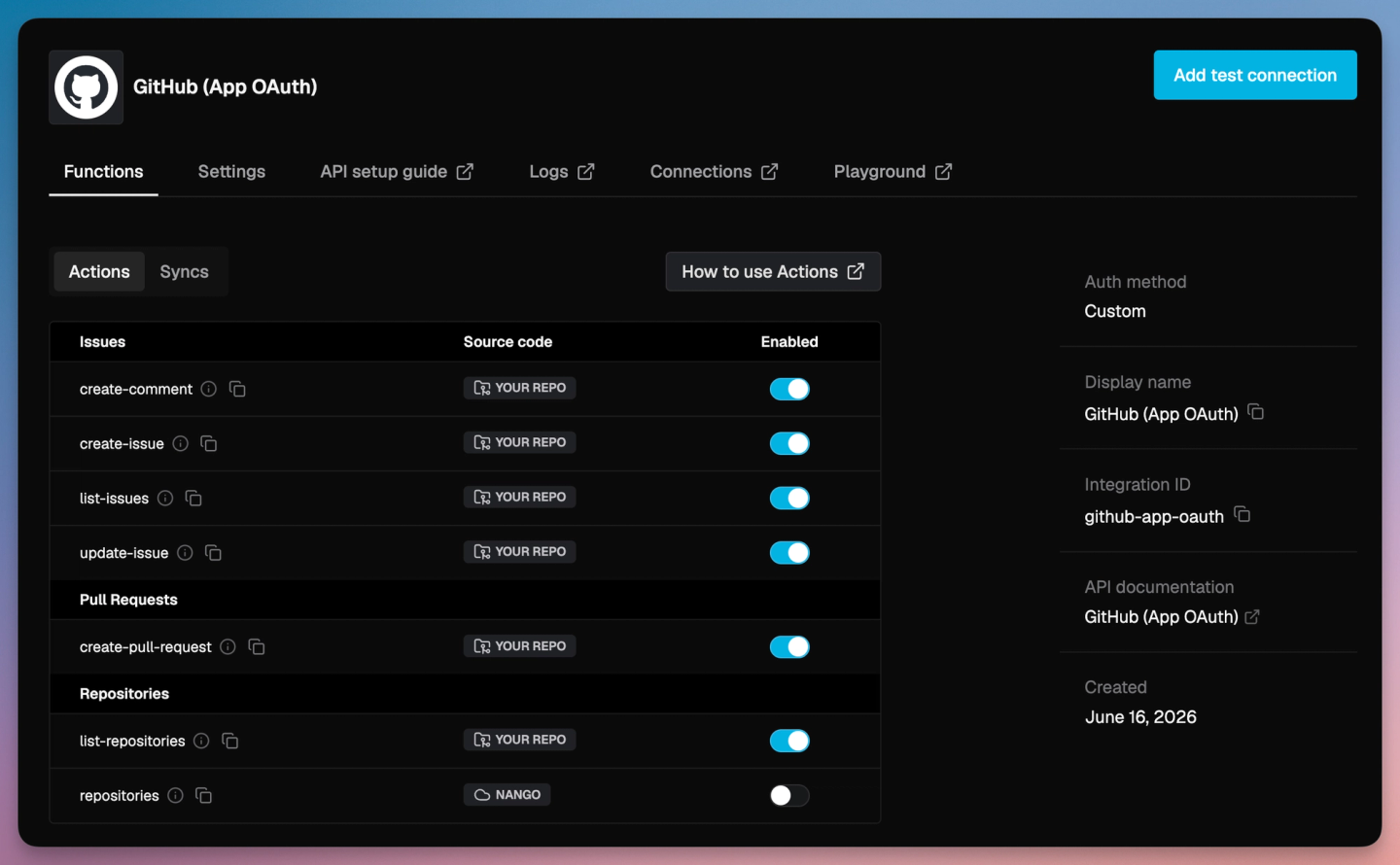
Commenting on a pull request uses the same shape. In GitHub, a pull request is also an issue, so a comment posts to /repos/{owner}/{repo}/issues/{number}/comments whether the number points at an issue or a PR. One more prompt adds an add-issue-comment action, and a third opens a pull request from a branch with POST /repos/{owner}/{repo}/pulls:
$building-nango-functions-locally Add actions to the github-app-oauth integration to comment on an issue
or PR, and to open a pull request from a head branch into a base branch.
You can test any action from your app, or run it from the Nango dashboard with the Playground against your connection.
A scheduled sync is enough for most data, but GitHub is event-rich, and a lot of products need to react the moment a pull request opens or an issue changes. GitHub Apps deliver one webhook stream for the events you subscribe to (push, pull_request, issues, and more).
Nango receives those webhooks, verifies the X-Hub-Signature-256 signature against your webhook secret, and forwards the verified event to your integration, so you do not write HMAC code. Prompt Codex to wire it up:
$building-nango-functions-locally Subscribe the github-app-oauth integration to pull_request and issues
webhook events and update the synced records as soon as events arrive.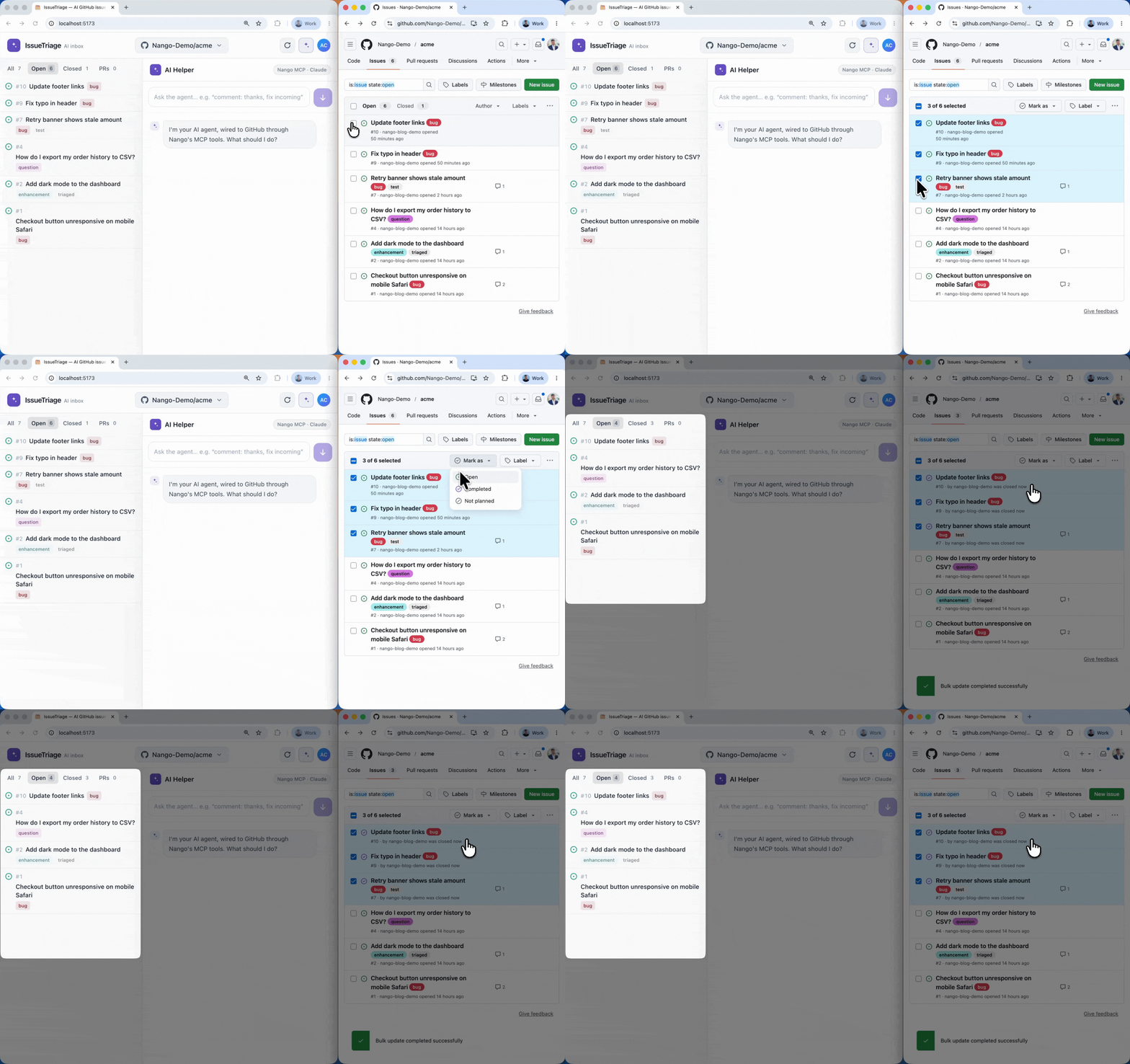
Keep the hourly sync running as a backstop. Webhook deliveries can be missed (a transient outage, a paused delivery), and a scheduled re-sync catches anything the event stream dropped. The combination of verified webhooks for freshness and a periodic sync for completeness is the pattern most production GitHub integrations settle on.
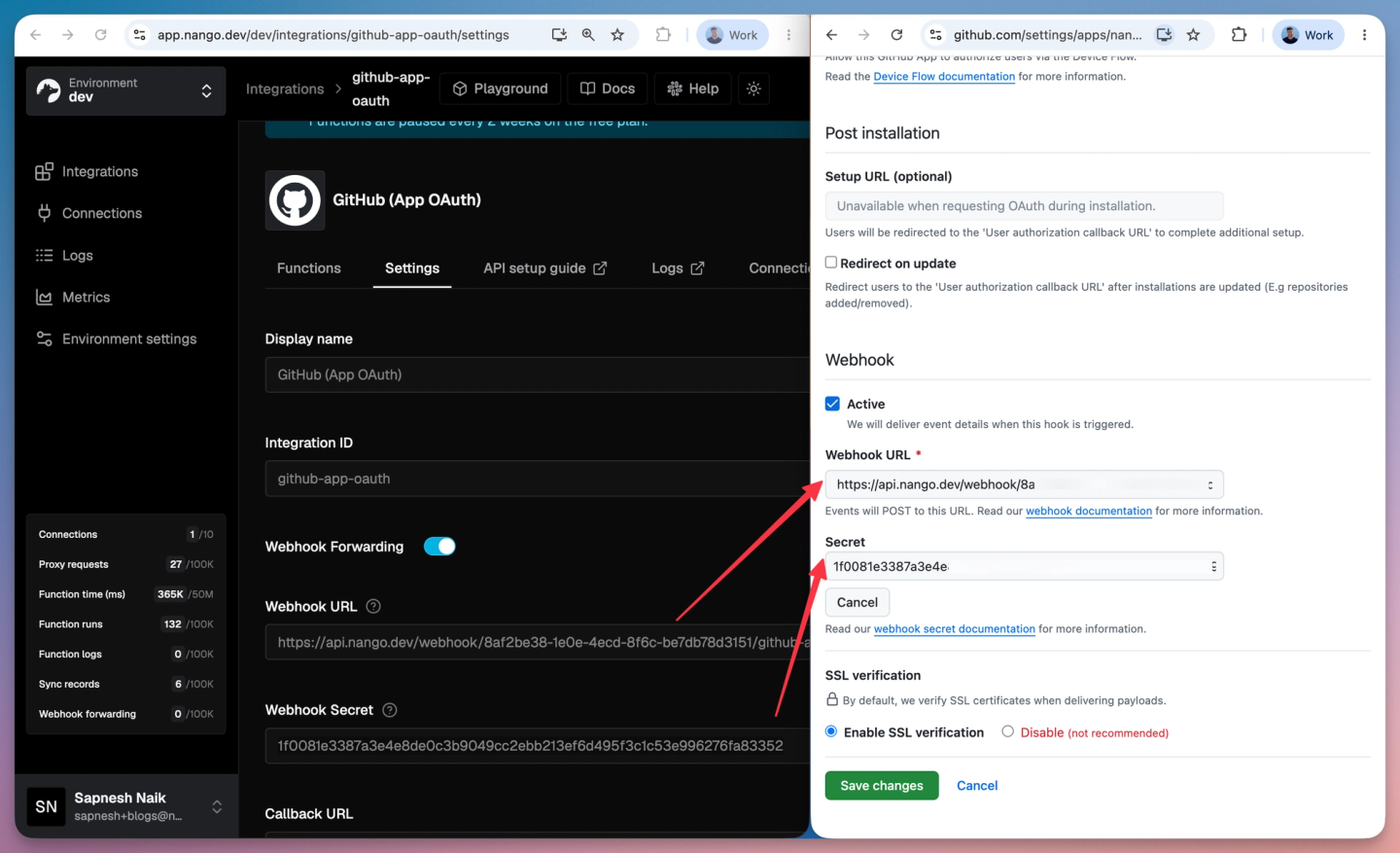
One manual step is needed to start receiving events: point your GitHub App at Nango’s webhook URL. Copy it from your integration’s settings page in the Nango dashboard, then paste it into your GitHub App under Developer settings > GitHub Apps > your app > Webhook URL.
This is where the previous steps pay off: the sync gives the agent current GitHub data to reason over, and the actions become the tools it acts with. Once they are deployed, the AI agents inside your product can use them. Nango exposes enabled actions as typed tool calls through a hosted MCP server, so an agent calls create-issue or add-issue-comment with typed inputs instead of guessing raw GitHub API parameters.
Point your MCP client at Nango’s server (Streamable HTTP transport) and pass three values:
Authorization:        Bearer <YOUR-NANGO-SECRET-KEY>
provider-config-key:  github-app-oauth
connection-id: <CONNECTION-ID>github-app-oauth).Codex can wire this into your product’s agent for you:
$building-nango-functions-locally Wire my product's AI agent to Nango's MCP server for the github-app-oauth
integration, passing the logged-in user's connection id, so it can read issues and open PRs. Add flexible actions to Nango to make the agent feature complete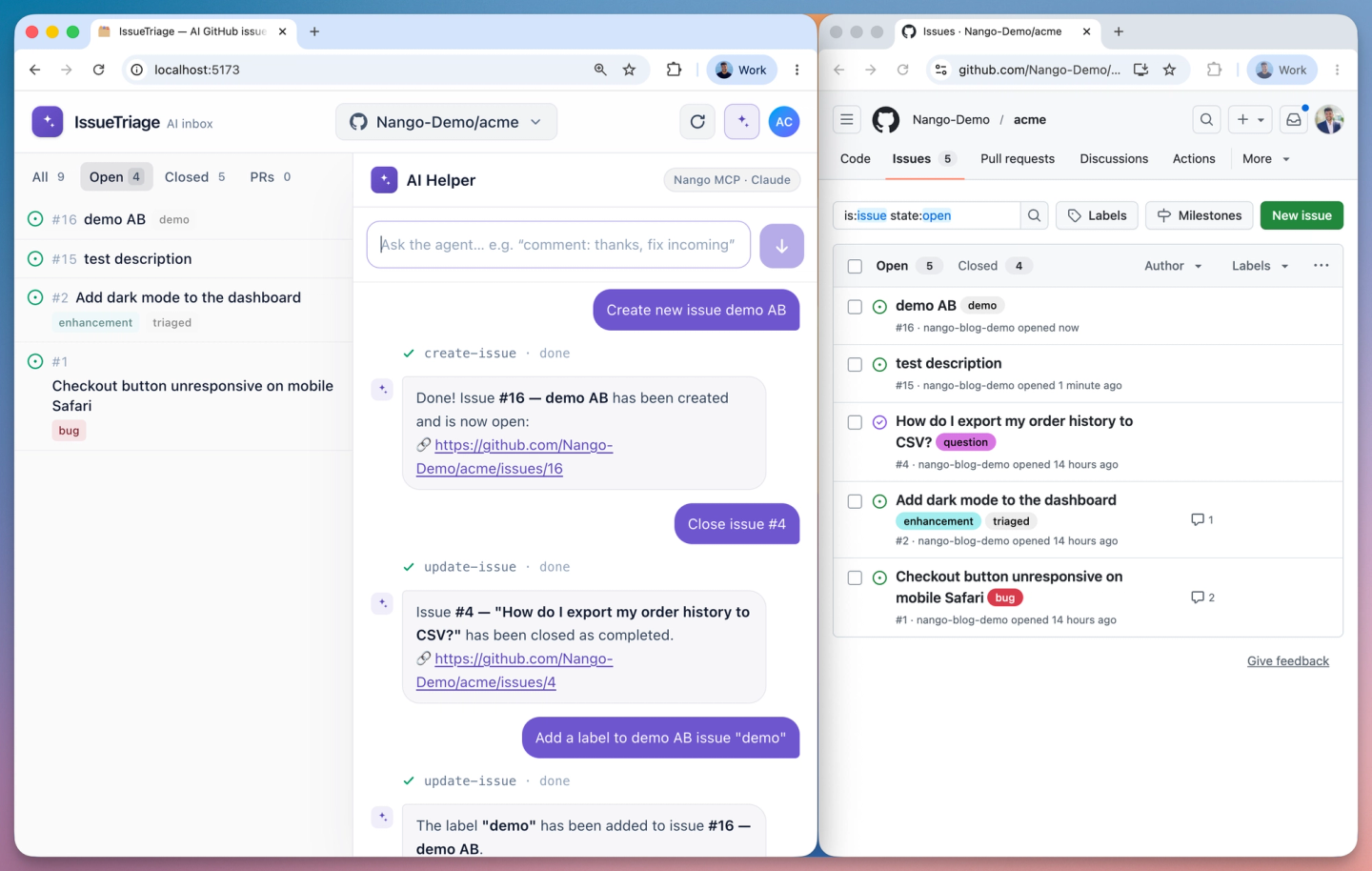
If you do not have an agent interface in your product yet but want to try the tools, add Nango’s MCP server to Codex itself. codex mcp add does not support custom headers, so add it to ~/.codex/config.toml:
[mcp_servers.nango_github]
url = "https://api.nango.dev/mcp"
bearer_token_env_var = "NANGO_SECRET_KEY"
http_headers = { "connection-id" = "<CONNECTION-ID>", "provider-config-key" = "github-app-oauth" }
Then ask Codex: “Open an issue titled ‘Flaky test in checkout’ in my connected repo using the nango github MCP.” For the patterns that make these tool calls reliable in production, see build reliable tool calls for AI agents.
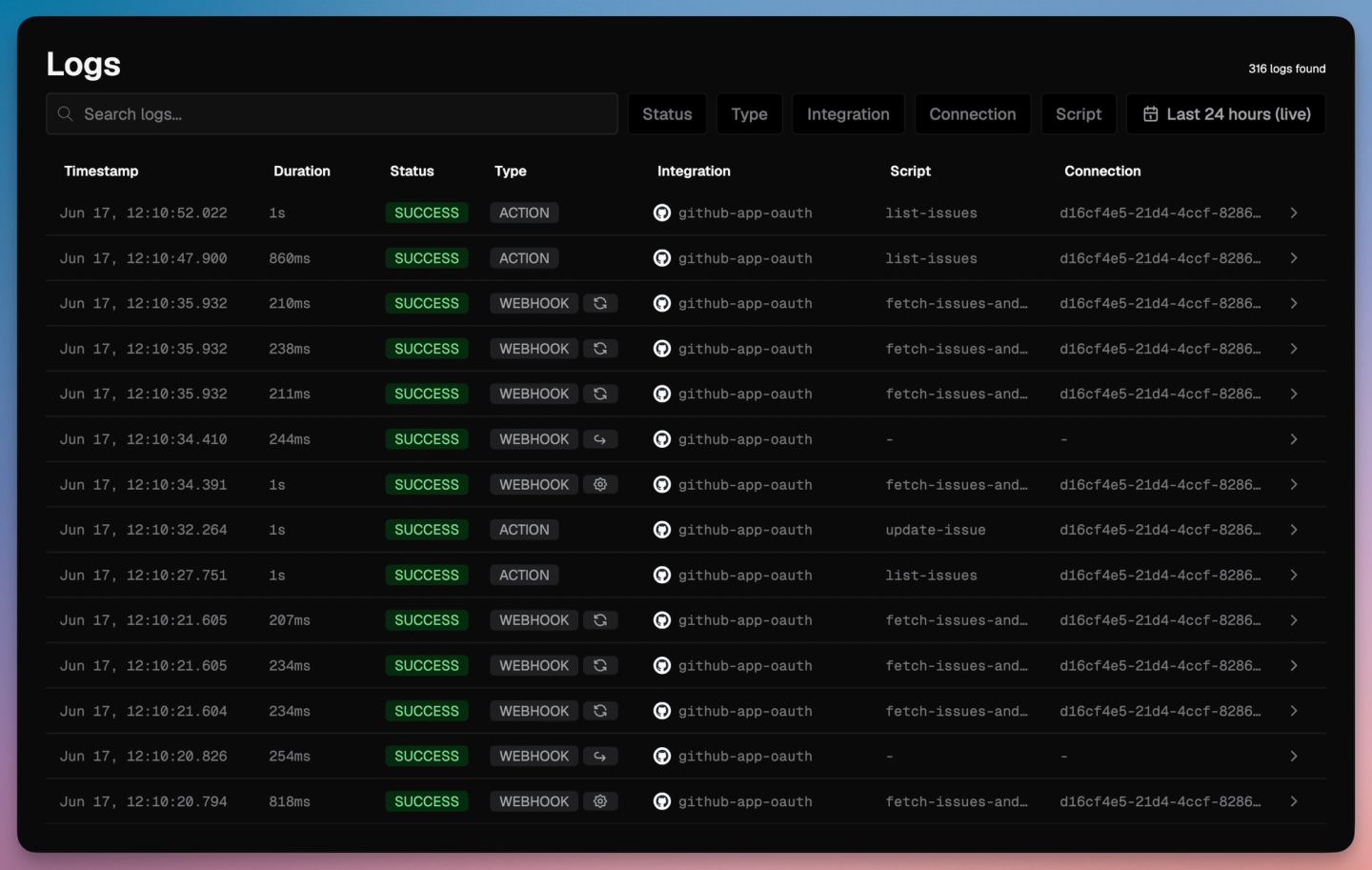
Tip: you can view detailed action and sync logs on the Nango dashboard.
| Issue | Cause and fix |
|---|---|
| `401 Bad credentials` | The token expired or the installation was revoked. Nango refreshes installation tokens (1 hour) and user tokens (8 hours) for you; if the customer removed the installation, they reconnect from your app. |
| `BAD_REFRESH_TOKEN` on a user token | The client secret was rotated or the installation was revoked. The customer reconnects. See the full breakdown. |
| `403` or `429` with `retry-after` | A primary or secondary rate limit (100 concurrent requests, 900 points per minute). Nango retries with backoff; spread bulk work and avoid firing parallel requests at one installation. |
| Issue sync contains pull requests | `GET /issues` returns PRs too. Filter on the `pull_request` field to keep them separate. |
| Webhook rejected or ignored | The `X-Hub-Signature-256` HMAC did not match. Confirm the webhook secret on your GitHub App matches the one in Nango; Nango verifies the signature for you. |
| `404` on a repo the user can see | The GitHub App installation was not granted that repository. The customer adds it under the installation's repository access settings. |
| Endpoint returns `Not Found` only for a GitHub App | Some endpoints work only with OAuth Apps. Check for the "Works with GitHub Apps" note on the endpoint in GitHub's docs. |
| `listRecords` is empty right after connecting | The sync starts only after your app saves the repo metadata, and the first run is asynchronous. Read records once a run completes. |
Should I use a GitHub App or an OAuth App for a customer-facing product?
Use a GitHub App. It installs per organization or repository with fine-grained permissions and rate limits that scale from 5,000 to 12,500 requests per hour. An OAuth App acts as the authorizing user and suits personal-developer tools.
How do you handle GitHub API rate limits when syncing data?
GitHub allows 5,000 to 12,500 requests per hour, plus secondary limits of 100 concurrent requests and 900 points per minute. Spread bulk work, avoid firing parallel requests at one installation, and retry on 403 or 429 using the retry-after header.
How do you verify GitHub webhooks?
GitHub signs each delivery with an X-Hub-Signature-256 header, an HMAC-SHA256 of the raw request body using your webhook secret. Verify it with a constant-time comparison before trusting the payload, and read the event type from the X-GitHub-Event header.
How long does it take to build a GitHub API integration?
By hand, a production integration with auth, syncs, webhooks, and rate-limit handling takes weeks. With Nango and a coding agent like Codex, the agent writes and tests the same integration against a real connection in about an hour.
A production-grade GitHub API integration for agents comes down to customer auth, incremental sync, writing safely, reacting in real time (signature-verified webhooks), and staying inside two rate-limit systems. Together they become the tools the AI agents in your product call to act on a customer’s GitHub.
With the Nango skill, Codex writes that logic as code from a prompt and tests it against a real connection, while Nango’s runtime handles managed OAuth, durable syncs, webhook verification, retries, and observability. The same workflow covers any of Nango’s 800+ supported APIs, and it scales into just-in-time integrations: integrations built on demand by an agent instead of pre-built for every use case.
Clone the demo project on GitHub to run it end to end, or build your first integration from the quickstart.
Related reading:
此内容由惯性聚合(RSS阅读器)自动聚合整理,仅供阅读参考。 原文来自 — 版权归原作者所有。