










Enterprise AI agents are leaving the server boundary.
A boundary that looks deceptively small until the agent starts acting on behalf of a person inside a browser tab, a desktop application, a row on a grid, a locally saved draft, a clipboard, a device permission, an approval flow, and the rest of the mess. That person’s work does not always translate into a server-side record, so server-only agent tools are insufficient as the primary integration model.
A server tool can update an account, search a knowledge base, create a ticket, or call an ERP workflow. This is the “record after” the product has turned intent into a stored fact.
The product moment arrives earlier.
A user selects three bullets from a proposed set of actions in a workflow. A sales engineer is editing the pricing for a set of products and has made unsaved changes to the discount for each. A support rep is viewing an incident timeline of incidents for a set of customers. A product manager has selected a cohort of customers for analysis. The client knows where the cursor is, what the user has selected, the scroll position in the product, the current route the user is on, the unsaved form data for the current step in the workflow, the dimensions of the current viewport, the current browser permission state, and the last UI action that the user performed. The server knows nothing, or it knows a stale object model for a set of records.
That gap is why LangChain's architecture for headless tools is so important. To the model, the tool is just another normal tool with a name, description, schema for the parameters, and result. The significant aspect of this is that the tool is being executed on the client.
This also shifts the focus of integration in the enterprise significantly. As we wrote about CRM integration moving into the agent runtime, identity, approval, retry, idempotency and tracing decide whether the integration is safe. And as we laid out this week, that same model is now crossing over into the browser as well. The backend runtime is still the place to put enterprise integration for that backend service. But the selected object in Figma, unsaved field in a CRM modal, or even more simply, the browser permission prompt are all now in the agent’s execution path.
The client runtime becomes part of the execution surface.
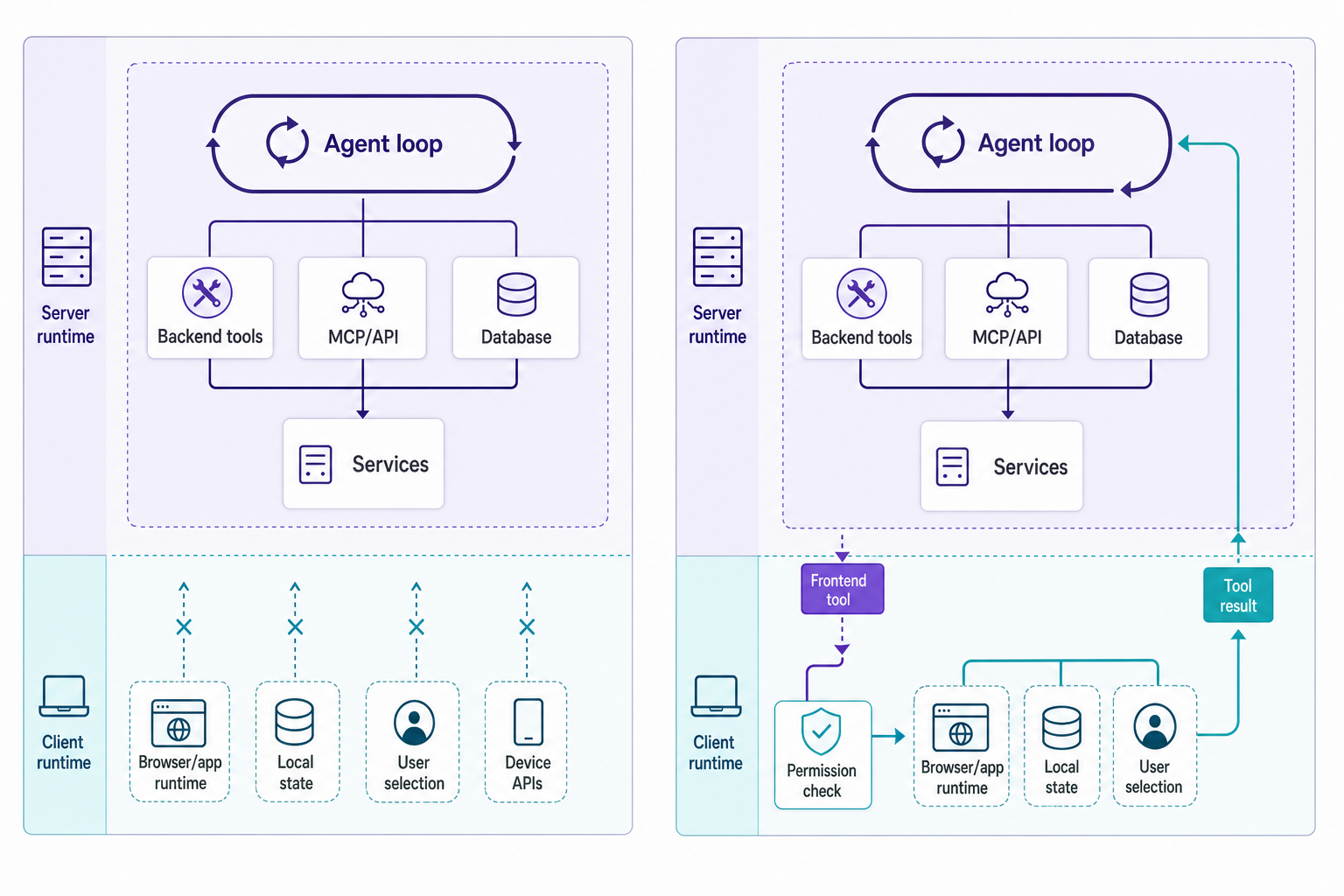
The lazy approach is the side channel: serialize application state, send that off to the server as a big ol’ binary blob, let the model generate a reply, then ask the app to patch the UI from the result. Sure, that works the first time. Then the shape of the serialized data changes in a way that is not obvious even to the author of the code, the model starts operating off stale context, and nobody knows whether the current UI came from a user action, a tool execution, or the model making a blind guess while the app team followed it.
Frontend tools make the contract explicit. AG-UI describes tools as frontend-defined functions passed to the agent at runtime with a name, description and a JSON Schema for the parameters. The frontend implements the argument validation, invocation of the tool after the call has completed, and insertion of the tool’s result into the conversation history. Simple.
The important part is the control the frontend has over the capabilities passed to the agent. For each tool, the frontend can decide whether it should be added or removed from the runtime based on user permissions, application context, and state (AG-UI tools).
A quote editor for example might decide to allow insertApprovedClause only when the record the quote is for is editable, the clause was chosen from the approved library and the user has permission to change quotes. A support console on the other hand might allow draftCustomerReply freely but require sendCustomerReply to be approved. A design tool might allow summarizeSelectedFrame without approval but require replaceSelectedFrameCopy to be approved.

We argued earlier that agent UI is runtime infrastructure because event streams give products typed handles for tools, state, approvals, subagents, errors, and observability. Client-executed tools make that argument less theoretical. A product UI is no longer merely a shell around an agent. It owns executable capabilities the agent cannot safely fake from the server.
MCP provides a standard interface to Tools and Data for Agents, A2A provides a standard interface for Agents to interact with other Agents. AG-UI is targeting the Agent-to-user-facing-application interface. In this space, events (programmed or human triggered) and the streaming of updates to the UI, as well as, multi-modal input (e.g., speech and ink), shared state, frontend tool calls, and human-in-the-loop interrupts all need to be dealt with by the UI. This is the scope of the functionality currently defined by AG-UI.
There’s a clear boundary in the system at the point where the user-facing application can determine the facts of runtime: who is currently present; what has the user selected; what has changed locally on the user’s workstation that will affect the tool results; what can be undone on the user’s workstation; and what, on the user’s workstation, requires a human click before a particular set of side effects can occur on the server. The agent-operable interface is the product once the tool moves from brochureware integration within the product to production action within the product.
Microsoft's Agent Framework AG-UI integration points in the same direction. Its documentation lists real-time streaming, session and thread management, state synchronization and sharing, human-in-the-loop approval workflows, custom and generative UIs, tool execution, and tool-result streaming for web and mobile clients.
Demos can rely on a program that sends out text, for example “Approved,” to a panel and then checks whether the approved text shows up in the right place. Production-grade enterprise AI agents have to account for the client action requested, the user's approval, the data under execution, and whether the action was actually sent somewhere else.
OpenAI's AgentKit page now says that Agent Builder and Evals will wind down after November 30, 2026 (OpenAI AgentKit update). The same update points teams toward the Agents SDK for workflows that should continue as code and Workspace Agents for natural-language prompting. Visual builders can still sketch intent. Durable agent integration keeps returning to application-owned code.
A canvas can sketch a workflow. It cannot check whether the active browser selection still matches the tool call arguments. It cannot own a local permission rule unless the application gives it one. It cannot prove that an approval prompt reflected the side effect about to occur. For enterprise AI agents, the durable boundary is application architecture: typed tools, scoped credentials, state synchronization, reviewable side effects, and traces that follow the action.
This is why AI agent governance follows the execution path. Governance for AI agents, using tools such as LangGraph, AG-UI, headless tools and SDKs, follows the execution path of the application running under the control of the AI agent. It does not follow the server path, and thus is distinctly different from governance of server-side applications. As before, the key to successful governance of AI agents, is the same as for any application: the application and its AI, must be owned by a product team, who can define the capabilities of the AI, and review the runtime facts of the AI operated by the application.
Backend-only traces don’t work when the browser is executing part of the agent’s plan. That means the agent can send a command to a client tool. The client tool can then validate local state. The user can approve the action. The browser can then call an external API. And the backend can store the result of the action. If these spans do not form a connected trace, then incident review turns into screenshots and Slack messages read one at a time in reverse chronological order.
The Honeycomb blog recently published a write-up on using OpenTelemetry in the browser (Honeycomb on OpenTelemetry in the browser). As the author points out, instrumenting frontend code is a difficult, messy problem because the code runs in surprise environments (i.e. under simultaneous and unpredictable user input). The post describes how browser instrumentation can propagate trace context to subsequent backend requests, and discusses the use of session IDs as a way to correlate together traces generated by the frontend code of different users within the same session.
Honeycomb’s frontend observability GA post pushes end-to-end user flows, high-cardinality data, user interaction context, custom attributes, and debugging specific user-impacting behavior. Add an agent to the frontend and the trace has to carry agent identifiers, tool-call IDs, approval decisions, permission outcomes, state versions, and receipt IDs for every action executed on the client.
A good result from a tool running on the client is more than just “ok: true”. It needs to include information about the command that was executed, the state that the tool read, the permission that was opened, who approved the action, the change that was made, the actions that can be undone, and the trace id.
The production checklist is straightforward.
Define client tools as code, which means typed contracts, not callback-style functions buried inside a component. Use the permission rules of the tool rather than heuristics in system prompts. Include the latest state version in each tool call so the client can reject stale requests. Route approvals through the product workflow with exact side-effect descriptions. Record a receipt for every client-executed action. Follow the execution path across browser, agent runtime, backend service, and external API. Build undo paths for actions that modify local or remote state. Someone has to own the interface.
Enterprise AI agents are leaving the server because the work was never only on the server. The work is in the messy middle where application state, user intent, approval, and side effects meet. This is where AI agent integration lives now.
此内容由惯性聚合(RSS阅读器)自动聚合整理,仅供阅读参考。 原文来自 — 版权归原作者所有。