









Last updated May 18, 2026
Heroku Postgres Advanced is in limited general availability. To start creating and using Advanced databases, open a ticket with Heroku Support to request access. Subscribe to our changelog to stay informed of when Heroku Postgres Advanced is generally available.
The Heroku Postgres Advanced tier offers flexible customization options to fit every database needs for your app. The Advanced tier brings increased storage capacity and scalability, decoupled compute and storage, and follower instance pools distributing read load. Manage your databases with the CLI and the web dashboard.
This article covers features on Heroku Postgres Advanced-tier databases. For information on Postgres databases on a different tier, see Heroku Postgres. To migrate your existing database to the Advanced tier, see Migrating to Heroku Postgres Advanced.
Classic Postgres databases include the Standard, Premium, Private, and Shield tiers.
We’ll update this table as we add features to the Advanced tier. You can also subscribe to our changelog to stay informed.
| Feature | Advanced | Classic |
|---|---|---|
| Common Runtime | X | X |
| Private and Shield Spaces | X | X |
| Attachments | X | X |
| Credentials | X | X |
| Followers | X | X |
| Forks | X | X |
| Rollbacks | X | X |
| PGSettings | X | X |
| Dataclips | X | X |
| Heroku Connect | X | X |
| Pipelines | X | X |
| Review Apps | X | X |
| Logs | X | X |
| Database Metrics | X | X |
| Plan Changes | X (different mechanism) | X |
| Version Upgrades | X | X |
| Database Maintenance | X | X |
| Trusted IPs for Data | X | X |
| Client-Side Connection Pooling | X | X |
| Bring Your Own Encryption Key (BYOK) | Evaluating | X |
| PGBackups | Evaluating | X |
| Server-Side Connection Pooling | To Be Added | X |
| Data Links | To Be Added | X |
| PrivateLink | To Be Added | X |
| mTLS | To Be Added | X |
| Global Clusters | To Be Added | Not Supported |
| Managed Logical Replication | To Be Added | Not Supported |
These features are only supported on Advanced-tier databases:
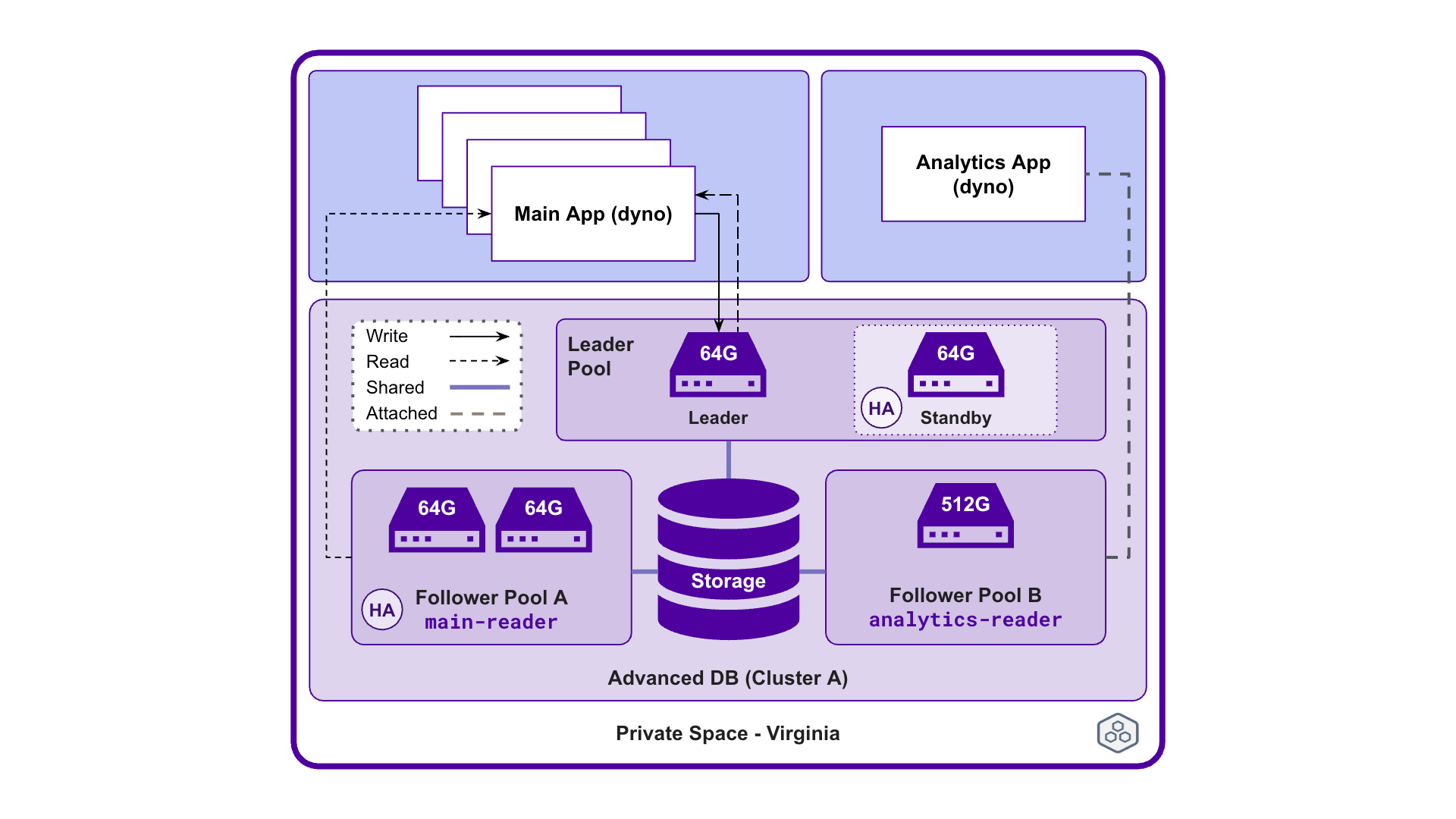
An example implementation of Postgres Advanced databases.
Heroku Postgres Advanced databases are made up of the following components:
Follower Pool A has two 64G-Performance instances.main-reader.You can use Advanced databases if you currently use Heroku Postgres Standard, Premium, Private or Shield databases. Here are some examples of use cases for Advanced databases:
Use Advanced databases if you have:
See our Getting Started Guide on how to create and manage Advanced databases.
Manage your Heroku Postgres Advanced databases with the data:pg:* CLI commands. See Managing Heroku Postgres using the CLI for more information.
The Postgres Advanced tier offers default plan levels that you can customize. See Choosing the Right Heroku Postgres Plan for details on the features and plans.
You can provision an Advanced database through interactive CLI prompts or through the command flags. For more information about how to provision an Advanced database, see Provisioning Heroku Postgres Advanced.
To modify a database and its instance pools after provisioning, see Managing Instance Pools on Heroku Postgres Advanced.
Advanced databases provide flexibility over traditional Heroku Postgres databases by having customization options. For more information about customizable features, see Provisioning Heroku Postgres Advanced.
In a database cluster, there’s one leader instance pool and optionally up to five follower instance pools. The difference between a leader instance pool and a follower instance pool is that the leader instance pool contains the only writer in the entire cluster, while follower instance pools use all instances for read operations. You can only adjust the compute level in the leader instance pool, but can adjust both the compute level and number of compute instances in a follower instance pool. The compute level is the same across all instances in an instance pool. See Managing Instance Pools on Heroku Postgres Advanced for more information.
The PostgreSQL project releases new major versions on a yearly basis. Heroku Postgres supports each major version after testing for compatibility with the platform. For more information about version support on Heroku Postgres, see Heroku Postgres Version Support.
For more information about upgrading the version on your database, see Upgrading the Version of a Heroku Postgres Database.
In Advanced databases, high availability is classified as having two or more compute instances within an instance pool. See High Availability on Heroku Postgres for more information.
For examples on connecting to Heroku Postgres, see Connecting to Heroku Postgres.
You can view your Postgres Advanced logs with the Heroku CLI, the dashboard, your logging add-on, or in your log drain. You can also install a platform monitoring add-on to help monitor database metrics. See Heroku Postgres Metrics Logs for more information.
Heroku Postgres Advanced uses different methods of calculating billing depending on the usage. See Usage and Billing on Heroku Postgres Advanced for more information.
From time to time, Heroku performs maintenance tasks on a Heroku Postgres database. Typical tasks include updating the underlying infrastructure of the database. For more information, see Heroku Postgres Maintenance.
Advanced databases have the following limits:
See Connection Limits on Heroku Postgres Advanced for more information on connection limits.
Submit all Heroku Postgres Advanced support and runtime issues via one of the Heroku Support channels.
此内容由惯性聚合(RSS阅读器)自动聚合整理,仅供阅读参考。 原文来自 — 版权归原作者所有。