
惯性聚合 高效追踪和阅读你感兴趣的博客、新闻、科技资讯
阅读原文 在惯性聚合中打开

推荐订阅源

宝玉的分享
宝玉的分享
NISL@THU
NISL@THU
E
Exploit-DB.com RSS Feed
L
LINUX DO - 热门话题
L
Lohrmann on Cybersecurity
K
Kaspersky official blog
Project Zero
Project Zero
Cisco Talos Blog
Cisco Talos Blog
T
The Exploit Database - CXSecurity.com
P
Palo Alto Networks Blog
C
CXSECURITY Database RSS Feed - CXSecurity.com
T
Threatpost
S
Schneier on Security
G
GRAHAM CLULEY
The Hacker News
The Hacker News
T
Threat Research - Cisco Blogs
Scott Helme
Scott Helme
Threat Intelligence Blog | Flashpoint
P
Privacy & Cybersecurity Law Blog
C
Cyber Attacks, Cyber Crime and Cyber Security
Cyberwarzone
Cyberwarzone
C
CERT Recently Published Vulnerability Notes
T
Tor Project blog
AWS News Blog
AWS News Blog
Simon Willison's Weblog
cs.CL updates on arXiv.org
爱范儿
爱范儿
P
Privacy International News Feed
云风的 BLOG
云风的 BLOG
P
Proofpoint News Feed
S
Securelist
G
Google Developers Blog
The Last Watchdog
The Last Watchdog
Google Online Security Blog
美团技术团队
F
Fortinet All Blogs
小众软件
小众软件
Recorded Future
Recorded Future
V
Visual Studio Blog
B
Blog RSS Feed
H
Help Net Security
CTFtime.org: upcoming CTF events
Google DeepMind News
Blog — PlanetScale
Blog — PlanetScale
博客园 - 聂微东
Stack Overflow Blog
Stack Overflow Blog
Martin Fowler
Martin Fowler
Latest news
Latest news
Spread Privacy
Spread Privacy
H
Heimdal Security Blog

WeepingDogel

A Simple Client Server Project Made by Python and Vue3 Annual Summary in 2023 Solve the problem of dual screen with NVIDIA and Intel GPUs Attempted solution to the OpenStack Provincial Competition problem (Part One: Installation) Attempt to Solve the Problem of VirtualBox Stuck on 'Starting' When Starting a Virtual Machine Some Thoughts on Writing HTML and CSS Python Learning Notes - ArgParse LAN Penetration Testing with Beef, Bettercap, and Other Tools Help with College Computer Homework
How To Transfer A Value From The Parent Component To The Child Component in Vue 3.2
WeepingDogel · 2023-07-22 · via WeepingDogel

Introduction

Vue is a popular JavaScript framework for building interactive web interfaces. It’s easy to learn, versatile, and has a supportive community.

Developing single-page applications with Vue is incredibly convenient.

However, there are instances where we encounter challenges when it comes to transferring values between parent and child components.

Still unclear? Imagine this scenario: You’ve created a button and you want it to control the content of a <p></p> element, thereby fulfilling a specific development requirement.

Then it’s time to transfer different values to ChildComponet to change the properties or trigger an event.

Ways to transfer a value from the parent to the child

Step 1: Create the Parent Component

  1. Create a new Vue component file for the parent component (e.g., ParentComponent.vue).
  2. In the component’s template, define the parent component’s content and include the child component.
1
2
3
4
5
6
<template>
    <div class="FatherBox">
        <ChildComponent />
        <button></button>
    </div>
</template>
  1. Import the child component by adding the necessary import statement.
1
2
3
<script lang="ts">
import ChildComponent from './ChildComponent.vue';
</script>
  1. Register the child component in the parent component’s components property.
1
2
3
4
5
6
7
<script lang="ts">
export default {
  components: {
    ChildComponent,
    },
}
</script>

Step 2: Define the Data in the Parent Component

  1. In the parent component’s script section, define a data property to store the value that will be passed to the child component.
1
2
3
4
5
6
7
8
9
<script lang="ts">
export default {
  data() {
    return {

    };
  },
}
</script>
  1. Assign the initial value to the data property. This will be the value passed initially to the child component.
1
2
3
4
5
6
7
8
9
<script lang="ts">
export default {
  data() {
    return {
      message: 'Hello from the parent component!', // Value to pass to child component
    };
  },
}
</script>

Step 3: Pass the Data as a Prop to the Child Component

1.In the parent component’s template, add the child component and use the colon (:) binding to pass the data property as a prop to the child component.

1
2
3
4
5
<template>
    <div class="FatherBox">
        <ChildComponent :message="message" />
    </div>
</template>
  1. The prop name in the child component should match the name you choose when passing the prop in the parent component.
 1
 2
 3
 4
 5
 6
 7
 8
 9
10
11
12
13
14
15
16
17
18
19
<script lang="ts">
import ChildComponent from './ChildComponent.vue';

export default {
    components: {
        ChildComponent,
    },
    data() {
        return {
            message: 'Hello from the parent component!', // Value to pass to child component
        };
    },
    methods: {
      changeMessage() {
            this.message = 'New message from parent!';
        },
    }
};
</script>

Step 4: Create the Child Component

  1. Create a new Vue component file for the child component (e.g., ChildComponent.vue).

  2. In the child component’s template, define the child component’s content. This will include rendering the prop value passed from the parent component.

1
2
3
4
5
<template>
    <div>
        <p>{{ message }}</p>
    </div>
</template>

Step 5: Define the Prop in the Child Component

  1. In the child component’s script section, define the prop for receiving the data sent by the parent component.
1
2
3
4
5
6
7
8
9
<script lang="ts">
export default {
    props: {
        message: {

        },
    },
};
</script>
  1. Specify the type of the prop (e.g., String, Number, etc.) to ensure data integrity. You can also set required: true if the prop must be passed.
1
2
3
4
message: {
  type: String,
  required: true,
},

Step 6: Emit an Event from the Child Component

  1. In the child component’s script, define a method that will emit an event to communicate with the parent component.
1
2
3
4
5
6
methods: {
  changeMessage() {
    const newMessage = 'New message from child!';

  },
},
  1. Inside the method, use this.$emit(’event-name’, data) to emit the event. Choose a suitable event name and pass any relevant data to the parent component.
1
2
3
4
5
6
methods: {
  changeMessage() {
    const newMessage = 'New message from child!';
    this.$emit('update-message', newMessage);
  },
},

Step 7: Handle the Event in the Parent Component

  1. In the parent component’s script, define a method that will handle the event emitted by the child component.
1
2
3
updateMessage(newMessage: any) {

},
  1. Add an event listener to the child component instance in the parent component’s template, using @event-name="methodName".
1
2
3
<template>
<ChildComponent :message="message" @update-message="updateMessage" />
</template>
  1. In the method, receive the emitted data as an argument and update the parent component’s data accordingly.
1
2
3
updateMessage(newMessage: any) {
  this.message = newMessage;
},

Compeleted Code

ParentComponent:

 1
 2
 3
 4
 5
 6
 7
 8
 9
10
11
12
13
14
15
16
17
18
19
20
21
22
23
24
25
26
27
28
29
30
31
32
33
34
35
36
37
38
<template>
    <div class="FatherBox">
        <ChildComponent :message="message" @update-message="updateMessage" />
        <button @click="changeMessage">Change Message By ParentComponent</button>
    </div>
</template>
  
<script lang="ts">
import ChildComponent from './ChildComponent.vue';

export default {
    components: {
        ChildComponent,
    },
    data() {
        return {
            message: 'Hello from the parent component!', // Value to pass to child component
        };
    },
    methods: {
        updateMessage(newMessage: any) {
            this.message = newMessage;
        },
        changeMessage() {
            this.message = 'New message from parent!';
        },
    },
};
</script>

<style scoped>
.FatherBox {
    background-color: #f1f1f1;
    border-radius: 20px;
    box-shadow: 0 5px 5px rgba(0, 0, 0, 0.2);
    padding: 20px;
}
</style>

ChildComponent:

 1
 2
 3
 4
 5
 6
 7
 8
 9
10
11
12
13
14
15
16
17
18
19
20
21
22
<template>
    <div>
        <p>{{ message }}</p>
        <button @click="changeMessage">Change Message</button>
    </div>
</template>
  
<script lang="ts">
export default {
    props: {
        message: {
            
        },
    },
    methods: {
        changeMessage() {
            const newMessage = 'New message from child!';
            this.$emit('update-message', newMessage);
        },
    },
};
</script>

Test

Then we can execute yarn dev to start a development server and we can see a page like this:
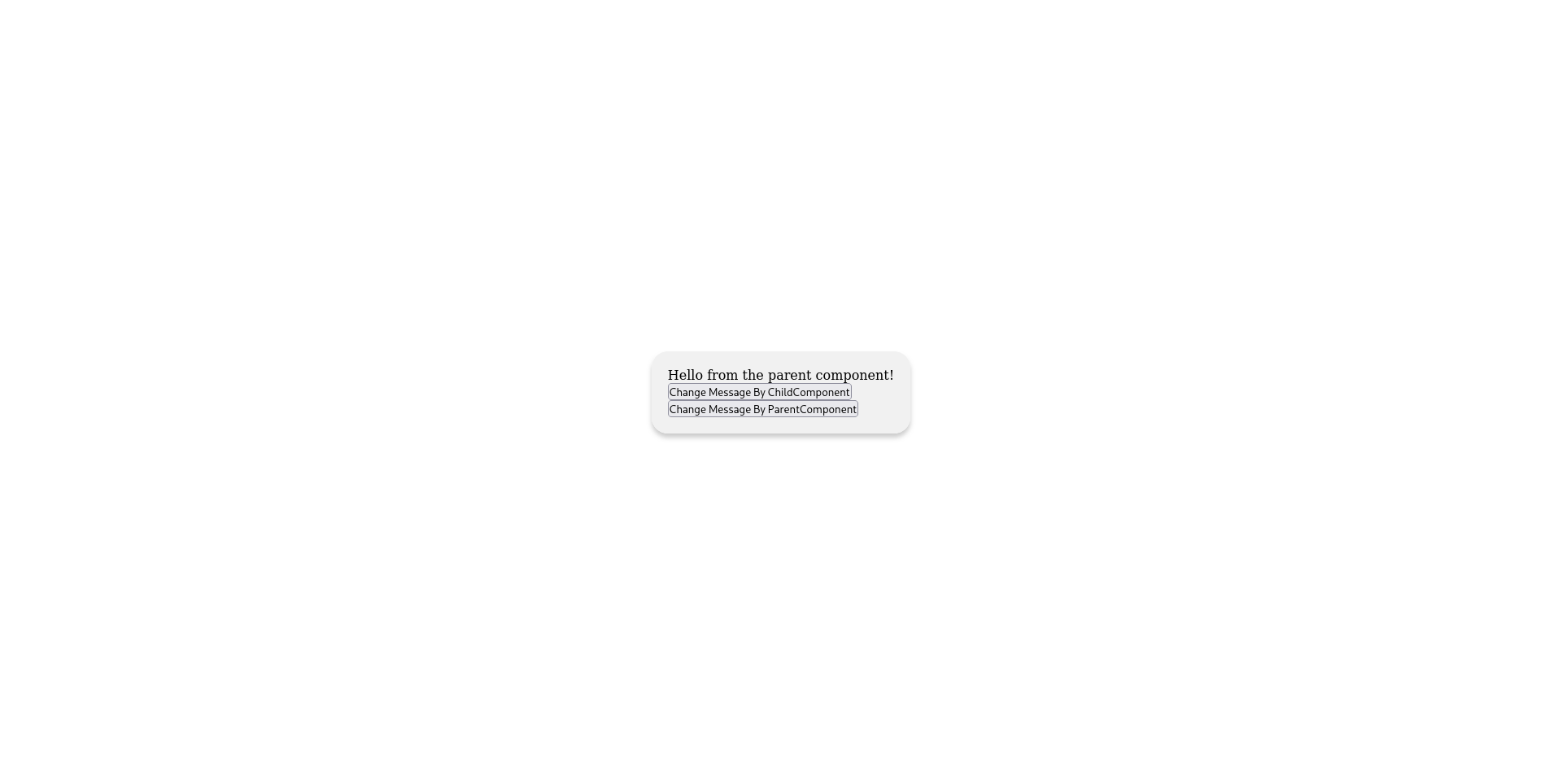
/img/Screenshot_2023-07-22_at_18-07-34_Vite_App.png

Now Let’s try clicking the first button!
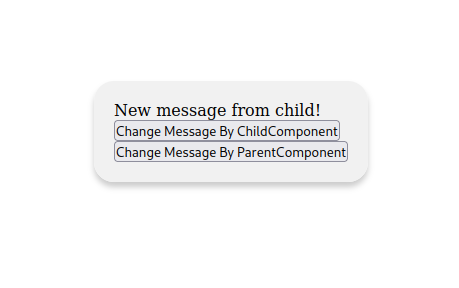
/img/2023-07-22-18-09-41屏幕截图.png

Obviously! The content of the text changed!

Then let’s click the second button!
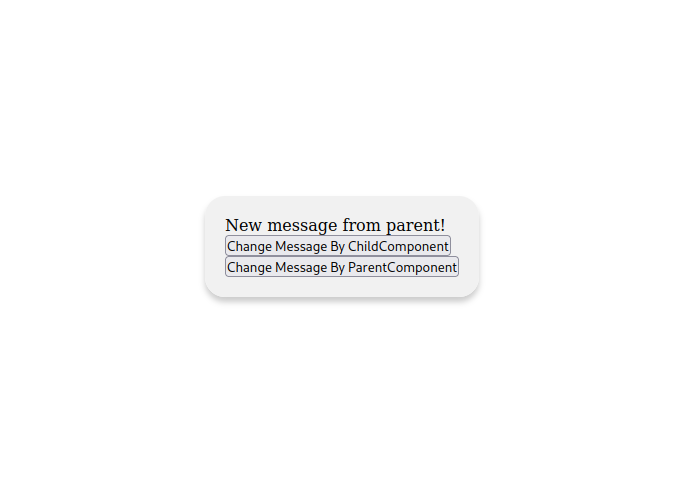
/img/2023-07-22-18-11-13屏幕截图.png

It became “New message from parent!”!

That’s amazing right?

Conclusion

That’s it! By following these steps, you can successfully pass a value from a parent component to a child component using props and events in Vue.js. Don’t forget to save your files, import components where necessary, and register components appropriately.