

惯性聚合 高效追踪和阅读你感兴趣的博客、新闻、科技资讯
阅读原文 在惯性聚合中打开

推荐订阅源

C
CXSECURITY Database RSS Feed - CXSecurity.com
aimingoo的专栏
aimingoo的专栏
Cyber Security Advisories - MS-ISAC
D
Docker
博客园 - 叶小钗
Recent Announcements
人人都是产品经理
人人都是产品经理
云风的 BLOG
云风的 BLOG
Vercel News
Vercel News
Hugging Face - Blog
Hugging Face - Blog
www.infosecurity-magazine.com
美团技术团队
K
KPMG report finds enterprise disconnect between AI and its ROI | CIO
F
Fortinet All Blogs
博客园 - 三生石上(FineUI控件)
Microsoft Security Blog
H
Heimdal Security Blog
有赞技术团队
有赞技术团队
The Cloudflare Blog
S
Secure Thoughts
cs.CV updates on arXiv.org
T
The Blog of Author Tim Ferriss
M
MIT News - Artificial intelligence
Google DeepMind News
Schneier on Security
N
News and Events Feed by Topic
小众软件
小众软件
C
Cybersecurity and Infrastructure Security Agency CISA
Application and Cybersecurity Blog
博客园 - Franky
T
Tenable Blog
The Last Watchdog
The Last Watchdog
腾讯CDC
量子位
Google DeepMind News
Help Net Security
Help Net Security
雷峰网
雷峰网
Recent Commits to openclaw:main
Cyberwarzone
Cyberwarzone
S
Securelist
Martin Fowler
Martin Fowler
OSCHINA 社区最新新闻
OSCHINA 社区最新新闻
罗磊的独立博客
奇客Solidot–传递最新科技情报
奇客Solidot–传递最新科技情报
P
Proofpoint News Feed
D
Darknet – Hacking Tools, Hacker News & Cyber Security
I
InfoQ
Spread Privacy
Spread Privacy
cs.AI updates on arXiv.org
H
Hackread – Cybersecurity News, Data Breaches, AI and More

czp's blog

Ubuntu 下使用 zsh · HonKit Linux 下无限试用 JetBrains · HonKit 使用 KMS 激活 Windows · HonKit 为 KVM 中的 Windows 虚拟机启用 VirtIO · HonKit 在 Spring Boot 中处理 MissingKotlinParameterException · HonKit 用 Spring Native 拯救微服务 · HonKit 正确调试 PHP · HonKit Ubuntu 增加最大文件打开数量限制 · HonKit 将 Minecraft 服务端编译到 native · HonKit 用凝聚力购买 P 社游戏 DLC · HonKit 模拟超星网课 Android 客户端 · HonKit 模拟 Bilibili Android 客户端 · HonKit 模拟哔咔 Android 客户端 · HonKit 异步是什么 · HonKit GCP Pub/Sub push 至 IAP 保护的 Endpoint · HonKit 部署 Spring Native 到 GCP App Engine · HonKit 多个 Gradle SubProject 同时编译导致 CI/CD 内存耗尽 · HonKit Google Cloud Build 运行 DIND · HonKit 在 Google Storage 中部署 SPA · HonKit Terraform 不自动更新 CloudRun service · HonKit Telegram Bot 收不到普通群聊消息的问题 · HonKit 加密货币交易 · HonKit 挖掘以太坊 · HonKit 挖掘门罗币 · HonKit 小明学英语 · HonKit 卖程序的小女孩 · HonKit 一个测试工程师走进一家酒吧 · HonKit 我给你们讲个 TCP 笑话吧! · HonKit 我给你们讲个 UDP 笑话吧! · HonKit 格局打开 · HonKit c 语言常见未定义行为 · HonKit 在 Kotlin 使用 SpaceEngineers Remote API · HonKit Kotlin 协程 · HonKit 在 Spring Boot 中正确注册 Jackson Module · HonKit Spring Boot Jpa 使用 Google Cloud SQL · HonKit Spring Boot 中配置单页应用 · HonKit Spring Boot 无法加载 ClasspathResource 问题 · HonKit 正确打包 Spring Boot 到 war · HonKit czp's blog · HonKit 鸣谢列表 · HonKit 友链 · HonKit
使用 VNC 来远程管理服务器 · HonKit
2026-04-11 · via czp's blog

众所周知, VNC 可以让用户远程访问服务器的图形界面, 这对于一些工作站来说是非常棒的功能. 但是网上能搜索到的资料可谓是讲不清道不楚, 现在我来教你如何最简单的使用 VNC.

首先, 登陆到需要被远程管理的服务器上, 安装 VNC 服务端

sudo apt install vnc4server

注意, 他不是一个服务, 不会长期运行, 接下去会讲到.

如果以 root 账户来安装软件包, 此时务必记得退出到普通账户, 桌面环境所用的账户取决于启动 VNC 服务器的账户.

此时启动服务端

vncserver

如果是第一次启动, 将要求配置一个密码, 务必记住它.

随后将会打印出这么几行内容

New 'server_name:1 (czp)' desktop is server_name:1

Starting applications specified in /home/czp/.vnc/xstartup
Log file is /home/czp/.vnc/server_name:1.log

这时候兴冲冲的连接上去, 就会看到一个灰色的屏幕, 那当然是因为我们还没有安装图形界面.

我们先把已启动的服务端关闭

vncserver -kill :1

其中的 1 是服务端启动时打印出来的序号, 更在服务器名后面.

很多人对服务端安装什么桌面环境犹豫不决, 秉承 GNU 一贯的实用主义风格, 服务器应当选择一种占用资源尽可能少的桌面, 因此我推荐 xfce4

sudo apt install xfce4

然后我们要对 VNC 服务端进行配置, 让它在启动时开启对应的桌面. 还记得第一次启动服务端时打印出的配置文件路径么, 编辑它

vim ~/.vnc/xstartup

通常来说, 默认配置已经非常完整, 只需要在最后一行加入(注意最后一个 &)

startxfce4 &

如果你的 vnc4server 版本比较旧, 默认配置不完整, 可以参考以下

#!/bin/sh

# Uncomment the following two lines for normal desktop:
# unset SESSION_MANAGER
# exec /etc/X11/xinit/xinitrc

[ -x /etc/vnc/xstartup ] && exec /etc/vnc/xstartup
[ -r $HOME/.Xresources ] && xrdb $HOME/.Xresources
xsetroot -solid grey
vncconfig -iconic &
x-terminal-emulator -geometry 80x24+10+10 -ls -title "$VNCDESKTOP Desktop" &
x-window-manager &
startxfce4 &

其中的 xrdb $HOME/.Xresourcesstartxfce4 & 是必须的.

然后再次启动 VNC 服务端.

那么如何连接上服务端呢. 首先我们需要一个 VNC 客户端程序. 如果你在本地使用 Ubuntu, 那么系统已经自带了 Remmina 并且应该已经预装了 VNC 插件. 连接配置也非常简单
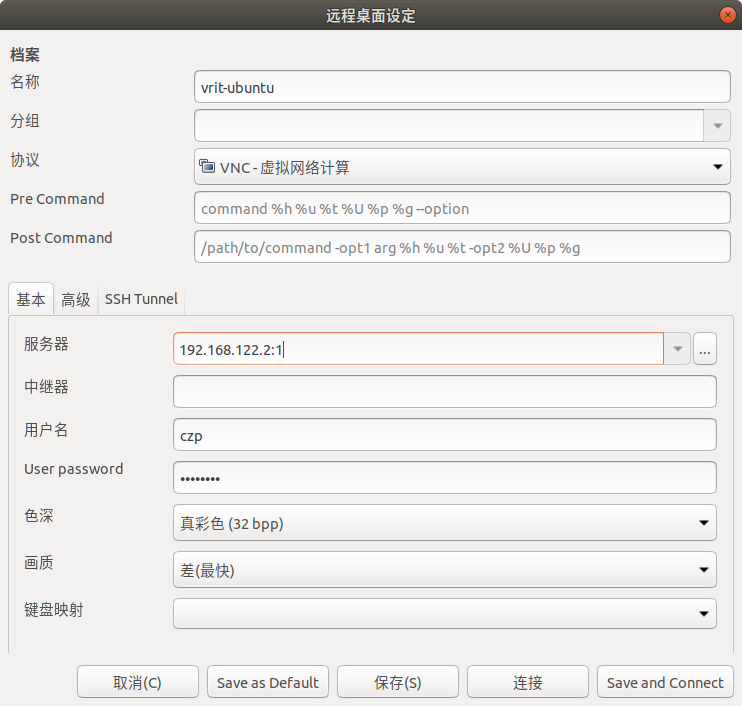
服务器应当填写 服务器地址:桌面序号
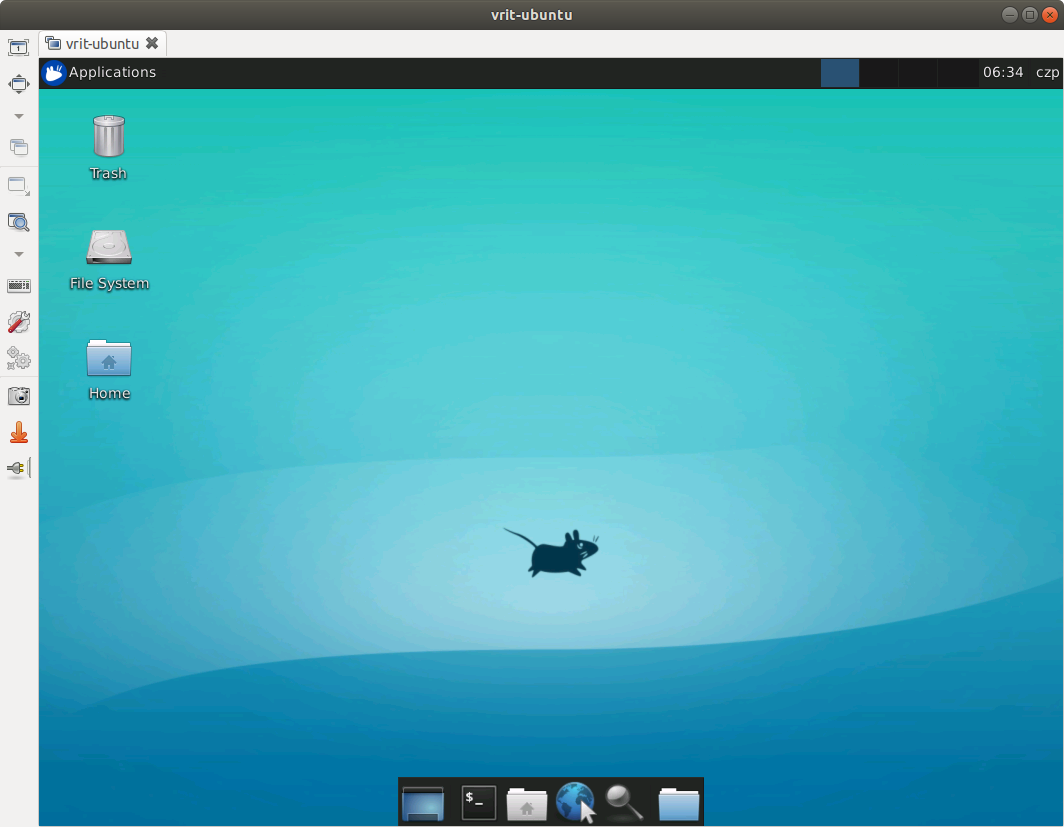
如果想要长期使用 VNC, 可以将 vnc4server 写成服务并使用 systemctl 来管理.