
惯性聚合 高效追踪和阅读你感兴趣的博客、新闻、科技资讯
阅读原文 在惯性聚合中打开

推荐订阅源

WordPress大学
WordPress大学
The GitHub Blog
The GitHub Blog
F
Fortinet All Blogs
Cloudbric
Cloudbric
P
Palo Alto Networks Blog
T
Threatpost
T
Tor Project blog
T
Tenable Blog
AWS News Blog
AWS News Blog
Project Zero
Project Zero
L
LangChain Blog
Cyberwarzone
Cyberwarzone
Engineering at Meta
Engineering at Meta
雷峰网
雷峰网
C
CERT Recently Published Vulnerability Notes
钛媒体:引领未来商业与生活新知
钛媒体:引领未来商业与生活新知
Security Latest
Security Latest
云风的 BLOG
云风的 BLOG
I
Intezer
cs.CL updates on arXiv.org
P
Proofpoint News Feed
A
Arctic Wolf
Cyber Security Advisories - MS-ISAC
Google DeepMind News
V
Vulnerabilities – Threatpost
C
Cybersecurity and Infrastructure Security Agency CISA
MongoDB | Blog
MongoDB | Blog
aimingoo的专栏
aimingoo的专栏
K
Kaspersky official blog
Jina AI
Jina AI
N
News | PayPal Newsroom
T
The Blog of Author Tim Ferriss
D
DataBreaches.Net
A
About on SuperTechFans
博客园 - 三生石上(FineUI控件)
博客园 - 【当耐特】
Hugging Face - Blog
Hugging Face - Blog
Recorded Future
Recorded Future
cs.AI updates on arXiv.org
S
Secure Thoughts
TaoSecurity Blog
TaoSecurity Blog
P
Privacy & Cybersecurity Law Blog
P
Proofpoint News Feed
MyScale Blog
MyScale Blog
IT之家
IT之家
Forbes - Security
Forbes - Security
The Hacker News
The Hacker News
Last Week in AI
Last Week in AI
T
Threat Research - Cisco Blogs
Y
Y Combinator Blog

噜啦 - 表单

表单:selet - 噜啦 input 标签 - 噜啦 表单相关属性 - 噜啦 表单 - 噜啦
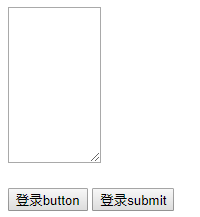
表单: textarea button - 噜啦
博主: 噜啦 · 2019-07-10 · via 噜啦 - 表单

DEMO

946dab8c6c2fe26408128695234587bd.png

CODE

<!DOCTYPE html>
<html>
    <head>
        <meta charset="utf-8">
        <title></title>
    </head>
    <body>
        <!-- 文本域 和 input type=text对比 
            rows 行
            cols 列
            disable 使输入框失效
            注意:表单项一定要加name属性,不然不会发送数据
            button 语义化标签 内部可以放图片
        -->
        <textarea name="name1" rows="10" cols="10"></textarea><br><br>
        
        <form action="http://baidu.com" >
            
            <button >登录button</button> <!-- 可以放图片-->
            <input type="submit" value="登录submit"/>
            
        </form>
        
    </body>
</html>

赞赏作者

如果觉得我的文章对你有用,请随意赞赏