







为了在Sublime上配置C语言,琢磨了几天,这里写一下配置教程
当然不放心的可以直接官网下载
配置C++编译环境
这里采用tdm-gcc,默认安装到C盘,记住不要勾选Check for...
设置环境变量(win10环境)
鼠标右键桌面上的此电脑->属性->高级系统设置->环境变量->系统变量中的path->添加你的编译器路径下的bin目录->重启电脑
补充一下(一般安装 tdm—gcc 后会自动添加,如果没有则需要手动添加)
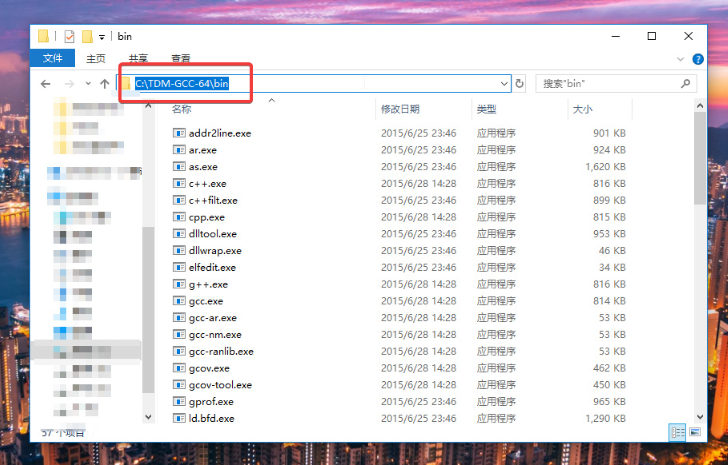






测试是否有g++/gcc环境:在cmd中输入g++ -v
接下来
重启电脑
Sublime
1.安装Package Control:
Sublime官网:点击访问
使用快捷键ctrl+~ 调出console然后把以下代码(适用于Sublime Text 3)复制进去:
import urllib.request,os,hashlib; h = '2915d1851351e5ee549c20394736b442' + '8bc59f460fa1548d1514676163dafc88'; pf = 'Package Control.sublime-package'; ipp = sublime.installed_packages_path(); urllib.request.install_opener( urllib.request.build_opener( urllib.request.ProxyHandler()) ); by = urllib.request.urlopen( 'http://packagecontrol.io/' + pf.replace(' ', '%20')).read(); dh = hashlib.sha256(by).hexdigest(); print('Error validating download (got %s instead of %s), please try manual install' % (dh, h)) if dh != h else open(os.path.join( ipp, pf), 'wb' ).write(by)
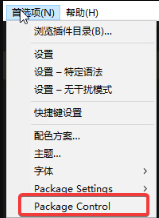
此处软件会出现卡顿是正常现象,如果菜单栏中的Preferences中出现Packge Control则表示安装成功,否则请多次尝试,直到安装成功
然后重启Sublime
3.Sublime build System配置
Sublime Text 3->Tools->Build System->New Build System,输入以下内容:
     {
         "encoding": "utf-8",
         "working_dir": "$file_path",
         "shell_cmd": "g++ -Wall \"${file}\" -o \"${file_path}/${file_base_name}\"",
         "file_regex": "^(..[^:]*):([0-9]+):?([0-9]+)?:? (.*)$",
         "selector": "source.c++",

         "variants":
         [
             {
             "name": "Run",
                 "shell_cmd": "g++ -Wall \"${file}\" -o \"${file_base_name}\" && start cmd /c \"\"${file_path}/${file_base_name}\" & pause\""
             }
         ]
     }
按ctrl+s保存配置文件,文件名xx.sublime-bulid,这里后缀名一定要是sublime-bulid
接下来在tool->build-system中选择xx.sublime-bulid(你刚刚保存的文件的文件名),这里是选择刚才自定义的C语言编译系统
然后你就可以直接在Sublime Text中按ctrl+b或者ctrl+shift+b来编译运行C语言程序了,程序都是以cmd的形式运行的。
汉化篇:(不懂的自行百度)
- 点击
Package Control->Install Package->输入Chinese->点击第一项安装中文包

PS:
1.Sublime右下角是可以选择语言类型的,C语言环境选择C,开启代码高亮

2.如果Ctrl+B编译时出现g++: error: : No such file or directory,请用Ctrl+S先保存文件,再编译运行

赞赏作者

如果觉得我的文章对你有用,请随意赞赏