


惯性聚合 高效追踪和阅读你感兴趣的博客、新闻、科技资讯
阅读原文 在惯性聚合中打开

推荐订阅源

Attack and Defense Labs
酷 壳 – CoolShell
酷 壳 – CoolShell
博客园_首页
博客园 - 司徒正美
月光博客
月光博客
Apple Machine Learning Research
T
Tailwind CSS Blog
Jina AI
Jina AI
GbyAI
GbyAI
Y
Y Combinator Blog
罗磊的独立博客
Cyber Security Advisories - MS-ISAC
P
Proofpoint News Feed
Last Week in AI
Last Week in AI
freeCodeCamp Programming Tutorials: Python, JavaScript, Git & More
量子位
雷峰网
雷峰网
博客园 - 【当耐特】
H
Hackread – Cybersecurity News, Data Breaches, AI and More
The GitHub Blog
The GitHub Blog
S
Secure Thoughts
博客园 - 三生石上(FineUI控件)
Cyberwarzone
Cyberwarzone
NISL@THU
NISL@THU
J
Java Code Geeks
C
Cisco Blogs
人人都是产品经理
人人都是产品经理
Webroot Blog
Webroot Blog
腾讯CDC
博客园 - 叶小钗
C
Cyber Attacks, Cyber Crime and Cyber Security
T
Troy Hunt's Blog
AI
AI
L
LangChain Blog
Know Your Adversary
Know Your Adversary
T
Tenable Blog
M
MIT News - Artificial intelligence
P
Privacy & Cybersecurity Law Blog
L
LINUX DO - 最新话题
Hugging Face - Blog
Hugging Face - Blog
F
Full Disclosure
P
Proofpoint News Feed
AWS News Blog
AWS News Blog
有赞技术团队
有赞技术团队
A
Arctic Wolf
Security Archives - TechRepublic
S
Schneier on Security
Recent Commits to openclaw:main
W
WeLiveSecurity
The Cloudflare Blog

Netlify Changelog

Gemini 3.5 Flash now available in Agent Runners 4 Nuxt CVEs: what Netlify users need to know Gemini 3.5 Flash now available in AI Gateway Agent Runners workflow improvements Next.js & React security release (May 2026): what to know Block project transfers out of your team Gemini 3.1 Flash-Lite now available in AI Gateway OpenAI GPT-5.5 Instant now available in AI Gateway New `netlify logs` CLI command Deploy to Netlify with Stripe Projects Netlify Database is now generally available OpenAI GPT-5.5 and GPT-5.5 Pro in AI Gateway & Agent Runners Rename an agent run GPT Image 2 now available in AI Gateway New frontend-design skill for Agent Runners Claude Opus 4.7 now available in AI Gateway and Agent Runners Pricing updates for Credit-based plans New sorting and filter controls on the Members page Netlify Database GA coming soon, no new databases for now Deploy logs streaming is now faster Netlify CLI adds prompt-based creation and anonymous deploys Deploy from Codex with the Netlify Plugin Hydrogen with React Router 7 now supported on Netlify Monitor credit usage by day Invoices for Enterprise Available on the Billing Page AI app development on production infrastructure with Netlify Introducing Prompt Templates OpenAI GPT-5.4 Nano and GPT-5.4 Mini in AI Gateway Change your pricing plan Internal Builder Role & Project Access Controls See your available credits at a glance Astro 6 just works on Netlify Limit AI feature usage OpenAI GPT-5.4 and GPT-5.4 Pro in AI Gateway & Agent Runners Deploy Preview screenshots in agent runs Gemini 3.1 Flash-Lite Preview now available in AI Gateway GPT-5.3 Instant now available in AI Gateway Use Netlify Agent Runners from Linear Automatic PHP bot scan blocking now live on all plans Support for stale-while-revalidate in Cache API Gemini 3.1 Flash Image Preview now available in AI Gateway GPT-5.3-Codex now available in AI Gateway Gemini 3.1 Pro Preview now available in AI Gateway Claude Sonnet 4.6 now available in AI Gateway and Agent Runners Sync changes with Agent Runners without Git Claude Opus 4.6 now available in AI Gateway and Agent Runners Agent Runners improvements recap 6 new React Router & Remix CVEs: what you need to know Vulnerability in Node.js: what Netlify users need to know 5 SvelteKit security vulnerabilities: what Netlify users need to know GPT-5.2-Codex Now Available in AI Gateway and Agent Runners Play Games While Agent Runners Do the Work Prerender.io support updated as new extension Gemini 3 Flash Preview now available in AI Gateway GPT-image-1.5 now available in AI Gateway AI Gateway now Generally Available Observability release is here Prerender extension now generally available Action required: React/Next.js CVE-2025-55184 and CVE-2025-55183 GPT-5.2 and GPT-5.2-Pro now available in AI Gateway and Agent Runners GPT-5.1-Codex-Max now available in AI Gateway and Agent Runners Netlify’s response to the critical React security vulnerability Netlify Vite Plugin now supports AI Gateway locally Claude Opus 4.5 now available in AI Gateway Projects deployed using a zip file via API now support branch deploys Day one support for Angular v21 on Netlify Gemini 3 now available in AI Gateway and Agent Runners DNS record management simplified for teams in Netlify organizations Skew protection for CLI workflows Support for more domain TLDs GPT-5.1 model now available in AI Gateway React Router 7 apps can now be deployed to Edge Functions | Netlify Changelog Git SHA exposed for triggered deploys | Netlify Changelog Test scheduled functions in Netlify dashboard | Netlify Changelog Revert agent run in a task | Netlify Changelog Deletion improvements with Netlify Blobs | Netlify Changelog Preview Server restart for cross-functional collaborators | Netlify Changelog AI inference usage graphs | Netlify Changelog Buy credit packs on demand | Netlify Changelog React Router 7 middleware now supported | Netlify Changelog Skew protection now available | Netlify Changelog Next.js 16 is ready to deploy on Netlify | Netlify Changelog Enforce Git-based workflows for production deploys | Netlify Changelog Claude Haiku 4.5 is now available in the AI Gateway | Netlify Changelog GPT 5 Pro now available in the AI Gateway | Netlify Changelog Updates to credit-based Personal and Pro plans | Netlify Changelog New AI workflows: Agent Runners and AI Gateway (beta) | Netlify Changelog Netlify pricing update: Introducing credit-based plans | Netlify Changelog Security Update: Multiple vulnerabilities in Next.js | Netlify Changelog ChatGPT deep link for failed deploy analysis | Netlify Changelog Equinix IP address expiring for 4-year old sites | Netlify Changelog Nuxt 4 support + new @netlify/nuxt module for local dev | Netlify Changelog Smart Secret Scanning for AI-Generated Code | Netlify Netlify DB: Serverless PostgreSQL Database | Netlify One-click install Netlify MCP on Cursor | Netlify Changelog Netlify MCP Server: AI Agents Can Now Deploy Code Directly | Netlify Netlify Becomes Official Vite Deployment Partner + New Plugin | Netlify Angular 20 support | Netlify Changelog Netlify CLI 21.4.1 UI and workflow enhancements | Netlify Changelog Security Update: Next.js sites on Netlify not vulnerable to CVE-2025-32421 | Netlify Changelog
Netlify now online: the Netlify app for Slack is generally available
Nahrin Jalal · 2023-12-05 · via Netlify Changelog

We are pleased to announce general availability of the Netlify App for Slack, which is now officially listed in the Slack app directory. With the app, you can subscribe to notifications in Slack for better visibility into your teams and sites on Netlify. Finally, you can meet your team where they are and automatically bring relevant notifications into Slack.

Netlify team Owners can go to app.netlify.com > Team Settings > Notifications to connect a Slack workspace to their Netlify team. In just a couple clicks, this connection will be ready to go. You can find detailed setup instructions in the docs.

Why install the Netlify App for Slack?

The app enables you to set up robust, customizable notification workflows in Slack. Without wrangling webhooks, your team can:

  • Make information in Netlify broadly available to more of your collaborators For example, reviewers can find a stream of Deploy Preview links available for pre-production review.
  • Monitor the health and security of your sites One use case Netlify customers are excited about is the ability to set up a purpose-built channel tracking environment variable changes, so that developers can pinpoint misconfigurations without scrolling through audit logs.
  • Keep tabs on product updates where you already work Technology changes so quickly, it’s hard just to keep track of the tech stack you already use. The last thing a developer wants is another login and another source of “truth”. The Netlify App for Slack makes this information available easily, on-demand, where your team is already working.

Common uses for Netlify notifications in Slack

Collaborate on new site releases

Deploy notifications are a popular use case for the Netlify App for Slack.

Let’s suppose your development team uses pull requests to share pre-production updates on your flagship site with stakeholders. From Site Settings > Notifications, your Netlify members can subscribe a Slack channel to “Deploy state changes” for Production and Deploy Previews (which are based on pull requests):
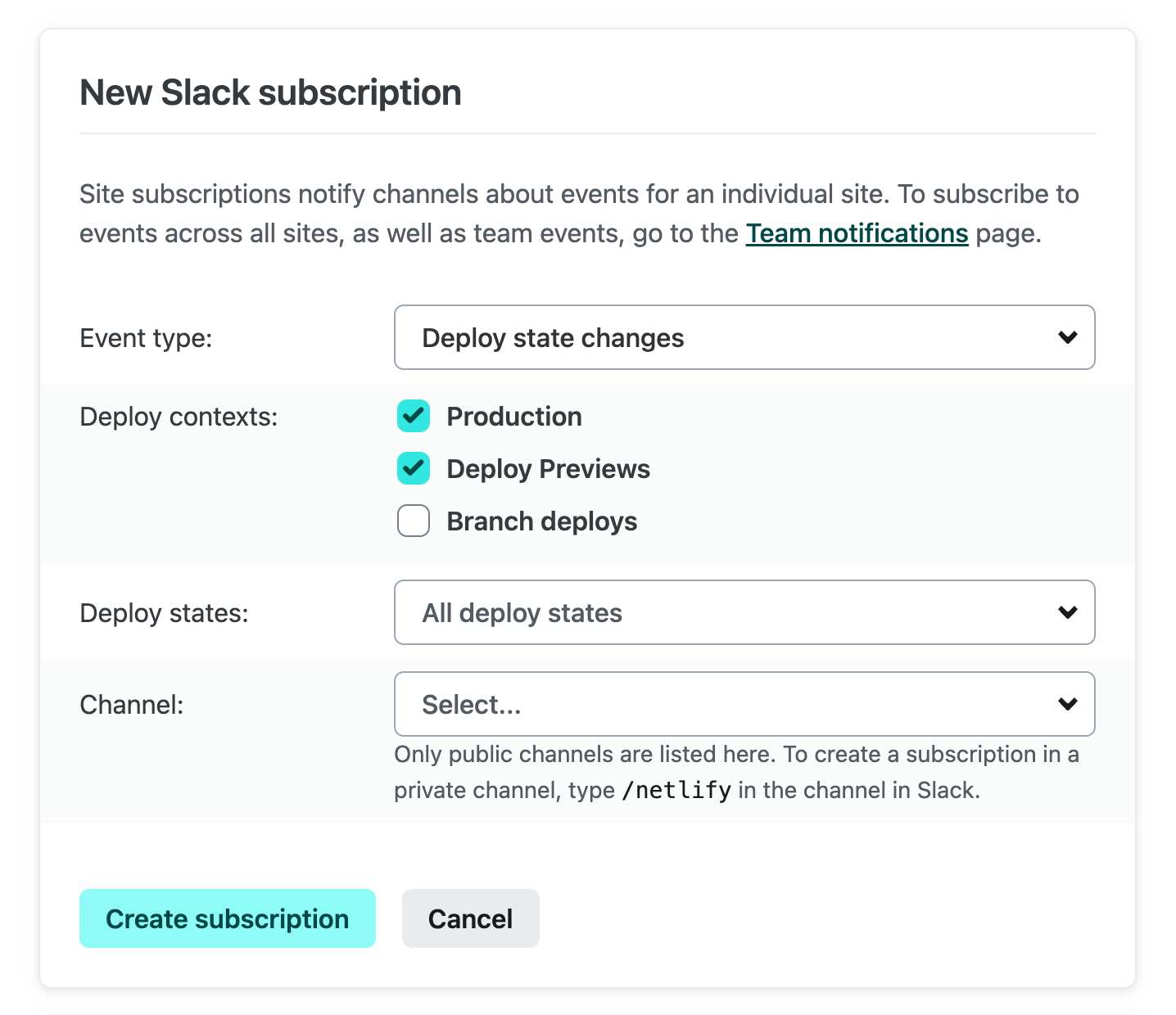
Slack subscription form in Netlify with the deploy state event selected, and with the production and deploy preview contexts selected

You can subscribe to a wide array of state changes. If you just want to know when a deploy has succeeded or failed, you can choose just these states:
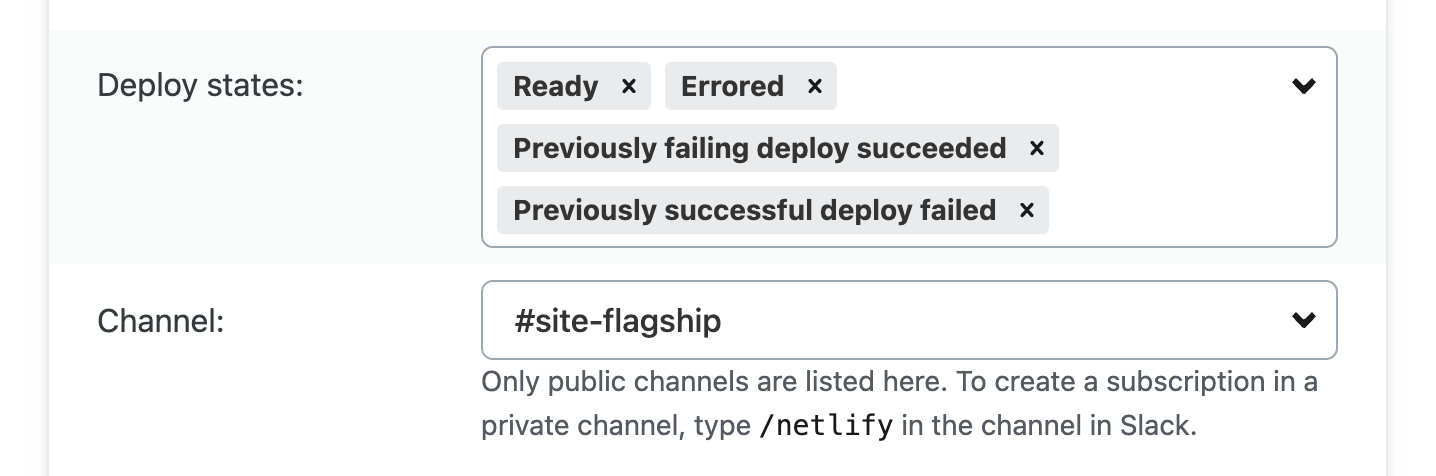
In the same form, under deploy states, there are 4 states selected: ready, errored, previously failing deploy succeeded, previously successful deploy failed

The #site-flagship channel in Slack will now receive notifications whenever a new deploy is ready or has failed on production and in Deploy Previews:
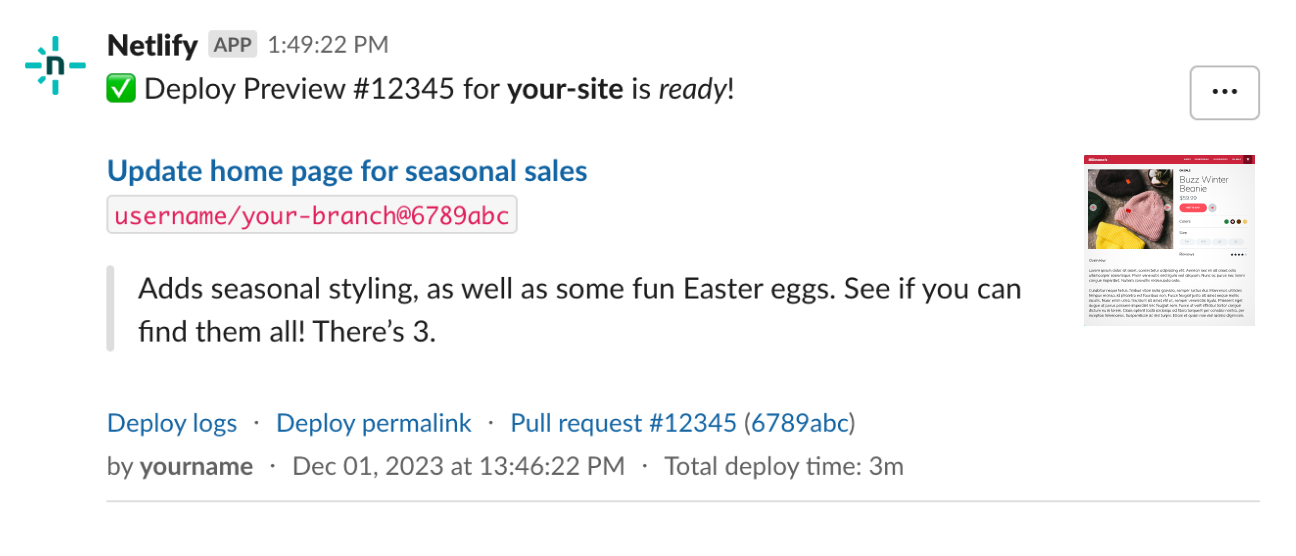
A Slack notification informing the channel that a new deploy is ready on a Deploy Preview

Let’s say your team also uses the Netlify Drawer to collaborate on changes in Deploy Previews. You can subscribe to “Comments and issues from the Netlify Drawer”:
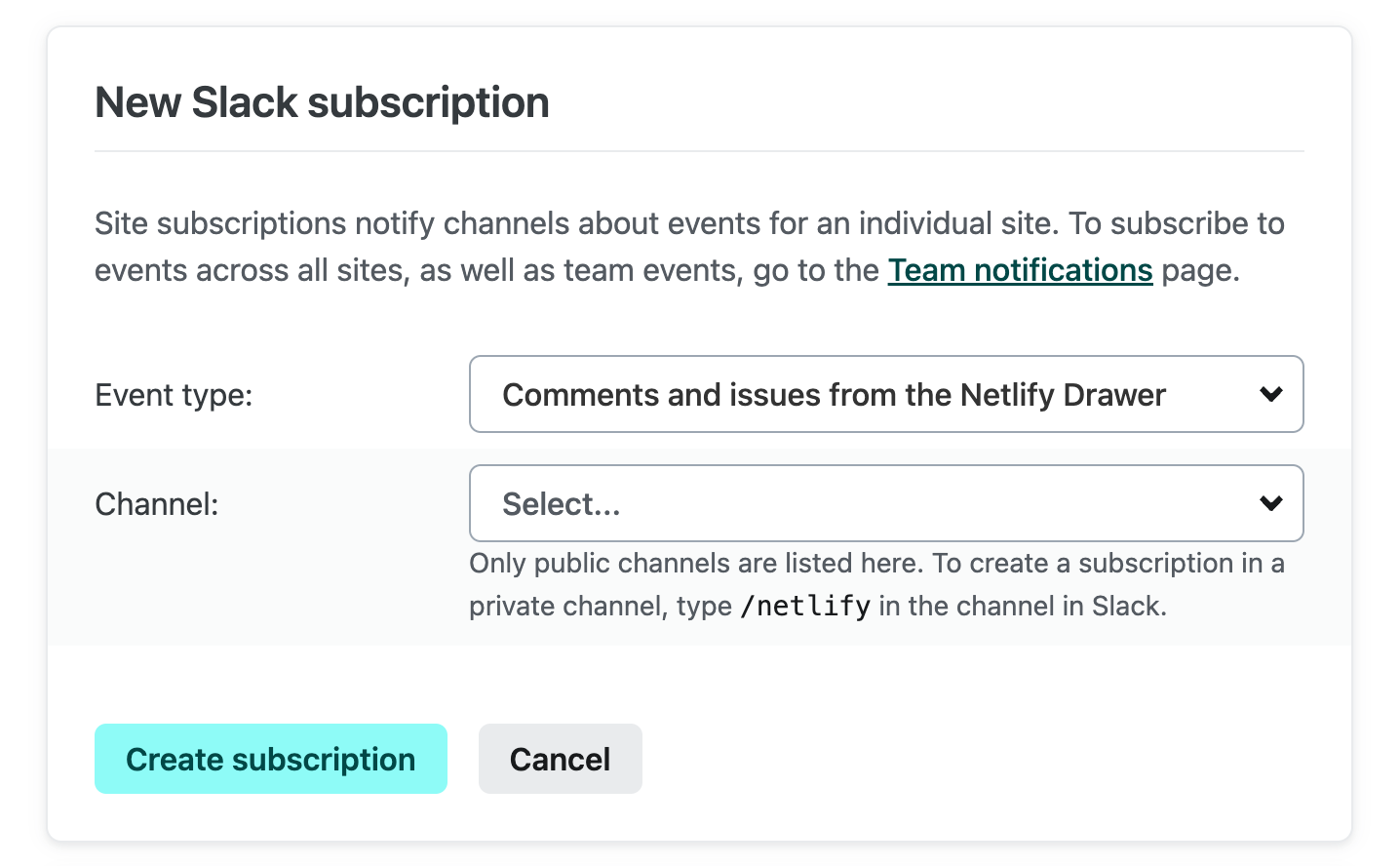
The subscription form with the comments and issues event type selected

Now activity will not only be posted back to the original pull request, but new comments and issues will be surfaced in Slack as well:
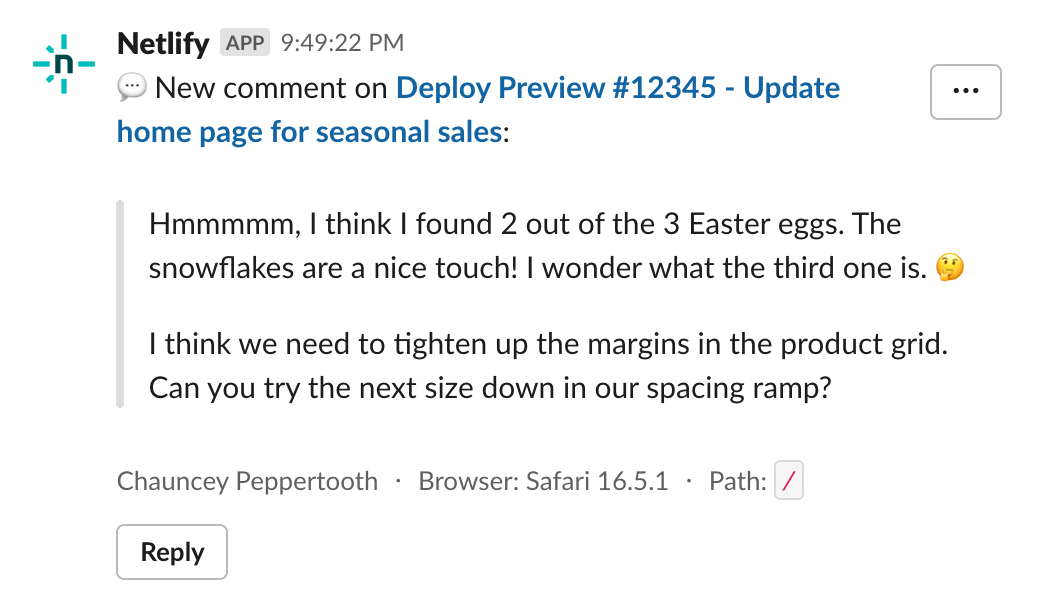
A Slack notification wherein Chauncey Peppertooth comments about the Easter eggs in a Deploy Preview, and gives feedback about tightening up some margins

This enables your non-coding collaborators to participate fully in the discussion where they’re already working.

Monitor platform activity for improved security

Engineering managers, software architects, and IT professionals may need to monitor that developer tooling is maintained in a secure fashion. For better observability of Netlify platform usage and changes, you can set up a few subscriptions from Team Settings > Notifications:
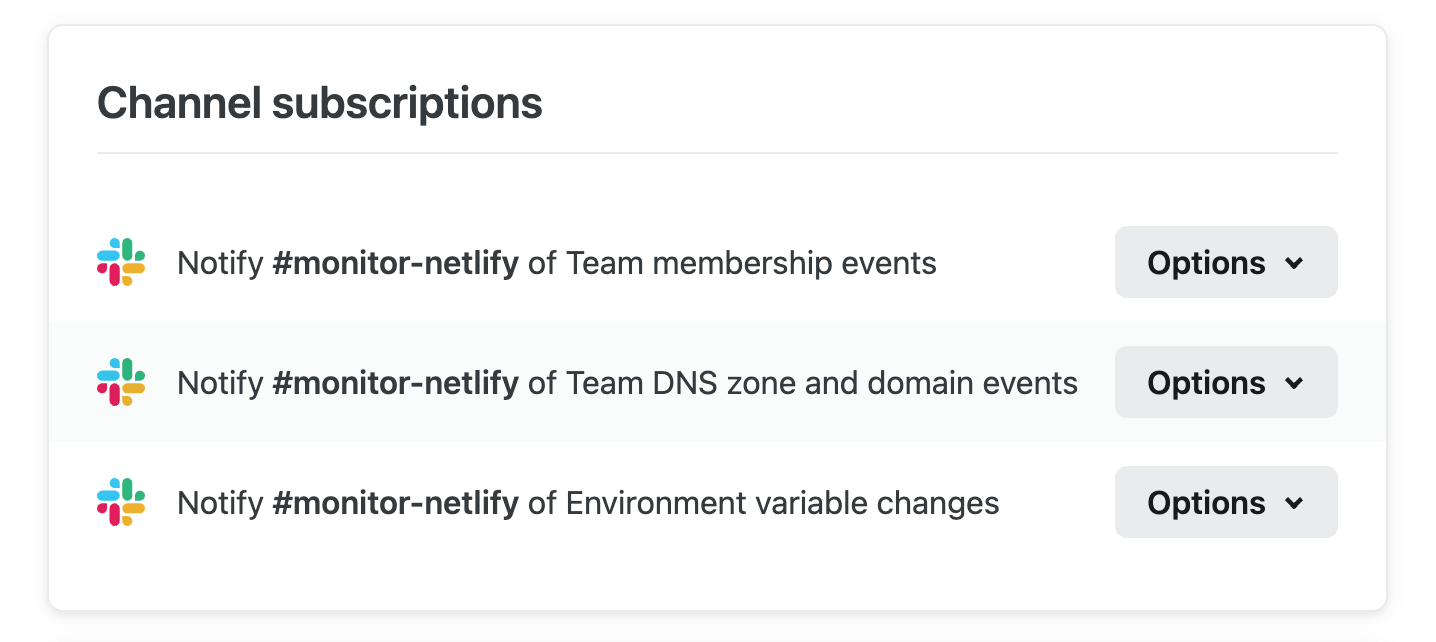
Team notification settings configured to monitor members, domains, and environment variables from Slack

In this example, the team can be alerted about the following (without having to dig through audit logs or “discover” surprises):

  • Changes to Netlify team membership
  • Changes to domain and DNS configuration
  • Modifications to secrets stored in environment variables

Set up a form submissions feed

Tracking form submissions is another popular use case. Suppose you’ve set up a handy lead generation form for the marketing team using Netlify Forms. Instead of constantly adding and removing email subscriptions for individuals, you can skip the tedious task management and notify the entire team. You can do this by subscribing the #team-marketing channel to “Form submissions” from Site Settings > Notifications:
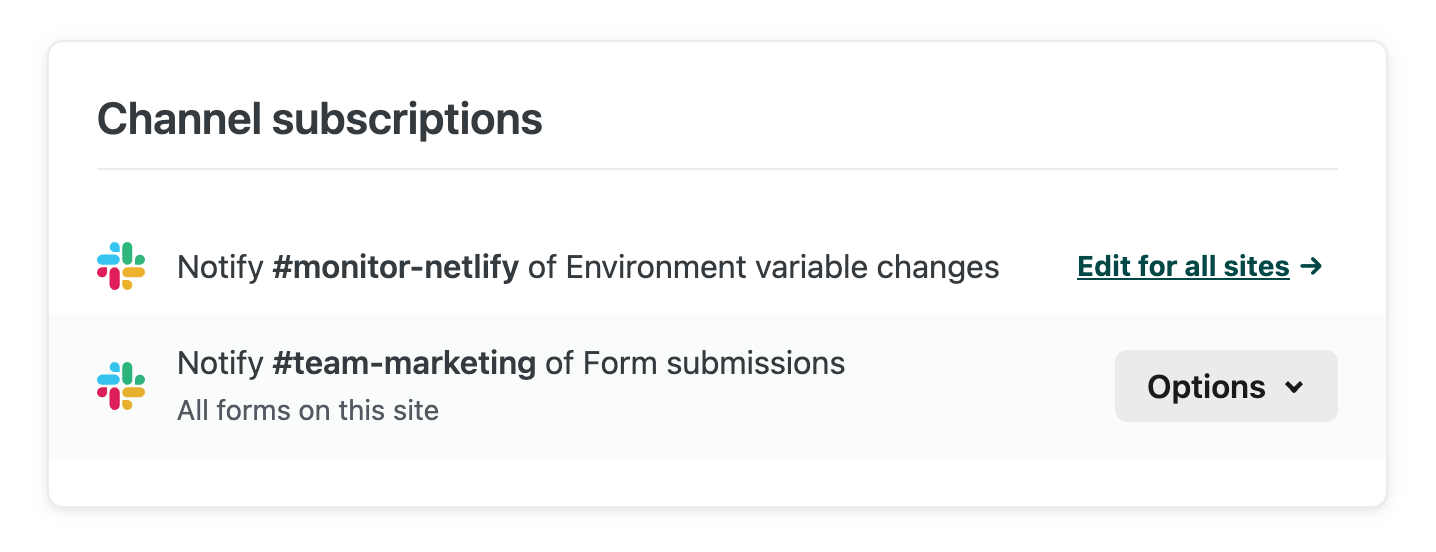
Channel subscriptions configured for form submissions

Now any form submissions associated with that site will stream into the #team-marketing channel:
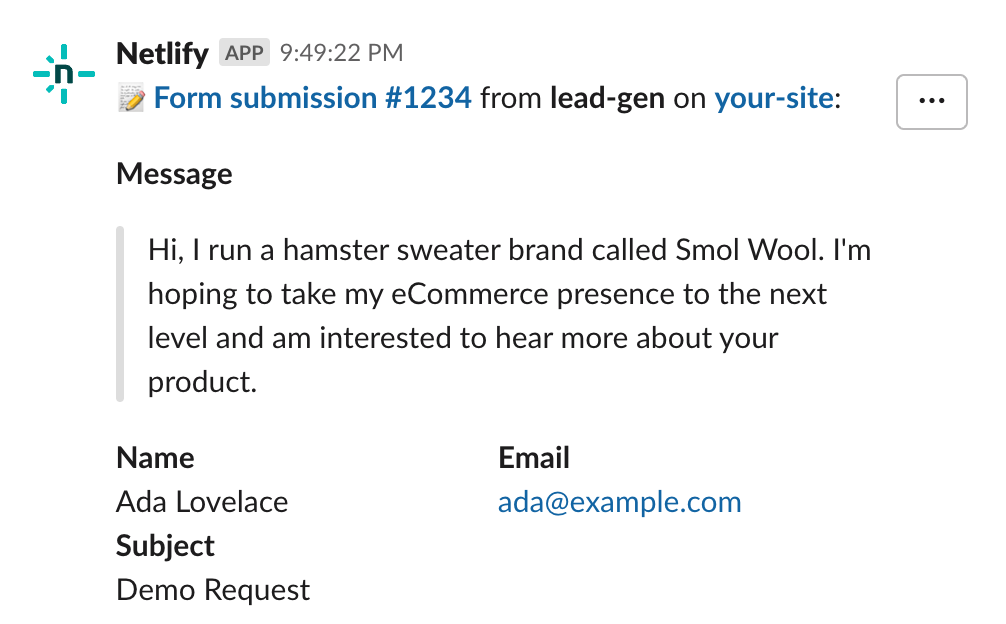
A Slack notification showing a submission from a lead generation form. Ada Lovelace runs a hamster sweater brand called Smol Wool and wants to know about this company's product.

In this example, we set up this subscription for a specific site. If you want submissions for all sites to send to this channel, you can set up a single subscription from Team Settings > Notifications:
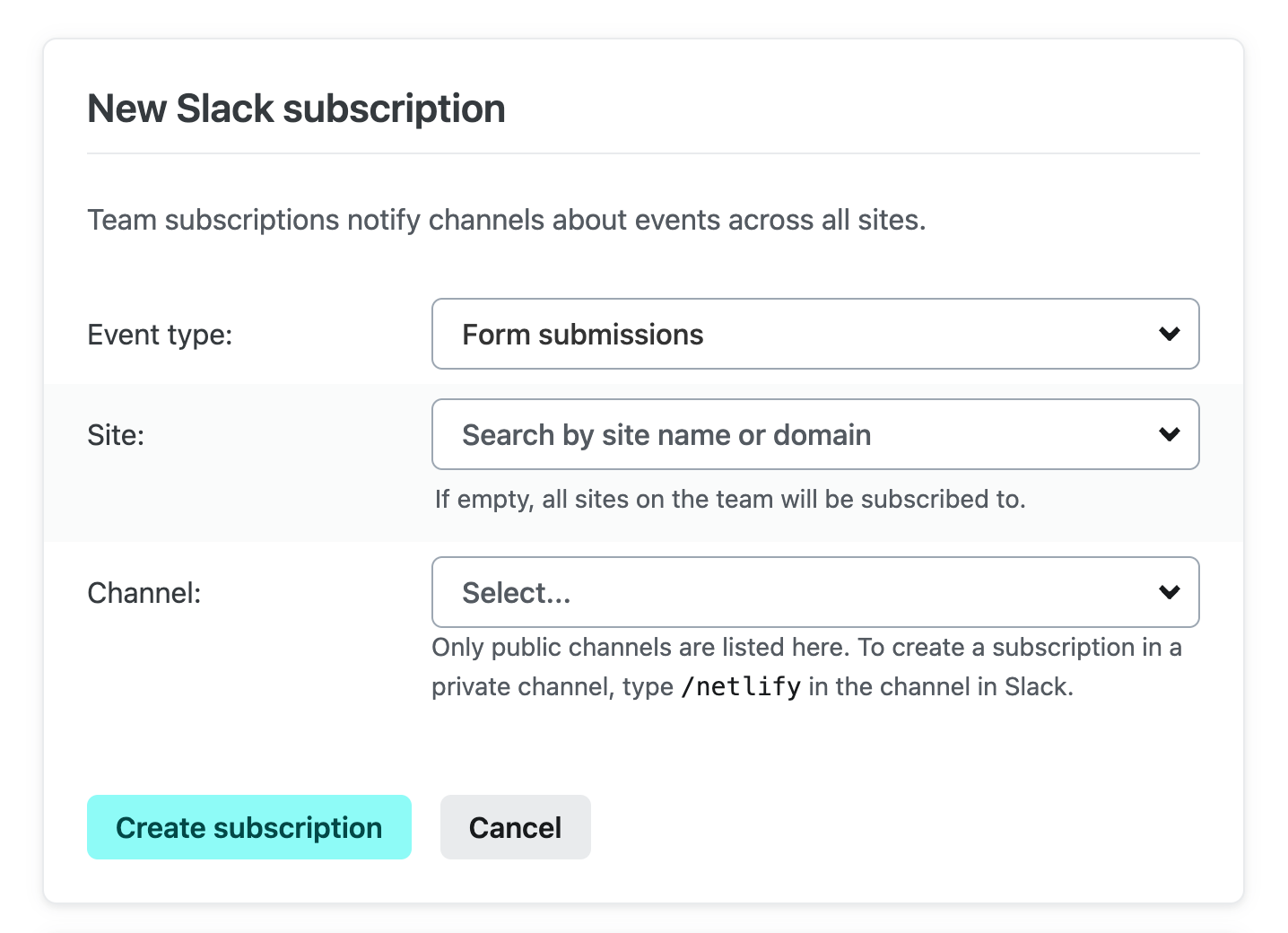
The Team-level subscription form with the form submissions event type selected`

Because we left the site field blank, we’ll subscribe to events from all sites. In general, you can set subscriptions in Slack from Netlify Team Settings or Site Settings, according to your needs.

Netlify product information at your fingertips

Tech moves fast, so it can be easy to miss a product update that could help you do your best work. The Netlify App for Slack makes product information available on-demand in two places:

  1. Netlify changelog From your Slack workspace > Apps > Netlify, you can find the Netlify changelog in the “Home” tab of the Netlify App. This changelog is a live feed of News & Announcements from this blog:
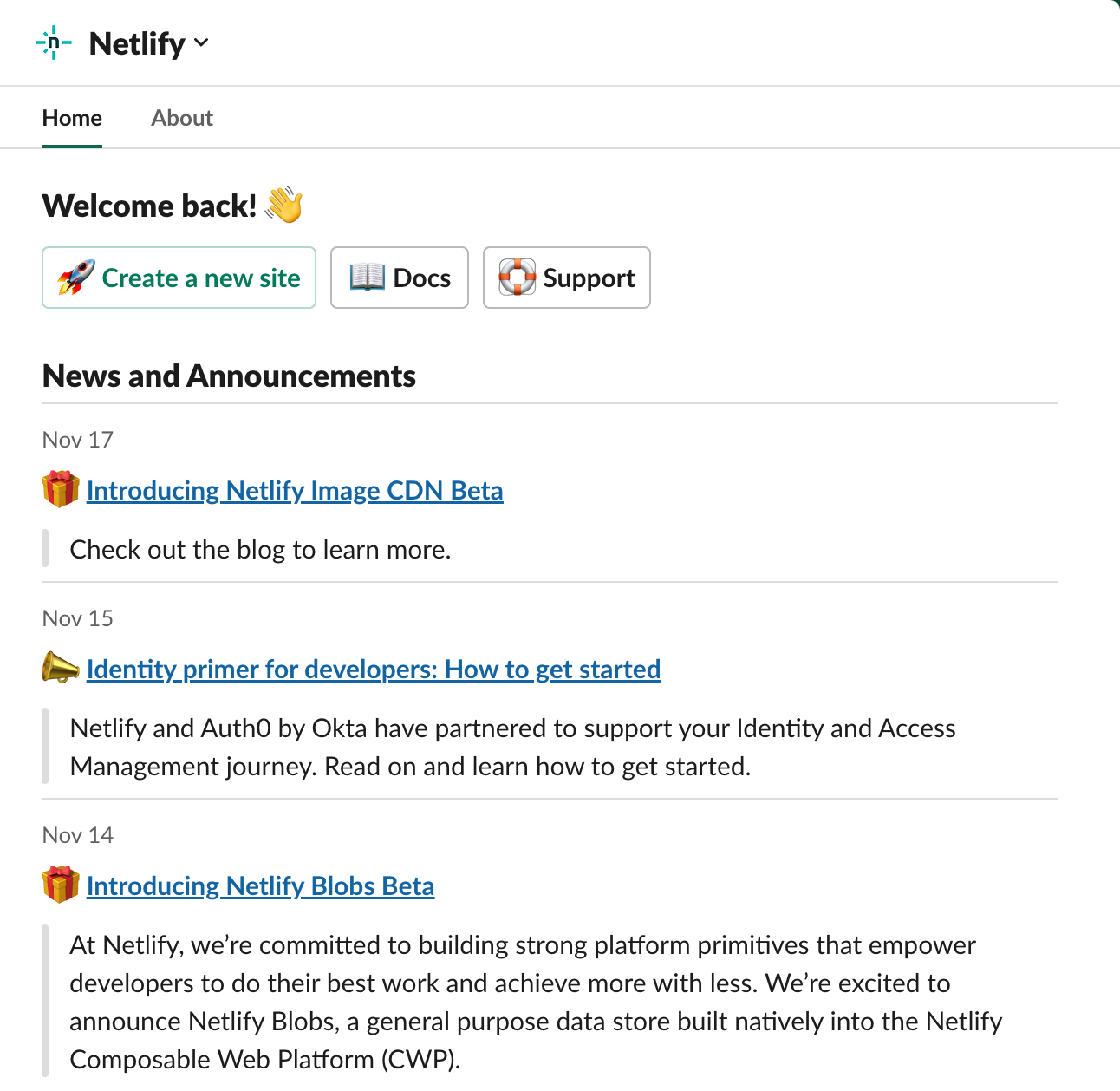
    The Home tab showing announcements like the Image CDN and the blobs beta, as wellas an identity primer for developers

    Hmm, maybe the Netlify Image CDN could be worth trying out?

  2. Ask Netlify bot Once the Netlify App for Slack is installed, you can invite @Netlify into a Slack channel and ask the bot questions about the platform. This AI-powered chat bot pulls data from our docs and other Netlify sources, and responds in-thread.

    These conversations can be really useful when you know what you’re trying to achieve, but don’t know which features might help:
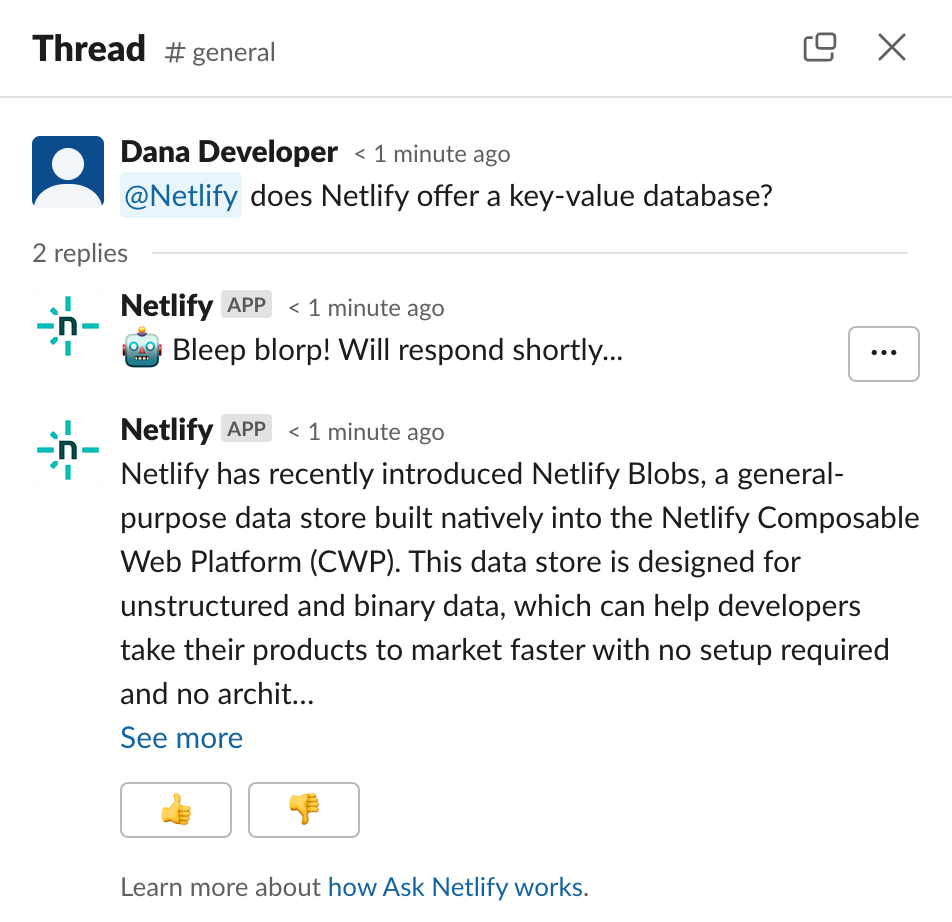
    A user on Slack asking @netlify if Netlify offers a key-value database. The bot responds in the original thread to share information about Netlify Blobs.

The Netlify App for Slack is now generally available for all your team’s communication needs.

To get started, go to app.netlify.com > Team Settings > Notifications to connect a Slack workspace.

If you aren’t quite ready to dig in, you can learn more about this integration in the docs.

Don’t be shy, we love feedback — you can use the “…” button on any Netlify notification in Slack to tell us what you think!