


惯性聚合 高效追踪和阅读你感兴趣的博客、新闻、科技资讯
阅读原文 在惯性聚合中打开

推荐订阅源

Recent Announcements
奇客Solidot–传递最新科技情报
奇客Solidot–传递最新科技情报
MongoDB | Blog
MongoDB | Blog
H
Help Net Security
钛媒体:引领未来商业与生活新知
钛媒体:引领未来商业与生活新知
人人都是产品经理
人人都是产品经理
freeCodeCamp Programming Tutorials: Python, JavaScript, Git & More
The GitHub Blog
The GitHub Blog
V
V2EX
Microsoft Security Blog
V
Visual Studio Blog
A
About on SuperTechFans
博客园_首页
L
LangChain Blog
量子位
雷峰网
雷峰网
Cyber Security Advisories - MS-ISAC
Jina AI
Jina AI
月光博客
月光博客
阮一峰的网络日志
阮一峰的网络日志
博客园 - 聂微东
Microsoft Azure Blog
M
MIT News - Artificial intelligence
N
Netflix TechBlog - Medium

Netlify Changelog

Gemini 3.5 Flash now available in Agent Runners 4 Nuxt CVEs: what Netlify users need to know Gemini 3.5 Flash now available in AI Gateway Agent Runners workflow improvements Next.js & React security release (May 2026): what to know Block project transfers out of your team Gemini 3.1 Flash-Lite now available in AI Gateway OpenAI GPT-5.5 Instant now available in AI Gateway New `netlify logs` CLI command Deploy to Netlify with Stripe Projects Netlify Database is now generally available OpenAI GPT-5.5 and GPT-5.5 Pro in AI Gateway & Agent Runners Rename an agent run GPT Image 2 now available in AI Gateway New frontend-design skill for Agent Runners Claude Opus 4.7 now available in AI Gateway and Agent Runners Pricing updates for Credit-based plans New sorting and filter controls on the Members page Netlify Database GA coming soon, no new databases for now Deploy logs streaming is now faster Netlify CLI adds prompt-based creation and anonymous deploys Deploy from Codex with the Netlify Plugin Hydrogen with React Router 7 now supported on Netlify Monitor credit usage by day Invoices for Enterprise Available on the Billing Page AI app development on production infrastructure with Netlify Introducing Prompt Templates OpenAI GPT-5.4 Nano and GPT-5.4 Mini in AI Gateway Change your pricing plan Internal Builder Role & Project Access Controls
Use Netlify Agent Runners from Linear
2026-02-28 · via Netlify Changelog

Linear users can now launch Netlify Agent Runners directly from any Linear issue, allowing you to seamlessly share context with your AI agent of choice. If you have your Linear issue synced with related Slack messages, this context will also be included in your agent run prompt.

Before starting your agent run, you can review and edit your prompt. Next, you can choose which AI agent to use — Claude Code, Google Gemini, or OpenAI Codex. Netlify Agent Runners doesn’t lock you into using a single AI agent so you can pick the agent that fits the task best.

To start an agent run from Linear:

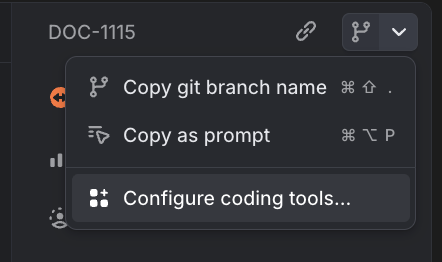
  1. Go to a Linear issue where you want to trigger an agent run.
  2. In the top right corner, select Configure coding tools…. Linear issue view showing the Configure coding tools option in the top right corner
  3. Toggle Netlify Agent Runners on.
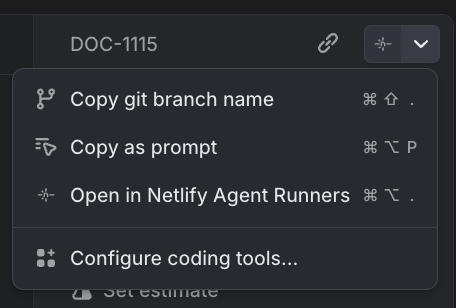
  4. Go back to the issue and in the top right corner, select Open in Netlify Agent Runners. Linear issue view showing the Open in Netlify Agent Runners option in the top right corner
  5. Review the prompt and choose your AI agent.
  6. To start the agent run, select Run task.

Once you’ve enabled this integration from your personal Linear preference settings, any Linear issue you open in your workspace will give you the option to open with Netlify Agent Runners.

Now your entire team can save time and seamlessly share context between Linear and Netlify Agent Runners while keeping this work clearly tracked across Linear and Netlify. Learn more about Agent Runners.