惯性聚合 高效追踪和阅读你感兴趣的博客、新闻、科技资讯
阅读原文 在惯性聚合中打开

推荐订阅源

Cyberwarzone
Cyberwarzone
F
Full Disclosure
V
Visual Studio Blog
freeCodeCamp Programming Tutorials: Python, JavaScript, Git & More
有赞技术团队
有赞技术团队
J
Java Code Geeks
博客园 - 【当耐特】
OSCHINA 社区最新新闻
OSCHINA 社区最新新闻
博客园 - 叶小钗
L
LINUX DO - 最新话题
T
Threatpost
S
SegmentFault 最新的问题
Vercel News
Vercel News
云风的 BLOG
云风的 BLOG
C
Cyber Attacks, Cyber Crime and Cyber Security
Google DeepMind News
Know Your Adversary
Know Your Adversary
S
Schneier on Security
V
Vulnerabilities – Threatpost
D
DataBreaches.Net
G
GRAHAM CLULEY
Latest news
Latest news
P
Privacy International News Feed
D
Darknet – Hacking Tools, Hacker News & Cyber Security
C
CXSECURITY Database RSS Feed - CXSecurity.com
Scott Helme
Scott Helme
L
Lohrmann on Cybersecurity
T
The Exploit Database - CXSecurity.com
Security Latest
Security Latest
G
Google Developers Blog
L
LangChain Blog
MyScale Blog
MyScale Blog
Project Zero
Project Zero
N
News and Events Feed by Topic
Hacker News - Newest:
Hacker News - Newest: "LLM"
大猫的无限游戏
大猫的无限游戏
P
Proofpoint News Feed
Blog — PlanetScale
Blog — PlanetScale
阮一峰的网络日志
阮一峰的网络日志
N
News | PayPal Newsroom
www.infosecurity-magazine.com
cs.AI updates on arXiv.org
SecWiki News
SecWiki News
T
Tor Project blog
C
Check Point Blog
Google Online Security Blog
GbyAI
GbyAI
The Last Watchdog
The Last Watchdog
cs.CL updates on arXiv.org
WordPress大学
WordPress大学

Netlify Changelog

Gemini 3.5 Flash now available in Agent Runners 4 Nuxt CVEs: what Netlify users need to know Gemini 3.5 Flash now available in AI Gateway Agent Runners workflow improvements Next.js & React security release (May 2026): what to know Block project transfers out of your team Gemini 3.1 Flash-Lite now available in AI Gateway OpenAI GPT-5.5 Instant now available in AI Gateway New `netlify logs` CLI command Deploy to Netlify with Stripe Projects Netlify Database is now generally available OpenAI GPT-5.5 and GPT-5.5 Pro in AI Gateway & Agent Runners Rename an agent run GPT Image 2 now available in AI Gateway New frontend-design skill for Agent Runners Claude Opus 4.7 now available in AI Gateway and Agent Runners Pricing updates for Credit-based plans New sorting and filter controls on the Members page Netlify Database GA coming soon, no new databases for now Deploy logs streaming is now faster Netlify CLI adds prompt-based creation and anonymous deploys Deploy from Codex with the Netlify Plugin Hydrogen with React Router 7 now supported on Netlify Monitor credit usage by day Invoices for Enterprise Available on the Billing Page AI app development on production infrastructure with Netlify Introducing Prompt Templates OpenAI GPT-5.4 Nano and GPT-5.4 Mini in AI Gateway Change your pricing plan Internal Builder Role & Project Access Controls See your available credits at a glance Astro 6 just works on Netlify Limit AI feature usage OpenAI GPT-5.4 and GPT-5.4 Pro in AI Gateway & Agent Runners Deploy Preview screenshots in agent runs Gemini 3.1 Flash-Lite Preview now available in AI Gateway GPT-5.3 Instant now available in AI Gateway Use Netlify Agent Runners from Linear Automatic PHP bot scan blocking now live on all plans Support for stale-while-revalidate in Cache API Gemini 3.1 Flash Image Preview now available in AI Gateway GPT-5.3-Codex now available in AI Gateway Gemini 3.1 Pro Preview now available in AI Gateway Claude Sonnet 4.6 now available in AI Gateway and Agent Runners Sync changes with Agent Runners without Git Claude Opus 4.6 now available in AI Gateway and Agent Runners Agent Runners improvements recap 6 new React Router & Remix CVEs: what you need to know Vulnerability in Node.js: what Netlify users need to know 5 SvelteKit security vulnerabilities: what Netlify users need to know GPT-5.2-Codex Now Available in AI Gateway and Agent Runners Play Games While Agent Runners Do the Work Prerender.io support updated as new extension Gemini 3 Flash Preview now available in AI Gateway GPT-image-1.5 now available in AI Gateway AI Gateway now Generally Available Observability release is here Prerender extension now generally available Action required: React/Next.js CVE-2025-55184 and CVE-2025-55183 GPT-5.2 and GPT-5.2-Pro now available in AI Gateway and Agent Runners GPT-5.1-Codex-Max now available in AI Gateway and Agent Runners Netlify’s response to the critical React security vulnerability Netlify Vite Plugin now supports AI Gateway locally Claude Opus 4.5 now available in AI Gateway Projects deployed using a zip file via API now support branch deploys Day one support for Angular v21 on Netlify Gemini 3 now available in AI Gateway and Agent Runners DNS record management simplified for teams in Netlify organizations Skew protection for CLI workflows Support for more domain TLDs GPT-5.1 model now available in AI Gateway React Router 7 apps can now be deployed to Edge Functions | Netlify Changelog Git SHA exposed for triggered deploys | Netlify Changelog Test scheduled functions in Netlify dashboard | Netlify Changelog Revert agent run in a task | Netlify Changelog Deletion improvements with Netlify Blobs | Netlify Changelog Preview Server restart for cross-functional collaborators | Netlify Changelog AI inference usage graphs | Netlify Changelog Buy credit packs on demand | Netlify Changelog React Router 7 middleware now supported | Netlify Changelog Skew protection now available | Netlify Changelog Next.js 16 is ready to deploy on Netlify | Netlify Changelog Enforce Git-based workflows for production deploys | Netlify Changelog Claude Haiku 4.5 is now available in the AI Gateway | Netlify Changelog GPT 5 Pro now available in the AI Gateway | Netlify Changelog Updates to credit-based Personal and Pro plans | Netlify Changelog New AI workflows: Agent Runners and AI Gateway (beta) | Netlify Changelog Netlify pricing update: Introducing credit-based plans | Netlify Changelog Security Update: Multiple vulnerabilities in Next.js | Netlify Changelog ChatGPT deep link for failed deploy analysis | Netlify Changelog Equinix IP address expiring for 4-year old sites | Netlify Changelog Nuxt 4 support + new @netlify/nuxt module for local dev | Netlify Changelog Smart Secret Scanning for AI-Generated Code | Netlify Netlify DB: Serverless PostgreSQL Database | Netlify One-click install Netlify MCP on Cursor | Netlify Changelog Netlify MCP Server: AI Agents Can Now Deploy Code Directly | Netlify Netlify Becomes Official Vite Deployment Partner + New Plugin | Netlify Angular 20 support | Netlify Changelog Netlify CLI 21.4.1 UI and workflow enhancements | Netlify Changelog Security Update: Next.js sites on Netlify not vulnerable to CVE-2025-32421 | Netlify Changelog
Announcing Netlify Preview Servers: real-time previews without rebuilds | Netlify
Nahrin Jalal · 2025-04-04 · via Netlify Changelog

Today, we’re making Preview Servers available to everyone. These cloud-hosted development environments change how teams and AI agents collaborate on web projects. Initially introduced in private beta as Dev Servers, Preview Servers help eliminate one of the most frustrating bottlenecks in web development–waiting for rebuilds.

Available now: Every Netlify plan includes one active Preview Server at no additional cost, with the option to add more as needed on paid plans. All usage of Preview Servers is free to try through April.

Modern web development practically requires instantaneous iteration. Content teams, designers, developers, and even AI tools all need to see changes immediately to maintain momentum and collaborate effectively. While developers have used local servers with hot module reloading for years, what’s been missing is a cloud-hosted environment that brings this same real-time experience to entire teams.

With Preview Servers, the time from making a change to seeing it rendered drops from minutes to seconds, eliminating the wait that disrupts your work. This real-time preview capability opens up new possibilities across workflows that can benefit from instant visual feedback.

How we use Preview Servers on Netlify.com

At Netlify, we’re using Preview Servers ourselves to improve our content creation process. Take our own blog publishing workflow using Sanity CMS and our Astro site as an example.

Before Preview Servers, our content team would make changes in Sanity and wait for a build to complete before they could see how their blog post would look on our site. This process could take a few minutes for each edit. It felt like our creative process was grinding to a halt with each build.

Now, with Preview Servers:

  1. Our engineering team set up a new preview branch with a Preview Server
  2. The engineer connected the Preview Server to our Sanity CMS via webhooks
  3. Content writers and editors make changes in Sanity and immediately see how they’ll appear on the live site
  4. Our editorial team can collaborate in real-time, reviewing and suggesting changes while seeing the exact presentation
  5. Final approvals happen faster with confidence that the published content will look exactly as intended

Here’s what it looks like:
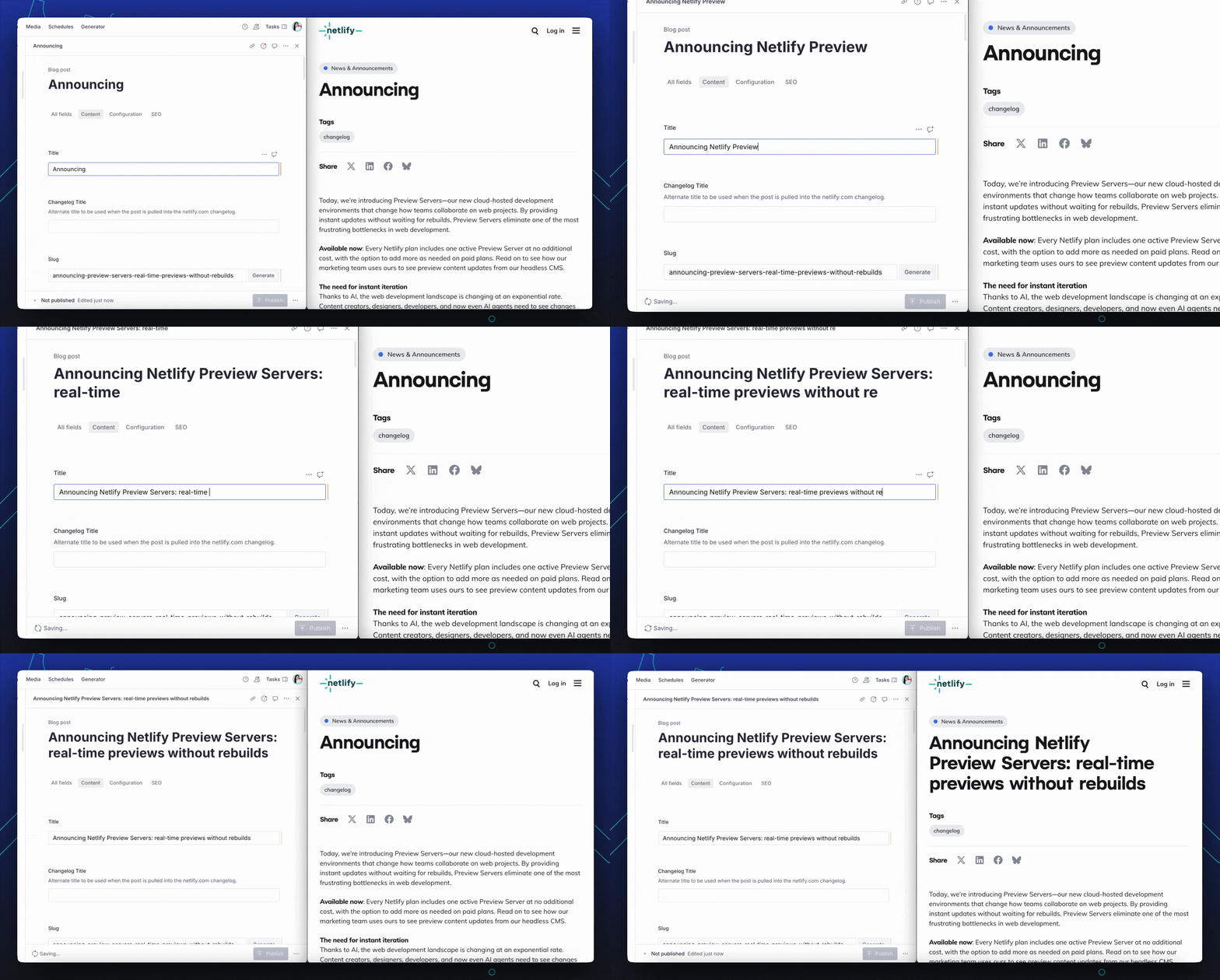
Previewing a headless CMS content change

A new primitive for live rendering

Preview Servers are a new primitive, meaning they work with all modern frontend frameworks, and change how teams can interact with web content and applications.

How Preview Servers work

Preview Servers run in secure, isolated virtual containers in Netlify’s infrastructure by taking advantage of the same netlify dev command that you run locally, but in a cloud environment with:

  • Framework auto-detection: Preview Servers automatically detect your site’s framework (Gatsby, Next.js, Astro, etc.) and configure the appropriate settings
  • Development server mode: Uses the development mode of your framework, allowing for instant page regeneration
  • Webhook integration: Connects to your CMS via webhooks to trigger content refreshes
  • Resource monitoring: Tracks CPU, memory, and disk usage in near real-time
  • Secure access: Uses existing access controls, so team members with appropriate roles can access without anything new to configure

For developers, this means you can set up Preview Servers once and provide a self-service model, freeing you to focus on core development instead of facilitating previews or struggling through a slow review process.

What’s possible with Preview Servers

While seeing real-time content updates from a headless CMS are a great first use for any content heavy site, Preview Servers unlock several other more advanced scenarios that we’re excited by.

  • AI-powered development workflows: Integrate Preview Servers with AI tools to visualize generated code changes in real-time, allowing developers and AI agents to collaborate on code with immediate feedback
  • Design tool integration: Connect design tools like Figma to Preview Servers for immediate visualization of design changes on live sites, closing the gap between design and implementation
  • Long-running development tasks: Run complex builds, tests, or data processing tasks in stable, secure environments without tying up local resources
  • Collaborative development: Create stable environments for multi-developer collaboration without local environment inconsistencies, setup friction, or security concerns
  • Educational platforms: Build interactive coding environments with real-time preview for learning web development

These dynamic use cases are why we’re eager to announce that the Preview Servers API is now available in private beta. This API will enable developers to create and manage Preview Servers for their users within their apps, opening up more opportunities for custom workflows and embedded experiences.

If you have a use case in mind for the API, sign up for the Preview Servers API private beta for early access.

Getting started with Preview Servers

Preview Servers are available today in the Dashboard for all Netlify customers. One active Preview Server is included in every plan. If you need additional Preview Servers, paid plans can add more as needed for multi-branch workflows or different environments.

To start your first server, in the Netlify Dashboard:

  1. Select the site you want to enable Preview Servers for
  2. Choose the Git branch from your repository that you want to use
  3. Configure your CMS webhook following our documentation
  4. Share the preview URL with your team

Starting a Preview Server

By default, your Preview Server URL will be formatted as https://devserver-BRANCHNAME--SITENAME.netlify.app. This URL always points to the current live instance of the Preview Server for that branch.

As we continue to expand Preview Servers, we’re particularly interested in hearing about your use cases for real-time previews and AI. Share your experiences, feedback, and ideas for how Preview Servers can help you with us on social or at our next Remote Desk.

For more detailed setup instructions, visit our Preview Servers documentation.