背景
最初是在 reddit 上看到有人在寻找可以解压 zip 文件的 Firefox 插件 [1],好奇为什么还有这种需求,发现作者使用的是环境受限的电脑,无法自由的安装本地程序。于是吾辈便去检查了现有的在线解压工具,结果却发现排名前 5 的解压工具都没有完全支持下面两点
- 解压大型 ZIP 文件,例如数十 G 的 ZIP
- 解压目录时保持目录结构
下面的视频展示了当前一些在线工具的表现
实际上,只有 ezyZip 有点接近,但它也不支持解压 ZIP 中的特定目录。
实现
在简单思考之后,吾辈考虑尝试使用时下流行的 Vibe Coding 来创建一个 Web 工具来满足这个需求。首先检查 zip 相关的 npm 包,吾辈之前经常使用的是 jszip,但这次检查时发现它的不能处理大型 ZIP 文件 [2]。所以找到了更快的 fflate,但遗憾的是,它完全不支持加密解密功能,但作者在 issue 中推荐了 zip.js [3]。
流式解压
官网给出的例子非常简单,也非常简洁明了。如果是解压文件并触发下载,只需要结合使用 BlobWriter/file-saver 即可。
1
2
3
4
5
6
7
8
9
10
11
| import { saveAs } from 'file-saver'const zipFileReader = new BlobReader(zipFileBlob)
const zipReader = new ZipReader(zipFileReader)
const firstEntry = (await zipReader.getEntries()).shift() const blobWriter = new BlobWriter() // 创建一个解析 zip 中的文件为 blob 的适配器
const blob = await firstEntry.getData(blobWriter) // 实际进行转换
await zipReader.close() // 关闭流 saveAs(blob, 'test.mp4') // 保存到磁盘
|
这段代码出现了一个有趣之处:BlobWriter,它是如何保存解压后的超大型文件的?毕竟数据总要在某个地方,blob 似乎都在内存中,而且也只允许流式读取而不能流式写入。检查一下 GitHub 上的源代码 [4]。
1
2
3
4
5
6
7
8
9
10
11
12
13
14
15
16
17
18
19
20
21
| class BlobWriter extends Stream {
constructor(contentType) {
super()
const writer = this
const transformStream = new TransformStream()
const headers = []
if (contentType) {
headers.push([HTTP_HEADER_CONTENT_TYPE, contentType])
}
Object.defineProperty(writer, PROPERTY_NAME_WRITABLE, {
get() {
return transformStream.writable
},
})
writer.blob = new Response(transformStream.readable, { headers }).blob()
} getData() {
return this.blob
}
}
|
是的,这里的关键在于 Response,它允许接受某种 ReadableStream [5] 类型的参数,而 ReadableStream 并不保存数据到内存,它只是一个可以不断拉取数据的流。
例如下面手动创建了一个 ReadableStream,它生成一个从零开始自增的无限流,但如果没有消费,它只会产生第一条数据。
1
2
3
4
5
6
7
8
9
| let i = 0
const stream = new ReadableStream({
pull(controller) {
console.log('generate', i)
controller.enqueue(i)
i++
},
})
const resp = new Response(stream)
|
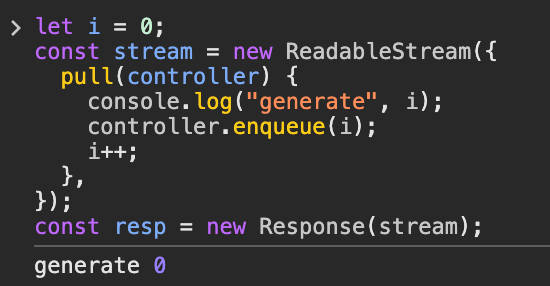
如果消费 100 次,它就会生成 100 个值。
1
2
3
4
5
6
7
| // before code...
const reader = resp.body!.getReader()
let chunk = await reader.read()
while (!chunk.done && i < 100) {
console.log('read', chunk.value)
chunk = await reader.read()
}
|
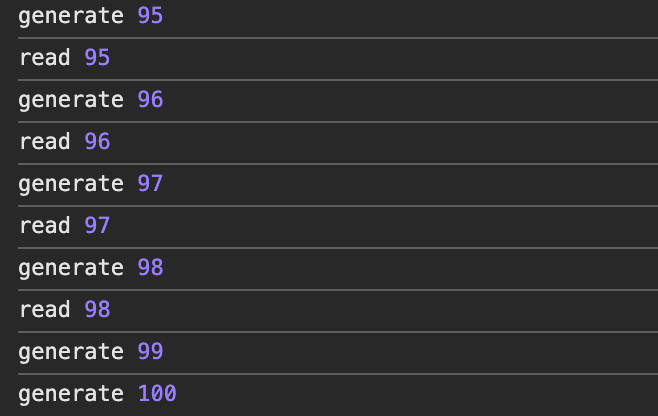
而在 zip.js 解压时,通过 firstEntry.getData(blobWriter) 将解压单个文件产生的二进制流写入到了 Response 并转换为 Blob 了。但是,难道 await new Response().blob() 不会将数据全部加载到内存中吗?
是的,一般认为 Blob 保存的数据都在内存中,但当 Blob 过大时,它会透明的转移到磁盘中 [6],至少在 Chromium 官方文档中是如此声称的,JavaScript 规范并未明确指定浏览器要如何实现。有人在 Stack Overflow 上提到 Blob 只是指向数据的指针,并不保存真实的数据 [7],这句话确实非常正确,而且有趣。顺便一提,可以访问 chrome://blob-internals/ 查看浏览器中所有的 Blob 对象。
解压目录
解压目录主要麻烦的是一次写入多个目录和文件到本地,而这需要利用浏览器中较新的 File System API [8],目前为止,它在浏览器中的兼容性还不错 [9],所以这里利用它来解压 ZIP 中的目录并写入本地。无论如何,只要做好降级处理,使用这个新 API 是可行的。
首先,可以通过拖拽 API 或者 input File 来获取一个目录的 FileSystemDirectoryHandle 句柄。一旦拿到它,就可以访问这个目录下所有的文件,并且可以创建子目录和写入文件(支持流式写入)。假设我们有一个要写入的文件列表,可以轻松使用下面的方法写入到选择的目录中。
1
2
3
4
5
6
7
8
9
10
11
12
13
14
15
16
17
18
19
20
21
22
23
24
25
26
27
28
29
30
31
32
33
34
35
36
37
38
39
40
41
42
43
44
45
46
47
48
49
50
51
52
53
| const list = [
{
path: 'test1/test1.txt',
content: 'test1',
},
{
path: 'test1/test2.txt',
content: 'test2',
},
{
path: 'test3/test3.txt',
content: 'test3',
},
]function fs(rootHandle: FileSystemDirectoryHandle) {
const dirCache = new Map<string, FileSystemDirectoryHandle>()
dirCache.set('', rootHandle)
async function mkdirp(path: string[]): Promise<FileSystemDirectoryHandle> {
if (path.length === 0) {
return rootHandle
}
const dirPath = path.join('/')
if (dirCache.has(dirPath)) {
return dirCache.get(dirPath)!
}
const parentPath = path.slice(0, -1)
const parentDir = await mkdirp(parentPath)
const newDir = await parentDir.getDirectoryHandle(path[path.length - 1], {
create: true,
})
dirCache.set(dirPath, newDir)
return newDir
}
return {
async write(path: string, blob: Blob) {
const pathParts = path.split('/').filter(Boolean)
const dir = await mkdirp(pathParts)
const fileHandle = await dir.getFileHandle(pathParts.pop()!, {
create: true,
})
const writable = await fileHandle.createWritable()
await blob.stream().pipeTo(writable) // 流式写入文件到本地
},
}
} const rootHandle = await navigator.storage.getDirectory() // rootHandle 是拖拽 API 或者 input File 获取的句柄,这里只是用来测试
const { write } = fs(rootHandle)
for (const it of list) {
console.log('write', it.path)
await write(it.path, new Blob([it.content]))
}
|
局限性
尽管 File System API 已经可以胜任普通的文件操作,但它仍然有一些局限性,包括
- 用户可以选择的目录是有限制的,例如,无法直接选择 ~/Desktop 或 ~/Downlaod 目录,因为这被认为是有风险的 [10]。
- 无法保存一些特定后缀名的文件,例如
*.cfg 或者以 ~ 结尾的文件,同样被认为有风险 [11]
总结
这是一个很早之前就有人做过的事情,但直到现在仍然可以发现一些有趣的东西。尤其是 Blob 的部分,之前从未真正去了解过它的存储方式。
基于本文探讨的技术,吾辈最终实现了一个名为 MyUnzip 的在线解压工具,欢迎访问 https://myunzip.com 试用并提出反馈。



