








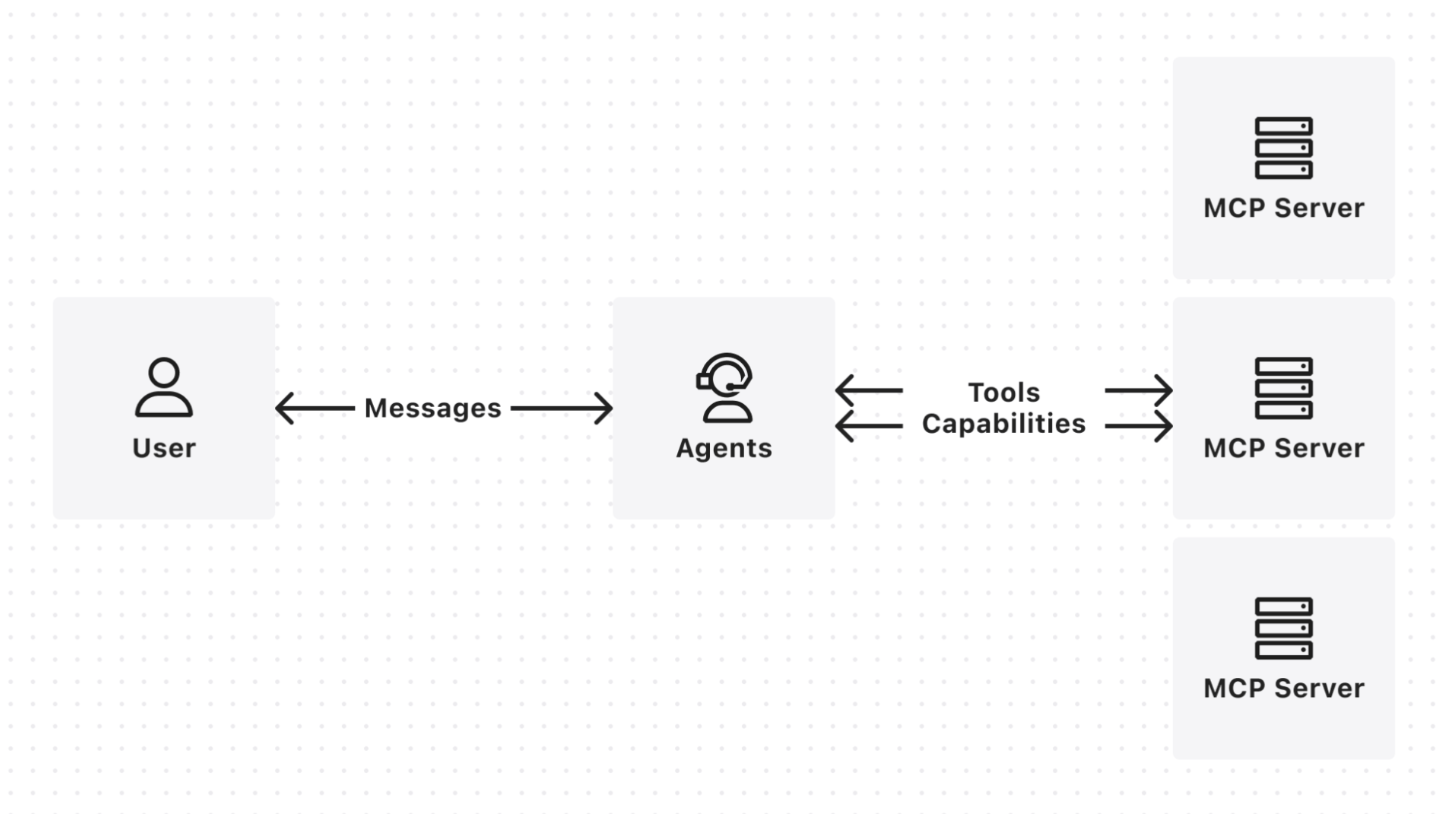
MCP 介绍性的文章相信大家都已经看到了很多了,相信大家或多或少都有所了解了。今天我们换一个视角,从大语言模型(后统称 LLM)和 MCP 协同的整个过程来了解 MCP 的的原理,进一步了解如何更好的去配置MCP,以及提升基于 MCP 实现的 Agent 效果。
Function Calling
其实提到 MCP 的工作过程,就不得不先说下 LLM Function Calling过程。OpenAI 在 2023 年 6 月 13 日首推了一项 LLM 的扩展能力,叫做 function calling(函数调用),让 LLM 具备了与外部系统交互的能力。但这个名称容易让人对其工作原理产生误解:LLM 通常作为外部系统,它如何调用我们内部系统的函数(同工具,后文中工具和函数会混用,实际代指同一个东西)呢?实际上,函数调用需要客户端和 LLM 端协同完成,这里的客户端可能是类似 cherry-studio 之类的聊天应用,也可能是一段本地代码。下面,我们通过时序图来了解其具体工作过程。
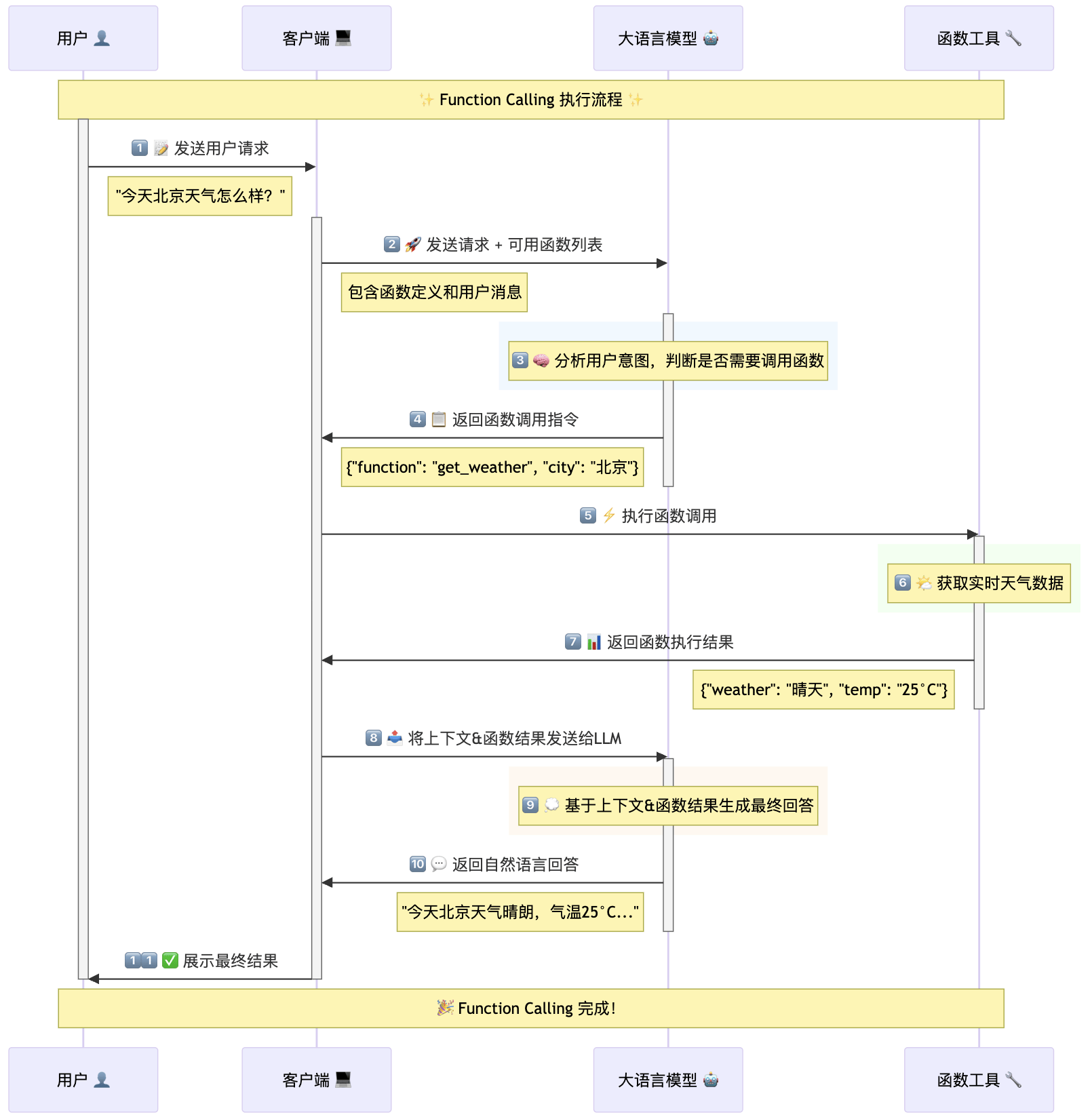
其实上图已经很清晰了,这里不再赘述。实际上在一些复杂场景,LLM 可能会进行多轮函数调用,也就是说会重复上图中 4-10 的过程,直到获取到所有必要信息。举个简单例子,假设我不是查询今天北京天气,而是查询 10 天前北京天气,这个时候 LLM 需要先调用时间工具获取 10 天前的日期,然后再用日期+城市去获取对应的天气数据,最后根据获取到的天气信息拼接成完整的答案回复用户。
大家可能会好奇,LLM 是如何感知到有哪些工具可用以及如何使用它们的?其实很简单,这些信息都是在上图中第2步传递给模型的。以 OpenAI 的调用方式为例,其 SDK 中提供了一个参数 tools,我们需要用特定的 JSON 格式来描述工具及其具体参数,然后传递给模型,在上图中第2步的具体调用如下:
from openai import OpenAI
import json

client = OpenAI()

tools = [{
  "name": "get_weather",
  "description": "获取给定地点的当前天气情况",
  "parameters": {
    "type": "object",
    "properties": {
      "location": {
        "type": "string",
        "description": "要获取天气信息的城市,例如:旧金山、东京、北京"
      },
      "unit": {
        "type": "string",
        "enum": ["摄氏度", "华氏度"],
        "description": "温度单位,可选值为 '摄氏度' 或 '华氏度'。",
        "default": "摄氏度"
      }
    },
    "required": ["location"]
  }
}]

input_messages = [
     {"role":"system", "content":"你是一名人工智能助手"},
     {"role": "user", "content": "今天北京天气怎么样?"}
]

response = client.responses.create(
    model="gpt-4.1",
    input=input_messages,
    tools=tools
)
从Function Calling到MCP
说完了 Function Calling,来说说 MCP 的执行流程。直接说结论,MCP 的执行流程本质上就是Function Calling。那为什么时隔1年多,MCP 突然爆火?我总结为 MCP 的诞生,解决了 Function Calling中 Functions(函数|工具)的热插拔问题。像上图中的步骤2里的函数描述,以及第5步中执行函数调用的过程,之前必须要硬编码(Hard Code)在客户端侧的代码中。这就意味着每次变更相关函数都需要更新代码,必然会极大拖慢 LLM 通过 Function Calling 与已有系统的集成速度。这就是过去两年多,各种智能体虽然发展迅速,但仍与已有系统存在割裂的根本原因。
MCP 是如何解决这个问题的:计算机科学中有个非常出名的梗——计算机科学中没有任何问题不能通过增加一个抽象层来解决,如果有,那就再加一层。显然,MCP 就是被加在 LLM 和现有系统 API 之间的一层。MCP 协议实现了统一的工具获取以及工具执行,这就意味着通过 MCP 协议,你可以动态地将各种工具集成到现有系统的 LLM 应用中,不再需要为每一个工具单独硬编码函数调用。假设原有 M 个应用场景和 N 个工具,原来需要 M×N 次的开发迭代,基于 MCP 就可以变成 M+N 次开发了,显著提升了 LLM + MCP 协同调用工具的效率。
下面我们通过一张时序图来进一步了解 MCP 的工作流程,从中我们可以看到 MCP 与传统 Function Calling 的区别,以及 MCP 如何成为工具与 LLM 之间的桥梁。
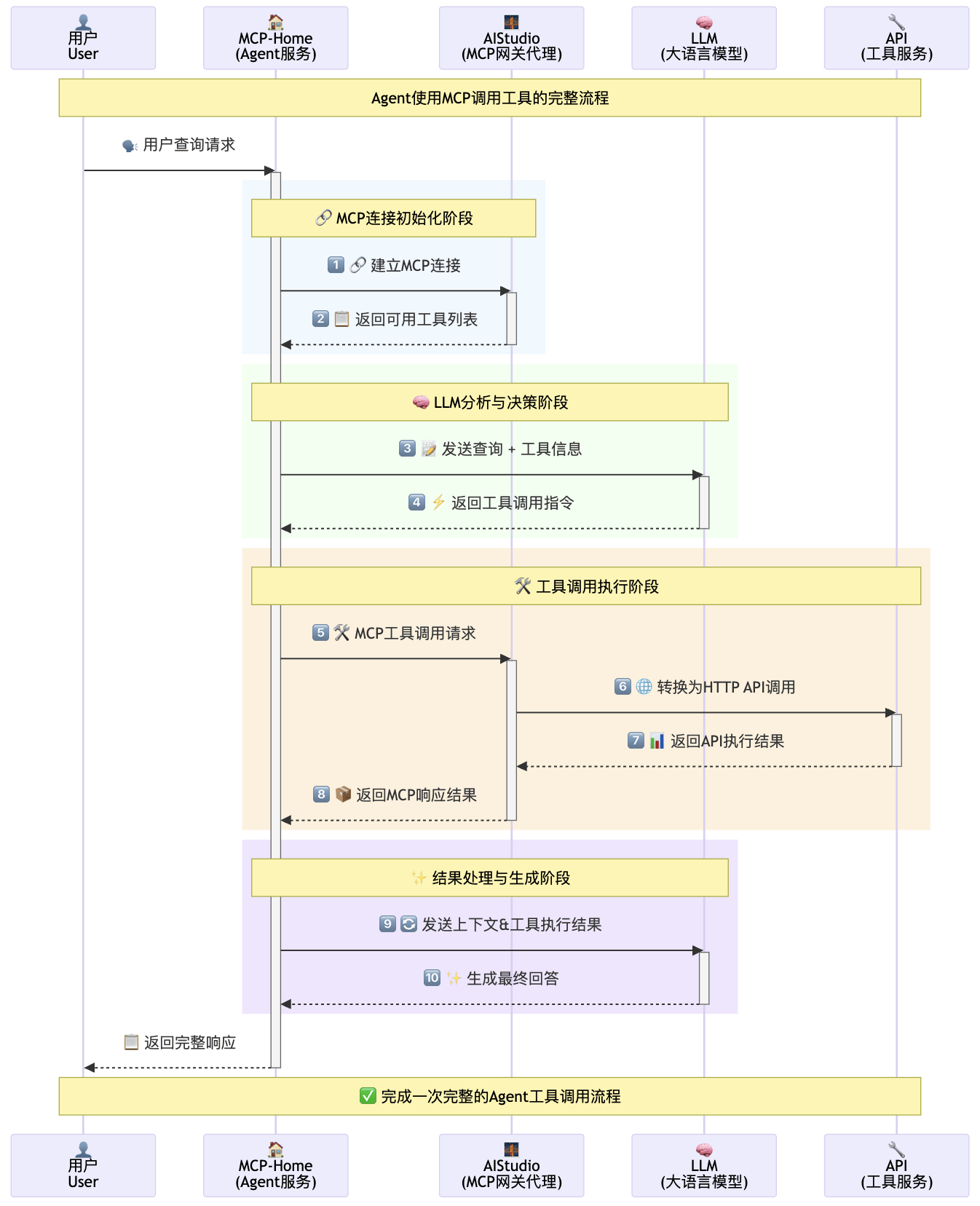
上图中,其实就是你创建的 Agent 在和你交互时的实际执行流程。如果你把 MCP 执行流程和 Function Calling 执行流程放在一起比较,你就会发现二者大体上没有太大差异。只是在工具的获取和执行上,从原来的硬编码变成了调用 MCP Server。我们来具体看下这两个步骤,这里我用 MCP 官方给的示例以及我自己创建的一个 MCP Server 为例,看下具体的细节。
MCP 初始化&工具获取:
在 MCP 协议中,所有的 MCP Server 都需要实现初始化方法 initialize(),初始化后,Client 需要调用 MCP Server 的 list_tools()方法获取服务器上所有可用的工具列表。工具描述包含了工具的名称、参数规范、调用方式等信息,这些信息会在随后传递给 LLM,使其了解有哪些工具可用以及如何正确调用它们。这一步骤相当于 Function Calling 中的工具描述传递,但更加灵活,因为工具可以动态注册和更新。 这里我们看下我自己基于 n8n 实现的一个时间相关的 MCP。
这里我们通过 mcp-sdk 初始化后,直接调用 list_tools() 就可以获取到工具信息,实际工具描述如下:
[
  {
    "name": "addTimeCurrent",
    "description": "获取当前时间指定时间后的时间值",
    "inputSchema": {
      "type": "object",
      "properties": {
        "Units": {
          "type": "string",
          "description": "时间单位,可选值有second、minute、hour、day、week、month、year"
        },
        "Duration": {
          "type": "number",
          "description": "需要增加的时间"
        }
      },
      "required": [
        "Units",
        "Duration"
      ],
      "additionalProperties": true,
      "$schema": "http://json-schema.org/draft-07/schema#"
    },
    "annotations": null
  },
  {
    "name": "addTime",
    "description": "计算给定时间增加指定时间后的结果",
    "inputSchema": {
      "type": "object",
      "properties": {
        "Date_to_Add_To": {
          "type": "string"
        },
        "Units": {
          "type": "string",
          "description": "时间单位,可选值有second、minute、hour、day、week、month、year"
        },
        "Duration": {
          "type": "number",
          "description": "需要增加的时间"
        }
      },
      "required": [
        "Date_to_Add_To",
        "Units",
        "Duration"
      ],
      "additionalProperties": true,
      "$schema": "http://json-schema.org/draft-07/schema#"
    },
    "annotations": null
  },

  {
    "name": "currentTime",
    "description": "获取当前时间",
    "inputSchema": {
      "type": "object",
      "properties": {},
      "additionalProperties": true,
      "$schema": "http://json-schema.org/draft-07/schema#"
    },
    "annotations": null
  },
  #....其他工具
]
可以看到每个工具都有三个主要字段:
- name:工具的唯一标识符,LLM 通过这个名称来引用和调用特定的工具。例如,"currentTime"表示获取当前时间的工具。
- description:工具的功能描述,帮助 LLM 理解这个工具的用途和适用场景。这个描述应当简洁明了,让 LLM 能够准确判断何时使用该工具。
- inputSchema:定义了工具输入参数的结构和类型,通常使用 JSON Schema 格式。这包括:
- 参数名称和类型(如 string、number、boolean 等)
- 参数描述,帮助 LLM 理解每个参数的含义
- 必填参数列表(required 字段)
- 参数约束或可选值范围(如时间单位只能是 second、minute 等)
这三个字段共同构成了工具的完整描述,使 LLM 能够理解工具的功能、适用场景以及如何正确地调用它。
LLM的分析与决策:
如果你对比下 MCP 协议中 tools的描述和 Function Calling 中的描述,就会发现其二者在本质上是非常相似的。 其本质作用就是为了让 LLM 理解这个工具是做什么的,以及如何使用。 在实际使用中,其实只需要将上文中的 json 传递给 LLM,LLM 就可以决策是否调用指定工具了,这里我们可以看下 MCP 官方提供的示例。
MCP 官方示例中 工具的传入非常简单粗暴直接放在系统提示词中了。具体的提示词如下,其中tools_description就是通过 list_tools()获取到的工具描述。
You are a helpful assistant with access to these tools:
                f"{tools_description}
Choose the appropriate tool based on the user's question.
If no tool is needed, reply directly.
IMPORTANT: When you need to use a tool, you must ONLY respond with
the exact JSON object format below, nothing else:
{
                '    "tool": "tool-name",'
                '    "arguments": {'
                '        "argument-name": "value"'
    }
}
After receiving a tool's response:
1. Transform the raw data into a natural, conversational response
2. Keep responses concise but informative
3. Focus on the most relevant information
4. Use appropriate context from the user's question
5. Avoid simply repeating the raw data
Please use only the tools that are explicitly defined above.
工具调用执行:
当 LLM 决定调用某个工具时,他会同时把工具名(tool-name)和参数(arguments),Client 会通过 MCP 协议的 execute_tool() 方法向对应 Server 发送调用请求。MCP Server 负责将请求转换为实际的 API 调用,并将执行结果返回给 Client。 在官方示例中,可能是 MCP 为了兼容不同模型, 并没有直接使用像 OpenAI 的 Function Calling API,而是纯通过 prompt 实现,完整流程的代码如下,我其中涵盖了上图中所有的步骤:
class ChatSession:
    """Orchestrates the interaction between user, LLM, and tools."""

    def __init__(self, servers: list[Server], llm_client: LLMClient) -> None:
        self.servers: list[Server] = servers
        self.llm_client: LLMClient = llm_client

    async def cleanup_servers(self) -> None:
        """Clean up all servers properly."""
        for server in reversed(self.servers):
            try:
                await server.cleanup()
            except Exception as e:
                logging.warning(f"Warning during final cleanup: {e}")

    async def process_llm_response(self, llm_response: str) -> str:
        """Process the LLM response and execute tools if needed.

        Args:
            llm_response: The response from the LLM.

        Returns:
            The result of tool execution or the original response.
        """
        try:
            tool_call = json.loads(llm_response)
            if "tool" in tool_call and "arguments" in tool_call:
                logging.info(f"Executing tool: {tool_call['tool']}")
                logging.info(f"With arguments: {tool_call['arguments']}")

                for server in self.servers:
                    tools = await server.list_tools()
                    if any(tool.name == tool_call["tool"] for tool in tools):
                        try:
                            logging.info(server)
                            result = await server.execute_tool(
                                tool_call["tool"], tool_call["arguments"]
                            )

                            if isinstance(result, dict) and "progress" in result:
                                progress = result["progress"]
                                total = result["total"]
                                percentage = (progress / total) * 100
                                logging.info(
                                    f"Progress: {progress}/{total} ({percentage:.1f}%)"
                                )

                            return f"Tool execution result: {result}"
                        except Exception as e:
                            error_msg = f"Error executing tool: {str(e)}"
                            logging.error(error_msg)
                            return error_msg

                return f"No server found with tool: {tool_call['tool']}"
            return llm_response
        except json.JSONDecodeError:
            return llm_response

    async def start(self) -> None:
        """Main chat session handler."""
        try:
            for server in self.servers:
                try:
                    await server.initialize()
                except Exception as e:
                    logging.error(f"Failed to initialize server: {e}")
                    await self.cleanup_servers()
                    return

            all_tools = []
            for server in self.servers:
                tools = await server.list_tools()
                all_tools.extend(tools)

            tools_description = "\n".join([tool.format_for_llm() for tool in all_tools])
            print(tools_description)

            system_message = (
                "You are a helpful assistant with access to these tools:\n\n"
                f"{tools_description}\n"
                "Choose the appropriate tool based on the user's question. "
                "If no tool is needed, reply directly.\n\n"
                "IMPORTANT: When you need to use a tool, you must ONLY respond with "
                "the exact JSON object format below, nothing else:\n"
                "{\n"
                '    "tool": "tool-name",\n'
                '    "arguments": {\n'
                '        "argument-name": "value"\n'
                "    }\n"
                "}\n\n"
                "After receiving a tool's response:\n"
                "1. Transform the raw data into a natural, conversational response\n"
                "2. Keep responses concise but informative\n"
                "3. Focus on the most relevant information\n"
                "4. Use appropriate context from the user's question\n"
                "5. Avoid simply repeating the raw data\n\n"
                "Please use only the tools that are explicitly defined above."
            )

            messages = [{"role": "system", "content": system_message}]

            while True:
                try:
                    user_input = input("You: ").strip().lower()
                    if user_input in ["quit", "exit"]:
                        logging.info("\nExiting...")
                        break

                    messages.append({"role": "user", "content": user_input})

                    llm_response = self.llm_client.get_response(messages)
                    logging.info("\nAssistant: %s", llm_response)

                    result = await self.process_llm_response(llm_response)

                    if result != llm_response:
                        messages.append({"role": "assistant", "content": llm_response})
                        messages.append({"role": "system", "content": result})

                        final_response = self.llm_client.get_response(messages)
                        logging.info("\nFinal response: %s", final_response)
                        messages.append(
                            {"role": "assistant", "content": final_response}
                        )
                    else:
                        messages.append({"role": "assistant", "content": llm_response})

                except KeyboardInterrupt:
                    logging.info("\nExiting...")
                    break

        finally:
            await self.cleanup_servers()
如何优化?
通过上文了解原理后,如何提升 MCP 的应用效果,我们可以从几个方面来优化:
工具描述优化
工具描述是 LLM 理解工具功能的关键,优化描述可以大幅提升工具调用的准确性和效率。良好的工具描述能让 LLM 更精确地理解何时应该使用该工具,以及如何正确地传递参数。
-
精确的功能描述:确保每个工具的 description 字段简洁明了,准确表达工具的功能。避免模糊或过于技术化的描述,使 LLM 能够准确判断何时应该使用该工具。
-
参数命名与描述:参数名称应当具有自解释性,同时为每个参数提供清晰的描述。例如,对于时间相关参数,明确说明格式要求(如 "YYYY-MM-DD")。
-
添加示例:在工具描述中添加使用示例,帮助 LLM 理解如何正确调用工具。这点在复杂工具中尤为重要。
合适的工具组合
在构建基于 MCP 的Agent时,工具组合的选择至关重要。应根据具体任务需求,精心挑选互补性强的工具集:
-
功能互补:确保工具集能覆盖应用所需的全部功能域,避免关键能力缺失
-
避免冗余:减少功能重叠的工具,降低 LLM 在工具选择时的困惑
-
复杂度平衡:在提供足够功能的同时,避免过多工具导致的选择困难和效率降低
提示词优化
提示词是影响 LLM 工具调用行为的重要因素:
- 业务场景:根据你实际的业务场景,设计合适的系统提示词,比如引入更多业务背景信息、给出一些场景示例等…… 业内各种提示词技巧都可以考虑使用。
- 调用策略指导:指导 LLM 何时应该调用工具,何时应该直接回答,以及如何处理多步骤任务中的工具链式调用
- 结果处理指南:提供明确的指导,告诉 LLM 如何处理和呈现工具返回的结果,尤其是对于返回大量原始数据的工具。
- 示例演示:在系统提示中添加典型的工具调用示例和预期输出,帮助 LLM 更好地理解调用模式。
结语
通过本文你可能会发现,MCP 并不是什么神秘或高科技的东西,本质上还是基于 LLM 的思考和决策能力,再加上一些工程实现来打通 LLM 与现有系统的连接。因此,我认为 MCP 的价值并不在于协议本身,而是基于该协议建立起来的工具生态。